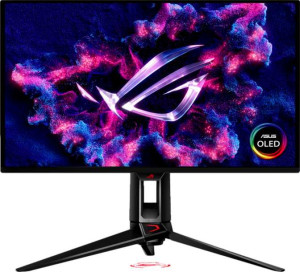
Asus ROG Swift OLED PG27UCDM 27"
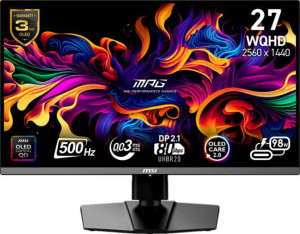
MSI MPG 272QR QD-OLED X50 27"

Asus ROG Swift OLED PG27UCDM 27" MSI MPG 272QR QD-OLED X50 27"

Common Features

  • Both products have QD-OLED, OLED/AMOLED display types.
  • Both products have a 0.03 ms response time.
  • Both products have a 26.5″ screen size.
  • Both products have an anti-glare coating.
  • Both products have a maximum horizontal viewing angle of 178º.
  • Both products have a maximum vertical viewing angle of 178º.
  • Both products have a matte panel.
  • Neither product has a glossy panel.
  • Both products support AMD FreeSync Premium Pro and Nvidia G-Sync Compatible adaptive synchronization.
  • Both products have two HDMI ports.
  • Both products support HDMI 2.1.
  • Both products have one DisplayPort 2.1 output.
  • Both products have four USB ports.
  • Both products have USB Type-C.
  • Both products support VESA mount.
  • Both products support tilt.
  • Both products have a swivel stand.
  • Neither product has a socket for a 3.5 mm audio jack.
  • Both products support picture-in-picture (PiP).
  • Neither product has stereo speakers.

Main Differences

  • Resolution is 3840 x 2160 px on Asus ROG Swift OLED PG27UCDM 27″ and 2560 x 1440 px on MSI MPG 272QR QD-OLED X50 27″.
  • Pixel density is 166 ppi on Asus ROG Swift OLED PG27UCDM 27″ and 110 ppi on MSI MPG 272QR QD-OLED X50 27″.
  • Adaptive synchronization is AMD FreeSync Premium Pro, Nvidia G-Sync Compatible on Asus ROG Swift OLED PG27UCDM 27″ and VESA Adaptive Sync on MSI MPG 272QR QD-OLED X50 27″.
  • Refresh rate is 240Hz on Asus ROG Swift OLED PG27UCDM 27″ and 500Hz on MSI MPG 272QR QD-OLED X50 27″.
  • Supports portrait mode on Asus ROG Swift OLED PG27UCDM 27″ but not on MSI MPG 272QR QD-OLED X50 27″.
  • Brightness (typical) is 250 nits on Asus ROG Swift OLED PG27UCDM 27″ and 550 nits on MSI MPG 272QR QD-OLED X50 27″.
  • Display colors are 1073 million on Asus ROG Swift OLED PG27UCDM 27″ and 1070 million on MSI MPG 272QR QD-OLED X50 27″.
  • sRGB coverage is 145% on Asus ROG Swift OLED PG27UCDM 27″ and 138% on MSI MPG 272QR QD-OLED X50 27″.
  • Has a socket for a 3.5 mm audio jack on MSI MPG 272QR QD-OLED X50 27″ but not on Asus ROG Swift OLED PG27UCDM 27″.
Specs Comparison
Asus ROG Swift OLED PG27UCDM 27"

Asus ROG Swift OLED PG27UCDM 27"

MSI MPG 272QR QD-OLED X50 27"

MSI MPG 272QR QD-OLED X50 27"

Display:
Display type QD-OLED, OLED/AMOLED QD-OLED, OLED/AMOLED
response time 0.03 ms 0.03 ms
screen size 26.5" 26.5"
resolution 3840 x 2160 px 2560 x 1440 px
pixel density 166 ppi 110 ppi
Adaptive synchronization AMD FreeSync Premium Pro, Nvidia G-Sync Compatible VESA Adaptive Sync
has anti-glare coating
refresh rate 240Hz 500Hz
maximum horizontal viewing angle 178º 178º
maximum vertical viewing angle 178º 178º
has a matte panel
has a glossy panel
has a touch screen

Both the Asus ROG Swift OLED PG27UCDM and MSI MPG 272QR QD-OLED X50 feature a QD-OLED display type, offering vibrant colors and deep contrasts. The screen size for both is 26.5″, providing a similar viewing experience. However, the resolution differs: the Asus model boasts a higher 3840 x 2160 px resolution, while the MSI model has a 2560 x 1440 px resolution. This results in a notably higher pixel density of 166 ppi on the Asus compared to 110 ppi on the MSI, which may affect the sharpness of text and images on the screen.

Regarding refresh rate, the MSI monitor stands out with an impressive 500Hz refresh rate, whereas the Asus offers a 240Hz refresh rate. This difference could make a noticeable impact in fast-paced gaming scenarios, with the MSI likely providing smoother motion. Both monitors have a 0.03 ms response time, ensuring ultra-fast reaction times with minimal ghosting or blur. Additionally, both monitors feature anti-glare coatings and matte panels, making them suitable for various lighting environments, and neither has a glossy panel or touch screen.

When it comes to adaptive synchronization, the Asus ROG Swift OLED PG27UCDM supports both AMD FreeSync Premium Pro and Nvidia G-Sync compatibility, offering broader support across graphics cards. In contrast, the MSI MPG 272QR QD-OLED X50 uses VESA Adaptive Sync, which may limit compatibility to specific devices, though still providing a smooth, tear-free experience for compatible setups. Both models share the same 178º maximum horizontal and vertical viewing angles, ensuring consistent visuals from various perspectives.

General info:
Type Gaming Gaming
release date January 2025 January 2025
supports total tilt
Has a swivel stand
Supports VESA mount
supports portrait mode

Both the Asus ROG Swift OLED PG27UCDM and MSI MPG 272QR QD-OLED X50 are designed as gaming monitors, making them well-suited for high-performance use. Both monitors support total tilt adjustments and come with a swivel stand, offering flexibility in positioning for ergonomic comfort. Additionally, both models support VESA mounting, allowing for easy attachment to compatible mounts or arms for further customization of the viewing setup.

However, one key difference between the two is that the Asus ROG Swift OLED PG27UCDM supports portrait mode, giving users the ability to rotate the screen for vertical orientation, which can be useful for certain tasks or gaming setups. The MSI MPG 272QR QD-OLED X50 does not support portrait mode, limiting its adjustability in this regard.

Overall, while both monitors share many of the same features, the addition of portrait mode on the Asus model provides an extra level of versatility that the MSI model does not offer.

Colors:
brightness (typical) 250 nits 550 nits
supports color calibration
display colors 1073 million 1070 million
bit depth 10-bit 10-bit
sRGB coverage 145% 138%

The Asus ROG Swift OLED PG27UCDM and MSI MPG 272QR QD-OLED X50 both offer impressive color performance, but there are a few differences in their specifications. The Asus model has a typical brightness of 250 nits, while the MSI model is significantly brighter at 550 nits, which could be an advantage in well-lit environments or for achieving higher peak brightness levels in HDR content.

Both monitors have a 10-bit color depth, ensuring smooth gradients and rich color representation. The Asus monitor supports 1073 million display colors, slightly surpassing the MSI's 1070 million colors. While the difference is minimal, it may result in a very slight difference in color reproduction. Both models offer wide sRGB coverage, with the Asus providing 145% and the MSI offering 138%. This means the Asus has a broader color gamut, resulting in a more vibrant and accurate representation of colors in content that supports it.

Neither monitor supports color calibration, so users may need to rely on factory settings for color accuracy. Overall, while both monitors offer strong color capabilities, the Asus ROG Swift OLED PG27UCDM stands out for its wider sRGB coverage and slightly higher number of display colors.

Connectivity:
HDMI ports 2 2
supports Thunderbolt
DisplayPort outputs 1 1
DisplayPort version DisplayPort 2.1 DisplayPort 2.1
has a socket for a 3.5 mm audio jack
has a DVI connector
USB ports 4 4
Has USB Type-C
HDMI version HDMI 2.1 HDMI 2.1
supports Ethernet
supports Wi-Fi
has AirPlay
mini DisplayPort outputs 0 0
has a VGA connector

Both the Asus ROG Swift OLED PG27UCDM and MSI MPG 272QR QD-OLED X50 offer a similar range of connectivity options. Each model has 2 HDMI ports, supports HDMI 2.1, and includes 1 DisplayPort output with DisplayPort 2.1. Both also feature 4 USB ports and USB Type-C support, providing versatile connectivity for various devices.

However, there are a few differences between the two models. The Asus ROG Swift OLED PG27UCDM does not include a socket for a 3.5 mm audio jack, while the MSI MPG 272QR QD-OLED X50 does. Both monitors do not have a DVI connector, mini DisplayPort outputs, or VGA connectors. Neither supports Thunderbolt, Ethernet, Wi-Fi, or AirPlay.

Overall, the key difference in connectivity is the presence of the 3.5 mm audio jack on the MSI model, which the Asus model lacks. Otherwise, both monitors offer very similar connectivity features.

Features:
has PiP
has stereo speakers
has built-in smart TV
has a remote control
supports Dolby Digital
supports Dolby Digital Plus
has DTS Surround
has an ambient light sensor
has a front camera

Both the Asus ROG Swift OLED PG27UCDM and MSI MPG 272QR QD-OLED X50 come with similar features in this category. Both monitors support PiP (Picture-in-Picture), allowing users to view two sources simultaneously on the screen. Neither model includes stereo speakers, built-in smart TV functionality, a remote control, or support for Dolby Digital, Dolby Digital Plus, or DTS Surround. Additionally, neither has an ambient light sensor or a front camera.

Overall, the feature sets of the two monitors are identical in this category, with both offering PiP and lacking any built-in audio or smart TV capabilities.

Comparison Summary

This is a specification comparison between Asus ROG Swift OLED PG27UCDM 27″ and MSI MPG 272QR QD-OLED X50 27″. Both products share a QD-OLED, OLED/AMOLED display type, a 0.03 ms response time, and support tilt and a swivel stand. However, the Asus ROG Swift OLED PG27UCDM 27″ features a 3840 x 2160 px resolution, 166 ppi pixel density, and a 240Hz refresh rate, while the MSI MPG 272QR QD-OLED X50 27″ has a 2560 x 1440 px resolution, 110 ppi pixel density, and a 500Hz refresh rate. The Asus also supports portrait mode, which is not available on the MSI, and the MSI has a socket for a 3.5 mm audio jack, unlike the Asus.