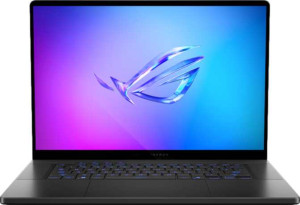
Asus ROG Zephyrus G16 (2025) GU605 16"
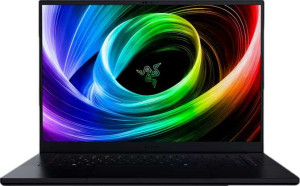
Razer Blade 16 (2025) 16"

Asus ROG Zephyrus G16 (2025) GU605 16" Razer Blade 16 (2025) 16"

Common Features

  • Both products are designed for gaming.
  • Both products do not use a fanless design.
  • Both products have a backlit keyboard.
  • Both products are not weather-sealed or splashproof.
  • Both products do not have a rugged build.
  • Both products have a 16″ screen size.
  • Both products have a resolution of 2560 x 1600 px.
  • Both products have a pixel density of 188 ppi.
  • Both products use OLED/AMOLED displays.
  • Both products do not have a touch screen.
  • Both products have a refresh rate of 240Hz.
  • Both products do not have an anti-reflection coating.
  • Both products have 4 supported displays.
  • Both products have 64GB of RAM.
  • Both products use flash storage.
  • Both products have 2048GB of internal storage.
  • Both products have 24GB of VRAM.
  • Both products have floating-point performance of 31.8 TFLOPS.
  • Both products use GDDR7 memory.
  • Both products have a texture rate of 496.9 GTexels/s.
  • Both products have a pixel rate of 193.9 GPixel/s.
  • Both products have HDMI output.
  • Both products have USB Type-C ports.
  • Both products support Wi-Fi.
  • Both products have a Wi-Fi version compatible with Wi-Fi 7, Wi-Fi 6E, Wi-Fi 6, Wi-Fi 5, and Wi-Fi 4.
  • Both products have a battery size of 90 Wh.
  • Both products have sleep-and-charge USB ports.
  • Both products do not have a MagSafe power adapter.
  • Both products have stereo speakers.
  • Both products have a socket for a 3.5 mm audio jack.
  • Both products support ray tracing.
  • Both products support DLSS.
  • Both products do not include a stylus.
  • Both products use 3D facial recognition.
  • Both products do not have voice commands.
  • Both products have a front camera.
  • Both products use Intel Resizable BAR.
  • Both products use Blackwell GPU architecture.
  • Both products do not have LHR.
  • Both products have a Thermal Design Power of 95W.
  • Both products support 3D.
  • Both products support multi-display technology.
  • Both products use OpenCL version 3.
  • Both products use OpenGL version 4.6.

Main Differences

  • Weight is 1950 g on Asus ROG Zephyrus G16 (2025) GU605 16″ and 2140 g on Razer Blade 16 (2025) 16″.
  • Volume is 1219.176 cm³ on Asus ROG Zephyrus G16 (2025) GU605 16″ and 1508.75 cm³ on Razer Blade 16 (2025) 16″.
  • Width is 354 mm on Asus ROG Zephyrus G16 (2025) GU605 16″ and 355 mm on Razer Blade 16 (2025) 16″.
  • Height is 246 mm on Asus ROG Zephyrus G16 (2025) GU605 16″ and 250 mm on Razer Blade 16 (2025) 16″.
  • Thickness is 14 mm on Asus ROG Zephyrus G16 (2025) GU605 16″ and 17 mm on Razer Blade 16 (2025) 16″.
  • RAM speed is 7467 MHz on Asus ROG Zephyrus G16 (2025) GU605 16″ and 8000 MHz on Razer Blade 16 (2025) 16″.
  • CPU speed is 6 x 2.9 & 8 x 2.7 GHz on Asus ROG Zephyrus G16 (2025) GU605 16″ and 12 x 2 GHz on Razer Blade 16 (2025) 16″.
  • CPU threads are 16 threads on Asus ROG Zephyrus G16 (2025) GU605 16″ and 24 threads on Razer Blade 16 (2025) 16″.
  • Turbo clock speed is 5.4GHz on Asus ROG Zephyrus G16 (2025) GU605 16″ and 5.1GHz on Razer Blade 16 (2025) 16″.
  • Geekbench 6 result (multi) is 17173 on Asus ROG Zephyrus G16 (2025) GU605 16″ and 13283 on Razer Blade 16 (2025) 16″.
  • Geekbench 6 result (single) is 2897 on Asus ROG Zephyrus G16 (2025) GU605 16″ and 2593 on Razer Blade 16 (2025) 16″.
  • PassMark result is 33969 on Asus ROG Zephyrus G16 (2025) GU605 16″ and 35142 on Razer Blade 16 (2025) 16″.
  • PassMark result (single) is 4472 on Asus ROG Zephyrus G16 (2025) GU605 16″ and 3872 on Razer Blade 16 (2025) 16″.
  • USB 3.2 Gen 2 ports (USB-C) are 1 on Asus ROG Zephyrus G16 (2025) GU605 16″ and absent on Razer Blade 16 (2025) 16″.
  • USB 3.2 Gen 2 ports (USB-A) are 2 on Asus ROG Zephyrus G16 (2025) GU605 16″ and 3 on Razer Blade 16 (2025) 16″.
  • USB 4 40Gbps ports are 1 on Asus ROG Zephyrus G16 (2025) GU605 16″ and 2 on Razer Blade 16 (2025) 16″.
  • Thunderbolt 4 ports are present on Asus ROG Zephyrus G16 (2025) GU605 16″ but not available on Razer Blade 16 (2025) 16″.
  • Dolby Atmos support is present on Asus ROG Zephyrus G16 (2025) GU605 16″ but not available on Razer Blade 16 (2025) 16″.
  • Fingerprint scanner is present on Razer Blade 16 (2025) 16″ but not available on Asus ROG Zephyrus G16 (2025) GU605 16″.
  • Number of microphones is 3 on Asus ROG Zephyrus G16 (2025) GU605 16″ and 2 on Razer Blade 16 (2025) 16″.
  • Clock multiplier is 29 on Asus ROG Zephyrus G16 (2025) GU605 16″ and 20 on Razer Blade 16 (2025) 16″.
  • GPU execution units are 128 on Asus ROG Zephyrus G16 (2025) GU605 16″ and 16 on Razer Blade 16 (2025) 16″.
  • GPU name is Arc 140T on Asus ROG Zephyrus G16 (2025) GU605 16″ and Radeon 890M on Razer Blade 16 (2025) 16″.
  • Type is Laptop on Asus ROG Zephyrus G16 (2025) GU605 16″ and Laptop, Desktop on Razer Blade 16 (2025) 16″.
  • CPU temperature is 110 °C on Asus ROG Zephyrus G16 (2025) GU605 16″ and 100 °C on Razer Blade 16 (2025) 16″.
  • RAM speed (max) is 8400 MHz on Asus ROG Zephyrus G16 (2025) GU605 16″ and 7500 MHz on Razer Blade 16 (2025) 16″.
  • Big.LITTLE technology is used on Asus ROG Zephyrus G16 (2025) GU605 16″ but not available on Razer Blade 16 (2025) 16″.
Specs Comparison
Asus ROG Zephyrus G16 (2025) GU605 16"

Asus ROG Zephyrus G16 (2025) GU605 16"

Razer Blade 16 (2025) 16"

Razer Blade 16 (2025) 16"

Design:
Type Gaming Gaming
weight 1950 g 2140 g
Uses a fanless design
Has a backlit keyboard
volume 1219.176 cm³ 1508.75 cm³
width 354 mm 355 mm
height 246 mm 250 mm
thickness 14 mm 17 mm
is weather-sealed (splashproof)
has a rugged build

The Asus ROG Zephyrus G16 (2025) and Razer Blade 16 (2025) both belong to the gaming laptop category, though they differ slightly in their physical dimensions. The ROG Zephyrus G16 weighs 1950 g, while the Razer Blade 16 is heavier at 2140 g. Additionally, the ROG Zephyrus has a volume of 1219.176 cm³, making it smaller in size compared to the Razer Blade 16, which has a larger volume of 1508.75 cm³.

In terms of thickness, the ROG Zephyrus is thinner at 14 mm, compared to the Razer Blade 16’s 17 mm. Both laptops feature a backlit keyboard for improved visibility in low-light environments, and neither of them uses a fanless design. However, neither product is weather-sealed (splashproof) or has a rugged build, indicating that both are designed for indoor use in typical gaming scenarios.

When it comes to the overall dimensions, the ROG Zephyrus G16 is slightly narrower (354 mm) and shorter (246 mm) than the Razer Blade 16, which measures 355 mm in width and 250 mm in height. Both laptops are clearly built with portability in mind, though the Razer Blade 16’s slightly larger size and weight may offer more space for internal components.

Display:
screen size 16" 16"
resolution 2560 x 1600 px 2560 x 1600 px
pixel density 188 ppi 188 ppi
Display type OLED/AMOLED OLED/AMOLED
has a touch screen
refresh rate 240Hz 240Hz
has anti-reflection coating
supported displays 4 4

Both the Asus ROG Zephyrus G16 (2025) and the Razer Blade 16 (2025) feature identical display specifications. Each laptop is equipped with a 16″ OLED/AMOLED screen, offering a resolution of 2560 x 1600 px and a pixel density of 188 ppi. Both displays also have a 240Hz refresh rate, ensuring smooth visuals during fast-paced gaming or other high-motion activities. Additionally, neither laptop includes a touch screen, and both lack anti-reflection coating to reduce glare.

In terms of supported displays, both models are capable of supporting up to four external displays, giving users flexibility in multi-monitor setups. Since all the key display specifications are the same, users can expect a very similar viewing experience on both devices in terms of sharpness, color accuracy, and refresh rate.

Performance:
RAM 64GB 64GB
RAM speed 7467 MHz 8000 MHz
Uses flash storage
internal storage 2048GB 2048GB
CPU speed 6 x 2.9 & 8 x 2.7 GHz 12 x 2 GHz
CPU threads 16 threads 24 threads
VRAM 24GB 24GB
floating-point performance 31.8 TFLOPS 31.8 TFLOPS
GDDR version GDDR7 GDDR7
texture rate 496.9 GTexels/s 496.9 GTexels/s
pixel rate 193.9 GPixel/s 193.9 GPixel/s
Is an NVMe SSD
DirectX version DirectX 12 Ultimate DirectX 12 Ultimate
GPU clock speed 990 MHz 990 MHz
uses multithreading
maximum memory amount 64GB 64GB
DDR memory version 5 5
turbo clock speed 5.4GHz 5.1GHz
GPU turbo 1515 MHz 1515 MHz
PCI Express (PCIe) version 4 4
semiconductor size 4 nm 4 nm
has XeSS (XMX)
Supports 64-bit

The Asus ROG Zephyrus G16 (2025) and the Razer Blade 16 (2025) both offer powerful performance specifications, with notable differences in their CPU and RAM configurations. Both laptops come with 64GB of RAM, but the ROG Zephyrus G16 has a RAM speed of 7467 MHz, while the Razer Blade 16 features a faster RAM speed of 8000 MHz. Both laptops use flash storage, with 2048GB of internal storage in each, and both include an NVMe SSD for fast read/write speeds.

When it comes to CPU performance, the Asus ROG Zephyrus G16 has a processor with 16 threads, consisting of 6 cores running at 2.9 GHz and 8 cores at 2.7 GHz. In contrast, the Razer Blade 16 has a CPU with 24 threads, made up of 12 cores running at 2 GHz. This gives the Razer Blade 16 a higher thread count, though the ROG Zephyrus G16's cores run at slightly higher speeds. Both devices support multithreading and have the same turbo clock speed of 5.4GHz for the ROG Zephyrus and 5.1GHz for the Razer Blade.

For GPU performance, both models include 24GB of VRAM and a GDDR7 memory version. They share identical texture and pixel rates, with both devices reaching 496.9 GTexels/s and 193.9 GPixel/s, respectively. The GPU clock speed is the same at 990 MHz, and both feature a GPU turbo clock speed of 1515 MHz. Other shared features include PCIe 4.0 support, a 4 nm semiconductor size, and support for 64-bit architecture. Neither laptop supports XeSS (XMX), and both support DirectX 12 Ultimate.

Benchmarks:
Geekbench 6 result (multi) 17173 13283
Geekbench 6 result (single) 2897 2593
PassMark result 33969 35142
PassMark result (single) 4472 3872

The Asus ROG Zephyrus G16 (2025) and the Razer Blade 16 (2025) have distinct benchmark results, with differences in both Geekbench and PassMark scores. In the Geekbench 6 multi-core test, the ROG Zephyrus G16 achieves a result of 17173, which is higher than the Razer Blade 16’s score of 13283. For the single-core Geekbench 6 test, the ROG Zephyrus G16 also leads with a score of 2897, compared to the Razer Blade 16’s 2593.

Turning to PassMark results, the Razer Blade 16 slightly outperforms the ROG Zephyrus G16 in total score, with a PassMark result of 35142, compared to 33969 for the ROG Zephyrus. However, in the single-core PassMark test, the ROG Zephyrus G16 has a higher score of 4472, while the Razer Blade 16 scores 3872.

These results show that the Asus ROG Zephyrus G16 generally performs better in single-core tests, while the Razer Blade 16 slightly edges out the ROG Zephyrus in overall multi-core PassMark performance.

Connectivity:
USB 3.2 Gen 2 ports (USB-C) 1 0
USB 3.2 Gen 2 ports (USB-A) 2 3
USB 4 20Gbps ports 0 0
USB 4 40Gbps ports 1 2
Thunderbolt 4 ports 1 0
USB 3.2 Gen 1 ports (USB-C) 0 0
USB 3.2 Gen 1 ports (USB-A) 0 0
Thunderbolt 3 ports 0 0
has an HDMI output
Has USB Type-C
supports Wi-Fi
Wi-Fi version Wi-Fi 7 (802.11be), Wi-Fi 6E (802.11ax), Wi-Fi 6 (802.11ax), Wi-Fi 5 (802.11ac), Wi-Fi 4 (802.11n) Wi-Fi 7 (802.11be), Wi-Fi 6E (802.11ax), Wi-Fi 6 (802.11ax), Wi-Fi 5 (802.11ac), Wi-Fi 4 (802.11n)
has an external memory slot
Bluetooth version 5.4 5.4
RJ45 ports 0 0
HDMI ports 1 1
HDMI version HDMI 2.1 HDMI 2.1
DisplayPort outputs 0 0
USB 2.0 ports 0 0
has AirPlay
mini DisplayPort outputs 0 0
has a VGA connector

The connectivity options for the Asus ROG Zephyrus G16 (2025) and the Razer Blade 16 (2025) show some differences in port selection. The ROG Zephyrus G16 features one USB 3.2 Gen 2 USB-C port and two USB 3.2 Gen 2 USB-A ports, in addition to a USB 4 40Gbps port and a Thunderbolt 4 port. It also has an HDMI output (HDMI 2.1), one external memory slot, and Bluetooth 5.4 support. The Razer Blade 16, on the other hand, has three USB 3.2 Gen 2 USB-A ports and two USB 4 40Gbps ports, but lacks the USB 3.2 Gen 2 USB-C port that the G16 has. Like the G16, the Razer Blade 16 also has an HDMI 2.1 output, one external memory slot, and Bluetooth 5.4 support.

Neither laptop has an RJ45 port for wired Ethernet, DisplayPort outputs, or mini DisplayPort outputs. Both feature support for Wi-Fi 7, Wi-Fi 6E, Wi-Fi 6, Wi-Fi 5, and Wi-Fi 4, as well as AirPlay for wireless streaming. Additionally, both lack a VGA connector, and the HDMI version for both is HDMI 2.1.

The main distinction between the two is the USB port configuration, with the Asus ROG Zephyrus G16 offering a mix of USB-C and USB-A options, while the Razer Blade 16 prioritizes USB-A and offers two USB 4 40Gbps ports instead of the USB-C port available on the G16.

Battery:
battery size 90 Wh 90 Wh
Has sleep-and-charge USB ports
Has a MagSafe power adapter

Both the Asus ROG Zephyrus G16 (2025) and the Razer Blade 16 (2025) feature identical battery specifications. Each laptop is equipped with a 90 Wh battery, providing the same capacity for power. Both models also include sleep-and-charge USB ports, allowing users to charge devices even when the laptop is in sleep mode. Additionally, neither laptop includes a MagSafe power adapter, which means charging is done via standard charging ports.

These similarities make the battery-related features of both laptops quite comparable, offering similar power and convenience in terms of charging and battery management.

Features:
release date January 2025 January 2025
has stereo speakers
has a socket for a 3.5 mm audio jack
supports ray tracing
supports DLSS
has Dolby Atmos
Stylus included
Has a fingerprint scanner
number of microphones 3 2
Uses 3D facial recognition
has voice commands
has a front camera
Has S/PDIF Out port
has a gyroscope
has GPS
has an accelerometer
has a compass
Has an optical disc drive

The Asus ROG Zephyrus G16 (2025) and the Razer Blade 16 (2025) offer many similar features, though with a few differences. Both laptops have stereo speakers, a 3.5 mm audio jack, and support for ray tracing and DLSS, making them great choices for gaming and multimedia. Both models also feature 3D facial recognition for secure logins and a front camera for video calls. However, the Asus ROG Zephyrus G16 has Dolby Atmos support, which enhances the audio experience, while the Razer Blade 16 does not.

In terms of microphones, the ROG Zephyrus G16 has three microphones, while the Razer Blade 16 has two. The Razer Blade 16, however, includes a fingerprint scanner, whereas the Asus model lacks this feature. Neither laptop comes with a stylus, and both lack voice command functionality. Additionally, neither device features an S/PDIF Out port, gyroscope, GPS, accelerometer, compass, or an optical disc drive.

Overall, the main differences are the inclusion of Dolby Atmos and the number of microphones on the Asus ROG Zephyrus G16, as well as the fingerprint scanner on the Razer Blade 16. Both laptops offer similar core features, including ray tracing, DLSS, and 3D facial recognition, making them well-equipped for gaming and general use.

Miscellaneous:
clock multiplier 29 20
AMD SAM / Intel Resizable BAR Intel Resizable BAR Intel Resizable BAR
GPU architecture Blackwell Blackwell
has LHR
Thermal Design Power (TDP) 95W 95W
Supports 3D
Supports multi-display technology
OpenCL version 3 3
OpenGL version 4.6 4.6
Supports ECC memory
memory bus width 256-bit 256-bit
effective memory speed 25400 MHz 25400 MHz
maximum memory bandwidth 811.5 GB/s 811.5 GB/s
render output units (ROPs) 128 128
texture mapping units (TMUs) 328 328
shading units 10496 10496
Has Double Precision Floating Point (DPFP)
GPU memory speed 2000 MHz 2000 MHz
GPU execution units 128 16
GPU name Arc 140T Radeon 890M
Type Laptop Laptop, Desktop
L3 cache 24 MB 24 MB
instruction sets MMX, F16C, FMA3, AES, AVX, AVX2, SSE 4.1, SSE 4.2 MMX, F16C, FMA3, AES, AVX, AVX2, SSE 4.1, SSE 4.2
Has an unlocked multiplier
Has NX bit
CPU temperature 110 °C 100 °C
Has integrated graphics
memory channels 2 2
RAM speed (max) 8400 MHz 7500 MHz
Uses big.LITTLE technology

The Asus ROG Zephyrus G16 (2025) and the Razer Blade 16 (2025) share many similar specifications, but they differ in some key areas related to CPU and GPU configurations. Both laptops support Intel Resizable BAR, have a thermal design power (TDP) of 95W, and are capable of supporting 3D and multi-display technology. They also feature the same OpenCL version (3) and OpenGL version (4.6), along with ECC memory support. The memory bus width and maximum memory bandwidth are identical at 256-bit and 811.5 GB/s, respectively.

In terms of CPU and GPU, the Asus ROG Zephyrus G16 has a higher clock multiplier (29) compared to the Razer Blade 16’s 20, which could indicate a higher level of performance potential. The G16 also has 128 GPU execution units, while the Razer Blade 16 has only 16, a significant difference in GPU execution power. The GPUs themselves are both based on Blackwell architecture, with the G16 using an Arc 140T GPU and the Razer Blade 16 using a Radeon 890M GPU. Both devices feature a 24MB L3 cache, integrated graphics, and two memory channels, though the G16 supports faster RAM speeds (8400 MHz vs. 7500 MHz in the Razer Blade 16).

Additional similarities include both systems supporting double precision floating point (DPFP) operations, with both having the same effective memory speed (25400 MHz) and GPU memory speed (2000 MHz). The Asus model uses big.LITTLE technology, while the Razer model does not. Regarding temperature, the ROG Zephyrus G16 has a CPU temperature of 110°C, which is slightly higher than the Razer Blade 16's 100°C. Both laptops lack an unlocked multiplier, and both support instruction sets such as MMX, F16C, FMA3, AES, AVX, AVX2, SSE 4.1, and SSE 4.2.

Comparison Summary

This is a specification comparison between Asus ROG Zephyrus G16 (2025) GU605 16″ and Razer Blade 16 (2025) 16″. Both devices are designed for gaming, have 16″ OLED/AMOLED displays with 2560 x 1600 px resolution and 240Hz refresh rate, include USB Type-C ports, support Wi-Fi across multiple standards including Wi-Fi 7, and feature 64GB of RAM with 2048GB flash storage. Weight and dimensions differ, with the Asus model at 1950 g and 354 x 246 x 14 mm versus the Razer at 2140 g and 355 x 250 x 17 mm. CPU configurations and turbo speeds vary, with the Asus using a 6 x 2.9 & 8 x 2.7 GHz CPU at 5.4GHz turbo and the Razer a 12 x 2 GHz CPU at 5.1GHz turbo. Graphics hardware also differs, with the Asus having Arc 140T and 128 GPU execution units while the Razer uses Radeon 890M with 16 units. Additional differences include RAM speed, USB and Thunderbolt port distribution, and presence of Dolby Atmos or fingerprint scanner features.