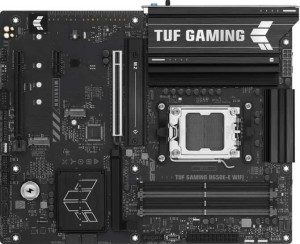
Asus TUF Gaming B650E-E Wi-Fi
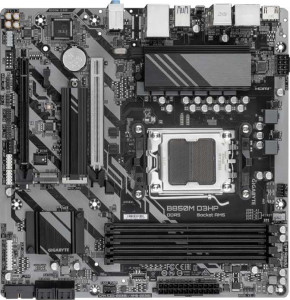
Gigabyte B850M D3HP

Asus TUF Gaming B650E-E Wi-Fi Gigabyte B850M D3HP

Overview

Welcome to our detailed spec comparison between the Asus TUF Gaming B650E-E Wi-Fi and the Gigabyte B850M D3HP — two AM5 motherboards that take notably different approaches to the mid-range market. While both share DDR5 support and a PCIe 5.0 x16 slot, they diverge in key areas such as form factor, connectivity features, and expandability. Read on to see how each board stacks up across memory, ports, storage, and more.

Common Features

  • Both motherboards use the AM5 CPU socket.
  • Both products feature a single CPU socket.
  • Both motherboards use the B650/B850 chipset family and support easy overclocking.
  • Neither product supports easy BIOS reset.
  • Neither motherboard has integrated graphics.
  • Both products come with a 3-year warranty.
  • Both boards share a height of 244 mm.
  • Both support HDMI 2.1 output.
  • Both motherboards support DDR5 memory.
  • Both support a maximum memory amount of 256 GB.
  • Both have 4 memory slots across 2 memory channels.
  • Neither board supports ECC memory.
  • Both provide 3 USB 3.2 Gen 1 Type-A ports on the rear panel.
  • Neither board has USB 3.2 Gen 2x2, USB 4, or Thunderbolt ports.
  • Both include a single RJ45 ethernet port.
  • Both provide 2 USB 3.2 Gen 1 ports and 4 USB 2.0 ports through internal expansion headers.
  • Both feature 4 SATA 3 connectors and no SATA 2 connectors.
  • Both offer a PCIe 5.0 x16 slot.
  • Both support 7.1 audio channels with 3 audio connectors.
  • Both support RAID 0, RAID 1, RAID 5, and RAID 10, but neither supports RAID 0+1.

Main Differences

  • The chipset is B650 on Asus TUF Gaming B650E-E Wi-Fi and B850 on Gigabyte B850M D3HP.
  • The form factor is ATX on Asus TUF Gaming B650E-E Wi-Fi and Micro-ATX on Gigabyte B850M D3HP.
  • The width is 305 mm on Asus TUF Gaming B650E-E Wi-Fi and 244 mm on Gigabyte B850M D3HP.
  • Wi-Fi is present on Asus TUF Gaming B650E-E Wi-Fi but not available on Gigabyte B850M D3HP.
  • Bluetooth is present on Asus TUF Gaming B650E-E Wi-Fi but not available on Gigabyte B850M D3HP.
  • RGB lighting is present on Asus TUF Gaming B650E-E Wi-Fi but not available on Gigabyte B850M D3HP.
  • Dual BIOS is present on Gigabyte B850M D3HP but not available on Asus TUF Gaming B650E-E Wi-Fi.
  • Maximum overclocked RAM speed is 8000 MHz on Asus TUF Gaming B650E-E Wi-Fi and 8200 MHz on Gigabyte B850M D3HP.
  • USB 3.2 Gen 2 Type-A ports number 1 on Asus TUF Gaming B650E-E Wi-Fi and 0 on Gigabyte B850M D3HP.
  • USB 3.2 Gen 2 Type-C ports number 1 on Asus TUF Gaming B650E-E Wi-Fi and 0 on Gigabyte B850M D3HP.
  • USB 3.2 Gen 1 Type-C ports number 0 on Asus TUF Gaming B650E-E Wi-Fi and 1 on Gigabyte B850M D3HP.
  • USB 2.0 rear ports number 3 on Asus TUF Gaming B650E-E Wi-Fi and 0 on Gigabyte B850M D3HP.
  • DisplayPort outputs number 1 on Asus TUF Gaming B650E-E Wi-Fi and 2 on Gigabyte B850M D3HP.
  • A PS/2 port is present on Gigabyte B850M D3HP but not available on Asus TUF Gaming B650E-E Wi-Fi.
  • Fan headers number 6 on Asus TUF Gaming B650E-E Wi-Fi and 4 on Gigabyte B850M D3HP.
  • M.2 sockets number 3 on Asus TUF Gaming B650E-E Wi-Fi and 2 on Gigabyte B850M D3HP.
  • A TPM connector is present on Gigabyte B850M D3HP but not available on Asus TUF Gaming B650E-E Wi-Fi.
  • A PCIe 4.0 x16 slot is present on Asus TUF Gaming B650E-E Wi-Fi but not available on Gigabyte B850M D3HP.
  • A PCIe x1 slot is present on Asus TUF Gaming B650E-E Wi-Fi but not available on Gigabyte B850M D3HP.
Specs Comparison
Asus TUF Gaming B650E-E Wi-Fi

Asus TUF Gaming B650E-E Wi-Fi

Gigabyte B850M D3HP

Gigabyte B850M D3HP

General info:
CPU socket AM5 AM5
chipset B650 B850
form factor ATX Micro-ATX
release date June 2025 January 2025
supports Wi-Fi
Has Bluetooth
HDMI version HDMI 2.1 HDMI 2.1
Easy to overclock
has RGB lighting
Easy to reset BIOS
Has dual BIOS
CPU sockets 1 1
Has integrated graphics
warranty period 3 years 3 years
height 244 mm 244 mm
width 305 mm 244 mm
Has integrated CPU

Both boards share the same AM5 socket and core fundamentals — single CPU socket, no integrated CPU or graphics, HDMI 2.1 output, overclocking support, and a 3-year warranty — so neither has a baseline advantage there. The most structurally significant difference is form factor: the Asus TUF Gaming B650E-E is a full ATX board (305 × 244 mm), while the Gigabyte B850M D3HP is Micro-ATX (244 × 244 mm). This means the Asus physically requires a mid- or full-tower case, whereas the Gigabyte fits in more compact builds — a real constraint to check before buying either.

Connectivity is where the Asus pulls ahead for most users: it includes built-in Wi-Fi and Bluetooth, while the Gigabyte has neither, meaning wireless users would need a separate adapter on the Gigabyte build. On the other hand, the Gigabyte counters with a dual BIOS — a second backup chip that can recover a corrupted firmware automatically, something the Asus lacks. Neither board offers an easy one-button BIOS reset, so that's a shared limitation. The Asus also includes RGB lighting; the Gigabyte does not, which is purely aesthetic but worth noting for case-window builds.

The chipset difference — B650 on the Asus vs. B850 on the Gigabyte — is also worth flagging: the B850 is a newer platform generation, which can imply improved power delivery and feature support depending on implementation, though the provided specs don't detail PCIe lane counts or USB configurations here. Overall, the Asus TUF B650E-E has a clear connectivity edge (Wi-Fi + Bluetooth out of the box), while the Gigabyte B850M D3HP edges ahead on firmware resilience (dual BIOS) and fits smaller cases. The right choice depends on whether wireless connectivity or build size is the bigger priority.
Memory:
maximum memory amount 256GB 256GB
overclocked RAM speed 8000 MHz 8200 MHz
memory slots 4 4
DDR memory version 5 5
memory channels 2 2
Supports ECC memory

For memory configuration, these two boards are remarkably well-matched. Both support DDR5, offer 4 slots across a dual-channel architecture, cap out at 256GB maximum capacity, and omit ECC support — meaning neither targets workstation or server use cases. In practice, dual-channel DDR5 with 4 slots gives enthusiasts room to start with 2 sticks and upgrade later without sacrificing performance, which is a practical layout for gaming and content creation builds alike.

The sole differentiator here is the maximum supported overclocked RAM speed: 8000 MHz on the Asus TUF B650E-E versus 8200 MHz on the Gigabyte B850M D3HP. In real-world terms, the gap between these two figures is extremely narrow — benchmarks rarely show meaningful performance differences at such closely spaced frequencies, and reaching either ceiling requires carefully validated high-end DDR5 kits that most users won't purchase.

The memory category is essentially a near-tie, with the Gigabyte holding a marginal theoretical edge in peak overclocked frequency. Unless a user is specifically chasing the absolute highest RAM overclock possible, this difference is unlikely to influence a purchasing decision in any practical way.

Ports:
USB 3.2 Gen 2 ports (USB-A) 1 0
USB 3.2 Gen 1 ports (USB-A) 3 3
USB 3.2 Gen 2 ports (USB-C) 1 0
USB 3.2 Gen 1 ports (USB-C) 0 1
USB 2.0 ports 3 0
USB 3.2 Gen 2x2 ports 0 0
USB 4 40Gbps ports 0 0
USB 4 20Gbps ports 0 0
Thunderbolt 4 ports 0 0
Thunderbolt 3 ports 0 0
has an HDMI output
DisplayPort outputs 1 2
RJ45 ports 1 1
Has USB Type-C
eSATA ports 0 0
DVI outputs 0 0
has a VGA connector
PS/2 ports 0 1

The rear I/O tells meaningfully different stories about each board's priorities. The Asus TUF B650E-E offers a broader and faster USB lineup: it includes a USB 3.2 Gen 2 Type-A and a USB 3.2 Gen 2 Type-C port — both running at 10 Gbps — alongside three Gen 1 Type-A ports and three USB 2.0 ports, for a total of eight USB connections. The Gigabyte B850M D3HP, by contrast, tops out at USB 3.2 Gen 1 speeds (5 Gbps) across its four USB ports, with no Gen 2 option at all. For users who regularly transfer large files or connect fast external SSDs, the Asus's 10 Gbps ports make a tangible real-world difference.

On video output, the Gigabyte counters with two DisplayPort outputs versus the Asus's single one — both boards include HDMI 2.1 as well — giving the Gigabyte an edge for multi-monitor setups driven directly from the motherboard's video output. The Gigabyte also includes a PS/2 port, a legacy connector useful only for very old keyboards or mice, which is a niche benefit at best. Notably, the Asus omits USB 2.0 entirely on the Gigabyte side, so legacy low-speed devices on the Gigabyte must share the limited Gen 1 ports.

Taken together, the Asus TUF B650E-E has a clear port advantage for most users: it delivers higher-speed USB connectivity and a larger total port count. The Gigabyte's dual DisplayPort is a genuine win for specific multi-display use cases, but for general connectivity breadth and USB throughput, the Asus comes out ahead.

Connectors:
USB 3.2 Gen 1 ports (through expansion) 2 2
USB 2.0 ports (through expansion) 4 4
SATA 3 connectors 4 4
fan headers 6 4
USB 3.0 ports (through expansion) 2 2
M.2 sockets 3 2
Has TPM connector
U.2 sockets 0 0
Has mSATA connector
SATA 2 connectors 0 0

Internal storage expansion is where these two boards diverge most noticeably. The Asus TUF B650E-E provides 3 M.2 sockets compared to the Gigabyte's 2 — a meaningful difference for users planning NVMe-heavy builds. Both offer 4 SATA 3 connectors alongside their M.2 slots, so traditional drive arrays are equally supported, but the Asus's extra M.2 slot gives builders more flexibility to run multiple fast SSDs without relying on adapters or sacrificing SATA ports.

Thermal management also splits the two: the Asus carries 6 fan headers versus the Gigabyte's 4. In a well-cooled gaming or workstation build with multiple case fans and a liquid cooler pump header, running out of native fan headers forces the use of splitters or external fan hubs — an added cost and complication the Asus avoids more easily. For straightforward builds, 4 headers on the Gigabyte is adequate, but enthusiast cooling setups will appreciate the Asus's headroom. Internal expansion connectors — USB headers and SATA — are identical between the two.

The Gigabyte's one unique entry here is a TPM connector, which the Asus lacks. This header allows adding a discrete TPM module for hardware-level security features, relevant in enterprise or security-conscious deployments. Still, for the majority of consumer builders, the Asus's extra M.2 slot and additional fan headers represent more impactful day-to-day advantages, giving the Asus TUF B650E-E a clear edge in this category for storage-rich and cooling-intensive builds.

Expansion slots:
PCIe 4.0 x16 slots 1 0
PCIe 5.0 x16 slots 1 1
PCIe 3.0 x16 slots 0 0
PCIe x1 slots 1 0
PCI slots 0 0
PCIe 2.0 x16 slots 0 0
PCIe x8 slots 0 0

Both boards anchor their expansion around a single PCIe 5.0 x16 slot — the current standard for flagship GPU installations, delivering up to 128 GB/s of bandwidth and ensuring full compatibility with the latest and next-generation graphics cards. On that core requirement, neither board compromises.

Where they part ways is in secondary expansion. The Asus TUF B650E-E adds a PCIe 4.0 x16 slot and a PCIe x1 slot, while the Gigabyte B850M D3HP offers nothing beyond its single primary slot. The PCIe 4.0 x16 slot on the Asus is particularly useful for add-in cards like capture cards, high-speed networking adapters, or even a secondary GPU for compute tasks, running at reduced lane counts but still with substantial bandwidth. The x1 slot covers smaller expansion cards. The Gigabyte's Micro-ATX footprint partly explains its leaner slot count — there is simply less board real estate to populate.

The verdict here favors the Asus TUF B650E-E clearly: users who plan to run any expansion card alongside their GPU — or who want the option to do so in the future — have that flexibility built in. The Gigabyte's single-slot layout is sufficient for a dedicated GPU-only build but leaves no room to grow.

Audio:
audio channels 7.1 7.1
Has S/PDIF Out port
audio connectors 3 3

Audio is a straight tie between these two boards. Both deliver 7.1-channel surround sound support through 3 analog audio connectors, and neither includes an S/PDIF optical output — meaning users who want to connect a home theater receiver or DAC via digital optical will need an external solution regardless of which board they choose.

The 7.1-channel capability covers the full surround sound spectrum for gaming headsets and speaker systems that support it, which is the standard expectation for a modern motherboard at this tier. Three analog jacks is the typical implementation for this channel count, handling line-in, line-out, and mic at a minimum with shared duties for surround configurations.

There is no differentiator to call out here — this category is a complete tie. Users with more demanding audio requirements, such as optical digital output or high-impedance headphone amplification, would need to evaluate add-in sound cards or external DACs independently of this board choice.

Storage:
Supports RAID 1
Supports RAID 10 (1+0)
Supports RAID 5
Supports RAID 0
Supports RAID 0+1

RAID support is identical across both boards. Each one covers the four configurations most relevant to consumer and prosumer builds: RAID 0 for striped performance, RAID 1 for mirrored redundancy, RAID 5 for distributed parity across three or more drives, and RAID 10 for the combined speed and redundancy of striped mirror pairs. Neither board supports RAID 0+1, though in practice that configuration is rarely distinguished from RAID 10 in consumer implementations.

Having RAID 5 available is worth noting for users building small NAS-adjacent workstations — it allows fault tolerance with better storage efficiency than pure mirroring. That said, RAID 5 on a consumer motherboard carries the usual caveats around rebuild times and write performance that apply regardless of board choice.

With no differences whatsoever across the supported configurations, this category is a complete tie. Storage redundancy and array options will not be a deciding factor between these two boards.

Comparison Summary & Verdict

After reviewing all the specifications, both boards serve distinct audiences. The Asus TUF Gaming B650E-E Wi-Fi is the stronger choice for users building a full-size ATX system who value built-in Wi-Fi and Bluetooth, more USB ports, additional M.2 slots, and a broader expansion slot lineup — ideal for gamers and enthusiasts who want a feature-rich, wireless-ready platform. The Gigabyte B850M D3HP, on the other hand, suits builders working with a compact Micro-ATX chassis who prioritize the newer B850 chipset, dual BIOS protection, slightly higher RAM overclocking headroom at 8200 MHz, and dual DisplayPort outputs, without needing onboard wireless connectivity.

Asus TUF Gaming B650E-E Wi-Fi
Buy Asus TUF Gaming B650E-E Wi-Fi if...

Buy the Asus TUF Gaming B650E-E Wi-Fi if you need built-in Wi-Fi and Bluetooth, more USB ports, and greater storage and expansion options in a full ATX build.

Gigabyte B850M D3HP
Buy Gigabyte B850M D3HP if...

Buy the Gigabyte B850M D3HP if you are building a compact Micro-ATX system and want the newer B850 chipset, dual BIOS protection, and dual DisplayPort outputs without requiring wireless connectivity.