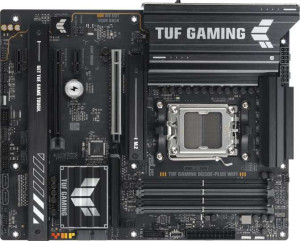
Asus TUF Gaming B650E-Plus Wi-Fi
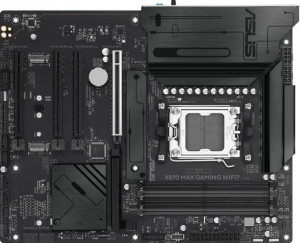
Asus X870 Max Gaming Wi-Fi7

Asus TUF Gaming B650E-Plus Wi-Fi Asus X870 Max Gaming Wi-Fi7

Common Features

  • Both products use the AM5 CPU socket.
  • Both products are ATX form factor motherboards.
  • Both products support Wi-Fi.
  • Both products have Bluetooth.
  • Both products have HDMI 2.1.
  • Both products are easy to overclock.
  • Both products have RGB lighting.
  • Both products do not have an easy way to reset BIOS.
  • Both products support a maximum memory amount of 256GB.
  • Both products support overclocked RAM speeds up to 8000 MHz.
  • Both products have 4 memory slots.
  • Both products use DDR5 memory.
  • Both products have 2 memory channels.
  • Both products do not support ECC memory.
  • Both products have 1 RJ45 port.
  • Both products have USB Type-C ports.
  • Both products have an HDMI output.
  • Both products have 4 SATA 3 connectors.
  • Both products support RAID 1, RAID 5, and RAID 10.

Main Differences

  • The Asus TUF Gaming B650E-Plus Wi-Fi uses the B650 chipset, while the Asus X870 Max Gaming Wi-Fi7 uses the X870 chipset.
  • The Asus TUF Gaming B650E-Plus Wi-Fi supports Wi-Fi 4, Wi-Fi 5, Wi-Fi 6, and Wi-Fi 6E, while the Asus X870 Max Gaming Wi-Fi7 also supports Wi-Fi 7 in addition to the other versions.
  • The Asus TUF Gaming B650E-Plus Wi-Fi has Bluetooth version 5.3, while the Asus X870 Max Gaming Wi-Fi7 has Bluetooth version 5.4.
  • The Asus TUF Gaming B650E-Plus Wi-Fi has 3 USB 3.2 Gen 2 ports (USB-A), while the Asus X870 Max Gaming Wi-Fi7 has only 1.
  • The Asus TUF Gaming B650E-Plus Wi-Fi has no USB 3.2 Gen 1 ports (USB-A), while the Asus X870 Max Gaming Wi-Fi7 has 3.
  • The Asus TUF Gaming B650E-Plus Wi-Fi has 6 USB 2.0 ports, while the Asus X870 Max Gaming Wi-Fi7 has 4.
  • The Asus TUF Gaming B650E-Plus Wi-Fi has 1 USB 3.2 Gen 2x2 port, while the Asus X870 Max Gaming Wi-Fi7 has none.
  • The Asus TUF Gaming B650E-Plus Wi-Fi has no USB 4 40Gbps ports, while the Asus X870 Max Gaming Wi-Fi7 has 2.
  • The Asus TUF Gaming B650E-Plus Wi-Fi has no Thunderbolt 4 ports, while the Asus X870 Max Gaming Wi-Fi7 has 2.
  • The Asus TUF Gaming B650E-Plus Wi-Fi has 1 DisplayPort output, while the Asus X870 Max Gaming Wi-Fi7 has none.
  • The Asus TUF Gaming B650E-Plus Wi-Fi has no TPM connector, while the Asus X870 Max Gaming Wi-Fi7 has one.
  • The Asus TUF Gaming B650E-Plus Wi-Fi has 1 PCIe 4.0 x16 slot, while the Asus X870 Max Gaming Wi-Fi7 has 2.
  • The Asus TUF Gaming B650E-Plus Wi-Fi has no PCIe 3.0 x16 slots, while the Asus X870 Max Gaming Wi-Fi7 has 1.
  • The Asus TUF Gaming B650E-Plus Wi-Fi has 2 PCIe x1 slots, while the Asus X870 Max Gaming Wi-Fi7 has none.
  • The Asus TUF Gaming B650E-Plus Wi-Fi has 5 audio connectors, while the Asus X870 Max Gaming Wi-Fi7 has 3.
Specs Comparison
Asus TUF Gaming B650E-Plus Wi-Fi

Asus TUF Gaming B650E-Plus Wi-Fi

Asus X870 Max Gaming Wi-Fi7

Asus X870 Max Gaming Wi-Fi7

General info:
CPU socket AM5 AM5
chipset B650 X870
form factor ATX ATX
release date May 2025 April 2025
supports Wi-Fi
Wi-Fi version Wi-Fi 4 (802.11n), Wi-Fi 5 (802.11ac), Wi-Fi 6 (802.11ax), Wi-Fi 6E (802.11ax) Wi-Fi 4 (802.11n), Wi-Fi 5 (802.11ac), Wi-Fi 6 (802.11ax), Wi-Fi 6E (802.11ax), Wi-Fi 7 (802.11be)
Has Bluetooth
Bluetooth version 5.3 5.4
HDMI version HDMI 2.1 HDMI 2.1
Easy to overclock
has RGB lighting
Easy to reset BIOS
Has dual BIOS
has aptX
CPU sockets 1 1
Has integrated graphics
warranty period 3 years 3 years
height 244 mm 244 mm
width 305 mm 305 mm
Has integrated CPU

The Asus TUF Gaming B650E-Plus Wi-Fi and the Asus X870 Max Gaming Wi-Fi7 both feature an AM5 CPU socket and ATX form factor, making them compatible with the same type of processors and motherboard size. Both support a range of Wi-Fi standards, including Wi-Fi 4, Wi-Fi 5, Wi-Fi 6, and Wi-Fi 6E, but the X870 Max also includes Wi-Fi 7 (802.11be), giving it an edge in future-proofing for the latest Wi-Fi technology.

Both motherboards come with Bluetooth, with the B650E-Plus supporting Bluetooth 5.3 and the X870 Max offering Bluetooth 5.4. Both models include HDMI 2.1 support and have RGB lighting, adding a visual flair to your build. Neither motherboard offers dual BIOS or easy BIOS resetting, and both lack aptX support.

In terms of size, both motherboards are identical, measuring 244 mm in height and 305 mm in width. Both also have a 3-year warranty period and do not feature integrated graphics or an integrated CPU. These two models are similar in most key specifications, with the X870 Max offering slightly more advanced Bluetooth and Wi-Fi support.

Memory:
maximum memory amount 256GB 256GB
overclocked RAM speed 8000 MHz 8000 MHz
memory slots 4 4
DDR memory version 5 5
memory channels 2 2
Supports ECC memory

Both the Asus TUF Gaming B650E-Plus Wi-Fi and the Asus X870 Max Gaming Wi-Fi7 feature the same maximum memory capacity of 256GB, which allows for substantial memory upgrades. Both motherboards support overclocked RAM speeds of up to 8000 MHz, ensuring high-performance memory configurations.

In terms of memory slots, both products have 4 slots, which offers flexibility for installing multiple memory modules. They also both use DDR5 memory and feature 2 memory channels, optimizing data transfer and performance.

Neither motherboard supports ECC (Error-Correcting Code) memory, meaning they are not designed for use in environments where data integrity is critical, such as certain professional or server applications.

Ports:
USB 3.2 Gen 2 ports (USB-A) 3 1
USB 3.2 Gen 1 ports (USB-A) 0 3
USB 3.2 Gen 2 ports (USB-C) 0 0
USB 3.2 Gen 1 ports (USB-C) 0 0
USB 2.0 ports 6 4
USB 3.2 Gen 2x2 ports 1 0
USB 4 40Gbps ports 0 2
USB 4 20Gbps ports 0 0
Thunderbolt 4 ports 0 2
Thunderbolt 3 ports 0 0
has an HDMI output
DisplayPort outputs 1 0
RJ45 ports 1 1
Has USB Type-C
eSATA ports 0 0
DVI outputs 0 0
has a VGA connector
PS/2 ports 0 0

The Asus TUF Gaming B650E-Plus Wi-Fi and the Asus X870 Max Gaming Wi-Fi7 have some key differences when it comes to their port configurations. The B650E-Plus offers 3 USB 3.2 Gen 2 USB-A ports, while the X870 Max provides just 1. However, the X870 Max has a higher number of USB 3.2 Gen 1 USB-A ports, offering 3 compared to the B650E-Plus’s 0. Both motherboards feature 6 USB 2.0 ports, and neither has any USB 3.2 Gen 2 or USB 3.2 Gen 1 USB-C ports.

For more advanced connections, the B650E-Plus includes 1 USB 3.2 Gen 2x2 port, while the X870 Max lacks this feature but includes 2 USB 4 40Gbps ports, which significantly outpace the B650E-Plus in terms of data transfer speed. The X870 Max also includes 2 Thunderbolt 4 ports, while the B650E-Plus does not have Thunderbolt support.

Both motherboards include HDMI output and have 1 RJ45 Ethernet port, ensuring network connectivity. The B650E-Plus features 1 DisplayPort output, whereas the X870 Max lacks any DisplayPort outputs. Neither has eSATA or DVI ports, and both lack a VGA connector or PS/2 ports. Both motherboards support USB Type-C connections, though the B650E-Plus does so without specific mention of speed, while the X870 Max may have faster Type-C ports with the inclusion of USB 4. The X870 Max also provides Thunderbolt 4, further enhancing its connectivity potential.

Connectors:
USB 3.2 Gen 1 ports (through expansion) 2 2
USB 2.0 ports (through expansion) 4 4
SATA 3 connectors 4 4
fan headers 6 6
USB 3.0 ports (through expansion) 2 2
M.2 sockets 3 3
Has TPM connector
U.2 sockets 0 0
Has mSATA connector
SATA 2 connectors 0 0

The Asus TUF Gaming B650E-Plus Wi-Fi and the Asus X870 Max Gaming Wi-Fi7 share several key connector features. Both motherboards offer 2 USB 3.2 Gen 1 ports and 4 USB 2.0 ports through expansion, as well as 2 USB 3.0 ports through expansion. Both also come with 4 SATA 3 connectors and 6 fan headers, ensuring plenty of expansion options for additional components and cooling solutions. Additionally, both feature 3 M.2 sockets for high-speed storage devices.

However, there is a difference in TPM support: the B650E-Plus does not have a TPM connector, while the X870 Max does. Both motherboards also lack U.2 sockets and mSATA connectors, and neither has SATA 2 connectors, which means they focus on modern storage interfaces.

In summary, while both motherboards are similar in terms of most connectors, the X870 Max stands out by offering a TPM connector for additional security, a feature the B650E-Plus does not include.

Expansion slots:
PCIe 4.0 x16 slots 1 2
PCIe 5.0 x16 slots 1 1
PCIe 3.0 x16 slots 0 1
PCIe x1 slots 2 0
PCI slots 0 0
PCIe 2.0 x16 slots 0 0
PCIe x8 slots 0 0

The Asus TUF Gaming B650E-Plus Wi-Fi and the Asus X870 Max Gaming Wi-Fi7 differ in the number and types of expansion slots available. The B650E-Plus includes 1 PCIe 4.0 x16 slot and 1 PCIe 5.0 x16 slot, with 2 PCIe x1 slots for smaller expansion cards. It does not offer PCIe 3.0 x16 slots or any other types of PCIe slots.

In comparison, the X870 Max provides 2 PCIe 4.0 x16 slots, along with 1 PCIe 5.0 x16 slot and 1 PCIe 3.0 x16 slot, giving it more flexibility in terms of supported card generations. It also lacks PCIe x1 slots, but this is in line with the B650E-Plus. Neither motherboard includes PCI slots, PCIe 2.0 x16 slots, or PCIe x8 slots.

Overall, the X870 Max offers more PCIe x16 slots across different generations, giving it a greater range of expansion options compared to the B650E-Plus.

Audio:
audio channels 7.1 7.1
Has S/PDIF Out port
audio connectors 5 3

Both the Asus TUF Gaming B650E-Plus Wi-Fi and the Asus X870 Max Gaming Wi-Fi7 offer 7.1 audio channels, ensuring immersive sound quality. Neither motherboard includes an S/PDIF Out port, which means both lack digital audio output support for high-quality audio over optical cables.

When it comes to audio connectors, the B650E-Plus offers 5 connectors, while the X870 Max has only 3. This difference suggests that the B650E-Plus may offer more flexibility for connecting external audio devices, such as speakers or headphones.

In summary, both motherboards support high-definition audio, but the B650E-Plus provides more audio connectors, which could be beneficial for users with more complex audio setups.

Storage:
Supports RAID 1
Supports RAID 10 (1+0)
Supports RAID 5
Supports RAID 0
Supports RAID 0+1

Both the Asus TUF Gaming B650E-Plus Wi-Fi and the Asus X870 Max Gaming Wi-Fi7 support the same RAID configurations, including RAID 1, RAID 10 (1+0), RAID 5, and RAID 0. This provides users with flexible options for data redundancy, speed, and fault tolerance. Neither motherboard supports RAID 0+1, meaning they lack this specific combination of RAID levels for enhanced redundancy and performance.

Since both products share identical RAID support, there are no differences in storage configuration capabilities between them in this area.

In summary, both the B650E-Plus and the X870 Max offer the same range of RAID options, so users can expect similar storage performance and redundancy choices from either motherboard.

Comparison Summary

This is a specification comparison between Asus TUF Gaming B650E-Plus Wi-Fi and Asus X870 Max Gaming Wi-Fi7. Both motherboards share a maximum memory amount of 256GB, support overclocked RAM speeds of up to 8000 MHz, have 4 memory slots, and feature 2 memory channels. However, the Asus TUF Gaming B650E-Plus Wi-Fi uses the B650 chipset and supports up to Wi-Fi 6E, while the Asus X870 Max Gaming Wi-Fi7 uses the X870 chipset and adds Wi-Fi 7 support. The Asus TUF Gaming B650E-Plus Wi-Fi has 3 USB 3.2 Gen 2 ports (USB-A), while the Asus X870 Max Gaming Wi-Fi7 has only 1. The Asus X870 Max Gaming Wi-Fi7 also offers 2 Thunderbolt 4 ports and 2 USB 4 40Gbps ports, which the Asus TUF Gaming B650E-Plus Wi-Fi lacks. Additionally, the Asus TUF Gaming B650E-Plus Wi-Fi includes 5 audio connectors, compared to just 3 on the Asus X870 Max Gaming Wi-Fi7.