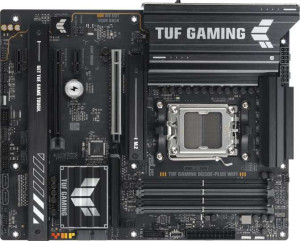
Asus TUF Gaming B650E-Plus Wi-Fi
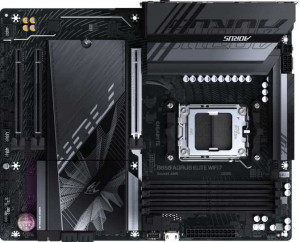
Gigabyte B850 Aorus Elite WiFi7

Asus TUF Gaming B650E-Plus Wi-Fi Gigabyte B850 Aorus Elite WiFi7

Overview

When choosing between the Asus TUF Gaming B650E-Plus Wi-Fi and the Gigabyte B850 Aorus Elite WiFi7, builders face a nuanced decision across several key battlegrounds. Both are AM5-compatible ATX motherboards with DDR5 support, Wi-Fi, and RGB lighting, yet they diverge meaningfully in areas like wireless connectivity, rear USB layout, chipset generation, and audio features. Read on to see how every specification stacks up before making your choice.

Common Features

  • Both motherboards use the AM5 CPU socket.
  • Both motherboards have an ATX form factor.
  • Wi-Fi connectivity is available on both motherboards.
  • Bluetooth connectivity is available on both motherboards.
  • Overclocking support is available on both motherboards.
  • RGB lighting is present on both motherboards.
  • Easy BIOS reset is not available on either motherboard.
  • aptX audio support is not available on either motherboard.
  • Both motherboards support a maximum memory amount of 256GB.
  • Both motherboards have 4 memory slots.
  • Both motherboards use DDR5 memory.
  • Both motherboards support 2 memory channels.
  • ECC memory support is not available on either motherboard.
  • Neither motherboard has USB 3.2 Gen 1 Type-C ports on the rear panel.
  • Neither motherboard has USB 4 40Gbps or USB 4 20Gbps ports.
  • Neither motherboard has Thunderbolt 3 or Thunderbolt 4 ports.
  • Both motherboards have 1 DisplayPort output.
  • Both motherboards have 1 RJ45 port.
  • USB Type-C connectivity is available on both motherboards.
  • Both motherboards have 2 USB 3.2 Gen 1 ports and 4 USB 2.0 ports available through expansion headers.
  • Both motherboards include 4 SATA 3 connectors.
  • Both motherboards have 6 fan headers.
  • Both motherboards provide 3 M.2 sockets.
  • Neither motherboard has an mSATA connector.
  • Both motherboards have 1 PCIe 5.0 x16 slot.
  • Both motherboards have 2 PCIe x1 slots.
  • Neither motherboard has PCIe 3.0 x16, PCIe 2.0 x16, or PCIe x8 slots.
  • Both motherboards support 7.1 audio channels.
  • Both motherboards support RAID 0, RAID 1, RAID 5, and RAID 10.
  • RAID 0+1 is not supported on either motherboard.

Main Differences

  • The chipset is B650 on Asus TUF Gaming B650E-Plus Wi-Fi and B850 on Gigabyte B850 Aorus Elite WiFi7.
  • Wi-Fi 7 (802.11be) support is present on Gigabyte B850 Aorus Elite WiFi7 but not available on Asus TUF Gaming B650E-Plus Wi-Fi.
  • Bluetooth version is 5.3 on Asus TUF Gaming B650E-Plus Wi-Fi and 5.4 on Gigabyte B850 Aorus Elite WiFi7.
  • Dual BIOS support is present on Gigabyte B850 Aorus Elite WiFi7 but not available on Asus TUF Gaming B650E-Plus Wi-Fi.
  • The maximum overclocked RAM speed is 8000 MHz on Asus TUF Gaming B650E-Plus Wi-Fi and 8200 MHz on Gigabyte B850 Aorus Elite WiFi7.
  • USB 3.2 Gen 2 Type-A ports count is 3 on Asus TUF Gaming B650E-Plus Wi-Fi and 2 on Gigabyte B850 Aorus Elite WiFi7.
  • USB 3.2 Gen 1 Type-A ports count is 0 on Asus TUF Gaming B650E-Plus Wi-Fi and 5 on Gigabyte B850 Aorus Elite WiFi7.
  • USB 3.2 Gen 2 Type-C ports count is 0 on Asus TUF Gaming B650E-Plus Wi-Fi and 1 on Gigabyte B850 Aorus Elite WiFi7.
  • USB 2.0 ports count is 6 on Asus TUF Gaming B650E-Plus Wi-Fi and 4 on Gigabyte B850 Aorus Elite WiFi7.
  • A USB 3.2 Gen 2x2 port is present on Asus TUF Gaming B650E-Plus Wi-Fi but not available on Gigabyte B850 Aorus Elite WiFi7.
  • An HDMI output is present on Asus TUF Gaming B650E-Plus Wi-Fi but not available on Gigabyte B850 Aorus Elite WiFi7.
  • A TPM connector is present on Gigabyte B850 Aorus Elite WiFi7 but not available on Asus TUF Gaming B650E-Plus Wi-Fi.
  • A PCIe 4.0 x16 slot is present on Asus TUF Gaming B650E-Plus Wi-Fi but not available on Gigabyte B850 Aorus Elite WiFi7.
  • An S/PDIF Out port is present on Gigabyte B850 Aorus Elite WiFi7 but not available on Asus TUF Gaming B650E-Plus Wi-Fi.
  • The number of rear audio connectors is 5 on Asus TUF Gaming B650E-Plus Wi-Fi and 2 on Gigabyte B850 Aorus Elite WiFi7.
Specs Comparison
Asus TUF Gaming B650E-Plus Wi-Fi

Asus TUF Gaming B650E-Plus Wi-Fi

Gigabyte B850 Aorus Elite WiFi7

Gigabyte B850 Aorus Elite WiFi7

General info:
CPU socket AM5 AM5
chipset B650 B850
form factor ATX ATX
release date May 2025 January 2025
supports Wi-Fi
Wi-Fi version Wi-Fi 4 (802.11n), Wi-Fi 5 (802.11ac), Wi-Fi 6 (802.11ax), Wi-Fi 6E (802.11ax) Wi-Fi 4 (802.11n), Wi-Fi 5 (802.11ac), Wi-Fi 6 (802.11ax), Wi-Fi 6E (802.11ax), Wi-Fi 7 (802.11be)
Has Bluetooth
Bluetooth version 5.3 5.4
Easy to overclock
has RGB lighting
Easy to reset BIOS
Has dual BIOS
has aptX
CPU sockets 1 1
Has integrated graphics
warranty period 3 years 3 years
height 244 mm 244 mm
width 305 mm 305 mm
Has integrated CPU

Both the Asus TUF Gaming B650E-Plus Wi-Fi and the Gigabyte B850 Aorus Elite WiFi7 share the same physical foundation: identical ATX form factor at 244 × 305 mm, a single AM5 CPU socket, no integrated CPU or graphics, RGB lighting, and a 3-year warranty. Both are also rated easy to overclock, making them viable for AMD Ryzen enthusiasts on either platform.

The most meaningful separators lie in the chipset and wireless stack. The Gigabyte runs the newer B850 chipset versus the Asus's B650, which in practice typically brings improved PCIe and USB bandwidth allocations on the B850 side. On wireless, the Gigabyte adds Wi-Fi 7 (802.11be) to the mix — a standard the Asus lacks entirely — delivering significantly higher theoretical throughput and lower latency on compatible routers. The Gigabyte also edges ahead with Bluetooth 5.4 versus 5.3 on the Asus, a minor but real improvement in connection stability and energy efficiency. Finally, only the Gigabyte includes a dual BIOS, a meaningful safety net that lets the board recover from a failed firmware update without external tools — a feature the Asus omits.

The Gigabyte B850 Aorus Elite WiFi7 holds a clear advantage in this group. Its newer chipset, Wi-Fi 7 support, slightly newer Bluetooth, and dual BIOS redundancy make it the more future-proof and resilient choice. The Asus TUF B650E-Plus remains competitive on fundamentals, but users who value cutting-edge wireless connectivity or added BIOS safety will find the Gigabyte the stronger option based purely on these specs.
Memory:
maximum memory amount 256GB 256GB
overclocked RAM speed 8000 MHz 8200 MHz
memory slots 4 4
DDR memory version 5 5
memory channels 2 2
Supports ECC memory

On paper, these two boards are almost a mirror image in the memory department: both support DDR5 with 4 slots, a 256 GB maximum capacity, dual-channel operation, and neither accommodates ECC memory. For the vast majority of users — gamers, content creators, and enthusiasts alike — this shared foundation means identical practical flexibility when it comes to kit selection and future upgrades.

The single differentiator is the maximum supported overclocked RAM speed. The Gigabyte B850 Aorus Elite WiFi7 edges ahead at 8200 MHz versus 8000 MHz on the Asus TUF B650E-Plus. In isolation, a 200 MHz gap at these frequencies is unlikely to produce a noticeable real-world performance difference in most workloads — but it does signal that the Gigabyte's memory controller and trace routing are validated for slightly more aggressive XMP/EXPO profiles, which matters to enthusiasts who push high-frequency kits to their ceiling.

For this group, the verdict is effectively a near-tie, with a marginal technical edge to the Gigabyte. Unless you are specifically targeting the fastest DDR5 kits on the market and need that extra headroom, neither board constrains you meaningfully more than the other in memory configuration.

Ports:
USB 3.2 Gen 2 ports (USB-A) 3 2
USB 3.2 Gen 1 ports (USB-A) 0 5
USB 3.2 Gen 2 ports (USB-C) 0 1
USB 3.2 Gen 1 ports (USB-C) 0 0
USB 2.0 ports 6 4
USB 3.2 Gen 2x2 ports 1 0
USB 4 40Gbps ports 0 0
USB 4 20Gbps ports 0 0
Thunderbolt 4 ports 0 0
Thunderbolt 3 ports 0 0
has an HDMI output
DisplayPort outputs 1 1
RJ45 ports 1 1
Has USB Type-C
eSATA ports 0 0
DVI outputs 0 0
has a VGA connector
PS/2 ports 0 0

The port layouts on these two boards take notably different philosophies. The Asus TUF B650E-Plus prioritizes high-speed throughput at the top end, offering a USB 3.2 Gen 2x2 port delivering 20 Gbps — ideal for the latest external NVMe enclosures — alongside three Gen 2 (10 Gbps) USB-A ports. The Gigabyte B850 Aorus Elite WiFi7 skips Gen 2x2 entirely but counters with broader connectivity breadth: five USB 3.2 Gen 1 ports, a USB 3.2 Gen 2 Type-C (10 Gbps), and a higher total USB port count of 12 versus the Asus's 10.

Two other distinctions stand out. The Asus includes an HDMI output that the Gigabyte omits entirely — a meaningful convenience for users who occasionally need to connect a display directly to the motherboard (for instance, during troubleshooting or when using a CPU with integrated graphics in the future). Both boards share a single DisplayPort output and one RJ45 Ethernet port, keeping video and networking options equivalent outside of that HDMI gap.

Neither board dominates outright, but the decision hinges on use case. Users who connect high-speed external storage will appreciate the Asus's Gen 2x2 port and its HDMI fallback. Those who need to plug in more USB devices simultaneously — peripherals, hubs, controllers — will benefit from the Gigabyte's larger port roster and its USB-C 10 Gbps option. On balance, the Gigabyte holds a slight edge in everyday versatility, while the Asus wins for peak-speed USB and display output flexibility.

Connectors:
USB 3.2 Gen 1 ports (through expansion) 2 2
USB 2.0 ports (through expansion) 4 4
SATA 3 connectors 4 4
fan headers 6 6
USB 3.0 ports (through expansion) 2 2
M.2 sockets 3 3
Has TPM connector
U.2 sockets 0 0
Has mSATA connector
SATA 2 connectors 0 0

Internally, these two boards are remarkably alike. Both provide 3 M.2 sockets, 4 SATA 3 connectors, 6 fan headers, and identical expansion USB headers — enough storage and cooling headroom to satisfy most enthusiast and prosumer builds without compromise.

The sole differentiator in this group is the TPM connector present on the Gigabyte B850 Aorus Elite WiFi7 and absent on the Asus. A dedicated TPM (Trusted Platform Module) header allows users to add a discrete TPM chip, which is relevant for enterprise environments, hardware-based encryption workflows, and certain compliance or security requirements. For most consumer gaming builds this goes unnoticed, but for anyone deploying BitLocker at the hardware level or working in a corporate or security-conscious context, having that header available is a tangible advantage.

As a result, the Gigabyte takes a narrow win here — not because of raw connectivity volume, which is identical, but because the TPM connector adds a layer of security flexibility the Asus simply cannot match in this configuration. Users building a purely personal gaming rig will find both boards equivalent in practice; those with security or enterprise needs should note the Gigabyte's edge.

Expansion slots:
PCIe 4.0 x16 slots 1 0
PCIe 5.0 x16 slots 1 1
PCIe 3.0 x16 slots 0 0
PCIe x1 slots 2 2
PCI slots 0 0
PCIe 2.0 x16 slots 0 0
PCIe x8 slots 0 0

Expansion slot layouts tell an important story about how much flexibility a board offers beyond the primary GPU. Both boards share a single PCIe 5.0 x16 slot — the main GPU lane — and two PCIe x1 slots for add-in cards like capture cards or network adapters. For single-GPU builds, this shared foundation is functionally identical.

Where they part ways is the secondary x16-sized slot. The Asus TUF B650E-Plus includes an additional PCIe 4.0 x16 slot that the Gigabyte entirely omits. In practice, this slot typically runs at x4 bandwidth, but its physical x16 size means it can accept a wider range of add-in cards — including older or bulkier GPUs used for compute, capture, or multi-GPU workflows — that simply won't fit in an x1 slot. The Gigabyte B850 Aorus Elite WiFi7 offers no such secondary large slot, limiting expansion to the two x1 positions once the primary GPU is installed.

The Asus holds a clear advantage here. The extra PCIe 4.0 x16 slot meaningfully extends the board's versatility for users who run a secondary GPU, a high-bandwidth capture card, or other x16-form-factor add-in cards — options the Gigabyte simply cannot accommodate.

Audio:
audio channels 7.1 7.1
Has S/PDIF Out port
audio connectors 5 2

Audio is another area where a shared headline figure masks meaningful differences underneath. Both boards support 7.1 surround sound, which on paper puts them on equal footing for immersive gaming or home-theater-style setups. The divergence comes in how that audio is delivered.

The Asus TUF B650E-Plus offers 5 analog audio connectors, giving users the physical jacks needed to wire up a full multi-channel analog speaker system directly from the rear I/O — a practical advantage for anyone running a traditional 5.1 or 7.1 speaker array without an external receiver. The Gigabyte B850 Aorus Elite WiFi7 trims this down to just 2 analog connectors, which limits direct analog multi-channel output, but compensates with an S/PDIF optical output that the Asus lacks entirely. S/PDIF is the preferred connection for AV receivers, soundbars, and DACs that accept a digital optical signal, delivering a clean, interference-free audio stream.

The right choice depends entirely on the user's audio setup. The Asus suits those running analog multi-channel speakers directly into the motherboard, while the Gigabyte is the stronger pick for anyone routing audio through a receiver or external DAC via optical. Neither board dominates universally — this is a genuine use-case split with no single winner.

Storage:
Supports RAID 1
Supports RAID 10 (1+0)
Supports RAID 5
Supports RAID 0
Supports RAID 0+1

RAID support is identical across both boards. The Asus TUF B650E-Plus and the Gigabyte B850 Aorus Elite WiFi7 each support RAID 0, RAID 1, RAID 5, and RAID 10 — covering the full range of configurations most users would realistically deploy, from pure performance striping to mirrored redundancy and the balanced protection of RAID 10.

Neither board supports RAID 0+1, but this omission is equally shared and largely inconsequential in practice, since RAID 10 achieves a functionally superior result for most workloads that would otherwise reach for 0+1. The presence of RAID 5 on both is worth noting for anyone building a multi-drive NAS-adjacent workstation, as it offers an efficient balance of storage capacity and fault tolerance across three or more drives.

This group is a complete tie. There is no basis to favor one board over the other on storage configuration support — users of either board will find the same RAID toolkit at their disposal.

Comparison Summary & Verdict

After a thorough side-by-side review, both boards share a strong foundation: AM5 socket, DDR5 support up to 256GB, PCIe 5.0, and solid RAID options. However, their differences carve out distinct audiences. The Asus TUF Gaming B650E-Plus Wi-Fi stands out with its HDMI output, a USB 3.2 Gen 2x2 port, more audio connectors, and an additional PCIe 4.0 x16 slot, making it a practical choice for users who value display flexibility and richer analog audio. The Gigabyte B850 Aorus Elite WiFi7, on the other hand, leads with Wi-Fi 7 support, dual BIOS, a newer Bluetooth 5.4, a TPM connector, and a higher overclocked RAM ceiling of 8200 MHz, positioning it as the forward-looking option for users prioritizing cutting-edge connectivity and platform longevity.

Asus TUF Gaming B650E-Plus Wi-Fi
Buy Asus TUF Gaming B650E-Plus Wi-Fi if...

Buy the Asus TUF Gaming B650E-Plus Wi-Fi if you need an HDMI output for direct display connectivity, want a USB 3.2 Gen 2x2 port, or prefer a more extensive set of rear audio connectors.

Gigabyte B850 Aorus Elite WiFi7
Buy Gigabyte B850 Aorus Elite WiFi7 if...

Buy the Gigabyte B850 Aorus Elite WiFi7 if you want the latest Wi-Fi 7 connectivity, dual BIOS protection, Bluetooth 5.4, a TPM connector, and support for higher overclocked RAM speeds up to 8200 MHz.