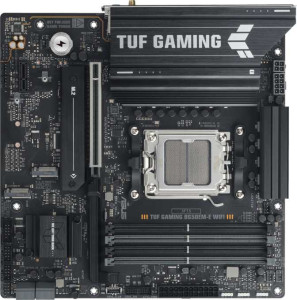
Asus TUF Gaming B650EM-E Wi-Fi
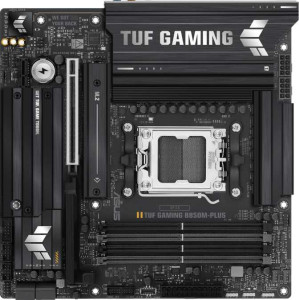
Asus TUF Gaming B850M-Plus

Asus TUF Gaming B650EM-E Wi-Fi Asus TUF Gaming B850M-Plus

Overview

Choosing between the Asus TUF Gaming B650EM-E Wi-Fi and the Asus TUF Gaming B850M-Plus is no simple task — both are Micro-ATX motherboards built around the AM5 socket with DDR5 memory support, PCIe 5.0, and solid storage options. Yet beneath their shared foundations lie meaningful distinctions in connectivity, wireless capability, memory capacity, and audio features that could make one a far better fit for your build than the other.

Common Features

  • Both boards use the AM5 CPU socket.
  • Both boards have a Micro-ATX form factor.
  • Both boards feature HDMI 2.1 output.
  • Overclocking support is available on both boards.
  • RGB lighting is present on both boards.
  • Easy BIOS reset is not available on either board.
  • Both boards have a single CPU socket.
  • Integrated graphics are not available on either board.
  • Both boards support DDR5 memory.
  • Both boards have 4 memory slots.
  • Both boards support dual-channel memory.
  • Both boards support a maximum overclocked RAM speed of 8000 MHz.
  • ECC memory support is not available on either board.
  • Neither board has USB 3.2 Gen 1 Type-C ports on the rear panel.
  • Both boards have 4 USB 2.0 rear ports.
  • Neither board includes USB 4 40Gbps, USB 4 20Gbps, Thunderbolt 3, or Thunderbolt 4 ports.
  • Both boards include an HDMI output.
  • Both boards have 1 RJ45 ethernet port.
  • Both boards provide 2 USB 3.2 Gen 1 ports and 4 USB 2.0 ports through internal expansion headers.
  • Both boards include 4 SATA 3 connectors and 3 M.2 sockets.
  • Neither board has a TPM connector, U.2 socket, or mSATA connector.
  • Both boards have 1 PCIe 5.0 x16 slot and 1 PCIe x1 slot, with no PCIe 4.0 x16, 3.0 x16, 2.0 x16, x8, or PCI slots.
  • Both boards support 7.1 audio channels.
  • Both boards support RAID 0, RAID 1, RAID 5, and RAID 10, but neither supports RAID 0+1.

Main Differences

  • The chipset is B650 on the Asus TUF Gaming B650EM-E Wi-Fi and B850 on the Asus TUF Gaming B850M-Plus.
  • Wi-Fi support is present on the Asus TUF Gaming B650EM-E Wi-Fi but not available on the Asus TUF Gaming B850M-Plus.
  • Bluetooth support is present on the Asus TUF Gaming B650EM-E Wi-Fi but not available on the Asus TUF Gaming B850M-Plus.
  • Dual BIOS is present on the Asus TUF Gaming B850M-Plus but not available on the Asus TUF Gaming B650EM-E Wi-Fi.
  • Maximum memory capacity is 256 GB on the Asus TUF Gaming B650EM-E Wi-Fi and 192 GB on the Asus TUF Gaming B850M-Plus.
  • USB 3.2 Gen 2 Type-A rear ports number 1 on the Asus TUF Gaming B650EM-E Wi-Fi and 3 on the Asus TUF Gaming B850M-Plus.
  • USB 3.2 Gen 1 Type-A rear ports number 2 on the Asus TUF Gaming B650EM-E Wi-Fi and 4 on the Asus TUF Gaming B850M-Plus.
  • A USB 3.2 Gen 2 Type-C rear port is present on the Asus TUF Gaming B650EM-E Wi-Fi but not available on the Asus TUF Gaming B850M-Plus.
  • A USB 3.2 Gen 2x2 rear port is present on the Asus TUF Gaming B850M-Plus but not available on the Asus TUF Gaming B650EM-E Wi-Fi.
  • DisplayPort outputs number 2 on the Asus TUF Gaming B650EM-E Wi-Fi and 1 on the Asus TUF Gaming B850M-Plus.
  • A PS/2 port is present on the Asus TUF Gaming B650EM-E Wi-Fi but not available on the Asus TUF Gaming B850M-Plus.
  • Fan headers number 4 on the Asus TUF Gaming B650EM-E Wi-Fi and 5 on the Asus TUF Gaming B850M-Plus.
  • An S/PDIF Out port is present on the Asus TUF Gaming B850M-Plus but not available on the Asus TUF Gaming B650EM-E Wi-Fi.
  • Audio connectors number 3 on the Asus TUF Gaming B650EM-E Wi-Fi and 5 on the Asus TUF Gaming B850M-Plus.
Specs Comparison
Asus TUF Gaming B650EM-E Wi-Fi

Asus TUF Gaming B650EM-E Wi-Fi

Asus TUF Gaming B850M-Plus

Asus TUF Gaming B850M-Plus

General info:
CPU socket AM5 AM5
chipset B650 B850
form factor Micro-ATX Micro-ATX
release date June 2025 January 2025
supports Wi-Fi
Has Bluetooth
HDMI version HDMI 2.1 HDMI 2.1
Easy to overclock
has RGB lighting
Easy to reset BIOS
Has dual BIOS
CPU sockets 1 1
Has integrated graphics
warranty period 3 years 3 years
height 244 mm 244 mm
width 244 mm 244 mm
Has integrated CPU

Both the Asus TUF Gaming B650EM-E Wi-Fi and the Asus TUF Gaming B850M-Plus share a strong common foundation: identical Micro-ATX form factor (244×244 mm), the same AM5 CPU socket, HDMI 2.1 output, RGB lighting, a 3-year warranty, and support for overclocking. For users building in a compact case around a current-gen AMD platform, either board fits the same physical and functional baseline.

The most significant real-world differentiator is connectivity. The B650EM-E includes built-in Wi-Fi and Bluetooth, which the B850M-Plus entirely lacks. For a desktop that will sit far from a router or needs wireless peripherals, the B650EM-E eliminates the need for an add-in card or USB dongle. On the other hand, the B850M-Plus moves up to the newer B850 chipset, which generally offers expanded support for next-generation features and higher-tier platform capabilities compared to the B650. It also adds a dual BIOS, a meaningful reliability feature that allows the board to recover from a failed firmware update automatically — something the B650EM-E does not provide.

In summary, the two boards trade meaningful advantages: the B650EM-E wins for users who need wireless connectivity out of the box, while the B850M-Plus holds an edge in platform headroom and BIOS resilience. Neither is a clear overall winner in this group — the right choice depends on whether wireless connectivity or chipset generation and dual-BIOS protection matters more to the buyer.
Memory:
maximum memory amount 256GB 192GB
overclocked RAM speed 8000 MHz 8000 MHz
memory slots 4 4
DDR memory version 5 5
memory channels 2 2
Supports ECC memory

Both boards share a largely identical memory profile: 4 slots, dual-channel DDR5, and a maximum overclocked speed of 8000 MHz. For most gaming and productivity workloads, this parity means either board will deliver equivalent memory bandwidth and responsiveness — the DDR5 platform with high-frequency support is well-suited to feeding modern AMD Ryzen processors without bottlenecking.

The one concrete differentiator here is maximum capacity. The B650EM-E Wi-Fi supports up to 256 GB of RAM, while the B850M-Plus caps out at 192 GB. In practical terms, the vast majority of desktop users — even those running demanding games, video editing, or virtualization — will never approach either ceiling. However, for professional workloads like large-scale 3D rendering, heavy multi-VM environments, or in-memory database work, that extra 64 GB headroom on the B650EM-E could matter.

The edge in this group goes to the B650EM-E Wi-Fi strictly on maximum capacity. For typical users the gap is irrelevant, but for memory-intensive professional use cases, the higher ceiling is a tangible advantage the B850M-Plus cannot match.

Ports:
USB 3.2 Gen 2 ports (USB-A) 1 3
USB 3.2 Gen 1 ports (USB-A) 2 4
USB 3.2 Gen 2 ports (USB-C) 1 0
USB 3.2 Gen 1 ports (USB-C) 0 0
USB 2.0 ports 4 4
USB 3.2 Gen 2x2 ports 0 1
USB 4 40Gbps ports 0 0
USB 4 20Gbps ports 0 0
Thunderbolt 4 ports 0 0
Thunderbolt 3 ports 0 0
has an HDMI output
DisplayPort outputs 2 1
RJ45 ports 1 1
Has USB Type-C
eSATA ports 0 0
DVI outputs 0 0
has a VGA connector
PS/2 ports 1 0

When it comes to rear I/O, the two boards take noticeably different approaches. The B850M-Plus prioritizes USB density, offering a total of 7 high-speed USB-A ports (3× Gen 2 + 4× Gen 1) compared to just 3 on the B650EM-E Wi-Fi. More importantly, the B850M-Plus adds a USB 3.2 Gen 2x2 port — running at 20 Gbps, it is the fastest USB connection available on either board, and is particularly useful for high-speed external NVMe enclosures or the latest portable SSDs.

The B650EM-E fights back on two fronts. It includes a rear USB-C Gen 2 port (10 Gbps), which the B850M-Plus lacks despite technically having USB-C present via its Gen 2x2 connector. For users with USB-C accessories that top out at 10 Gbps, this is a more broadly compatible option. The B650EM-E also provides 2 DisplayPort outputs versus just 1 on the B850M-Plus, making it the stronger choice for anyone running multiple monitors directly off the board's rear video outputs.

On balance, the B850M-Plus holds the edge for USB-heavy desks — more ports and a faster peak speed give it greater day-to-day flexibility for peripherals and storage. The B650EM-E is the better pick specifically for multi-display setups or workflows that rely on a standard USB-C connection at the rear panel.

Connectors:
USB 3.2 Gen 1 ports (through expansion) 2 2
USB 2.0 ports (through expansion) 4 4
SATA 3 connectors 4 4
fan headers 4 5
USB 3.0 ports (through expansion) 2 2
M.2 sockets 3 3
Has TPM connector
U.2 sockets 0 0
Has mSATA connector
SATA 2 connectors 0 0

Internal connectors are remarkably well-matched across these two boards. Both offer 4 SATA 3 connectors, 3 M.2 sockets, and identical expansion USB headers — meaning storage configurations and internal USB flexibility are effectively the same whichever board you choose. Three M.2 slots in a Micro-ATX board is a generous allocation, comfortably supporting an OS drive plus one or two additional NVMe drives without touching the SATA ports.

The only measurable difference in this group is fan headers: the B850M-Plus provides 5 fan headers versus 4 on the B650EM-E Wi-Fi. In a compact Micro-ATX build where cooling management is already constrained by case size, that extra header can matter — it allows independent control of an additional fan or pump without requiring a separate fan hub, which is a small but real convenience for builders prioritizing thermal performance or quiet operation.

The B850M-Plus takes a narrow edge here solely due to its additional fan header. For the vast majority of builds the difference will go unnoticed, but for thermal-conscious builders maxing out their cooling hardware, that one extra header removes a potential pain point.

Expansion slots:
PCIe 4.0 x16 slots 0 0
PCIe 5.0 x16 slots 1 1
PCIe 3.0 x16 slots 0 0
PCIe x1 slots 1 1
PCI slots 0 0
PCIe 2.0 x16 slots 0 0
PCIe x8 slots 0 0

Expansion slot configurations are identical on both boards: one PCIe 5.0 x16 slot and one PCIe x1 slot, with no legacy PCIe 4.0, 3.0, or PCI slots present. For a Micro-ATX form factor this is a sensible and practical layout — the primary x16 slot handles a discrete GPU, while the x1 slot accommodates a secondary card such as a sound card, capture card, or additional networking adapter.

The presence of PCIe 5.0 on the primary slot is the more forward-looking detail. Current mainstream GPUs do not yet saturate PCIe 4.0 bandwidth, so the PCIe 5.0 slot offers headroom for next-generation graphics cards rather than an immediate real-world performance uplift. Both boards are equally positioned for that future transition.

This group is a straight tie — there is no differentiator between the two products here. Neither board holds any expansion slot advantage over the other.

Audio:
audio channels 7.1 7.1
Has S/PDIF Out port
audio connectors 3 5

Both boards deliver 7.1 surround sound support, making either a capable foundation for an immersive audio setup without a dedicated sound card. That shared capability is where the common ground ends, however — the analog connector count and digital output availability diverge meaningfully between the two.

The B850M-Plus comes equipped with 5 audio connectors compared to just 3 on the B650EM-E Wi-Fi. More connectors mean more simultaneous analog audio devices can be connected directly to the rear panel — relevant for users running a full surround speaker setup, as fewer connectors can require workarounds to fully utilize all 7.1 channels. The B850M-Plus also adds an S/PDIF optical output, which the B650EM-E lacks entirely. S/PDIF is the standard interface for connecting to AV receivers, soundbars, and DAC/amplifier units via a digital signal, offering a cleaner, noise-free audio path compared to analog — a meaningful feature for home theater or high-fidelity listening setups.

The audio edge clearly belongs to the B850M-Plus. Its combination of more analog connectors and an S/PDIF output makes it the stronger choice for users who prioritize onboard audio quality and flexibility, whether for gaming surround setups or more audiophile-oriented configurations.

Storage:
Supports RAID 1
Supports RAID 10 (1+0)
Supports RAID 5
Supports RAID 0
Supports RAID 0+1

RAID support is perfectly matched across both boards. Each supports RAID 0 (striping for performance), RAID 1 (mirroring for redundancy), RAID 5 (distributed parity, balancing performance and fault tolerance), and RAID 10 (a combined mirror-and-stripe configuration for both speed and resilience) — while neither supports RAID 0+1. This covers all the configurations relevant to mainstream desktop and prosumer use cases.

This is a complete tie. There is no storage RAID differentiator between the two products — a user's choice between these boards will have no bearing on their available RAID options.

Comparison Summary & Verdict

After a thorough side-by-side analysis, both boards prove to be capable Micro-ATX platforms for AMD AM5 builds, sharing strong fundamentals like PCIe 5.0 x16, three M.2 sockets, DDR5 support up to 8000 MHz, and full RAID capability. However, their differences point each board toward a distinct audience. The Asus TUF Gaming B650EM-E Wi-Fi stands out for users who rely on built-in Wi-Fi and Bluetooth, need a higher maximum memory capacity of 256 GB, or want more display output flexibility with two DisplayPort connectors. The Asus TUF Gaming B850M-Plus, on the other hand, appeals to those who prioritize dual BIOS redundancy, a richer rear USB layout, enhanced audio with five connectors and S/PDIF Out, and an extra fan header for more complex cooling setups. Neither board is universally superior — your ideal pick comes down to whether wireless connectivity or a more robust wired feature set matters most to your build.

Asus TUF Gaming B650EM-E Wi-Fi
Buy Asus TUF Gaming B650EM-E Wi-Fi if...

Buy the Asus TUF Gaming B650EM-E Wi-Fi if you need built-in Wi-Fi and Bluetooth, want support for up to 256 GB of RAM, or prefer having two DisplayPort outputs for a multi-monitor setup.

Asus TUF Gaming B850M-Plus
Buy Asus TUF Gaming B850M-Plus if...

Buy the Asus TUF Gaming B850M-Plus if you value dual BIOS protection, a more versatile rear USB layout, superior audio connectivity with S/PDIF Out, and an additional fan header for advanced cooling configurations.