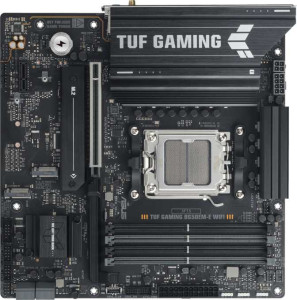
Asus TUF Gaming B650EM-E Wi-Fi
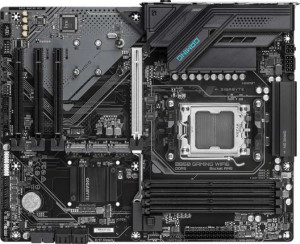
Gigabyte B850 Gaming WiFi6

Asus TUF Gaming B650EM-E Wi-Fi Gigabyte B850 Gaming WiFi6

Overview

Choosing between the Asus TUF Gaming B650EM-E Wi-Fi and the Gigabyte B850 Gaming WiFi6 means weighing two capable AM5 motherboards that share a strong feature foundation yet diverge in meaningful ways. From their chipset generation and form factor to USB port selection, fan header counts, and expansion slot configurations, each board targets a distinct type of builder. This comparison breaks down every key specification to help you decide which one best fits your next build.

Common Features

  • Both boards use the AM5 CPU socket.
  • Wi-Fi is supported on both products, covering Wi-Fi 4 (802.11n), Wi-Fi 5 (802.11ac), and Wi-Fi 6 (802.11ax).
  • Bluetooth is available on both products.
  • Both feature HDMI 2.1 output.
  • Overclocking is easy on both products.
  • Easy BIOS reset is not available on either product.
  • aptX audio is not supported on either product.
  • Both boards support a maximum memory amount of 256GB.
  • Both boards have 4 memory slots.
  • Both use DDR5 memory.
  • Both operate with 2 memory channels.
  • ECC memory is not supported on either product.
  • Both boards provide 2 USB 3.2 Gen 1 ports (USB-A).
  • Both boards provide 4 USB 2.0 ports.
  • USB 3.2 Gen 2x2, USB 4 (40Gbps and 20Gbps), Thunderbolt 3, and Thunderbolt 4 ports are absent on both products.
  • An HDMI output is present on both products.
  • Both boards have 2 USB 3.2 Gen 1 ports available through expansion.
  • Both boards have 4 USB 2.0 ports available through expansion.
  • Both boards include 4 SATA 3 connectors and no SATA 2 connectors.
  • Both boards have 3 M.2 sockets and no U.2 sockets.
  • mSATA connector support is absent on both products.
  • Both boards feature 1 PCIe 5.0 x16 slot and no PCIe 4.0, 3.0, 2.0 x16, PCI, or PCIe x8 slots.
  • Audio output is 7.1 channels on both products.
  • S/PDIF Out port is not present on either product.
  • Both boards have 3 audio connectors.
  • RAID 0, RAID 1, RAID 5, and RAID 10 (1+0) are supported on both products.
  • RAID 0+1 is not supported on either product.

Main Differences

  • The chipset is B650 on Asus TUF Gaming B650EM-E Wi-Fi and B850 on Gigabyte B850 Gaming WiFi6.
  • The form factor is Micro-ATX on Asus TUF Gaming B650EM-E Wi-Fi and ATX on Gigabyte B850 Gaming WiFi6.
  • The width is 244 mm on Asus TUF Gaming B650EM-E Wi-Fi and 305 mm on Gigabyte B850 Gaming WiFi6.
  • Bluetooth version is 5.2 on Asus TUF Gaming B650EM-E Wi-Fi and 5.3 on Gigabyte B850 Gaming WiFi6.
  • RGB lighting is present on Asus TUF Gaming B650EM-E Wi-Fi but not available on Gigabyte B850 Gaming WiFi6.
  • Dual BIOS is present on Gigabyte B850 Gaming WiFi6 but not available on Asus TUF Gaming B650EM-E Wi-Fi.
  • Maximum overclocked RAM speed is 8000 MHz on Asus TUF Gaming B650EM-E Wi-Fi and 8200 MHz on Gigabyte B850 Gaming WiFi6.
  • USB 3.2 Gen 2 ports (USB-A) number 1 on Asus TUF Gaming B650EM-E Wi-Fi and 2 on Gigabyte B850 Gaming WiFi6.
  • A USB 3.2 Gen 2 port (USB-C) is present on Asus TUF Gaming B650EM-E Wi-Fi but not available on Gigabyte B850 Gaming WiFi6.
  • A USB 3.2 Gen 1 port (USB-C) is present on Gigabyte B850 Gaming WiFi6 but not available on Asus TUF Gaming B650EM-E Wi-Fi.
  • DisplayPort outputs number 2 on Asus TUF Gaming B650EM-E Wi-Fi and 1 on Gigabyte B850 Gaming WiFi6.
  • Fan headers number 4 on Asus TUF Gaming B650EM-E Wi-Fi and 6 on Gigabyte B850 Gaming WiFi6.
  • A TPM connector is present on Gigabyte B850 Gaming WiFi6 but not available on Asus TUF Gaming B650EM-E Wi-Fi.
  • PCIe x1 slots number 1 on Asus TUF Gaming B650EM-E Wi-Fi and 3 on Gigabyte B850 Gaming WiFi6.
Specs Comparison
Asus TUF Gaming B650EM-E Wi-Fi

Asus TUF Gaming B650EM-E Wi-Fi

Gigabyte B850 Gaming WiFi6

Gigabyte B850 Gaming WiFi6

General info:
CPU socket AM5 AM5
chipset B650 B850
form factor Micro-ATX ATX
release date June 2025 January 2025
supports Wi-Fi
Wi-Fi version Wi-Fi 4 (802.11n), Wi-Fi 5 (802.11ac), Wi-Fi 6 (802.11ax) Wi-Fi 4 (802.11n), Wi-Fi 5 (802.11ac), Wi-Fi 6 (802.11ax)
Has Bluetooth
Bluetooth version 5.2 5.3
HDMI version HDMI 2.1 HDMI 2.1
Easy to overclock
has RGB lighting
Easy to reset BIOS
Has dual BIOS
has aptX
CPU sockets 1 1
Has integrated graphics
warranty period 3 years 3 years
height 244 mm 244 mm
width 244 mm 305 mm
Has integrated CPU

Both boards share the same AM5 socket, support overclocking, include Wi-Fi 6 and Bluetooth, and carry a 3-year warranty — so on paper they target a similar audience. The most consequential platform difference is the chipset: the Asus uses a B650 while the Gigabyte steps up to a B850, which is a newer generation and generally offers improved I/O capabilities and PCIe lane allocation, meaning the Gigabyte has a slight forward-looking edge for storage and peripheral expansion without paying for a premium X-series board.

Form factor is a real-world dividing line here. The Asus is Micro-ATX (244 × 244 mm), making it the right pick for compact or space-constrained builds, while the Gigabyte is a full ATX (244 × 305 mm), providing more room for additional slots, VRM cooling headroom, and better cable management. The Gigabyte also includes dual BIOS — a meaningful reliability feature that lets the board recover from a failed firmware flash automatically — something the Asus lacks. Conversely, the Asus ships with RGB lighting, which the Gigabyte omits entirely; a minor but visible aesthetic difference for builders who care about case aesthetics. Bluetooth is nearly identical at 5.2 vs 5.3, with 5.3 offering marginally better connection stability and slightly lower power draw in practice.

Overall, the Gigabyte B850 Gaming WiFi6 holds a clear general-info advantage for most builders: it pairs a newer chipset with a full ATX layout and the added safety net of dual BIOS. The Asus TUF B650EM-E earns its place specifically for small-form-factor builds or budget-conscious setups where its Micro-ATX footprint and RGB aesthetics matter more than platform longevity.
Memory:
maximum memory amount 256GB 256GB
overclocked RAM speed 8000 MHz 8200 MHz
memory slots 4 4
DDR memory version 5 5
memory channels 2 2
Supports ECC memory

Memory compatibility is essentially a tie between these two boards on every foundational spec: both support DDR5, offer 4 slots across a dual-channel configuration, and cap out at 256GB of maximum RAM. For the vast majority of users — gamers, content creators, and even workstation builders — these shared specs mean neither board imposes any practical limitation on memory capacity or bandwidth architecture.

The only measurable difference is the maximum overclocked RAM speed: the Asus tops out at 8000 MHz while the Gigabyte pushes to 8200 MHz. In real-world terms, the performance delta between these two frequencies is negligible for gaming and most productivity workloads — we are talking about a gap that typically falls within margin-of-error territory in benchmarks. It becomes relevant only to extreme enthusiasts chasing the absolute ceiling of DDR5 overclocking, and even then only if paired with binned, high-frequency memory kits.

For this specification group, the two boards are effectively evenly matched. The Gigabyte's marginally higher frequency ceiling is a technical win on paper, but it carries no practical significance for typical use cases. Buyers should not let this difference influence their decision.

Ports:
USB 3.2 Gen 2 ports (USB-A) 1 2
USB 3.2 Gen 1 ports (USB-A) 2 2
USB 3.2 Gen 2 ports (USB-C) 1 0
USB 3.2 Gen 1 ports (USB-C) 0 1
USB 2.0 ports 4 4
USB 3.2 Gen 2x2 ports 0 0
USB 4 40Gbps ports 0 0
USB 4 20Gbps ports 0 0
Thunderbolt 4 ports 0 0
Thunderbolt 3 ports 0 0
has an HDMI output
DisplayPort outputs 2 1
RJ45 ports 1 1
Has USB Type-C
eSATA ports 0 0
DVI outputs 0 0
has a VGA connector
PS/2 ports 1 1

The rear I/O layout of these two boards is close, but a few targeted differences matter depending on how you use your peripherals. The Gigabyte edges ahead on high-speed USB-A connectivity with 2× USB 3.2 Gen 2 (10Gbps) Type-A ports versus just one on the Asus — useful if you regularly plug in fast external SSDs or high-bandwidth devices directly. However, the Asus counters with a USB 3.2 Gen 2 Type-C port (10Gbps), while the Gigabyte only offers a slower Gen 1 Type-C (5Gbps). For users with modern USB-C accessories — newer smartphones, portable NVMe enclosures, or docking stations — the Asus delivers noticeably more throughput on that connector.

The display output situation also diverges meaningfully. The Asus provides 2 DisplayPort outputs alongside HDMI, giving it a three-monitor potential from the rear I/O alone when using an AMD APU or integrated graphics. The Gigabyte is limited to 1 DisplayPort plus HDMI, which restricts multi-display flexibility. For users relying on CPU-integrated graphics for a secondary display or a home-theater setup, this is a genuine practical difference.

On balance, the Asus TUF B650EM-E holds a modest but real edge in this group. Its faster USB-C port and extra DisplayPort output make it the more versatile option for users with multi-monitor setups or USB-C-heavy peripherals, even though the Gigabyte slightly leads in high-speed USB-A count.

Connectors:
USB 3.2 Gen 1 ports (through expansion) 2 2
USB 2.0 ports (through expansion) 4 4
SATA 3 connectors 4 4
fan headers 4 6
USB 3.0 ports (through expansion) 2 2
M.2 sockets 3 3
Has TPM connector
U.2 sockets 0 0
Has mSATA connector
SATA 2 connectors 0 0

Internal connectivity is largely identical between these two boards: both offer 3 M.2 sockets, 4 SATA 3 connectors, and the same expansion USB headers — a solid foundation for storage-heavy builds with multiple NVMe drives and traditional HDDs or SSDs running simultaneously. Neither board supports U.2 or mSATA, so there are no surprises on the exotic storage front.

Where the Gigabyte pulls ahead is in thermal management and security. Its 6 fan headers versus the Asus's 4 is a meaningful advantage for builders running complex cooling setups — think custom water-cooling loops with multiple pumps and radiator fans, or air-cooled systems with several case fans requiring independent control. Having two extra headers eliminates the need for fan splitters, which can complicate wiring and reduce individual fan control granularity. Additionally, the Gigabyte includes a TPM connector, which the Asus lacks entirely. While Windows 11 can leverage a firmware TPM, a dedicated header allows for a discrete TPM module — relevant for enterprise environments, certain security compliance requirements, or users who prefer hardware-based encryption.

The Gigabyte B850 Gaming WiFi6 takes a clear edge in this group. The extra fan headers serve a practical purpose in any thermally demanding build, and the TPM connector adds a layer of security flexibility that the Asus simply cannot match internally.

Expansion slots:
PCIe 4.0 x16 slots 0 0
PCIe 5.0 x16 slots 1 1
PCIe 3.0 x16 slots 0 0
PCIe x1 slots 1 3
PCI slots 0 0
PCIe 2.0 x16 slots 0 0
PCIe x8 slots 0 0

Both boards commit to the same primary GPU slot — a single PCIe 5.0 x16 — which is the current gold standard for discrete graphics cards, offering double the bandwidth of PCIe 4.0. For gaming or GPU-compute workloads, neither board has an advantage here; your graphics card will run at full speed on either platform.

The divergence comes down to smaller expansion slots. The Gigabyte offers 3 PCIe x1 slots compared to just 1 on the Asus. These lower-bandwidth slots are used for add-in cards like capture cards, sound cards, additional network adapters, or USB/SATA expansion cards. For a compact Micro-ATX board like the Asus, having only one such slot is a natural consequence of its smaller PCB — there is simply less physical space. The Gigabyte's ATX layout accommodates three, giving builders considerably more flexibility to expand functionality without replacing the board.

The Gigabyte B850 Gaming WiFi6 holds the edge in this group purely on expansion headroom. If your build will ever require more than one add-in card alongside a GPU, the Gigabyte is the only realistic option between the two. For straightforward single-GPU builds with no additional PCIe cards, both boards are effectively equivalent.

Audio:
audio channels 7.1 7.1
Has S/PDIF Out port
audio connectors 3 3

Audio is a clean draw between these two boards — every spec in this category is identical. Both deliver 7.1 surround sound support through 3 analog audio connectors, and neither includes an S/PDIF optical output. The 7.1 channel capability covers the full range of surround sound configurations used in gaming headsets and home theater setups, while the 3-connector layout is the standard arrangement for line-in, line-out, and microphone on a typical rear I/O panel.

The absence of S/PDIF on both boards is worth noting for users who own external DACs, AV receivers, or soundbars that rely on optical digital input — neither board can feed those devices directly from the motherboard. Such users would need a dedicated sound card or a USB audio interface regardless of which board they choose.

This group offers no basis for differentiation: the two boards are completely evenly matched on audio. Any decision should rest entirely on the other specification groups.

Storage:
Supports RAID 1
Supports RAID 10 (1+0)
Supports RAID 5
Supports RAID 0
Supports RAID 0+1

RAID support is a perfect mirror across both boards. Each offers RAID 0 (striping for maximum speed), RAID 1 (mirroring for redundancy), RAID 5 (distributed parity, balancing performance and fault tolerance across three or more drives), and RAID 10 (a combined stripe-and-mirror array requiring four drives). Neither board supports RAID 0+1, though in practice RAID 0+1 and RAID 10 serve overlapping purposes, making its absence inconsequential for most users.

It is worth contextualizing who these RAID modes actually serve: on a consumer gaming or prosumer workstation board, RAID 1 and RAID 10 are the configurations most likely to see real use — primarily for users who want data redundancy without investing in dedicated NAS hardware. RAID 5 requires careful controller support to deliver reliable parity rebuilds, and RAID 0 is increasingly niche now that single NVMe drives offer exceptional throughput on their own.

With identical RAID support across the board, this group is a complete tie. Neither product offers any storage configuration capability that the other lacks, and the decision between them remains unaffected by this spec group.

Comparison Summary & Verdict

After examining all the specifications, both boards share a solid AM5 foundation with DDR5 support, a PCIe 5.0 x16 slot, and three M.2 sockets, along with Wi-Fi 6 connectivity. The key differences, however, reveal two distinct profiles. The Asus TUF Gaming B650EM-E Wi-Fi suits builders who need a compact Micro-ATX footprint, RGB lighting, and a USB-C Gen 2 port in a smaller chassis. The Gigabyte B850 Gaming WiFi6 appeals to those seeking the newer B850 chipset, dual BIOS resilience, six fan headers, a TPM connector, and higher RAM overclocking headroom, all within a full ATX layout offering greater expansion flexibility.

Asus TUF Gaming B650EM-E Wi-Fi
Buy Asus TUF Gaming B650EM-E Wi-Fi if...

Buy the Asus TUF Gaming B650EM-E Wi-Fi if you are building a compact Micro-ATX system and want RGB lighting, a USB-C Gen 2 port, and dual DisplayPort outputs in a smaller footprint.

Gigabyte B850 Gaming WiFi6
Buy Gigabyte B850 Gaming WiFi6 if...

Buy the Gigabyte B850 Gaming WiFi6 if you want a full ATX board with the newer B850 chipset, dual BIOS protection, six fan headers, a TPM connector, and higher RAM overclocking headroom.