Asus TUF Gaming B850-BTF Wi-Fi W
Asus TUF Gaming B850-Plus WiFi

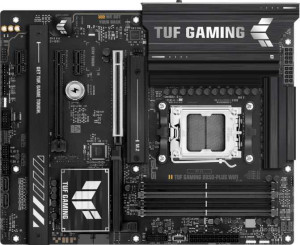
Asus TUF Gaming B850-BTF Wi-Fi W Asus TUF Gaming B850-Plus WiFi

Overview

When choosing between two capable AMD AM5 boards built on the B850 chipset, the Asus TUF Gaming B850-BTF Wi-Fi W and the Asus TUF Gaming B850-Plus WiFi make for a fascinating head-to-head. Both arrive as full ATX boards with Wi-Fi 7, DDR5 support, and an identical port layout — yet they part ways in a few targeted areas, including maximum memory capacity, audio output options, and PCIe expansion flexibility. Read on to find out which one suits your build best.

Common Features

  • Both boards use the AM5 CPU socket.
  • Both boards feature the B850 chipset.
  • Both boards have an ATX form factor.
  • Wi-Fi is supported on both boards, covering Wi-Fi 4, Wi-Fi 5, Wi-Fi 6, Wi-Fi 6E, and Wi-Fi 7.
  • Bluetooth 5.4 is available on both boards.
  • Both boards include an HDMI 2.1 port.
  • Both boards support a maximum overclocked RAM speed of 8000 MHz.
  • Both boards have 4 memory slots.
  • Both boards use DDR5 memory.
  • Both boards operate with 2 memory channels.
  • ECC memory is not supported on either board.
  • Both boards include 3 USB 3.2 Gen 2 Type-A ports.
  • Both boards include 4 USB 3.2 Gen 1 Type-A ports.
  • Neither board has USB 3.2 Gen 2 Type-C ports.
  • Neither board has USB 3.2 Gen 1 Type-C ports.
  • Both boards include 2 USB 2.0 ports.
  • Both boards include 1 USB 3.2 Gen 2x2 port.
  • Neither board has USB 4 40Gbps or USB 4 20Gbps ports.
  • Both boards provide 2 USB 3.2 Gen 1 ports through expansion.
  • Both boards provide 1 USB-C 3.2 Gen 2 port through expansion.
  • Both boards provide 4 USB 2.0 ports through expansion.
  • Both boards have 4 SATA 3 connectors.
  • Both boards include 6 fan headers.
  • Both boards have 3 M.2 sockets.
  • Neither board has a TPM connector.
  • Both boards feature 1 PCIe 5.0 x16 slot and 1 PCIe 4.0 x16 slot.
  • Neither board has PCIe 3.0 x16, PCIe 2.0 x16, PCIe x8, PCIe x4, or legacy PCI slots.
  • Both boards have a signal-to-noise ratio of 120 dB on the DAC.
  • Both boards support 7.1 audio channels with 5 audio connectors.
  • Both boards support RAID 0, RAID 1, RAID 5, and RAID 10.
  • RAID 0+1 is not supported on either board.

Main Differences

  • Easy BIOS reset is available on the Asus TUF Gaming B850-BTF Wi-Fi W but not on the Asus TUF Gaming B850-Plus WiFi.
  • Maximum memory capacity is 256 GB on the Asus TUF Gaming B850-BTF Wi-Fi W and 192 GB on the Asus TUF Gaming B850-Plus WiFi.
  • PCIe x1 slots number 1 on the Asus TUF Gaming B850-BTF Wi-Fi W and 2 on the Asus TUF Gaming B850-Plus WiFi.
  • An S/PDIF Out port is present on the Asus TUF Gaming B850-BTF Wi-Fi W but not available on the Asus TUF Gaming B850-Plus WiFi.
Specs Comparison
Asus TUF Gaming B850-BTF Wi-Fi W

Asus TUF Gaming B850-BTF Wi-Fi W

Asus TUF Gaming B850-Plus WiFi

Asus TUF Gaming B850-Plus WiFi

General info:
CPU socket AM5 AM5
chipset B850 B850
form factor ATX ATX
release date May 2025 January 2025
supports Wi-Fi
Wi-Fi version Wi-Fi 4 (802.11n), Wi-Fi 5 (802.11ac), Wi-Fi 6 (802.11ax), Wi-Fi 6E (802.11ax), Wi-Fi 7 (802.11be) Wi-Fi 4 (802.11n), Wi-Fi 5 (802.11ac), Wi-Fi 6 (802.11ax), Wi-Fi 6E (802.11ax), Wi-Fi 7 (802.11be)
Has Bluetooth
Bluetooth version 5.4 5.4
HDMI version HDMI 2.1 HDMI 2.1
Easy to overclock
has RGB lighting
Easy to reset BIOS
Has dual BIOS
has aptX
CPU sockets 1 1
Has integrated graphics
warranty period 3 years 3 years
height 244 mm 244 mm
width 305 mm 305 mm
Has integrated CPU

At their core, the Asus TUF Gaming B850-BTF Wi-Fi W and the Asus TUF Gaming B850-Plus WiFi are remarkably similar boards. Both share the same AM5 socket, B850 chipset, and standard ATX form factor (244 × 305 mm), making them equally compatible with current AMD processors and fitting into the same range of cases. Connectivity parity is complete as well: both offer Wi-Fi 7 (backwards-compatible through Wi-Fi 4), Bluetooth 5.4, and HDMI 2.1, along with RGB lighting, dual BIOS, and a 3-year warranty. For the vast majority of general-use criteria, these two boards are functionally interchangeable.

The only differentiator in this spec group is Easy to reset BIOS, which the BTF Wi-Fi W supports and the Plus WiFi does not. In practical terms, this typically refers to a dedicated physical button or mechanism that allows users to clear the BIOS without needing a CPU or display installed — a meaningful convenience when troubleshooting POST failures, recovering from a bad overclock, or preparing a board for a new CPU generation. For builders who overclock or experiment with settings frequently, the absence of this feature on the Plus WiFi adds a small but real friction point.

Overall, the BTF Wi-Fi W holds a narrow edge in this category solely due to its easier BIOS reset capability. If that feature matters to your workflow — especially for enthusiast builders — it is a genuine quality-of-life advantage. For users who rarely touch BIOS settings, the two boards are effectively tied on all general specifications.

Memory:
maximum memory amount 256GB 192GB
overclocked RAM speed 8000 MHz 8000 MHz
memory slots 4 4
DDR memory version 5 5
memory channels 2 2
Supports ECC memory

Both boards share a strong memory foundation: four DDR5 slots arranged in a dual-channel configuration, support for overclocked speeds up to 8000 MHz, and no ECC support — a standard trade-off at the consumer B-series chipset level. Dual-channel DDR5 at these frequencies delivers substantial bandwidth for gaming, content creation, and compute-heavy workloads alike, so neither board shortchanges users on day-to-day memory performance.

Where they diverge is maximum capacity. The BTF Wi-Fi W supports up to 256 GB, while the Plus WiFi caps at 192 GB. That 64 GB difference has little relevance for typical gaming or everyday desktop use, but it becomes meaningful in professional or prosumer contexts — think large virtual machine environments, memory-intensive video editing timelines, or simulation workloads where headroom matters. As 64 GB DDR5 DIMMs become more commercially available, the BTF Wi-Fi W will be able to take full advantage of them across all four slots, whereas the Plus WiFi imposes an architectural ceiling that cannot be overcome through upgrades.

The BTF Wi-Fi W has a clear edge here, strictly by virtue of its higher memory ceiling. For most users this distinction is academic today, but for anyone building a workstation with long-term scalability in mind, it is a meaningful advantage worth factoring in.

Ports:
USB 3.2 Gen 2 ports (USB-A) 3 3
USB 3.2 Gen 1 ports (USB-A) 4 4
USB 3.2 Gen 2 ports (USB-C) 0 0
USB 3.2 Gen 1 ports (USB-C) 0 0
USB 2.0 ports 2 2
USB 3.2 Gen 2x2 ports 1 1
USB 4 40Gbps ports 0 0
USB 4 20Gbps ports 0 0
Thunderbolt 4 ports 0 0
Thunderbolt 3 ports 0 0
has an HDMI output
DisplayPort outputs 1 1
RJ45 ports 1 1
Has USB Type-C
eSATA ports 0 0
DVI outputs 0 0
has a VGA connector
PS/2 ports 0 0

Across every single port specification in this group, the BTF Wi-Fi W and the Plus WiFi are absolutely identical. Both boards offer the same rear I/O USB lineup — 3× USB 3.2 Gen 2 Type-A, 4× USB 3.2 Gen 1 Type-A, 2× USB 2.0, and a single USB 3.2 Gen 2x2 port delivering up to 20 Gbps — which is a well-rounded selection for connecting peripherals, external drives, and high-speed devices without requiring a hub.

Display output connectivity is equally matched, with both providing HDMI and one DisplayPort output alongside a single RJ45 ethernet port. The presence of a USB Type-C connector on both is worth noting for users with modern accessories, though neither board ventures into USB 4 or Thunderbolt territory — a common characteristic at the B-series mainstream tier. Legacy connectors like VGA, DVI, eSATA, and PS/2 are absent on both, reflecting a clean, modern I/O philosophy.

This is a straightforward dead heat: no differentiation exists between these two boards on ports whatsoever. Buyers can remove connectivity from their decision-making criteria entirely when choosing between these two models.

Connectors:
USB 3.2 Gen 1 ports (through expansion) 2 2
USB-C 3.2 Gen 2 ports (through expansion) 1 1
USB 2.0 ports (through expansion) 4 4
SATA 3 connectors 4 4
fan headers 6 6
USB 3.0 ports (through expansion) 2 2
M.2 sockets 3 3
Has TPM connector
U.2 sockets 0 0
Has mSATA connector
SATA 2 connectors 0 0

Internal connector specs tell the same story as the ports group: the BTF Wi-Fi W and the Plus WiFi are completely identical across every data point provided. Both boards feature 3× M.2 sockets for NVMe storage, 4× SATA 3 connectors for traditional drives, and 6 fan headers — a generous allocation that gives builders solid control over airflow and thermals without needing a separate fan controller.

The internal USB expansion headers are equally matched, supporting up to 4 additional USB 2.0, 2 USB 3.0, and a single USB-C 3.2 Gen 2 front-panel connection — enough to fully populate a mid-tower case with modern front-panel I/O. The three M.2 slots are particularly noteworthy: they allow users to run multiple fast NVMe drives simultaneously without sacrificing any SATA ports, which suits both gaming builds and content creation rigs that need tiered storage.

Once again, this category is a complete tie. Every internal connector and expansion option is shared between the two boards, so storage configuration, cooling flexibility, and front-panel connectivity offer no basis for differentiation here.

Expansion slots:
PCIe 4.0 x16 slots 1 1
PCIe 5.0 x16 slots 1 1
PCIe 3.0 x16 slots 0 0
PCIe x1 slots 1 2
PCI slots 0 0
PCIe 2.0 x16 slots 0 0
PCIe x4 slots 0 0
PCIe x8 slots 0 0

For primary GPU and high-bandwidth expansion, both boards are on equal footing: each provides one PCIe 5.0 x16 slot for a discrete graphics card and one PCIe 4.0 x16 slot for secondary devices such as a capture card, additional NVMe controller, or a second GPU. The PCIe 5.0 primary slot is future-relevant, as next-generation GPUs are beginning to leverage that additional bandwidth headroom.

The only divergence in this group is the number of PCIe x1 slots — the BTF Wi-Fi W offers one, while the Plus WiFi offers two. PCIe x1 slots are used for lower-bandwidth add-in cards: sound cards, USB expansion cards, network adapters, and similar peripherals. Having a second x1 slot means the Plus WiFi can accommodate one more such card simultaneously, which matters in builds that rely on multiple add-in cards alongside a full-size GPU.

The Plus WiFi holds a narrow edge here for builders who need maximum expansion flexibility at the x1 level. For the majority of users who will populate only the primary x16 slot and leave x1 slots untouched, the practical difference is negligible — but for those running specialized multi-card configurations, the extra slot on the Plus WiFi is a genuine advantage.

Audio:
Signal-to-Noise ratio (DAC) 120 dB 120 dB
audio channels 7.1 7.1
Has S/PDIF Out port
audio connectors 5 5

On the fundamentals, these two boards are evenly matched: both deliver 7.1-channel audio, a 120 dB signal-to-noise ratio on the DAC, and 5 analog audio connectors. A 120 dB SNR is a strong figure for onboard audio, meaning the analog output is clean and quiet enough to satisfy most users with quality headphones or stereo speakers without requiring a dedicated sound card.

The single differentiator is the S/PDIF optical output, which the BTF Wi-Fi W includes and the Plus WiFi omits. S/PDIF is a digital audio output that allows a lossless bitstream to be sent to an external DAC, AV receiver, or soundbar over an optical cable — bypassing the motherboard's analog circuitry entirely. For users with a home theater setup, a high-end external DAC, or optical-input speakers, this port is a meaningful connectivity option that the Plus WiFi simply cannot replicate without an add-in card.

The BTF Wi-Fi W has the edge in this category thanks to its S/PDIF output. Users invested in analog-only audio setups will find both boards equivalent in practice, but anyone routing audio digitally to external equipment will find the BTF Wi-Fi W the more accommodating choice.

Storage:
Supports RAID 1
Supports RAID 10 (1+0)
Supports RAID 5
Supports RAID 0
Supports RAID 0+1

Storage redundancy and performance configurations are identical on both boards. Each supports RAID 0 (striping for speed), RAID 1 (mirroring for redundancy), RAID 5 (distributed parity for a balance of performance and fault tolerance), and RAID 10 (a stripe of mirrors combining both speed and redundancy). Neither supports RAID 0+1, though this omission is inconsequential in practice since RAID 10 is generally the preferred implementation of that concept anyway.

This breadth of RAID support is a solid offering for a B-series board — RAID 5 in particular is often associated with higher-end platforms, so its presence gives users meaningful options for building small NAS-style or workstation storage arrays directly off the motherboard without additional controllers. That said, the practical utility depends on having sufficient drives populated, which ties back to the four SATA ports and three M.2 slots noted in the connectors group.

With every RAID mode matching exactly, this category is a complete tie. Neither the BTF Wi-Fi W nor the Plus WiFi offers any storage configuration advantage over the other.

Comparison Summary & Verdict

After a thorough look at both boards, the Asus TUF Gaming B850-BTF Wi-Fi W and the Asus TUF Gaming B850-Plus WiFi share an impressively strong common foundation — Wi-Fi 7, DDR5 up to 8000 MHz, and a well-equipped port selection. The BTF Wi-Fi W distinguishes itself with a higher 256 GB maximum memory capacity, a convenient easy BIOS reset feature, and a dedicated S/PDIF optical output, making it the stronger pick for power users and those with home theater audio requirements. The Plus WiFi responds with two PCIe x1 slots compared to one, giving it a modest advantage for builders who plan to populate multiple smaller expansion cards. Neither board is a universal winner — your decision should come down to whether greater memory headroom and audio flexibility or additional PCIe x1 expansion better serves your specific build goals.

Asus TUF Gaming B850-BTF Wi-Fi W
Buy Asus TUF Gaming B850-BTF Wi-Fi W if...

Choose the Asus TUF Gaming B850-BTF Wi-Fi W if you need a higher maximum memory capacity of 256 GB, want the convenience of easy BIOS reset, or require an S/PDIF optical output for your audio setup.

Asus TUF Gaming B850-Plus WiFi
Buy Asus TUF Gaming B850-Plus WiFi if...

Opt for the Asus TUF Gaming B850-Plus WiFi if you need two PCIe x1 slots to accommodate multiple expansion cards in your build.