Asus TUF Gaming B850-E Wi-Fi
Asus TUF Gaming B850-Plus WiFi

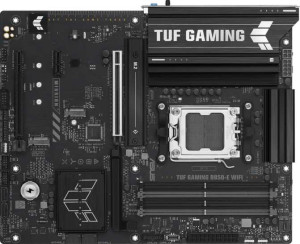
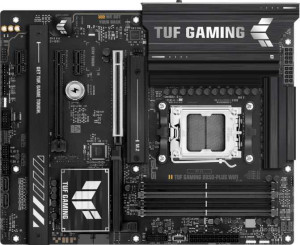
Asus TUF Gaming B850-E Wi-Fi Asus TUF Gaming B850-Plus WiFi

Overview

When choosing between the Asus TUF Gaming B850-E Wi-Fi and the Asus TUF Gaming B850-Plus WiFi, builders face a nuanced decision within the same B850 chipset family. Both boards share a strong foundation of AM5 compatibility, DDR5 memory, and PCIe 5.0 support, yet they diverge in meaningful ways across wireless connectivity, USB port configuration, and maximum memory capacity — details that can significantly shape a build depending on your priorities.

Common Features

  • Both motherboards use the AM5 CPU socket.
  • Both motherboards feature the B850 chipset.
  • Both motherboards have an ATX form factor.
  • Wi-Fi connectivity is available on both motherboards.
  • Bluetooth is available on both motherboards.
  • Both motherboards output HDMI version 2.1.
  • Overclocking support is available on both motherboards.
  • RGB lighting is present on both motherboards.
  • Both motherboards support overclocked RAM speeds up to 8000 MHz.
  • Both motherboards have 4 memory slots.
  • Both motherboards use DDR5 memory.
  • Both motherboards support 2 memory channels.
  • ECC memory is not supported on either motherboard.
  • Neither motherboard has USB 3.2 Gen 1 Type-C ports on the rear panel.
  • Neither motherboard has USB 4 40Gbps or USB 4 20Gbps ports.
  • Neither motherboard has Thunderbolt 3 or Thunderbolt 4 ports.
  • Both motherboards have an HDMI output and 1 DisplayPort output.
  • Both motherboards have 1 RJ45 port.
  • Both motherboards provide 2 USB 3.2 Gen 1 ports and 2 USB 3.0 ports through expansion, plus 4 USB 2.0 ports through expansion.
  • Both motherboards have 4 SATA 3 connectors, 3 M.2 sockets, 6 fan headers, and no U.2 sockets.
  • Neither motherboard has a TPM connector.
  • Both motherboards have 1 PCIe 5.0 x16 slot and 1 PCIe 4.0 x16 slot, with no PCIe 3.0, 2.0, x8, or x4 slots.
  • Both motherboards support 7.1 audio channels.
  • S/PDIF Out port is not available on either motherboard.
  • Both motherboards support RAID 0, RAID 1, RAID 5, and RAID 10, but neither supports RAID 0+1.

Main Differences

  • Wi-Fi 7 (802.11be) support is present on Asus TUF Gaming B850-Plus WiFi but not available on Asus TUF Gaming B850-E Wi-Fi.
  • Bluetooth version is 5.3 on Asus TUF Gaming B850-E Wi-Fi and 5.4 on Asus TUF Gaming B850-Plus WiFi.
  • Easy BIOS reset is supported on Asus TUF Gaming B850-E Wi-Fi but not available on Asus TUF Gaming B850-Plus WiFi.
  • Maximum memory capacity is 256 GB on Asus TUF Gaming B850-E Wi-Fi and 192 GB on Asus TUF Gaming B850-Plus WiFi.
  • USB 3.2 Gen 2 Type-A ports total 1 on Asus TUF Gaming B850-E Wi-Fi and 3 on Asus TUF Gaming B850-Plus WiFi.
  • USB 3.2 Gen 1 Type-A ports total 3 on Asus TUF Gaming B850-E Wi-Fi and 4 on Asus TUF Gaming B850-Plus WiFi.
  • USB 3.2 Gen 2 Type-C ports total 1 on Asus TUF Gaming B850-E Wi-Fi and 0 on Asus TUF Gaming B850-Plus WiFi.
  • USB 2.0 ports total 3 on Asus TUF Gaming B850-E Wi-Fi and 2 on Asus TUF Gaming B850-Plus WiFi.
  • USB 3.2 Gen 2x2 ports total 0 on Asus TUF Gaming B850-E Wi-Fi and 1 on Asus TUF Gaming B850-Plus WiFi.
  • PCIe x1 slots total 1 on Asus TUF Gaming B850-E Wi-Fi and 2 on Asus TUF Gaming B850-Plus WiFi.
  • Audio connectors total 3 on Asus TUF Gaming B850-E Wi-Fi and 5 on Asus TUF Gaming B850-Plus WiFi.
Specs Comparison
Asus TUF Gaming B850-E Wi-Fi

Asus TUF Gaming B850-E Wi-Fi

Asus TUF Gaming B850-Plus WiFi

Asus TUF Gaming B850-Plus WiFi

General info:
CPU socket AM5 AM5
chipset B850 B850
form factor ATX ATX
release date April 2025 January 2025
supports Wi-Fi
Wi-Fi version Wi-Fi 4 (802.11n), Wi-Fi 5 (802.11ac), Wi-Fi 6 (802.11ax), Wi-Fi 6E (802.11ax) Wi-Fi 4 (802.11n), Wi-Fi 5 (802.11ac), Wi-Fi 6 (802.11ax), Wi-Fi 6E (802.11ax), Wi-Fi 7 (802.11be)
Has Bluetooth
Bluetooth version 5.3 5.4
HDMI version HDMI 2.1 HDMI 2.1
Easy to overclock
has RGB lighting
Easy to reset BIOS
Has dual BIOS
has aptX
CPU sockets 1 1
Has integrated graphics
warranty period 3 years 3 years
height 244 mm 244 mm
width 305 mm 305 mm
Has integrated CPU

Both the Asus TUF Gaming B850-E Wi-Fi and the Asus TUF Gaming B850-Plus WiFi share the same fundamental platform: AM5 socket, B850 chipset, standard ATX form factor (244 × 305 mm), and identical HDMI 2.1 output. Both support overclocking, dual BIOS, RGB lighting, and carry a 3-year warranty — so for the vast majority of build considerations, they are on equal footing.

The meaningful differences come down to wireless connectivity and BIOS management. The B850-Plus WiFi pulls ahead on wireless, adding Wi-Fi 7 (802.11be) to its stack, whereas the B850-E tops out at Wi-Fi 6E. In practice, Wi-Fi 7 offers significantly higher theoretical throughput and lower latency — particularly relevant if you have a Wi-Fi 7 router and want to future-proof your build. The B850-Plus also edges ahead with Bluetooth 5.4 versus 5.3 on the B850-E, bringing marginally improved connection stability and energy efficiency. On the flip side, the B850-E includes an easy BIOS reset feature that the B850-Plus lacks — a small but genuinely useful convenience when troubleshooting failed overclocks or memory training issues.

Overall, the B850-Plus WiFi has a clear connectivity edge thanks to Wi-Fi 7 and the newer Bluetooth revision, making it the stronger choice for users who prioritize cutting-edge wireless performance. The B850-E counters with its easier BIOS reset, which appeals to builders who frequently tinker with settings, but that single convenience feature does not outweigh the wireless advantages of its sibling for most users.
Memory:
maximum memory amount 256GB 192GB
overclocked RAM speed 8000 MHz 8000 MHz
memory slots 4 4
DDR memory version 5 5
memory channels 2 2
Supports ECC memory

On the memory front, the two boards share a solid common foundation: both use DDR5 in a 4-slot, dual-channel configuration and support overclocked speeds up to 8000 MHz. For gaming and content creation workloads, that ceiling is more than sufficient to extract strong performance from modern AM5 processors.

The single but notable split is maximum capacity. The B850-E Wi-Fi supports up to 256 GB of RAM, while the B850-Plus WiFi caps out at 192 GB. In day-to-day gaming or typical creative workflows, neither limit will ever be approached — but for power users running large virtual machines, memory-intensive professional applications, or future-proofing a workstation build, that extra 64 GB headroom on the B850-E is a tangible advantage.

The B850-E Wi-Fi has the clear edge here, strictly on the basis of its higher memory ceiling. For mainstream users the gap is irrelevant, but for anyone planning to push RAM capacity to its limits, the B850-E is the more accommodating board.

Ports:
USB 3.2 Gen 2 ports (USB-A) 1 3
USB 3.2 Gen 1 ports (USB-A) 3 4
USB 3.2 Gen 2 ports (USB-C) 1 0
USB 3.2 Gen 1 ports (USB-C) 0 0
USB 2.0 ports 3 2
USB 3.2 Gen 2x2 ports 0 1
USB 4 40Gbps ports 0 0
USB 4 20Gbps ports 0 0
Thunderbolt 4 ports 0 0
Thunderbolt 3 ports 0 0
has an HDMI output
DisplayPort outputs 1 1
RJ45 ports 1 1
Has USB Type-C
eSATA ports 0 0
DVI outputs 0 0
has a VGA connector
PS/2 ports 0 0

Rear I/O connectivity is where these two boards diverge most visibly in day-to-day use. The B850-Plus WiFi wins on raw USB-A count, offering 7 USB-A ports in total (3× Gen 2 at 10 Gbps, 4× Gen 1 at 5 Gbps) versus just 4 USB-A ports on the B850-E — a meaningful difference for desks crowded with peripherals, external drives, and controllers. The B850-Plus also adds a USB 3.2 Gen 2x2 port, delivering 20 Gbps throughput, which is useful for fast external NVMe enclosures or high-bandwidth storage devices.

The B850-E Wi-Fi counters with a dedicated USB 3.2 Gen 2 Type-C port on the rear panel — something the B850-Plus entirely lacks in high-speed form. That 10 Gbps USB-C connection is increasingly important for modern peripherals, displays, and docks that rely on Type-C. Both boards share identical video output options (HDMI 2.1 and one DisplayPort) and a single RJ45 LAN port, so those are non-factors in the comparison.

The verdict here depends on usage pattern. The B850-Plus holds the edge for sheer port density and peak single-port bandwidth via Gen 2x2, making it better suited for users with many USB-A devices or fast external storage. The B850-E is the stronger pick for anyone who relies on a high-speed USB-C connection at the rear — a trade-off with no universal right answer, but one worth weighing carefully before choosing.

Connectors:
USB 3.2 Gen 1 ports (through expansion) 2 2
USB 2.0 ports (through expansion) 4 4
SATA 3 connectors 4 4
fan headers 6 6
USB 3.0 ports (through expansion) 2 2
M.2 sockets 3 3
Has TPM connector
U.2 sockets 0 0
Has mSATA connector
SATA 2 connectors 0 0

Across every internal connector spec provided, the Asus TUF Gaming B850-E Wi-Fi and the Asus TUF Gaming B850-Plus WiFi are a perfect match. Both offer 3 M.2 sockets for NVMe storage, 4 SATA 3 connectors for traditional drives, and 6 fan headers — enough to run a well-ventilated build without needing a separate fan controller. Internal USB expansion is equally balanced, with identical header counts for USB 3.2 Gen 1 and USB 2.0 passthrough.

The three M.2 sockets deserve a mention in context: for most users that means a boot drive plus one or two additional NVMe drives without ever touching the SATA ports — a flexible setup that covers gaming rigs, creative workstations, and NAS-adjacent builds alike. The six fan headers provide ample headroom for managing both CPU cooler and case airflow from the motherboard directly, reducing dependency on external hubs.

This group is a complete tie. Neither board offers any internal connectivity advantage over the other, so storage needs, cooling ambitions, and expansion plans should not factor into the decision between these two models.

Expansion slots:
PCIe 4.0 x16 slots 1 1
PCIe 5.0 x16 slots 1 1
PCIe 3.0 x16 slots 0 0
PCIe x1 slots 1 2
PCI slots 0 0
PCIe 2.0 x16 slots 0 0
PCIe x4 slots 0 0
PCIe x8 slots 0 0

For the primary GPU slot, both boards are identical where it counts: a full-bandwidth PCIe 5.0 x16 slot ensures neither board will bottleneck current or near-future graphics cards, and a secondary PCIe 4.0 x16 slot provides a high-speed lane for additional cards or compatible PCIe 4.0 devices. That shared foundation means GPU performance and primary expansion capability are equal across both models.

The only divergence is in legacy x1 slots — the B850-Plus WiFi includes 2 PCIe x1 slots compared to just 1 on the B850-E. In practical terms, x1 slots are used for add-in cards like sound cards, network adapters, or capture cards. Having two instead of one is a minor but real convenience for users who plan to populate multiple such cards simultaneously.

The B850-Plus holds a slim edge here thanks to its extra x1 slot, though for the majority of builders — who use one GPU and no additional expansion cards — both boards are effectively tied. Only users with specific multi-card expansion needs will find the B850-Plus meaningfully more accommodating.

Audio:
audio channels 7.1 7.1
Has S/PDIF Out port
audio connectors 3 5

Audio capability is mostly consistent between the two boards — both deliver 7.1 surround sound and neither includes a S/PDIF optical output, so users requiring digital passthrough to an external receiver or DAC will need an add-in card on either platform.

Where they part ways is in the number of analog audio jacks. The B850-Plus WiFi provides 5 audio connectors versus 3 on the B850-E. More rear-panel jacks means the B850-Plus can fully serve a multi-channel analog speaker setup — such as a 5.1 or 7.1 surround system — without requiring a dedicated sound card, while the B850-E's more limited connector count may restrict users who want to hook up multiple analog audio devices simultaneously.

The B850-Plus has a clear advantage for analog audio. Users with headsets or simple stereo setups will find both boards equally capable, but anyone looking to run a multi-channel speaker arrangement directly off the motherboard will be better served by the B850-Plus and its expanded jack layout.

Storage:
Supports RAID 1
Supports RAID 10 (1+0)
Supports RAID 5
Supports RAID 0
Supports RAID 0+1

RAID support is identical across both boards. The Asus TUF Gaming B850-E Wi-Fi and B850-Plus WiFi each support RAID 0, 1, 5, and 10 — covering the full practical spectrum from pure performance striping to mirrored redundancy and the combined protection of RAID 10. Neither supports RAID 0+1, but that omission is inconsequential given that RAID 10 achieves the same goals more efficiently and is the preferred standard.

This is a complete tie. Storage redundancy and array configuration options are no differentiator between these two models — buyers with RAID-dependent workflows can proceed with either board without compromise.

Comparison Summary & Verdict

After a thorough comparison, both boards are well-matched at their core, but each caters to a different type of builder. The Asus TUF Gaming B850-E Wi-Fi stands out with its higher maximum memory capacity of 256 GB, a dedicated USB 3.2 Gen 2 Type-C rear port, and a convenient easy BIOS reset feature — making it the stronger pick for power users and those who value serviceability. The Asus TUF Gaming B850-Plus WiFi, on the other hand, pulls ahead with Wi-Fi 7 support, Bluetooth 5.4, more USB 3.2 Gen 2 Type-A ports, a USB 3.2 Gen 2x2 port, more audio connectors, and an extra PCIe x1 slot — making it the better choice for users who prioritize cutting-edge wireless performance and versatile connectivity.

Asus TUF Gaming B850-E Wi-Fi
Buy Asus TUF Gaming B850-E Wi-Fi if...

Buy the Asus TUF Gaming B850-E Wi-Fi if you need a maximum memory capacity of 256 GB, want a rear USB 3.2 Gen 2 Type-C port, or value the convenience of easy BIOS reset functionality.

Asus TUF Gaming B850-Plus WiFi
Buy Asus TUF Gaming B850-Plus WiFi if...

Buy the Asus TUF Gaming B850-Plus WiFi if cutting-edge Wi-Fi 7 connectivity is a priority, or if you need more USB 3.2 Gen 2 Type-A ports, a USB 3.2 Gen 2x2 port, and a richer audio connector selection.