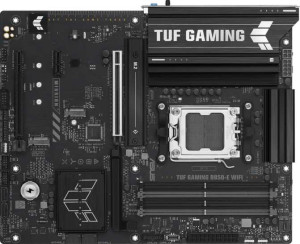
Asus TUF Gaming B850-E Wi-Fi
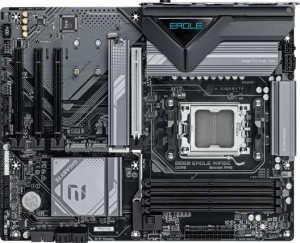
Gigabyte B850 Eagle WiFi6E

Asus TUF Gaming B850-E Wi-Fi Gigabyte B850 Eagle WiFi6E

Overview

Welcome to our in-depth spec comparison between the Asus TUF Gaming B850-E Wi-Fi and the Gigabyte B850 Eagle WiFi6E, two compelling AM5 motherboards built around the B850 chipset. While they share a strong foundation of features, key battlegrounds emerge around RGB aesthetics and ease-of-use features, rear port configurations, expansion slot layouts, and memory overclocking headroom. Read on to see how every spec stacks up before making your decision.

Common Features

  • Both boards use the AM5 CPU socket.
  • Both boards feature the B850 chipset.
  • Both boards use the ATX form factor.
  • Wi-Fi is supported on both boards, covering Wi-Fi 4, Wi-Fi 5, Wi-Fi 6, and Wi-Fi 6E.
  • Bluetooth 5.3 is available on both boards.
  • Both boards include an HDMI 2.1 output.
  • Both boards support a maximum memory amount of 256GB.
  • Both boards have 4 memory slots.
  • Both boards use DDR5 memory.
  • Both boards have 2 memory channels.
  • ECC memory is not supported on either board.
  • Neither board includes USB 3.2 Gen 2x2, USB 4 40Gbps, USB 4 20Gbps, Thunderbolt 4, or Thunderbolt 3 ports.
  • Both boards include one DisplayPort output and one RJ45 port.
  • Both boards provide 2 USB 3.2 Gen 1 ports and 4 USB 2.0 ports through expansion.
  • Both boards have 4 SATA 3 connectors, 3 M.2 sockets, and no U.2 sockets.
  • Both boards include 6 fan headers.
  • An mSATA connector is not present on either board.
  • Both boards have one PCIe 5.0 x16 slot and no PCIe 3.0 x16, PCIe 2.0 x16, PCI, PCIe x4, or PCIe x8 slots.
  • Both boards support 7.1 audio channels with 3 audio connectors, and neither includes an S/PDIF Out port.
  • Both boards support RAID 0, RAID 1, RAID 5, and RAID 10, but neither supports RAID 0+1.

Main Differences

  • RGB lighting is present on the Asus TUF Gaming B850-E Wi-Fi but not available on the Gigabyte B850 Eagle WiFi6E.
  • An easy BIOS reset feature is available on the Asus TUF Gaming B850-E Wi-Fi but not on the Gigabyte B850 Eagle WiFi6E.
  • Maximum overclocked RAM speed is 8000 MHz on the Asus TUF Gaming B850-E Wi-Fi and 8200 MHz on the Gigabyte B850 Eagle WiFi6E.
  • USB 3.2 Gen 2 ports (USB-A) count is 1 on the Asus TUF Gaming B850-E Wi-Fi and 2 on the Gigabyte B850 Eagle WiFi6E.
  • USB 3.2 Gen 1 ports (USB-A) count is 3 on the Asus TUF Gaming B850-E Wi-Fi and 2 on the Gigabyte B850 Eagle WiFi6E.
  • A USB 3.2 Gen 2 port (USB-C) is present on the Asus TUF Gaming B850-E Wi-Fi but not on the Gigabyte B850 Eagle WiFi6E.
  • A USB 3.2 Gen 1 port (USB-C) is present on the Gigabyte B850 Eagle WiFi6E but not on the Asus TUF Gaming B850-E Wi-Fi.
  • USB 2.0 port count is 3 on the Asus TUF Gaming B850-E Wi-Fi and 4 on the Gigabyte B850 Eagle WiFi6E.
  • A PS/2 port is present on the Gigabyte B850 Eagle WiFi6E but not on the Asus TUF Gaming B850-E Wi-Fi.
  • A TPM connector is present on the Gigabyte B850 Eagle WiFi6E but not on the Asus TUF Gaming B850-E Wi-Fi.
  • A PCIe 4.0 x16 slot is present on the Asus TUF Gaming B850-E Wi-Fi but not on the Gigabyte B850 Eagle WiFi6E.
  • PCIe x1 slot count is 1 on the Asus TUF Gaming B850-E Wi-Fi and 3 on the Gigabyte B850 Eagle WiFi6E.
Specs Comparison
Asus TUF Gaming B850-E Wi-Fi

Asus TUF Gaming B850-E Wi-Fi

Gigabyte B850 Eagle WiFi6E

Gigabyte B850 Eagle WiFi6E

General info:
CPU socket AM5 AM5
chipset B850 B850
form factor ATX ATX
release date April 2025 January 2025
supports Wi-Fi
Wi-Fi version Wi-Fi 4 (802.11n), Wi-Fi 5 (802.11ac), Wi-Fi 6 (802.11ax), Wi-Fi 6E (802.11ax) Wi-Fi 4 (802.11n), Wi-Fi 5 (802.11ac), Wi-Fi 6 (802.11ax), Wi-Fi 6E (802.11ax)
Has Bluetooth
Bluetooth version 5.3 5.3
HDMI version HDMI 2.1 HDMI 2.1
Easy to overclock
has RGB lighting
Easy to reset BIOS
Has dual BIOS
has aptX
CPU sockets 1 1
Has integrated graphics
warranty period 3 years 3 years
height 244 mm 244 mm
width 305 mm 305 mm
Has integrated CPU

Both the Asus TUF Gaming B850-E Wi-Fi and the Gigabyte B850 Eagle WiFi6E share the same foundational DNA: the AM5 socket on a B850 chipset, full ATX dimensions (244 × 305 mm), Wi-Fi 6E with Bluetooth 5.3, HDMI 2.1, dual BIOS, and a 3-year warranty. For most builders, this means the two boards are interchangeable at the platform level — same CPU compatibility, same wireless standard for low-latency, high-throughput connectivity, and the same safety net of a backup BIOS chip in case of a failed update.

The differences, while few, are meaningful in practice. The Asus TUF supports easy BIOS reset, a feature absent on the Gigabyte — this matters for overclockers or first-time builders who may face a no-POST situation and need a fast recovery path without hunting for jumpers or remove the CMOS battery. The Asus also includes RGB lighting, which the Gigabyte omits entirely; purely aesthetic, but relevant for builds inside windowed cases where visual cohesion matters.

On balance, the Asus TUF Gaming B850-E Wi-Fi holds a modest but clear edge in this group. Its easy BIOS reset is a genuine quality-of-life advantage — not a marketing checkbox — and adds a layer of resilience that the Gigabyte B850 Eagle simply does not offer. The RGB inclusion is a secondary bonus. For builders who prioritize convenience and recoverability, the Asus is the stronger choice here; the Gigabyte is competitive only if neither of those features matters to the specific use case.
Memory:
maximum memory amount 256GB 256GB
overclocked RAM speed 8000 MHz 8200 MHz
memory slots 4 4
DDR memory version 5 5
memory channels 2 2
Supports ECC memory

Memory configuration is nearly identical across both boards: four DDR5 slots, dual-channel architecture, a 256GB maximum capacity, and no ECC support. For the overwhelming majority of consumer workloads — gaming, content creation, streaming — 256GB is far beyond what any current use case demands, and dual-channel DDR5 provides ample bandwidth. Neither board disadvantages the user at the platform level.

The only differentiator here is the maximum supported overclocked RAM speed: 8200 MHz on the Gigabyte versus 8000 MHz on the Asus TUF. In practical terms, this 200 MHz gap is marginal — real-world performance differences at these frequencies are typically within the noise floor of most benchmarks, and achieving either ceiling requires carefully binned memory kits and stable XMP/EXPO profiles. It is not a factor that will meaningfully separate the two boards for typical users.

For memory, these boards are effectively tied. The Gigabyte B850 Eagle holds a technically higher ceiling on paper, but the 200 MHz advantage is unlikely to translate into a perceptible difference outside of synthetic memory benchmarks. Builders optimizing specifically for extreme memory overclocking may give Gigabyte a marginal nod, but for everyone else, this category is a wash.

Ports:
USB 3.2 Gen 2 ports (USB-A) 1 2
USB 3.2 Gen 1 ports (USB-A) 3 2
USB 3.2 Gen 2 ports (USB-C) 1 0
USB 3.2 Gen 1 ports (USB-C) 0 1
USB 2.0 ports 3 4
USB 3.2 Gen 2x2 ports 0 0
USB 4 40Gbps ports 0 0
USB 4 20Gbps ports 0 0
Thunderbolt 4 ports 0 0
Thunderbolt 3 ports 0 0
has an HDMI output
DisplayPort outputs 1 1
RJ45 ports 1 1
Has USB Type-C
eSATA ports 0 0
DVI outputs 0 0
has a VGA connector
PS/2 ports 0 1

The rear I/O layouts of these two boards share a common baseline — HDMI, DisplayPort, a single RJ45 LAN port, and USB-C — but the differences in how they distribute USB bandwidth reveal distinct design philosophies. The most impactful distinction is the Type-C implementation: the Asus TUF offers a USB 3.2 Gen 2 USB-C port running at 10Gbps, while the Gigabyte equips its USB-C with the slower Gen 1 standard at 5Gbps. For users connecting modern external SSDs, docking stations, or high-speed peripherals via USB-C, that 2× bandwidth advantage on the Asus is a tangible real-world win.

On the USB-A side, the Gigabyte counters with two Gen 2 USB-A ports versus one on the Asus, giving it a slight edge for users who prioritize fast USB-A throughput at the rear. The Gigabyte also includes a PS/2 port — an uncommon inclusion in 2024 that serves a niche but specific purpose: PS/2 supports full N-key rollover without USB overhead, which some mechanical keyboard enthusiasts and legacy peripheral users still actively seek out. The Asus has no equivalent.

Taking the full picture into account, the Asus TUF Gaming B850-E Wi-Fi holds the edge in ports for most modern use cases. The Gen 2 USB-C implementation is a more forward-looking choice and addresses how high-speed peripherals are increasingly being connected today. The Gigabyte's PS/2 inclusion is a meaningful differentiator only for a narrow audience, and its stronger USB-A Gen 2 count does not fully offset the slower USB-C ceiling.

Connectors:
USB 3.2 Gen 1 ports (through expansion) 2 2
USB 2.0 ports (through expansion) 4 4
SATA 3 connectors 4 4
fan headers 6 6
USB 3.0 ports (through expansion) 2 2
M.2 sockets 3 3
Has TPM connector
U.2 sockets 0 0
Has mSATA connector
SATA 2 connectors 0 0

Internal connectors are a mirror image across these two boards — both offer 3 M.2 sockets, 4 SATA 3 ports, 6 fan headers, and identical expansion USB headers. For storage builders, three M.2 slots alongside four SATA ports provides genuine flexibility: NVMe drives for the OS and primary workloads, with SATA ports available for bulk storage or older drives, all without compromise.

The sole differentiator in this group is the TPM connector present on the Gigabyte B850 Eagle and absent on the Asus TUF. A discrete TPM (Trusted Platform Module) header allows users to install a physical TPM chip, which is relevant for enterprise environments, certain security compliance requirements, or users who prefer hardware-based encryption and attestation over the firmware TPM solution integrated in modern AMD processors. For the typical consumer builder, the firmware TPM already satisfies Windows 11 requirements and most security needs — but in business or professional deployment contexts, a dedicated header offers an additional layer of control and auditability.

As a result, the Gigabyte B850 Eagle holds a narrow edge in connectors strictly due to its TPM header. The practical significance depends entirely on the use case: for home and gaming builds, this category is a functional tie; for professionally or security-focused deployments, the Gigabyte's inclusion of a dedicated TPM connector is a meaningful advantage the Asus cannot match.

Expansion slots:
PCIe 4.0 x16 slots 1 0
PCIe 5.0 x16 slots 1 1
PCIe 3.0 x16 slots 0 0
PCIe x1 slots 1 3
PCI slots 0 0
PCIe 2.0 x16 slots 0 0
PCIe x4 slots 0 0
PCIe x8 slots 0 0

Both boards lead with a single PCIe 5.0 x16 slot for the primary GPU — the current top-tier standard that delivers up to 128GB/s of bandwidth and ensures compatibility with next-generation graphics cards without any bottlenecking. That shared foundation means neither board disadvantages the user for the primary build objective. Where they diverge is in secondary slot configuration.

The Asus TUF adds a PCIe 4.0 x16 slot alongside its PCIe 5.0 primary, which opens the door for a second discrete card — whether that is a secondary GPU, a high-throughput NVMe add-in card, a capture card, or a 10GbE network adapter requiring x16 physical clearance. The Gigabyte, by contrast, replaces that second full-length slot with three PCIe x1 slots — useful for adding multiple low-bandwidth expansion cards simultaneously (sound cards, Wi-Fi adapters, controllers), but incapable of hosting anything requiring x4 or higher lane counts.

The Asus TUF Gaming B850-E Wi-Fi holds a clear edge here for most enthusiast and power-user scenarios. A second x16 physical slot is simply more versatile than three x1 slots — it accommodates a broader range of high-performance expansion cards that x1 cannot. The Gigabyte's three x1 slots serve a niche audience needing multiple simultaneous low-bandwidth add-ins, but that use case is considerably less common than wanting a capable secondary full-length slot.

Audio:
audio channels 7.1 7.1
Has S/PDIF Out port
audio connectors 3 3

Audio is the most clear-cut category in this entire comparison: the Asus TUF Gaming B850-E Wi-Fi and the Gigabyte B850 Eagle are identical in every measurable way. Both deliver 7.1-channel surround sound support through 3 analog audio connectors, and neither includes an S/PDIF optical output — meaning users who rely on optical out for an AV receiver or external DAC will need to source that connectivity elsewhere regardless of which board they choose.

The 7.1-channel implementation is the relevant practical note here: it supports full surround sound configurations for home theater setups or high-end headphone amplifiers, which is meaningful for audio-conscious builders. The absence of S/PDIF on both boards is a shared limitation worth flagging for that specific audience, though USB DACs and external audio interfaces remain accessible workarounds on either platform.

This category is an unambiguous tie. There is no data in this group that separates the two boards in any direction — both offer the same audio channel count, the same connector complement, and the same missing features. The audio decision should play no role in choosing between these two motherboards.

Storage:
Supports RAID 1
Supports RAID 10 (1+0)
Supports RAID 5
Supports RAID 0
Supports RAID 0+1

RAID support is identical across both boards: RAID 0, 1, 5, and 10 are all present, while RAID 0+1 is absent on both. In practical terms, this covers the configurations that matter most — RAID 0 for striped performance, RAID 1 for straightforward mirroring and redundancy, RAID 5 for the balance of performance and fault tolerance across three or more drives, and RAID 10 for those who want both speed and redundancy at scale.

The absence of RAID 0+1 on both boards is worth a brief note: while conceptually similar to RAID 10, RAID 0+1 mirrors striped arrays rather than striping mirrored ones, resulting in different failure behavior. Its omission is common on consumer motherboards and is unlikely to affect any non-enterprise user. The supported RAID modes here are well-suited to the NAS-adjacent, multi-drive home or small office build.

Storage, like audio, is a complete tie. Every supported and unsupported RAID configuration is identical between the Asus TUF Gaming B850-E Wi-Fi and the Gigabyte B850 Eagle. No advantage can be awarded to either board on this basis, and storage RAID capability should carry no weight in the buying decision between these two.

Comparison Summary & Verdict

Both the Asus TUF Gaming B850-E Wi-Fi and the Gigabyte B850 Eagle WiFi6E deliver a solid B850 platform with DDR5 support, Wi-Fi 6E, three M.2 sockets, and comprehensive RAID capabilities. The Asus TUF Gaming B850-E Wi-Fi stands out for builders who value RGB lighting, a convenient easy BIOS reset button, a USB-C Gen 2 rear port, and an additional PCIe 4.0 x16 slot for extra expansion flexibility. The Gigabyte B850 Eagle WiFi6E, on the other hand, appeals to users who prioritize a slightly higher RAM overclock ceiling at 8200 MHz, more USB-A Gen 2 ports, a TPM connector for security-conscious builds, a PS/2 legacy port, and three PCIe x1 slots for peripheral cards. Neither board is a clear-cut winner; your ideal choice comes down to your specific build requirements and personal preferences.

Asus TUF Gaming B850-E Wi-Fi
Buy Asus TUF Gaming B850-E Wi-Fi if...

Buy the Asus TUF Gaming B850-E Wi-Fi if you want RGB lighting, a convenient easy BIOS reset feature, a rear USB-C Gen 2 port, and an extra PCIe 4.0 x16 slot for a more versatile build.

Gigabyte B850 Eagle WiFi6E
Buy Gigabyte B850 Eagle WiFi6E if...

Buy the Gigabyte B850 Eagle WiFi6E if you need a higher maximum RAM overclock speed, more rear USB-A Gen 2 ports, a built-in TPM connector, or legacy PS/2 support.