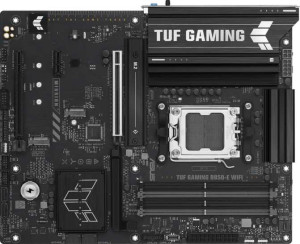
Asus TUF Gaming B850-E Wi-Fi
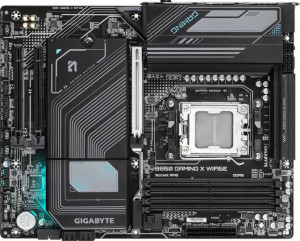
Gigabyte B850 Gaming X WiFi6E

Asus TUF Gaming B850-E Wi-Fi Gigabyte B850 Gaming X WiFi6E

Overview

Choosing the right AMD AM5 motherboard can be a pivotal decision for your next build, and the Asus TUF Gaming B850-E Wi-Fi and Gigabyte B850 Gaming X WiFi6E are two strong contenders in the B850 chipset space. Both boards arrive with a shared foundation of Wi-Fi 6E, DDR5 memory, and PCIe 5.0 support, yet they diverge in notable ways around BIOS management, expansion slot layout, and onboard connectivity that could meaningfully influence which one belongs in your system.

Common Features

  • Both boards use the AM5 CPU socket.
  • Both boards are based on the B850 chipset.
  • Both boards use the ATX form factor.
  • Both boards support Wi-Fi, including Wi-Fi 4 (802.11n), Wi-Fi 5 (802.11ac), Wi-Fi 6 (802.11ax), and Wi-Fi 6E (802.11ax).
  • Bluetooth is available on both boards at version 5.3.
  • Both boards include an HDMI 2.1 port.
  • Both boards support a maximum memory amount of 256GB.
  • Both boards have 4 memory slots.
  • Both boards use DDR5 memory.
  • Both boards operate in dual-channel memory mode.
  • ECC memory is not supported on either board.
  • Both boards have 1 USB 3.2 Gen 2 port (USB-A), 3 USB 3.2 Gen 1 ports (USB-A), 1 USB 3.2 Gen 2 port (USB-C), and 3 USB 2.0 ports.
  • Neither board has USB 3.2 Gen 2x2, USB 4 40Gbps, USB 4 20Gbps, or USB 3.2 Gen 1 (USB-C) ports.
  • Both boards provide 2 USB 3.2 Gen 1 ports and 4 USB 2.0 ports through expansion.
  • Both boards include 1 USB 3.2 Gen 2x2 port through expansion.
  • Both boards have 4 SATA 3 connectors, 3 M.2 sockets, and 6 fan headers.
  • Both boards feature 1 PCIe 5.0 x16 slot and no PCIe 3.0 x16, PCIe 2.0 x16, PCI, PCIe x4, or PCIe x8 slots.
  • Both boards support 7.1 audio channels with 3 audio connectors, and neither has an S/PDIF Out port.
  • Both boards support RAID 0, RAID 1, RAID 5, and RAID 10 (1+0), but neither supports RAID 0+1.

Main Differences

  • Easy BIOS reset is available on the Asus TUF Gaming B850-E Wi-Fi but not on the Gigabyte B850 Gaming X WiFi6E.
  • The maximum overclocked RAM speed is 8000 MHz on the Asus TUF Gaming B850-E Wi-Fi and 8200 MHz on the Gigabyte B850 Gaming X WiFi6E.
  • A PS/2 port is present on the Gigabyte B850 Gaming X WiFi6E but not on the Asus TUF Gaming B850-E Wi-Fi.
  • A TPM connector is present on the Gigabyte B850 Gaming X WiFi6E but not on the Asus TUF Gaming B850-E Wi-Fi.
  • The Asus TUF Gaming B850-E Wi-Fi has 1 PCIe 4.0 x16 slot, while the Gigabyte B850 Gaming X WiFi6E has none.
  • The Asus TUF Gaming B850-E Wi-Fi has 1 PCIe x1 slot, while the Gigabyte B850 Gaming X WiFi6E has 2 PCIe x1 slots.
Specs Comparison
Asus TUF Gaming B850-E Wi-Fi

Asus TUF Gaming B850-E Wi-Fi

Gigabyte B850 Gaming X WiFi6E

Gigabyte B850 Gaming X WiFi6E

General info:
CPU socket AM5 AM5
chipset B850 B850
form factor ATX ATX
release date April 2025 January 2025
supports Wi-Fi
Wi-Fi version Wi-Fi 4 (802.11n), Wi-Fi 5 (802.11ac), Wi-Fi 6 (802.11ax), Wi-Fi 6E (802.11ax) Wi-Fi 4 (802.11n), Wi-Fi 5 (802.11ac), Wi-Fi 6 (802.11ax), Wi-Fi 6E (802.11ax)
Has Bluetooth
Bluetooth version 5.3 5.3
HDMI version HDMI 2.1 HDMI 2.1
Easy to overclock
has RGB lighting
Easy to reset BIOS
Has dual BIOS
has aptX
CPU sockets 1 1
Has integrated graphics
warranty period 3 years 3 years
height 244 mm 244 mm
width 305 mm 305 mm
Has integrated CPU

At the platform level, the Asus TUF Gaming B850-E Wi-Fi and Gigabyte B850 Gaming X WiFi6E are built on identical foundations: both use the AM5 socket with a B850 chipset, share the same ATX form factor (244 × 305 mm), and offer the same wireless stack — Wi-Fi 6E and Bluetooth 5.3 — along with HDMI 2.1 output, RGB lighting, dual BIOS, and a 3-year warranty. For most buyers, these shared fundamentals mean both boards slot into the same builds and support the same CPU ecosystem without compromise.

The only meaningful differentiator in this group is the Easy to reset BIOS feature: the Asus TUF Gaming B850-E has it, while the Gigabyte does not. In practice, this matters most when a failed BIOS flash or a misconfigured overclock leaves the system unbootable — a dedicated reset mechanism (typically a physical button or clear-CMOS header) lets you recover without pulling the CMOS battery or needing a secondary system. Both boards support overclocking, which makes recovery tooling more relevant, not less.

Overall, these two motherboards are essentially tied across every general specification except one: the Asus TUF Gaming B850-E Wi-Fi holds a practical edge thanks to its easier BIOS reset capability, which adds a modest but real layer of resilience for enthusiasts who intend to push their system settings.

Memory:
maximum memory amount 256GB 256GB
overclocked RAM speed 8000 MHz 8200 MHz
memory slots 4 4
DDR memory version 5 5
memory channels 2 2
Supports ECC memory

Both boards share the same core memory architecture: DDR5 support across 4 slots in a dual-channel configuration, with a 256GB maximum capacity ceiling. For the vast majority of users — including content creators loading large project files and gamers running memory-hungry titles — that headroom is more than sufficient, and the dual-channel setup ensures bandwidth is used efficiently.

Where they diverge is at the upper limit of overclocked RAM support. The Gigabyte B850 Gaming X WiFi6E tops out at 8200 MHz, versus 8000 MHz on the Asus TUF Gaming B850-E Wi-Fi. The gap is narrow — 200 MHz — and in real-world workloads the performance delta will be negligible for most users. However, for enthusiasts chasing maximum memory throughput or competing in benchmark runs, the Gigabyte's slightly higher ceiling offers a small but genuine advantage.

On balance, the memory specifications of these two boards are nearly identical. The Gigabyte B850 Gaming X WiFi6E claims a marginal edge solely due to its higher overclocked RAM speed ceiling, but this distinction is only meaningful to users who actively push memory overclocking to its limits — for everyone else, these boards are effectively tied in this category.

Ports:
USB 3.2 Gen 2 ports (USB-A) 1 1
USB 3.2 Gen 1 ports (USB-A) 3 3
USB 3.2 Gen 2 ports (USB-C) 1 1
USB 3.2 Gen 1 ports (USB-C) 0 0
USB 2.0 ports 3 3
USB 3.2 Gen 2x2 ports 0 0
USB 4 40Gbps ports 0 0
USB 4 20Gbps ports 0 0
Thunderbolt 4 ports 0 0
Thunderbolt 3 ports 0 0
has an HDMI output
DisplayPort outputs 1 1
RJ45 ports 1 1
Has USB Type-C
eSATA ports 0 0
DVI outputs 0 0
has a VGA connector
PS/2 ports 0 1

The rear I/O layout of these two boards is remarkably similar. Both offer the same USB mix — one USB 3.2 Gen 2 Type-A, three USB 3.2 Gen 1 Type-A, one USB 3.2 Gen 2 Type-C, and three USB 2.0 ports — alongside a single DisplayPort, HDMI, and one RJ45 ethernet jack. Neither board reaches for USB4 or Thunderbolt, which is typical for the B850 tier, and the absence of legacy connectors like eSATA or DVI keeps the panel clean and modern.

The sole differentiator here is the Gigabyte B850 Gaming X WiFi6E's inclusion of a PS/2 port. This legacy connector is rarely needed in 2024 builds, but it does serve a specific niche: users with older mechanical keyboards or input devices that predate USB, or system administrators who require PS/2 for BIOS-level input without USB driver support. For the overwhelming majority of builders, this port will go unused.

These two boards are essentially tied in this category. The Gigabyte's PS/2 port is the only distinction, and its relevance is limited to a narrow set of legacy use cases — it does not represent a meaningful connectivity advantage for typical users. If PS/2 support is not a requirement, the port selection on both boards is functionally identical.

Connectors:
USB 3.2 Gen 1 ports (through expansion) 2 2
USB 3.2 Gen 2x2 ports (through expansion) 1 1
USB 2.0 ports (through expansion) 4 4
SATA 3 connectors 4 4
fan headers 6 6
USB 3.0 ports (through expansion) 2 2
M.2 sockets 3 3
Has TPM connector
U.2 sockets 0 0
Has mSATA connector
SATA 2 connectors 0 0

Internally, the two boards are virtually mirror images of each other. Both provide 3 M.2 sockets and 4 SATA 3 connectors for storage, 6 fan headers for cooling management, and an identical expansion USB layout. For a mid-range B850 platform, this is a well-rounded internal connector set — three M.2 slots in particular means users can run a primary NVMe drive alongside additional SSDs without touching any SATA ports.

The only internal differentiator is the TPM connector on the Gigabyte B850 Gaming X WiFi6E, which the Asus TUF Gaming B850-E Wi-Fi lacks. A discrete TPM header allows users to add a physical Trusted Platform Module — relevant for enterprise security policies, BitLocker encryption workflows, or compliance requirements that mandate hardware-based cryptographic key storage. Most consumer gaming builds will never need it, but for users deploying this board in a professional or security-conscious environment, its presence removes a potential barrier.

The Gigabyte B850 Gaming X WiFi6E takes a narrow edge here purely on account of the TPM connector. For general consumers and gamers, this distinction is inconsequential and the two boards remain functionally identical in this category. However, for anyone with security or enterprise requirements, Gigabyte's inclusion of that header is a practical advantage the Asus simply does not offer.

Expansion slots:
PCIe 4.0 x16 slots 1 0
PCIe 5.0 x16 slots 1 1
PCIe 3.0 x16 slots 0 0
PCIe x1 slots 1 2
PCI slots 0 0
PCIe 2.0 x16 slots 0 0
PCIe x4 slots 0 0
PCIe x8 slots 0 0

Both boards lead with a PCIe 5.0 x16 slot as the primary GPU lane — the current standard for pairing with top-tier discrete graphics cards and ensuring no bandwidth bottleneck for present or near-future GPUs. That shared foundation puts them on equal footing for single-GPU gaming and workstation builds.

The divergence comes in secondary expansion. The Asus TUF Gaming B850-E Wi-Fi adds a PCIe 4.0 x16 slot alongside its x1 slot, while the Gigabyte B850 Gaming X WiFi6E foregoes a secondary x16 slot entirely in favor of two PCIe x1 slots. In practice, the Asus's second x16 slot is valuable for users who want to install a high-bandwidth expansion card — such as a capture card, 10GbE NIC, or a secondary GPU — without being constrained to the narrow x1 lane. The Gigabyte's dual x1 slots serve simpler add-in cards well, but cannot accommodate cards that require x4 or greater physical or electrical bandwidth.

For expansion flexibility, the Asus TUF Gaming B850-E Wi-Fi holds a clear advantage. The presence of a PCIe 4.0 x16 slot as secondary expansion meaningfully broadens the range of compatible add-in cards, making it the stronger choice for users planning anything beyond a basic single-GPU configuration.

Audio:
audio channels 7.1 7.1
Has S/PDIF Out port
audio connectors 3 3

Audio is a non-issue for differentiation here — both boards are identical across every provided specification. Each delivers 7.1-channel surround audio support through 3 analog connectors, and neither includes an S/PDIF optical output. The 7.1 configuration covers the full surround sound spectrum, suitable for multi-speaker setups and high-quality headphone DAC/amp combinations, while the 3-connector layout handles the standard input/output/mic arrangement typical of integrated motherboard audio.

The absence of S/PDIF on both boards means users who rely on optical output to connect to an external receiver or DAC will need a discrete sound card or USB audio solution regardless of which board they choose. This is a shared limitation, not a differentiator.

This category is a complete tie. There is no audio-based reason to favor one board over the other — both offer the same capabilities and the same constraints.

Storage:
Supports RAID 1
Supports RAID 10 (1+0)
Supports RAID 5
Supports RAID 0
Supports RAID 0+1

RAID support is identical across both boards. Each covers the four most practical configurations: RAID 0 for striped performance, RAID 1 for mirrored redundancy, RAID 5 for distributed parity across three or more drives, and RAID 10 for the combined speed and redundancy of striped mirror pairs. Together these options address the full range of consumer and prosumer storage needs — from pure throughput to data protection.

Neither board supports RAID 0+1, though this omission is inconsequential in practice since RAID 10 achieves a functionally equivalent outcome with superior fault tolerance and is the preferred standard for that use case anyway.

This category is a complete tie. The storage RAID capabilities of the Asus TUF Gaming B850-E Wi-Fi and the Gigabyte B850 Gaming X WiFi6E are indistinguishable — there is no storage-based reason to prefer one over the other.

Comparison Summary & Verdict

After examining both boards closely, the Asus TUF Gaming B850-E Wi-Fi and Gigabyte B850 Gaming X WiFi6E share a rock-solid AM5/B850 foundation, offering Wi-Fi 6E, Bluetooth 5.3, DDR5 support up to 256GB, and three M.2 sockets. Where they diverge is telling: the Asus board wins on convenience with its easy BIOS reset capability and adds an extra PCIe 4.0 x16 slot, making it the better pick for builders who value straightforward troubleshooting and flexible multi-card expansion. The Gigabyte board counters with a slightly higher overclocked RAM ceiling of 8200 MHz, a dedicated TPM connector for security-conscious deployments, and a PS/2 port for those with legacy peripherals. Choose the Asus for easier maintenance and a more versatile slot layout; opt for the Gigabyte if peak memory performance and broader onboard connectivity are your priorities.

Asus TUF Gaming B850-E Wi-Fi
Buy Asus TUF Gaming B850-E Wi-Fi if...

Buy the Asus TUF Gaming B850-E Wi-Fi if you want a hassle-free easy BIOS reset feature and need an additional PCIe 4.0 x16 slot for greater expansion flexibility.

Gigabyte B850 Gaming X WiFi6E
Buy Gigabyte B850 Gaming X WiFi6E if...

Choose the Gigabyte B850 Gaming X WiFi6E if you want a higher overclocked RAM speed of 8200 MHz, a TPM connector for added security, or a PS/2 port for legacy peripherals.