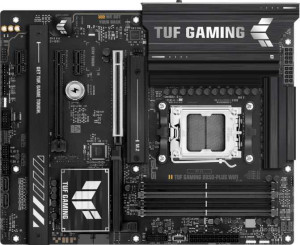
Asus TUF Gaming B850-Plus WiFi
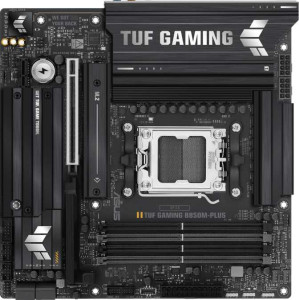
Asus TUF Gaming B850M-Plus

Asus TUF Gaming B850-Plus WiFi Asus TUF Gaming B850M-Plus

Overview

When choosing between the Asus TUF Gaming B850-Plus WiFi and the Asus TUF Gaming B850M-Plus, the decision goes well beyond physical size. Both boards are built on the AM5 socket with the B850 chipset and share a powerful DDR5 memory platform, yet they diverge meaningfully in areas such as form factor, wireless capabilities, and expansion slot configuration. This side-by-side comparison walks through every specification to help you determine which of these two TUF Gaming motherboards is the right foundation for your next AMD build.

Common Features

  • Both motherboards use the AM5 CPU socket.
  • Both motherboards feature the B850 chipset.
  • Both motherboards support HDMI 2.1.
  • Overclocking is supported on both motherboards.
  • RGB lighting is present on both motherboards.
  • Easy BIOS reset is not available on either motherboard.
  • Dual BIOS is present on both motherboards.
  • Both motherboards have a single CPU socket.
  • Both motherboards support up to 192GB of maximum memory.
  • Both motherboards support overclocked RAM speeds of up to 8000 MHz.
  • Both motherboards have 4 memory slots.
  • Both motherboards use DDR5 memory.
  • Both motherboards have 2 memory channels.
  • ECC memory is not supported on either motherboard.
  • Both motherboards have 3 USB 3.2 Gen 2 Type-A ports.
  • Both motherboards have 4 USB 3.2 Gen 1 Type-A ports.
  • USB 3.2 Gen 2 Type-C ports are absent on both motherboards.
  • USB 3.2 Gen 1 Type-C ports are absent on both motherboards.
  • Both motherboards have 1 USB 3.2 Gen 2x2 port.
  • USB 4 40Gbps ports are not available on either motherboard.
  • USB 4 20Gbps ports are not available on either motherboard.
  • Thunderbolt 4 ports are not available on either motherboard.
  • Both motherboards provide 2 USB 3.2 Gen 1 ports through expansion.
  • Both motherboards provide 4 USB 2.0 ports through expansion.
  • Both motherboards have 4 SATA 3 connectors.
  • Both motherboards have 3 M.2 sockets.
  • A TPM connector is not present on either motherboard.
  • U.2 sockets are absent on both motherboards.
  • An mSATA connector is not available on either motherboard.
  • Both motherboards have 1 PCIe 5.0 x16 slot.
  • PCIe 3.0 x16 slots are absent on both motherboards.
  • PCI slots are absent on both motherboards.
  • Both motherboards have a signal-to-noise ratio of 120 dB on the DAC.
  • Both motherboards support 7.1 audio channels.
  • Both motherboards have 5 audio connectors.
  • Both motherboards support RAID 0, RAID 1, RAID 5, and RAID 10.
  • RAID 0+1 is not supported on either motherboard.

Main Differences

  • The form factor is ATX on Asus TUF Gaming B850-Plus WiFi and Micro-ATX on Asus TUF Gaming B850M-Plus.
  • Wi-Fi support is present on Asus TUF Gaming B850-Plus WiFi but not available on Asus TUF Gaming B850M-Plus.
  • Bluetooth support is present on Asus TUF Gaming B850-Plus WiFi but not available on Asus TUF Gaming B850M-Plus.
  • The width is 305 mm on Asus TUF Gaming B850-Plus WiFi and 244 mm on Asus TUF Gaming B850M-Plus.
  • USB 2.0 ports total 2 on Asus TUF Gaming B850-Plus WiFi and 4 on Asus TUF Gaming B850M-Plus.
  • Fan headers total 6 on Asus TUF Gaming B850-Plus WiFi and 5 on Asus TUF Gaming B850M-Plus.
  • A PCIe 4.0 x16 slot is present on Asus TUF Gaming B850-Plus WiFi but absent on Asus TUF Gaming B850M-Plus.
  • PCIe x1 slots total 2 on Asus TUF Gaming B850-Plus WiFi and 1 on Asus TUF Gaming B850M-Plus.
  • An S/PDIF Out port is present on Asus TUF Gaming B850M-Plus but not available on Asus TUF Gaming B850-Plus WiFi.
Specs Comparison
Asus TUF Gaming B850-Plus WiFi

Asus TUF Gaming B850-Plus WiFi

Asus TUF Gaming B850M-Plus

Asus TUF Gaming B850M-Plus

General info:
CPU socket AM5 AM5
chipset B850 B850
form factor ATX Micro-ATX
release date January 2025 January 2025
supports Wi-Fi
Has Bluetooth
HDMI version HDMI 2.1 HDMI 2.1
Easy to overclock
has RGB lighting
Easy to reset BIOS
Has dual BIOS
CPU sockets 1 1
Has integrated graphics
warranty period 3 years 3 years
height 244 mm 244 mm
width 305 mm 244 mm
Has integrated CPU

Both boards share the same AM5 socket and B850 chipset foundation, meaning identical CPU compatibility and platform-level feature parity. They also match on HDMI 2.1 output, dual BIOS protection, RGB lighting, and overclocking support — so neither board holds a structural platform advantage over the other. The shared 3-year warranty and lack of integrated graphics or CPU are equally expected at this tier.

The defining split between these two comes down to form factor and wireless connectivity. The B850-Plus WiFi is a full ATX board (305 × 244 mm), offering more PCIe slots, M.2 connectors, and expansion headroom — and critically, it includes built-in Wi-Fi and Bluetooth. The B850M-Plus is a Micro-ATX design (244 × 244 mm), which fits smaller cases and typically costs less, but it ships with no Wi-Fi or Bluetooth. For a modern desktop build, the absence of wireless on the M-Plus means you either run ethernet-only or budget for a separate wireless adapter — a real added cost and inconvenience.

The B850-Plus WiFi has a clear edge in this group: it offers more physical expansion space and eliminates the need for any wireless add-on hardware. The B850M-Plus makes sense only if you are intentionally targeting a compact build with a wired-only network setup, where the smaller footprint outweighs the missing connectivity features.

Memory:
maximum memory amount 192GB 192GB
overclocked RAM speed 8000 MHz 8000 MHz
memory slots 4 4
DDR memory version 5 5
memory channels 2 2
Supports ECC memory

On memory, these two boards are completely identical across every spec — and the shared configuration is genuinely strong. Both support DDR5 with four slots across two channels, a ceiling of 192GB, and overclocked speeds up to 8000 MHz. That capacity ceiling is well beyond what any gaming or mainstream workstation build will realistically use today, so neither board will bottleneck you as memory kits grow denser over time.

The 8000 MHz overclocked ceiling is also noteworthy: DDR5 at those speeds sits at the high end of what the AM5 platform currently supports, meaning enthusiasts chasing maximum memory bandwidth for CPU-heavy workloads or memory-sensitive applications will find both boards equally capable. The dual-channel architecture is standard for this platform and ensures full bandwidth utilization when slots are populated in matched pairs.

This group is a complete tie. There is no memory-related reason to choose one board over the other — your decision should rest entirely on the differentiators found in other spec groups.

Ports:
USB 3.2 Gen 2 ports (USB-A) 3 3
USB 3.2 Gen 1 ports (USB-A) 4 4
USB 3.2 Gen 2 ports (USB-C) 0 0
USB 3.2 Gen 1 ports (USB-C) 0 0
USB 2.0 ports 2 4
USB 3.2 Gen 2x2 ports 1 1
USB 4 40Gbps ports 0 0
USB 4 20Gbps ports 0 0
Thunderbolt 4 ports 0 0
Thunderbolt 3 ports 0 0
has an HDMI output
DisplayPort outputs 1 1
RJ45 ports 1 1
Has USB Type-C
eSATA ports 0 0
DVI outputs 0 0
has a VGA connector
PS/2 ports 0 0

Port selection across these two boards is remarkably similar, with an identical high-speed USB lineup: three USB 3.2 Gen 2 Type-A ports, four USB 3.2 Gen 1 Type-A ports, and a single USB 3.2 Gen 2x2 port delivering up to 20Gbps — enough for fast external SSDs and high-bandwidth peripherals. Both also include HDMI, a DisplayPort output, and a single RJ45 Ethernet port, so display and wired network connectivity are equally served.

The only measurable difference in this group is the USB 2.0 port count: the B850M-Plus offers 4 versus the B850-Plus WiFi's 2. While USB 2.0 is low-bandwidth by modern standards, these ports remain practical for keyboards, mice, headset dongles, and other low-demand peripherals that simply do not need higher speeds. Having twice as many means the B850M-Plus can accommodate more legacy or budget peripherals without requiring a hub.

For most users the USB 2.0 gap is a minor convenience rather than a meaningful advantage, but the B850M-Plus holds a narrow edge here purely on rear-panel device capacity. If your setup involves many simultaneous low-speed USB devices, that extra headroom matters; otherwise, the two boards are effectively tied across all the ports that actually drive performance.

Connectors:
USB 3.2 Gen 1 ports (through expansion) 2 2
USB 2.0 ports (through expansion) 4 4
SATA 3 connectors 4 4
fan headers 6 5
USB 3.0 ports (through expansion) 2 2
M.2 sockets 3 3
Has TPM connector
U.2 sockets 0 0
Has mSATA connector
SATA 2 connectors 0 0

Internal connector layouts are nearly identical between these two boards. Both provide three M.2 sockets for NVMe storage — a strong count for this chipset tier — alongside four SATA 3 ports for traditional drives, and matching expansion headers for USB. For most builds, this means equivalent storage flexibility and internal cabling options regardless of which board you choose.

The sole differentiator here is fan header count: the B850-Plus WiFi offers 6 fan headers versus the B850M-Plus's 5. That extra header matters more than it might initially seem — in a well-cooled gaming or workstation build with a CPU cooler, multiple case fans, and optionally a pump header for an AIO liquid cooler, headers fill up quickly. Having six means you are less likely to need a fan splitter, which can complicate thermal management and reduce per-fan control granularity.

The B850-Plus WiFi has a modest edge in this group. It is not a dramatic gap, but the additional fan header is a genuine convenience for enthusiast builds targeting strong thermal control. Buyers planning a compact or minimally cooled system inside a Micro-ATX case will likely never exhaust the B850M-Plus's five headers, making the difference practically negligible for that use case.

Expansion slots:
PCIe 4.0 x16 slots 1 0
PCIe 5.0 x16 slots 1 1
PCIe 3.0 x16 slots 0 0
PCIe x1 slots 2 1
PCI slots 0 0
PCIe 2.0 x16 slots 0 0
PCIe x4 slots 0 0
PCIe x8 slots 0 0

Both boards anchor their expansion lineup with a single PCIe 5.0 x16 slot — the primary GPU slot — which is identical in capability and bandwidth. Where they diverge is in secondary expansion: the B850-Plus WiFi adds a PCIe 4.0 x16 slot alongside two PCIe x1 slots, while the B850M-Plus offers only one PCIe x1 slot and no secondary x16 slot at all.

That secondary PCIe 4.0 x16 slot on the B850-Plus WiFi is a meaningful differentiator. While it will not run a second GPU at full x16 bandwidth, it is well-suited for high-bandwidth add-in cards — capture cards, 10GbE NICs, RAID controllers, or NVMe expansion cards — that would otherwise saturate a narrow x1 slot. The additional x1 slot further means the ATX board can accommodate more simultaneous expansion cards, a real advantage for users building a feature-rich workstation or streaming rig.

The B850-Plus WiFi has a clear edge in this group. The B850M-Plus covers the essentials for a single-GPU build, but its reduced slot count directly limits future expandability. For anyone who anticipates adding a high-bandwidth peripheral card down the line, the ATX board's extra slots provide headroom the Micro-ATX model simply cannot match.

Audio:
Signal-to-Noise ratio (DAC) 120 dB 120 dB
audio channels 7.1 7.1
Has S/PDIF Out port
audio connectors 5 5

Analog audio performance is identical across both boards: a 120 dB signal-to-noise ratio, 7.1-channel output, and five audio connectors. A 120 dB SNR is a strong figure for onboard audio, indicating low background noise and clean reproduction — sufficient for high-impedance headphones and quality speaker systems without an add-in sound card for most users.

The single differentiator is the presence of an S/PDIF optical output on the B850M-Plus, which the B850-Plus WiFi omits entirely. S/PDIF allows a lossless digital audio signal to be passed directly to an external DAC, AV receiver, or sound system via optical cable — bypassing the motherboard's analog circuitry altogether. For users with a home theater setup, a quality external DAC, or a receiver that accepts optical input, this is a genuinely useful connection that cannot be replicated through the analog jacks.

The B850M-Plus holds a narrow but clear edge in this group. Most gamers and general users will never miss S/PDIF, but for audiophiles or home theater enthusiasts routing audio through external equipment, its absence on the B850-Plus WiFi is a real omission — particularly notable given that the WiFi model is otherwise the more feature-rich board across other categories.

Storage:
Supports RAID 1
Supports RAID 10 (1+0)
Supports RAID 5
Supports RAID 0
Supports RAID 0+1

RAID support is a perfect match between these two boards. Both handle the four configurations that matter most in practice: RAID 0 for pure performance striping, RAID 1 for mirroring and data redundancy, RAID 5 for distributed parity across three or more drives, and RAID 10 for the combined speed-and-redundancy sweet spot favored in small workstation and NAS-adjacent builds. Neither board supports RAID 0+1, but that mode is rarely missed given that RAID 10 covers the same ground more efficiently.

This is a complete tie. Whichever board you choose, your RAID options are identical — so storage configuration strategy should play no role in deciding between them. Any differentiation between these two boards comes down entirely to the other specification groups.

Comparison Summary & Verdict

Both the Asus TUF Gaming B850-Plus WiFi and the Asus TUF Gaming B850M-Plus deliver a solid B850 platform with AM5 compatibility, DDR5 support up to 192GB at 8000 MHz, three M.2 sockets, four SATA 3 connectors, a PCIe 5.0 x16 slot, dual BIOS, and 7.1 audio at 120 dB. The real split comes down to use-case priorities. The B850-Plus WiFi is the stronger pick for full-tower and mid-tower builds that demand built-in Wi-Fi and Bluetooth, a second PCIe 4.0 x16 slot for added expansion, two extra PCIe x1 slots, and six fan headers for comprehensive cooling control. The B850M-Plus, on the other hand, is purpose-built for compact Micro-ATX cases, and it adds an S/PDIF Out port and more rear USB 2.0 connections, making it a practical choice for space-conscious builders who do not require onboard wireless.

Asus TUF Gaming B850-Plus WiFi
Buy Asus TUF Gaming B850-Plus WiFi if...

Choose the Asus TUF Gaming B850-Plus WiFi if you want built-in Wi-Fi and Bluetooth, need a full ATX board with an extra PCIe 4.0 x16 slot and more fan headers for a high-end open build.

Asus TUF Gaming B850M-Plus
Buy Asus TUF Gaming B850M-Plus if...

Opt for the Asus TUF Gaming B850M-Plus if you are building in a compact Micro-ATX case and value an S/PDIF Out port along with additional USB 2.0 rear connectivity over onboard wireless.