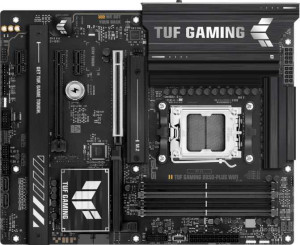
Asus TUF Gaming B850-Plus WiFi
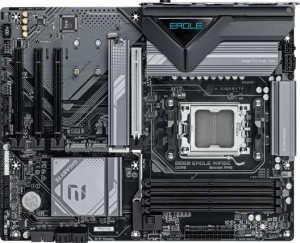
Gigabyte B850 Eagle WiFi6E

Asus TUF Gaming B850-Plus WiFi Gigabyte B850 Eagle WiFi6E

Overview

Welcome to our detailed spec comparison between the Asus TUF Gaming B850-Plus WiFi and the Gigabyte B850 Eagle WiFi6E. Both boards share the AM5 socket and B850 chipset in a standard ATX form factor, making this a close contest at their respective price points. The key battlegrounds include wireless connectivity standards, memory ceiling and speed, rear USB port configuration, and expansion slot layout. Read on to see which board best fits your build.

Common Features

  • Both boards use the AM5 CPU socket.
  • Both boards feature the B850 chipset.
  • Both boards have an ATX form factor.
  • Wi-Fi support is available on both boards.
  • Bluetooth is available on both boards.
  • Both boards have HDMI 2.1 output.
  • Overclocking is supported on both boards.
  • Easy BIOS reset is not available on either board.
  • Both boards have 4 memory slots.
  • Both boards use DDR5 memory.
  • Both boards support 2 memory channels.
  • ECC memory is not supported on either board.
  • Neither board has USB 3.2 Gen 2 ports (USB-C) on the rear panel.
  • Neither board has USB 4 or Thunderbolt ports.
  • Both boards have 1 DisplayPort output.
  • Both boards have 1 RJ45 port.
  • Both boards provide 2 USB 3.2 Gen 1 ports through expansion.
  • Both boards provide 4 USB 2.0 ports through expansion.
  • Both boards have 4 SATA 3 connectors.
  • Both boards have 6 fan headers.
  • Both boards have 3 M.2 sockets.
  • Neither board has a mSATA connector.
  • Both boards have 1 PCIe 5.0 x16 slot.
  • Both boards support 7.1 audio channels.
  • S/PDIF Out is not available on either board.
  • Both boards support RAID 0, RAID 1, RAID 5, and RAID 10.
  • RAID 0+1 is not supported on either board.

Main Differences

  • Wi-Fi version support extends to Wi-Fi 7 (802.11be) on Asus TUF Gaming B850-Plus WiFi, while Gigabyte B850 Eagle WiFi6E tops out at Wi-Fi 6E (802.11ax).
  • Bluetooth version is 5.4 on Asus TUF Gaming B850-Plus WiFi and 5.3 on Gigabyte B850 Eagle WiFi6E.
  • RGB lighting is present on Asus TUF Gaming B850-Plus WiFi but not available on Gigabyte B850 Eagle WiFi6E.
  • Maximum memory capacity is 192GB on Asus TUF Gaming B850-Plus WiFi and 256GB on Gigabyte B850 Eagle WiFi6E.
  • Maximum RAM speed is 4000 MHz on Asus TUF Gaming B850-Plus WiFi and 5200 MHz on Gigabyte B850 Eagle WiFi6E.
  • Maximum overclocked RAM speed is 8000 MHz on Asus TUF Gaming B850-Plus WiFi and 8200 MHz on Gigabyte B850 Eagle WiFi6E.
  • USB 3.2 Gen 2 ports (USB-A) count is 3 on Asus TUF Gaming B850-Plus WiFi and 2 on Gigabyte B850 Eagle WiFi6E.
  • USB 3.2 Gen 1 ports (USB-A) count is 4 on Asus TUF Gaming B850-Plus WiFi and 2 on Gigabyte B850 Eagle WiFi6E.
  • A USB 3.2 Gen 1 port (USB-C) is not present on Asus TUF Gaming B850-Plus WiFi but is available on Gigabyte B850 Eagle WiFi6E.
  • USB 2.0 port count is 2 on Asus TUF Gaming B850-Plus WiFi and 4 on Gigabyte B850 Eagle WiFi6E.
  • A USB 3.2 Gen 2x2 port is present on Asus TUF Gaming B850-Plus WiFi but not available on Gigabyte B850 Eagle WiFi6E.
  • A PS/2 port is not present on Asus TUF Gaming B850-Plus WiFi but is available on Gigabyte B850 Eagle WiFi6E.
  • A TPM connector is not present on Asus TUF Gaming B850-Plus WiFi but is available on Gigabyte B850 Eagle WiFi6E.
  • PCIe 4.0 x16 slot count is 1 on Asus TUF Gaming B850-Plus WiFi and 0 on Gigabyte B850 Eagle WiFi6E.
  • PCIe x1 slot count is 2 on Asus TUF Gaming B850-Plus WiFi and 3 on Gigabyte B850 Eagle WiFi6E.
  • Audio connector count is 5 on Asus TUF Gaming B850-Plus WiFi and 3 on Gigabyte B850 Eagle WiFi6E.
Specs Comparison
Asus TUF Gaming B850-Plus WiFi

Asus TUF Gaming B850-Plus WiFi

Gigabyte B850 Eagle WiFi6E

Gigabyte B850 Eagle WiFi6E

General info:
CPU socket AM5 AM5
chipset B850 B850
form factor ATX ATX
release date January 2025 January 2025
supports Wi-Fi
Wi-Fi version Wi-Fi 4 (802.11n), Wi-Fi 5 (802.11ac), Wi-Fi 6 (802.11ax), Wi-Fi 6E (802.11ax), Wi-Fi 7 (802.11be) Wi-Fi 4 (802.11n), Wi-Fi 5 (802.11ac), Wi-Fi 6 (802.11ax), Wi-Fi 6E (802.11ax)
Has Bluetooth
Bluetooth version 5.4 5.3
HDMI version HDMI 2.1 HDMI 2.1
Easy to overclock
has RGB lighting
Easy to reset BIOS
Has dual BIOS
has aptX
CPU sockets 1 1
Has integrated graphics
warranty period 3 years 3 years
height 244 mm 244 mm
width 305 mm 305 mm
Has integrated CPU

Both the Asus TUF Gaming B850-Plus WiFi and the Gigabyte B850 Eagle WiFi6E share the same fundamental platform: the AM5 socket with a B850 chipset, standard ATX form factor, identical 244 × 305 mm dimensions, and a 3-year warranty. Both support overclocking, carry dual BIOS for recovery safety, and output video via HDMI 2.1. For builders deciding between these two at the platform level, there is no meaningful difference in the foundation itself.

The most consequential differentiator in this group is wireless connectivity. The Asus TUF includes Wi-Fi 7 (802.11be), while the Gigabyte tops out at Wi-Fi 6E (802.11ax). In practice, Wi-Fi 7 delivers significantly higher theoretical throughput, lower latency via Multi-Link Operation (MLO), and better performance in congested environments — a tangible advantage for users with a Wi-Fi 7 router or those planning to upgrade. The Asus also edges ahead on Bluetooth 5.4 versus the Gigabyte's Bluetooth 5.3, bringing marginally improved connection stability and power efficiency, though this gap is minor in daily use. The Gigabyte's product name explicitly references Wi-Fi 6E, which accurately reflects its ceiling.

A secondary but visible difference is that the Asus TUF includes RGB lighting, which the Gigabyte Eagle lacks entirely. This is purely aesthetic and irrelevant to performance, but relevant for builders who want an illuminated build without adding separate components. Overall, the Asus TUF Gaming B850-Plus WiFi holds a clear edge in this group, driven by its superior Wi-Fi 7 support — a forward-looking advantage that the Gigabyte simply does not offer.
Memory:
maximum memory amount 192GB 256GB
RAM speed (max) 4000 MHz 5200 MHz
overclocked RAM speed 8000 MHz 8200 MHz
memory slots 4 4
DDR memory version 5 5
memory channels 2 2
Supports ECC memory

On the shared fundamentals, both boards are evenly matched: four DDR5 slots in a dual-channel configuration, with no ECC support — standard fare for a consumer B850 platform. Where things diverge is in the ceiling each board sets for memory performance and capacity.

The Gigabyte B850 Eagle WiFi6E supports a higher native RAM speed of 5200 MHz versus the Asus TUF's 4000 MHz, and pushes overclocked speeds to 8200 MHz compared to 8000 MHz on the Asus. While the overclocking gap is narrow enough to be negligible in real-world use, the native speed difference is more meaningful — a higher base frequency means better out-of-the-box performance without needing to manually enable XMP/EXPO profiles. For users running memory-sensitive workloads like video editing, 3D rendering, or large datasets, the Gigabyte's native headroom is a genuine advantage.

The capacity gap is harder to ignore: the Gigabyte supports up to 256 GB of RAM, while the Asus caps at 192 GB. For the vast majority of gaming or everyday workstation builds, neither limit is likely to be reached. However, for power users considering heavy virtualization or professional workloads over a long hardware lifecycle, the Gigabyte's extra headroom provides meaningful future-proofing. Taken together, the Gigabyte B850 Eagle WiFi6E holds a clear advantage in this group on both maximum capacity and native memory speed.

Ports:
USB 3.2 Gen 2 ports (USB-A) 3 2
USB 3.2 Gen 1 ports (USB-A) 4 2
USB 3.2 Gen 2 ports (USB-C) 0 0
USB 3.2 Gen 1 ports (USB-C) 0 1
USB 2.0 ports 2 4
USB 3.2 Gen 2x2 ports 1 0
USB 4 40Gbps ports 0 0
USB 4 20Gbps ports 0 0
Thunderbolt 4 ports 0 0
Thunderbolt 3 ports 0 0
has an HDMI output
DisplayPort outputs 1 1
RJ45 ports 1 1
Has USB Type-C
eSATA ports 0 0
DVI outputs 0 0
has a VGA connector
PS/2 ports 0 1

Video and networking outputs are identical between the two boards — both offer HDMI, one DisplayPort, and a single RJ45 ethernet port, with no Thunderbolt on either side. The real divergence is in USB bandwidth and port count, where the two boards take noticeably different approaches.

The Asus TUF Gaming B850-Plus WiFi is the stronger performer here. It provides more high-speed USB-A ports — 3× USB 3.2 Gen 2 (10 Gbps) versus the Gigabyte's 2 — and adds a USB 3.2 Gen 2x2 port delivering 20 Gbps, which the Gigabyte lacks entirely. That 2x2 port is particularly useful for fast external SSDs capable of saturating 10 Gbps connections. The Gigabyte counters with a USB 3.2 Gen 1 Type-C rear port that the Asus does not have, which matters for users with USB-C peripherals or cables — but at only 5 Gbps, it is the slower end of the modern USB spectrum. The Gigabyte also includes a PS/2 port, a niche addition relevant only to users with legacy keyboards or mice.

Adding it up, the Asus offers more total high-speed connectivity with its superior USB-A Gen 2 count and the exclusive Gen 2x2 port, making it the better fit for bandwidth-intensive peripherals. The Gigabyte's Type-C addition is a convenience feature but does not offset the gap. The Asus TUF Gaming B850-Plus WiFi takes the edge in this group for users who prioritize fast, high-throughput rear I/O.

Connectors:
USB 3.2 Gen 1 ports (through expansion) 2 2
USB 2.0 ports (through expansion) 4 4
SATA 3 connectors 4 4
fan headers 6 6
USB 3.0 ports (through expansion) 2 2
M.2 sockets 3 3
Has TPM connector
U.2 sockets 0 0
Has mSATA connector
SATA 2 connectors 0 0

For internal connectors, these two boards are remarkably close. Both offer 3× M.2 sockets, 4× SATA 3 connectors, 6 fan headers, and identical expansion USB headers — a well-balanced internal layout that supports most mainstream and enthusiast builds without compromise.

The only differentiator in this group is the TPM connector, which the Gigabyte B850 Eagle WiFi6E includes and the Asus TUF does not. A dedicated TPM header allows users to add a discrete TPM module, which is relevant for enterprise environments, hardware-based encryption workflows, or strict Windows 11 compliance in scenarios where a firmware TPM (fTPM) is insufficient or disabled. For most home builders, fTPM handled at the BIOS level makes a physical connector unnecessary — but in managed IT or security-conscious deployments, having the header is a concrete advantage.

Given how closely matched everything else is, the Gigabyte takes a narrow edge in this group purely on the strength of that TPM connector. It is a niche feature, but it is the only point of distinction here — and for the users who need it, its absence on the Asus is a genuine gap.

Expansion slots:
PCIe 4.0 x16 slots 1 0
PCIe 5.0 x16 slots 1 1
PCIe 3.0 x16 slots 0 0
PCIe x1 slots 2 3
PCI slots 0 0
PCIe 2.0 x16 slots 0 0
PCIe x4 slots 0 0
PCIe x8 slots 0 0

Both boards lead with a single PCIe 5.0 x16 slot as the primary GPU lane — the current-generation standard that ensures full bandwidth compatibility with modern discrete graphics cards and future-proofed add-in cards. That shared foundation means neither board holds an inherent advantage for the primary GPU installation.

The key differentiator is the Asus TUF's additional PCIe 4.0 x16 slot, which the Gigabyte does not offer. In practice, this second full-length slot is valuable for multi-GPU setups, high-bandwidth capture cards, or professional accelerator cards that benefit from x16 physical lane width — even if they operate at x4 electrically. The Gigabyte counters with 3× PCIe x1 slots versus the Asus's 2, offering a marginal advantage for users stacking multiple low-profile add-in cards such as sound cards, network adapters, or USB expansion cards simultaneously.

For most builders, the extra x1 slot on the Gigabyte is unlikely to matter, while the second full-length PCIe 4.0 x16 slot on the Asus represents a more versatile and impactful expansion option. The Asus TUF Gaming B850-Plus WiFi takes the edge here — its dual full-length slot layout offers greater flexibility for power users who need to pair a GPU with another high-bandwidth card.

Audio:
audio channels 7.1 7.1
Has S/PDIF Out port
audio connectors 5 3

Audio is a short story here, with one meaningful distinction. Both boards deliver 7.1-channel surround sound support and neither includes an S/PDIF optical output — meaning users who rely on digital optical passthrough to an external DAC or receiver will need to look elsewhere regardless of which board they choose.

Where they part ways is in the number of analog audio jacks. The Asus TUF Gaming B850-Plus WiFi provides 5 audio connectors, while the Gigabyte B850 Eagle WiFi6E offers only 3. In practical terms, a full 7.1 analog setup typically requires more connectors to route all speaker channels — the Asus's extra jacks accommodate this more naturally without requiring adapter workarounds. For users with a stereo headset or standard 2.0/2.1 speaker setup, three connectors is perfectly adequate, but for those running a multi-speaker analog surround configuration, the Asus gives more direct routing flexibility.

Given that both boards advertise 7.1 capability, the Asus's 5-connector layout is the more consistent implementation of that promise. The Asus TUF takes a modest but clear edge in this group — its rear audio panel is better equipped to actually support the surround sound configuration it advertises.

Storage:
Supports RAID 1
Supports RAID 10 (1+0)
Supports RAID 5
Supports RAID 0
Supports RAID 0+1

Storage configuration support is a clean draw. Both the Asus TUF Gaming B850-Plus WiFi and the Gigabyte B850 Eagle WiFi6E support RAID 0, RAID 1, RAID 5, and RAID 10 — and neither supports RAID 0+1. The supported modes cover the full range of practical use cases: RAID 0 for striped performance, RAID 1 for mirrored redundancy, RAID 5 for distributed parity across three or more drives, and RAID 10 for the combined performance and redundancy of a striped mirror array.

The absence of RAID 0+1 on both boards is worth noting in context: RAID 0+1 (mirroring of stripes) is functionally similar to RAID 10 but less fault-tolerant in multi-drive failure scenarios. Its omission is therefore not a meaningful limitation — RAID 10 is generally the preferred choice anyway for builds that need both speed and resilience.

With no differences whatsoever across any of the provided storage specs, this group is a complete tie. Neither board offers any storage configuration advantage over the other.

Comparison Summary & Verdict

Both boards are solid B850-platform choices, but they cater to slightly different builders. The Asus TUF Gaming B850-Plus WiFi stands out with Wi-Fi 7 support, Bluetooth 5.4, a PCIe 4.0 x16 secondary slot, more high-speed USB-A ports, a USB 3.2 Gen 2x2 port, and 5 audio connectors, making it the stronger pick for gamers and enthusiasts who want cutting-edge wireless and richer connectivity. The Gigabyte B850 Eagle WiFi6E counters with a higher 256GB memory ceiling, faster native and overclocked RAM speeds of 5200 MHz and 8200 MHz, a TPM connector for security-focused builds, and a USB-C Gen 1 rear port. If raw memory performance and future-proofing your RAM kit matter most, Gigabyte has the edge; if wireless headroom and port variety are priorities, the Asus TUF is the smarter choice.

Asus TUF Gaming B850-Plus WiFi
Buy Asus TUF Gaming B850-Plus WiFi if...

Buy the Asus TUF Gaming B850-Plus WiFi if you want Wi-Fi 7 readiness, Bluetooth 5.4, more high-speed USB-A ports, and RGB lighting for a feature-rich gaming build.

Gigabyte B850 Eagle WiFi6E
Buy Gigabyte B850 Eagle WiFi6E if...

Buy the Gigabyte B850 Eagle WiFi6E if you need a higher 256GB memory capacity, faster RAM speeds, and a TPM connector for a security-conscious or memory-intensive workstation build.