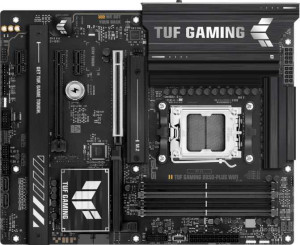
Asus TUF Gaming B850-Plus WiFi
Gigabyte B850M Aorus Elite WiFi6E Ice

Asus TUF Gaming B850-Plus WiFi Gigabyte B850M Aorus Elite WiFi6E Ice

Overview

When choosing between the Asus TUF Gaming B850-Plus WiFi and the Gigabyte B850M Aorus Elite WiFi6E Ice, builders face a compelling decision across several key battlegrounds: form factor, wireless capability, memory performance, and expansion flexibility. Both boards share the AM5 socket and B850 chipset, yet their approaches to connectivity and expandability reveal meaningfully different priorities suited to different kinds of PC builds.

Common Features

  • Both boards use the AM5 CPU socket.
  • Both use the B850 chipset.
  • Wi-Fi support is available on both products.
  • Bluetooth is available on both products.
  • Overclocking is supported on both products.
  • RGB lighting is present on both products.
  • Easy BIOS reset is not available on either product.
  • Dual BIOS is present on both products.
  • Both boards have 4 memory slots.
  • Both use DDR5 memory.
  • Both support 2 memory channels.
  • ECC memory is not supported on either product.
  • Neither board has USB 3.2 Gen 1 Type-C ports.
  • Neither board has USB 4 40Gbps ports.
  • Neither board has USB 4 20Gbps ports.
  • Neither board has Thunderbolt 4 or Thunderbolt 3 ports.
  • Both boards include 1 DisplayPort output.
  • Both boards include 1 RJ45 port.
  • USB Type-C connectivity is available on both products.
  • Both boards provide 2 USB 3.2 Gen 1 ports through expansion.
  • Both boards provide 4 USB 2.0 ports through expansion.
  • Both boards have 4 SATA 3 connectors.
  • Both boards have 6 fan headers.
  • Neither board has a U.2 socket.
  • An mSATA connector is not present on either product.
  • Neither board has SATA 2 connectors.
  • Both boards have 1 PCIe 5.0 x16 slot.
  • Neither board has PCIe 3.0 x16, PCIe 2.0 x16, PCIe x8, or PCI slots.
  • Both boards support 7.1 audio channels.
  • Both boards support RAID 0, RAID 1, RAID 5, and RAID 10.
  • RAID 0+1 is not supported on either product.

Main Differences

  • The Asus TUF Gaming B850-Plus WiFi has an ATX form factor, while the Gigabyte B850M Aorus Elite WiFi6E Ice has a Micro-ATX form factor.
  • The Asus TUF Gaming B850-Plus WiFi supports Wi-Fi 7 (802.11be) in addition to Wi-Fi 4/5/6/6E, while the Gigabyte B850M Aorus Elite WiFi6E Ice tops out at Wi-Fi 6E.
  • Bluetooth version is 5.4 on the Asus TUF Gaming B850-Plus WiFi and 5.3 on the Gigabyte B850M Aorus Elite WiFi6E Ice.
  • The width is 305 mm on the Asus TUF Gaming B850-Plus WiFi and 244 mm on the Gigabyte B850M Aorus Elite WiFi6E Ice.
  • Maximum memory capacity is 192 GB on the Asus TUF Gaming B850-Plus WiFi and 256 GB on the Gigabyte B850M Aorus Elite WiFi6E Ice.
  • Maximum RAM speed is 4000 MHz on the Asus TUF Gaming B850-Plus WiFi and 5200 MHz on the Gigabyte B850M Aorus Elite WiFi6E Ice.
  • Overclocked RAM speed reaches 8000 MHz on the Asus TUF Gaming B850-Plus WiFi and 8200 MHz on the Gigabyte B850M Aorus Elite WiFi6E Ice.
  • USB 3.2 Gen 2 Type-A ports number 3 on the Asus TUF Gaming B850-Plus WiFi and 2 on the Gigabyte B850M Aorus Elite WiFi6E Ice.
  • USB 3.2 Gen 1 Type-A ports number 4 on the Asus TUF Gaming B850-Plus WiFi and 5 on the Gigabyte B850M Aorus Elite WiFi6E Ice.
  • A USB 3.2 Gen 2 Type-C port is present on the Gigabyte B850M Aorus Elite WiFi6E Ice but not available on the Asus TUF Gaming B850-Plus WiFi.
  • USB 2.0 ports number 2 on the Asus TUF Gaming B850-Plus WiFi and 4 on the Gigabyte B850M Aorus Elite WiFi6E Ice.
  • A USB 3.2 Gen 2x2 port is present on the Asus TUF Gaming B850-Plus WiFi but not available on the Gigabyte B850M Aorus Elite WiFi6E Ice.
  • An HDMI output is present on the Asus TUF Gaming B850-Plus WiFi but not available on the Gigabyte B850M Aorus Elite WiFi6E Ice.
  • M.2 sockets number 3 on the Asus TUF Gaming B850-Plus WiFi and 2 on the Gigabyte B850M Aorus Elite WiFi6E Ice.
  • A TPM connector is present on the Gigabyte B850M Aorus Elite WiFi6E Ice but not available on the Asus TUF Gaming B850-Plus WiFi.
  • A PCIe 4.0 x16 slot is present on the Asus TUF Gaming B850-Plus WiFi but not available on the Gigabyte B850M Aorus Elite WiFi6E Ice.
  • PCIe x1 slots number 2 on the Asus TUF Gaming B850-Plus WiFi, while the Gigabyte B850M Aorus Elite WiFi6E Ice has none.
  • A PCIe x4 slot is present on the Gigabyte B850M Aorus Elite WiFi6E Ice but not available on the Asus TUF Gaming B850-Plus WiFi.
  • An S/PDIF Out port is present on the Gigabyte B850M Aorus Elite WiFi6E Ice but not available on the Asus TUF Gaming B850-Plus WiFi.
  • Audio connectors number 5 on the Asus TUF Gaming B850-Plus WiFi and 2 on the Gigabyte B850M Aorus Elite WiFi6E Ice.
Specs Comparison
Asus TUF Gaming B850-Plus WiFi

Asus TUF Gaming B850-Plus WiFi

Gigabyte B850M Aorus Elite WiFi6E Ice

Gigabyte B850M Aorus Elite WiFi6E Ice

General info:
CPU socket AM5 AM5
chipset B850 B850
form factor ATX Micro-ATX
release date January 2025 January 2025
supports Wi-Fi
Wi-Fi version Wi-Fi 4 (802.11n), Wi-Fi 5 (802.11ac), Wi-Fi 6 (802.11ax), Wi-Fi 6E (802.11ax), Wi-Fi 7 (802.11be) Wi-Fi 4 (802.11n), Wi-Fi 5 (802.11ac), Wi-Fi 6 (802.11ax), Wi-Fi 6E (802.11ax)
Has Bluetooth
Bluetooth version 5.4 5.3
Easy to overclock
has RGB lighting
Easy to reset BIOS
Has dual BIOS
has aptX
CPU sockets 1 1
Has integrated graphics
warranty period 3 years 3 years
height 244 mm 244 mm
width 305 mm 244 mm
Has integrated CPU

Both boards share a strong common foundation: the AM5 socket, B850 chipset, single CPU socket, no integrated graphics or CPU, 3-year warranty, dual BIOS, RGB lighting, Bluetooth, Wi-Fi, and overclocking support. For a user scanning the headline specs, these two boards look nearly identical on paper — but the differences that do exist carry real practical weight.

The most consequential difference is form factor. The Asus TUF Gaming B850-Plus WiFi is a full ATX board (305 × 244 mm), while the Gigabyte B850M Aorus Elite WiFi6E Ice is Micro-ATX (244 × 244 mm). ATX means more PCIe slots, more headers, and greater expansion headroom, but it also demands a larger case. Micro-ATX is the better pick for compact or mid-size builds where physical footprint matters. The second meaningful gap is wireless connectivity: the Asus extends to Wi-Fi 7 (802.11be), which delivers significantly higher throughput and lower latency than Wi-Fi 6E — a genuine future-proofing advantage as Wi-Fi 7 routers become mainstream. The Gigabyte tops out at Wi-Fi 6E. Bluetooth follows the same pattern: Asus offers Bluetooth 5.4 versus the Gigabyte′s 5.3, a minor but measurable improvement in connection stability and energy efficiency.

In summary, the Asus TUF Gaming B850-Plus WiFi holds a clear edge for users who want maximum expansion and the latest wireless standards, particularly Wi-Fi 7. The Gigabyte B850M Aorus Elite WiFi6E Ice makes more sense for builders working within a compact case constraint, accepting slightly older wireless tech as a trade-off for a smaller board footprint. Neither board has a meaningful advantage in overclockability, BIOS features, warranty, or audio (neither supports aptX).
Memory:
maximum memory amount 192GB 256GB
RAM speed (max) 4000 MHz 5200 MHz
overclocked RAM speed 8000 MHz 8200 MHz
memory slots 4 4
DDR memory version 5 5
memory channels 2 2
Supports ECC memory

On the shared fundamentals, both boards are well-aligned: four DDR5 slots, dual-channel architecture, and no ECC support — meaning neither targets workstation or server use cases. For mainstream gaming and content creation builds, this shared baseline is entirely appropriate.

Where the Gigabyte pulls ahead is on ceiling specs. Its 256 GB maximum capacity outpaces the Asus′s 192 GB cap — a gap that is largely theoretical today but becomes relevant for memory-hungry professional workloads as module densities increase. More immediately impactful is the native RAM speed: the Gigabyte supports up to 5200 MHz without overclocking, versus 4000 MHz on the Asus. Since DDR5 performance scales noticeably with frequency in CPU-bound and memory-bandwidth-sensitive tasks, this 1200 MHz native advantage translates to real-world gains without touching XMP or EXPO profiles. The overclocked ceiling also slightly favors the Gigabyte at 8200 MHz versus 8000 MHz, though the practical difference at those extremes is marginal.

The Gigabyte B850M Aorus Elite WiFi6E Ice holds a clear memory advantage here, primarily through its higher native RAM speed support and larger maximum capacity. For users planning to run fast DDR5 kits out of the box or future-proof their build with higher-density modules, the Gigabyte is the stronger choice in this category.

Ports:
USB 3.2 Gen 2 ports (USB-A) 3 2
USB 3.2 Gen 1 ports (USB-A) 4 5
USB 3.2 Gen 2 ports (USB-C) 0 1
USB 3.2 Gen 1 ports (USB-C) 0 0
USB 2.0 ports 2 4
USB 3.2 Gen 2x2 ports 1 0
USB 4 40Gbps ports 0 0
USB 4 20Gbps ports 0 0
Thunderbolt 4 ports 0 0
Thunderbolt 3 ports 0 0
has an HDMI output
DisplayPort outputs 1 1
RJ45 ports 1 1
Has USB Type-C
eSATA ports 0 0
DVI outputs 0 0
has a VGA connector
PS/2 ports 0 0

Rear I/O port counts are surprisingly similar in total, but the composition tells a more interesting story. The Asus TUF Gaming B850-Plus WiFi includes a USB 3.2 Gen 2x2 port — running at 20 Gbps — which the Gigabyte lacks entirely. This is the standout high-speed connectivity win for the Asus, making it meaningfully faster for external SSDs or high-bandwidth peripherals that support that standard. The Gigabyte counters with a USB 3.2 Gen 2 Type-C port (10 Gbps), which the Asus omits, offering modern connector compatibility that is increasingly relevant for newer devices and accessories.

On display output, the gap is clear: the Asus provides both HDMI and DisplayPort, while the Gigabyte offers DisplayPort only. For users relying on integrated graphics — or connecting a secondary monitor directly to the board — the Asus′s HDMI output adds meaningful plug-and-play flexibility, especially with TVs and monitors that lack DisplayPort. Both boards share a single RJ45 port and neither offers Thunderbolt or USB 4, so those looking for ultra-high-speed wired peripherals will find neither board distinguished in that regard.

The Asus TUF Gaming B850-Plus WiFi takes the edge in this category. Its Gen 2x2 port delivers the fastest single USB connection available on either board, and its dual display output (HDMI + DisplayPort) is a practical advantage over the Gigabyte′s DisplayPort-only setup. The Gigabyte′s Type-C Gen 2 port is a useful inclusion, but it does not offset the Asus′s broader high-speed and display connectivity advantages.

Connectors:
USB 3.2 Gen 1 ports (through expansion) 2 2
USB 2.0 ports (through expansion) 4 4
SATA 3 connectors 4 4
fan headers 6 6
USB 3.0 ports (through expansion) 2 2
M.2 sockets 3 2
Has TPM connector
U.2 sockets 0 0
Has mSATA connector
SATA 2 connectors 0 0

Internal connectors are remarkably consistent between these two boards — both offer identical counts of SATA 3 ports, fan headers, USB expansion headers, and neither includes U.2 or mSATA. For most builds, this parity means storage and cooling configuration flexibility is essentially the same on either platform.

The two meaningful divergences come down to M.2 sockets and the TPM connector. The Asus provides 3 M.2 sockets versus the Gigabyte′s 2, which is a tangible advantage for NVMe-heavy builds — whether that means running a dedicated OS drive, a fast scratch disk, and a storage drive simultaneously, or simply leaving room for future expansion without displacing any SATA ports. The Gigabyte, on the other hand, includes a TPM connector while the Asus does not. A discrete TPM header is relevant for enterprise environments, certain security compliance scenarios, or users who prefer a dedicated hardware security module over relying solely on firmware TPM (fTPM).

For the majority of consumer builders focused on storage expandability, the Asus TUF Gaming B850-Plus WiFi has the edge here thanks to its additional M.2 slot. The Gigabyte′s TPM connector is a niche but genuine advantage for security-conscious users — but for most, the extra NVMe socket on the Asus carries more practical day-to-day value.

Expansion slots:
PCIe 4.0 x16 slots 1 0
PCIe 5.0 x16 slots 1 1
PCIe 3.0 x16 slots 0 0
PCIe x1 slots 2 0
PCI slots 0 0
PCIe 2.0 x16 slots 0 0
PCIe x4 slots 0 1
PCIe x8 slots 0 0

Both boards lead with a PCIe 5.0 x16 primary slot — the current gold standard for discrete GPU connectivity, delivering up to 128 GB/s of bandwidth and ensuring full compatibility with current and next-generation graphics cards. That shared foundation means neither board disadvantages a high-end GPU build at the primary slot level.

Beyond that, the expansion stories diverge significantly. The Asus adds a PCIe 4.0 x16 slot and two PCIe x1 slots, giving it a total of four expansion slots. This matters for users who want to run a secondary GPU, a dedicated capture card, a PCIe network card, or other add-in devices alongside their primary GPU. The Gigabyte, constrained by its Micro-ATX form factor, offers only a single additional slot — a PCIe x4 — which is useful for NVMe expansion cards or certain network adapters, but far more limited in scope than the Asus′s multi-slot layout.

The Asus TUF Gaming B850-Plus WiFi wins this category outright. Its broader slot configuration — especially the secondary PCIe 4.0 x16 and dual x1 slots — gives builders significantly more flexibility for multi-card or accessory-heavy setups. The Gigabyte′s single secondary PCIe x4 slot is a direct consequence of its smaller board footprint, and users planning anything beyond a single GPU should factor this limitation into their decision.

Audio:
audio channels 7.1 7.1
Has S/PDIF Out port
audio connectors 5 2

Audio is one of the more nuanced spec categories to compare, because the right choice depends heavily on how a user connects their audio devices. Both boards support 7.1 surround sound, so the channel capability ceiling is identical — neither has an advantage for surround sound gaming or home theater setups in terms of channel count.

The key split is between analog and digital output philosophy. The Asus provides 5 audio connectors — enough to wire up a full multi-channel analog speaker system without a separate audio interface. The Gigabyte counters with only 2 analog connectors, but compensates with an S/PDIF optical output, which the Asus lacks entirely. S/PDIF is the preferred connection for users routing audio through an AV receiver, a DAC, or a soundbar — delivering a clean digital signal that bypasses the motherboard′s analog circuitry and any associated electromagnetic interference from the board itself.

This is genuinely a use-case split rather than a clear winner. The Asus TUF Gaming B850-Plus WiFi is the stronger choice for users running a multi-speaker analog setup directly from the motherboard. The Gigabyte B850M Aorus Elite WiFi6E Ice is better suited for those using an external DAC or AV receiver via optical, where S/PDIF connectivity is essential and the reduced analog port count is irrelevant.

Storage:
Supports RAID 1
Supports RAID 10 (1+0)
Supports RAID 5
Supports RAID 0
Supports RAID 0+1

Storage configuration support is a complete tie between these two boards. Both support RAID 0, 1, 5, and 10, and neither supports RAID 0+1 — the spec sheet is a perfect mirror image across every entry in this category.

In practical terms, this means both boards cover the full range of configurations relevant to consumer and prosumer use: RAID 0 for striped performance, RAID 1 for mirrored redundancy, RAID 5 for a balance of performance and fault tolerance across three or more drives, and RAID 10 for combined striping and mirroring. The absence of RAID 0+1 on both is inconsequential in most real-world scenarios, as RAID 10 is generally preferred over 0+1 for its superior fault tolerance anyway.

There is no differentiator to declare here — this category is a dead heat. Whichever board a user chooses, their RAID configuration options are identical, and storage redundancy or performance setup will not be a deciding factor between the two.

Comparison Summary & Verdict

After examining the full specification set, both boards deliver a solid B850 foundation with DDR5 memory, dual BIOS, and RAID support. However, their strengths diverge clearly. The Asus TUF Gaming B850-Plus WiFi stands out with its ATX footprint, Wi-Fi 7 support, three M.2 slots, a USB 3.2 Gen 2x2 port, more audio connectors, and additional PCIe expansion lanes — making it the stronger pick for enthusiasts who want maximum connectivity and future-proofing. The Gigabyte B850M Aorus Elite WiFi6E Ice, by contrast, excels in higher memory capacity (256 GB) and faster RAM speeds (up to 8200 MHz overclocked), and adds a TPM connector and S/PDIF Out — appealing to compact-build users who prioritize memory headroom and a smaller chassis without sacrificing core features.

Asus TUF Gaming B850-Plus WiFi
Buy Asus TUF Gaming B850-Plus WiFi if...

Buy the Asus TUF Gaming B850-Plus WiFi if you want a full ATX board with Wi-Fi 7, three M.2 slots, more PCIe expansion, and broader rear connectivity including HDMI and a USB 3.2 Gen 2x2 port.

Gigabyte B850M Aorus Elite WiFi6E Ice
Buy Gigabyte B850M Aorus Elite WiFi6E Ice if...

Buy the Gigabyte B850M Aorus Elite WiFi6E Ice if you need a compact Micro-ATX build with higher maximum memory capacity, faster RAM support, a TPM connector, and S/PDIF audio output.