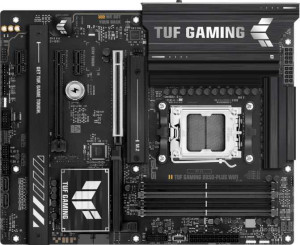
Asus TUF Gaming B850-Plus WiFi
MSI MAG B850 Tomahawk Max WiFi

Asus TUF Gaming B850-Plus WiFi MSI MAG B850 Tomahawk Max WiFi

Overview

When choosing between the Asus TUF Gaming B850-Plus WiFi and the MSI MAG B850 Tomahawk Max WiFi, builders are faced with two capable AM5 motherboards sharing the same B850 chipset and ATX form factor. Both offer Wi-Fi 7, Bluetooth 5.4, and PCIe 5.0 support, yet they diverge in meaningful ways across memory capacity and speed, rear-panel USB configuration, storage expansion, and onboard connectivity options — making the choice far from straightforward.

Common Features

  • Both boards use the AM5 CPU socket.
  • Both boards feature the B850 chipset.
  • Both boards have an ATX form factor.
  • Wi-Fi is supported on both boards.
  • Both boards support Wi-Fi 4 (802.11n), Wi-Fi 5 (802.11ac), Wi-Fi 6 (802.11ax), Wi-Fi 6E (802.11ax), and Wi-Fi 7 (802.11be).
  • Bluetooth is available on both boards at version 5.4.
  • Both boards include an HDMI 2.1 output.
  • Both boards have 4 memory slots.
  • Both boards use DDR5 memory.
  • Both boards support 2 memory channels.
  • ECC memory is not supported on either board.
  • Neither board has USB 3.2 Gen 1 Type-C ports on the rear panel.
  • Neither board includes USB 4 (40Gbps or 20Gbps) or Thunderbolt 3/4 ports.
  • Both boards have a single RJ45 port.
  • Both boards include a USB Type-C connector.
  • Both boards provide 4 USB 2.0 ports through internal expansion headers.
  • Both boards have 4 SATA 3 connectors and no SATA 2 connectors.
  • Neither board has a U.2 socket or mSATA connector.
  • Both boards include one PCIe 5.0 x16 slot and one PCIe 4.0 x16 slot.
  • Both boards deliver 7.1 audio channels with a 120 dB signal-to-noise ratio.
  • RAID 0, RAID 1, and RAID 10 (1+0) are supported on both boards, while RAID 0+1 is not supported on either.

Main Differences

  • Easy BIOS reset is available on MSI MAG B850 Tomahawk Max WiFi but not on Asus TUF Gaming B850-Plus WiFi.
  • Height is 244 mm on Asus TUF Gaming B850-Plus WiFi and 243.8 mm on MSI MAG B850 Tomahawk Max WiFi.
  • Width is 305 mm on Asus TUF Gaming B850-Plus WiFi and 304.8 mm on MSI MAG B850 Tomahawk Max WiFi.
  • Maximum supported memory is 192 GB on Asus TUF Gaming B850-Plus WiFi and 256 GB on MSI MAG B850 Tomahawk Max WiFi.
  • Maximum native RAM speed is 4000 MHz on Asus TUF Gaming B850-Plus WiFi and 5600 MHz on MSI MAG B850 Tomahawk Max WiFi.
  • Maximum overclocked RAM speed is 8000 MHz on Asus TUF Gaming B850-Plus WiFi and 8400 MHz on MSI MAG B850 Tomahawk Max WiFi.
  • USB 3.2 Gen 2 Type-A ports number 3 on Asus TUF Gaming B850-Plus WiFi and 2 on MSI MAG B850 Tomahawk Max WiFi.
  • USB 3.2 Gen 1 Type-A ports number 4 on Asus TUF Gaming B850-Plus WiFi and 1 on MSI MAG B850 Tomahawk Max WiFi.
  • USB 3.2 Gen 2 Type-C ports number 0 on Asus TUF Gaming B850-Plus WiFi and 3 on MSI MAG B850 Tomahawk Max WiFi.
  • USB 2.0 rear panel ports number 2 on Asus TUF Gaming B850-Plus WiFi and 4 on MSI MAG B850 Tomahawk Max WiFi.
  • A USB 3.2 Gen 2x2 port is present on Asus TUF Gaming B850-Plus WiFi but not available on MSI MAG B850 Tomahawk Max WiFi.
  • A DisplayPort output is present on Asus TUF Gaming B850-Plus WiFi but not available on MSI MAG B850 Tomahawk Max WiFi.
  • USB 3.2 Gen 1 expansion headers support 2 ports on Asus TUF Gaming B850-Plus WiFi and 4 ports on MSI MAG B850 Tomahawk Max WiFi.
  • Fan headers number 6 on Asus TUF Gaming B850-Plus WiFi and 8 on MSI MAG B850 Tomahawk Max WiFi.
  • M.2 sockets number 3 on Asus TUF Gaming B850-Plus WiFi and 4 on MSI MAG B850 Tomahawk Max WiFi.
  • A TPM connector is present on MSI MAG B850 Tomahawk Max WiFi but not on Asus TUF Gaming B850-Plus WiFi.
  • PCIe x1 slots number 2 on Asus TUF Gaming B850-Plus WiFi and 1 on MSI MAG B850 Tomahawk Max WiFi.
  • An S/PDIF output port is present on MSI MAG B850 Tomahawk Max WiFi but not on Asus TUF Gaming B850-Plus WiFi.
  • Audio connectors number 5 on Asus TUF Gaming B850-Plus WiFi and 2 on MSI MAG B850 Tomahawk Max WiFi.
  • RAID 5 is supported on Asus TUF Gaming B850-Plus WiFi but not on MSI MAG B850 Tomahawk Max WiFi.
Specs Comparison
Asus TUF Gaming B850-Plus WiFi

Asus TUF Gaming B850-Plus WiFi

MSI MAG B850 Tomahawk Max WiFi

MSI MAG B850 Tomahawk Max WiFi

General info:
CPU socket AM5 AM5
chipset B850 B850
form factor ATX ATX
release date January 2025 January 2025
supports Wi-Fi
Wi-Fi version Wi-Fi 4 (802.11n), Wi-Fi 5 (802.11ac), Wi-Fi 6 (802.11ax), Wi-Fi 6E (802.11ax), Wi-Fi 7 (802.11be) Wi-Fi 4 (802.11n), Wi-Fi 5 (802.11ac), Wi-Fi 6 (802.11ax), Wi-Fi 6E (802.11ax), Wi-Fi 7 (802.11be)
Has Bluetooth
Bluetooth version 5.4 5.4
HDMI version HDMI 2.1 HDMI 2.1
Easy to overclock
has RGB lighting
Easy to reset BIOS
Has dual BIOS
has aptX
CPU sockets 1 1
Has integrated graphics
warranty period 3 years 3 years
height 244 mm 243.8 mm
width 305 mm 304.8 mm
Has integrated CPU

At a platform level, the Asus TUF Gaming B850-Plus WiFi and the MSI MAG B850 Tomahawk Max WiFi are remarkably alike. Both are full-size ATX boards built on the AMD B850 chipset with an AM5 socket, meaning they target the same generation of Ryzen processors and offer identical upgrade paths. Connectivity is also a dead heat: both support the full Wi-Fi 7 (802.11be) stack down to Wi-Fi 4, Bluetooth 5.4, and HDMI 2.1 — so neither board will bottleneck your wireless peripherals or display output. Overclocking support, RGB lighting, dual BIOS, and a 3-year warranty are shared as well, and the physical footprints are essentially indistinguishable at roughly 244 × 305 mm.

The only meaningful differentiator in this group is Easy to reset BIOS: the MSI Tomahawk Max WiFi supports it, while the Asus TUF does not. In practice, a dedicated BIOS reset mechanism — typically a physical button on the I/O shield — is a genuine quality-of-life feature. If a failed overclock or a corrupted firmware update leaves your system unbootable, being able to recover without needing a POST or a spare CPU is a significant convenience, especially for users who push their hardware aggressively or upgrade components frequently.

Overall, these two boards are functionally equivalent at the general-info level, but the MSI MAG B850 Tomahawk Max WiFi holds a narrow edge thanks to its easier BIOS reset capability — a small but real advantage for anyone who values resilience and ease of recovery in their build.

Memory:
maximum memory amount 192GB 256GB
RAM speed (max) 4000 MHz 5600 MHz
overclocked RAM speed 8000 MHz 8400 MHz
memory slots 4 4
DDR memory version 5 5
memory channels 2 2
Supports ECC memory

Both boards share the same DDR5 foundation with 4 slots across 2 memory channels, but the capacity and speed ceilings tell meaningfully different stories. The MSI MAG B850 Tomahawk Max WiFi supports up to 256GB of RAM, versus 192GB on the Asus TUF Gaming B850-Plus WiFi — a 33% headroom advantage that matters most for workstation-style workloads like large virtual machines, video editing with massive timelines, or memory-intensive data processing. For gaming alone, neither ceiling is a practical constraint, but the MSI's higher cap signals a board better prepared for demanding professional use cases.

The speed gap is equally consequential. The Tomahawk Max WiFi's native RAM ceiling of 5600 MHz versus the TUF's 4000 MHz, and its overclocked peak of 8400 MHz against 8000 MHz, indicate that MSI's board is more permissive with high-frequency kits out of the box and at the upper end of XMP/EXPO profiles. In real-world terms, faster memory directly benefits CPU-bound tasks and games that are sensitive to memory latency and bandwidth — particularly on AMD's Ryzen architecture, which is well-documented to respond positively to memory frequency increases.

With advantages in both maximum capacity and supported memory speeds, the MSI MAG B850 Tomahawk Max WiFi has a clear edge in this category. The Asus TUF remains entirely adequate for mainstream builds, but users planning high-density memory configurations or intending to run fast DDR5 kits at rated speeds will find the MSI the more capable platform.

Ports:
USB 3.2 Gen 2 ports (USB-A) 3 2
USB 3.2 Gen 1 ports (USB-A) 4 1
USB 3.2 Gen 2 ports (USB-C) 0 3
USB 3.2 Gen 1 ports (USB-C) 0 0
USB 2.0 ports 2 4
USB 3.2 Gen 2x2 ports 1 0
USB 4 40Gbps ports 0 0
USB 4 20Gbps ports 0 0
Thunderbolt 4 ports 0 0
Thunderbolt 3 ports 0 0
has an HDMI output
DisplayPort outputs 1 0
RJ45 ports 1 1
Has USB Type-C
eSATA ports 0 0
DVI outputs 0 0
has a VGA connector
PS/2 ports 0 0

The port layouts on these two boards reflect fundamentally different philosophies about modern connectivity. The Asus TUF Gaming B850-Plus WiFi leans heavily into USB-A quantity, offering a combined 7 USB-A ports (3× Gen 2 at 10Gbps and 4× Gen 1 at 5Gbps), plus a standout USB 3.2 Gen 2x2 port delivering a full 20Gbps — the fastest single USB connection on either board. It also includes a DisplayPort output alongside HDMI, giving it two distinct video-out options. This layout suits users with a large collection of traditional USB-A peripherals and anyone who benefits from a secondary display connector.

The MSI MAG B850 Tomahawk Max WiFi, by contrast, makes a decisive bet on USB-C, packing 3× USB 3.2 Gen 2 Type-C ports at 10Gbps each — versus zero on the Asus. That triple-C configuration is a significant advantage for users running modern external SSDs, recent smartphones, or USB-C monitors, and it future-proofs the board more effectively as the industry continues its shift away from USB-A. The trade-off is a much thinner USB-A selection and no DisplayPort output whatsoever.

Neither board has a definitive overall win here — the right choice depends entirely on your peripheral ecosystem. The Asus TUF holds the edge for raw USB-A density, the fastest single port via Gen 2x2, and dual video outputs. The MSI Tomahawk Max WiFi is the stronger pick for anyone invested in modern USB-C devices. Users bridging old and new hardware will likely find the Asus more immediately practical, while forward-looking builders will appreciate the MSI's Type-C commitment.

Connectors:
USB 3.2 Gen 1 ports (through expansion) 2 4
USB 2.0 ports (through expansion) 4 4
SATA 3 connectors 4 4
fan headers 6 8
USB 3.0 ports (through expansion) 2 4
M.2 sockets 3 4
Has TPM connector
U.2 sockets 0 0
Has mSATA connector
SATA 2 connectors 0 0

Internal connectors are where a board's true expandability lives, and the MSI MAG B850 Tomahawk Max WiFi pulls ahead on nearly every metric here. Its 4 M.2 sockets versus the Asus TUF's 3 means one additional slot for NVMe storage — meaningful for content creators, video editors, or power users who want to run multiple fast drives without touching the SATA ports. Both boards offer 4 SATA 3 connectors, so traditional HDD or SSD arrays are equally supported on either platform.

Fan and thermal management tells a similar story. The Tomahawk Max WiFi provides 8 fan headers compared to the TUF's 6, which is a tangible advantage in high-airflow builds with multiple case fans, radiator pumps, and AIO headers to manage. Two extra headers eliminate the need for splitters or fan hubs in complex cooling setups, simplifying cable management and giving finer individual control over each fan zone. The MSI also doubles the TUF's internal USB 3.0 expansion headers — 4 versus 2 — useful for front-panel connectivity on cases with multiple high-speed USB ports.

A quieter but notable differentiator is the MSI's TPM connector, which the Asus lacks. A dedicated TPM header supports hardware-based security modules — relevant for enterprise environments, Windows 11 compliance without relying solely on firmware TPM, or users who prioritize hardware-level encryption. Taken together, the MSI MAG B850 Tomahawk Max WiFi holds a clear advantage in this category, offering more storage slots, more fan headers, more internal USB bandwidth, and an added security feature that the Asus simply does not provide.
Expansion slots:
PCIe 4.0 x16 slots 1 1
PCIe 5.0 x16 slots 1 1
PCIe 3.0 x16 slots 0 0
PCIe x1 slots 2 1
PCI slots 0 0
PCIe 2.0 x16 slots 0 0
PCIe x4 slots 0 0
PCIe x8 slots 0 0

For the slots that matter most, these two boards are identical: both feature one PCIe 5.0 x16 slot and one PCIe 4.0 x16 slot, covering the primary GPU lane and a secondary full-bandwidth slot for additional cards or high-speed adapters. The PCIe 5.0 primary slot ensures compatibility with current and next-generation graphics cards without any bandwidth bottleneck, while the PCIe 4.0 x16 slot offers ample throughput for capture cards, 10GbE NICs, or other expansion hardware.

The only differentiator is a modest one: the Asus TUF Gaming B850-Plus WiFi includes 2 PCIe x1 slots, while the MSI MAG B850 Tomahawk Max WiFi provides just 1. PCIe x1 slots serve legacy or low-bandwidth add-in cards — sound cards, USB expansion cards, and similar accessories. Having two rather than one is genuinely useful if you rely on multiple such cards simultaneously, but for most modern builds that lean on onboard audio and integrated USB, a single x1 slot is rarely a constraint.

This category is effectively a near-tie, with the Asus TUF holding a slim edge for users who specifically need more than one PCIe x1 slot. Anyone building a standard gaming or workstation rig will find both boards equally equipped for the expansion workloads that actually matter.

Audio:
Signal-to-Noise ratio (DAC) 120 dB 120 dB
audio channels 7.1 7.1
Has S/PDIF Out port
audio connectors 5 2

On the fundamentals, these boards are evenly matched: both deliver 7.1 surround audio with a 120 dB signal-to-noise ratio from their onboard DACs. A 120 dB SNR is a strong figure for integrated audio, indicating clean output with minimal background noise — well-suited for gaming headsets, stereo speakers, and even entry-level studio monitoring without requiring a dedicated sound card.

Where they diverge is in how that audio reaches your devices. The Asus TUF Gaming B850-Plus WiFi offers 5 analog audio connectors, giving you the physical jacks needed to simultaneously connect a full analog surround speaker system, a front-panel headset, and a microphone without adapters. The MSI MAG B850 Tomahawk Max WiFi cuts that to just 2 analog connectors, which limits multi-device analog setups — but compensates with an S/PDIF optical output that the Asus entirely lacks. S/PDIF is the preferred connection for AV receivers, soundbars, and DAC/amp units that accept a digital signal, passing audio processing downstream to dedicated hardware rather than relying on the motherboard's codec.

The right board depends on your audio setup. For users with analog speaker arrays or multiple simultaneous analog connections, the Asus TUF has a practical advantage with its denser jack layout. For anyone routing audio through a receiver or external DAC via optical, the MSI's S/PDIF out is the more capable choice. Neither board is strictly superior — they cater to different audio workflows, making this category a contextual tie.

Storage:
Supports RAID 1
Supports RAID 10 (1+0)
Supports RAID 5
Supports RAID 0
Supports RAID 0+1

RAID support on consumer motherboards is a niche but important consideration for users who manage multi-drive arrays for redundancy or performance. Both boards cover the most common configurations — RAID 0 for striped performance, RAID 1 for mirroring, and RAID 10 for a combined stripe-and-mirror approach — so the vast majority of home server and workstation RAID setups are equally supported on either platform.

The single differentiator is RAID 5, which the Asus TUF Gaming B850-Plus WiFi supports and the MSI MAG B850 Tomahawk Max WiFi does not. RAID 5 distributes parity data across three or more drives, offering a balance of redundancy, storage efficiency, and read performance that neither RAID 1 nor RAID 10 fully replicates — particularly when maximizing usable capacity across multiple drives is a priority. It is the configuration of choice for small NAS-style builds where losing a full drive's worth of space to pure mirroring (as in RAID 1) is undesirable.

For most gaming or general-purpose builds, this distinction is irrelevant — RAID of any kind is rarely used in those contexts. But for users specifically planning a multi-drive redundant array where storage efficiency matters, the Asus TUF holds a clear and functional edge as the only board here with RAID 5 capability.

Comparison Summary & Verdict

Both boards are strong B850 contenders, but each suits a different type of builder. The Asus TUF Gaming B850-Plus WiFi stands out for users who need a more diverse rear USB-A selection, a DisplayPort output, a USB 3.2 Gen 2x2 port, RAID 5 support, and more analog audio connectors — making it a solid pick for multimedia enthusiasts and those with legacy display or storage setups. The MSI MAG B850 Tomahawk Max WiFi pulls ahead for power users who want higher maximum memory capacity (256 GB), faster native and overclocked RAM speeds, an extra M.2 slot, more fan headers, three rear USB-C ports, a TPM connector, and easy BIOS reset functionality. If future-proofing memory and system manageability are your priorities, the MSI is the stronger platform.

Asus TUF Gaming B850-Plus WiFi
Buy Asus TUF Gaming B850-Plus WiFi if...

Buy the Asus TUF Gaming B850-Plus WiFi if you need a DisplayPort output, a broader range of rear USB-A ports including a USB 3.2 Gen 2x2 port, RAID 5 support, or more analog audio connectors.

MSI MAG B850 Tomahawk Max WiFi
Buy MSI MAG B850 Tomahawk Max WiFi if...

Buy the MSI MAG B850 Tomahawk Max WiFi if you want higher maximum memory capacity (256 GB), faster RAM speeds, an extra M.2 slot, more fan headers, three rear USB-C ports, or easy BIOS reset capability.