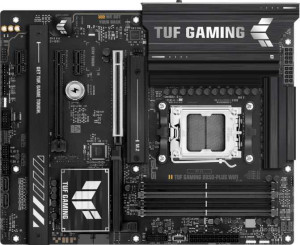
Asus TUF Gaming B850-Plus WiFi
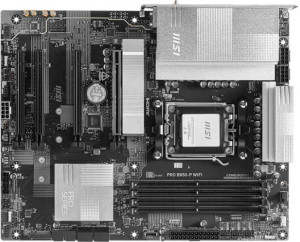
MSI Pro B850-P WiFi

Asus TUF Gaming B850-Plus WiFi MSI Pro B850-P WiFi

Overview

Welcome to our detailed spec comparison between the Asus TUF Gaming B850-Plus WiFi and the MSI Pro B850-P WiFi, two ATX motherboards built on the AM5 platform with the B850 chipset. Both boards share a strong common foundation, yet they diverge in meaningful ways across memory capacity and speed, rear USB port configurations, audio connectivity, and storage features — making the choice between them far from trivial depending on your build goals.

Common Features

  • Both motherboards use the AM5 CPU socket.
  • Both motherboards feature the B850 chipset.
  • Both boards use the ATX form factor.
  • Wi-Fi is supported on both boards, covering Wi-Fi 4, Wi-Fi 5, Wi-Fi 6, Wi-Fi 6E, and Wi-Fi 7.
  • Bluetooth 5.4 is available on both motherboards.
  • Both boards include an HDMI 2.1 output.
  • Both boards have 4 memory slots supporting DDR5.
  • Both boards support 2 memory channels.
  • ECC memory is not supported on either board.
  • Neither board has USB 3.2 Gen 1 USB-C ports on the rear panel.
  • Neither board includes USB 4 40Gbps or USB 4 20Gbps ports.
  • Neither board features Thunderbolt 3 or Thunderbolt 4 ports.
  • Both boards include one RJ45 port.
  • Both boards have at least one USB Type-C port.
  • Both boards provide 4 USB 2.0 expansion headers and 4 SATA 3 connectors.
  • Both boards include 6 fan headers and 3 M.2 sockets.
  • Neither board has an mSATA connector or U.2 sockets.
  • Both boards have 1 PCIe 5.0 x16 slot, 1 PCIe 4.0 x16 slot, and 2 PCIe x1 slots.
  • Both boards support 7.1 audio channels.
  • Both boards support RAID 0 and RAID 1, but not RAID 0+1.

Main Differences

  • Easy BIOS reset is available on MSI Pro B850-P WiFi but not on Asus TUF Gaming B850-Plus WiFi.
  • The height is 244 mm on Asus TUF Gaming B850-Plus WiFi and 243.8 mm on MSI Pro B850-P WiFi.
  • The width is 305 mm on Asus TUF Gaming B850-Plus WiFi and 304.8 mm on MSI Pro B850-P WiFi.
  • Maximum memory capacity is 192 GB on Asus TUF Gaming B850-Plus WiFi and 256 GB on MSI Pro B850-P WiFi.
  • Maximum native RAM speed is 4000 MHz on Asus TUF Gaming B850-Plus WiFi and 5600 MHz on MSI Pro B850-P WiFi.
  • Maximum overclocked RAM speed is 8000 MHz on Asus TUF Gaming B850-Plus WiFi and 8200 MHz on MSI Pro B850-P WiFi.
  • USB 3.2 Gen 2 Type-A rear ports number 3 on Asus TUF Gaming B850-Plus WiFi and 1 on MSI Pro B850-P WiFi.
  • USB 3.2 Gen 1 Type-A rear ports number 4 on Asus TUF Gaming B850-Plus WiFi and 1 on MSI Pro B850-P WiFi.
  • USB 3.2 Gen 2 Type-C rear ports number 0 on Asus TUF Gaming B850-Plus WiFi and 2 on MSI Pro B850-P WiFi.
  • USB 2.0 rear ports number 2 on Asus TUF Gaming B850-Plus WiFi and 4 on MSI Pro B850-P WiFi.
  • A USB 3.2 Gen 2x2 port is present on Asus TUF Gaming B850-Plus WiFi but not on MSI Pro B850-P WiFi.
  • A DisplayPort output is present on Asus TUF Gaming B850-Plus WiFi but not on MSI Pro B850-P WiFi.
  • USB 3.2 Gen 1 expansion headers support 2 ports on Asus TUF Gaming B850-Plus WiFi and 4 ports on MSI Pro B850-P WiFi.
  • USB 3.0 expansion headers support 2 ports on Asus TUF Gaming B850-Plus WiFi and 4 ports on MSI Pro B850-P WiFi.
  • A TPM connector is present on MSI Pro B850-P WiFi but not on Asus TUF Gaming B850-Plus WiFi.
  • An S/PDIF output port is present on MSI Pro B850-P WiFi but not on Asus TUF Gaming B850-Plus WiFi.
  • The number of analog audio connectors is 5 on Asus TUF Gaming B850-Plus WiFi and 2 on MSI Pro B850-P WiFi.
  • RAID 10 support is available on Asus TUF Gaming B850-Plus WiFi but not on MSI Pro B850-P WiFi.
  • RAID 5 support is available on Asus TUF Gaming B850-Plus WiFi but not on MSI Pro B850-P WiFi.
Specs Comparison
Asus TUF Gaming B850-Plus WiFi

Asus TUF Gaming B850-Plus WiFi

MSI Pro B850-P WiFi

MSI Pro B850-P WiFi

General info:
CPU socket AM5 AM5
chipset B850 B850
form factor ATX ATX
release date January 2025 January 2025
supports Wi-Fi
Wi-Fi version Wi-Fi 4 (802.11n), Wi-Fi 5 (802.11ac), Wi-Fi 6 (802.11ax), Wi-Fi 6E (802.11ax), Wi-Fi 7 (802.11be) Wi-Fi 4 (802.11n), Wi-Fi 5 (802.11ac), Wi-Fi 6 (802.11ax), Wi-Fi 6E (802.11ax), Wi-Fi 7 (802.11be)
Has Bluetooth
Bluetooth version 5.4 5.4
HDMI version HDMI 2.1 HDMI 2.1
Easy to overclock
has RGB lighting
Easy to reset BIOS
Has dual BIOS
has aptX
CPU sockets 1 1
Has integrated graphics
warranty period 3 years 3 years
height 244 mm 243.8 mm
width 305 mm 304.8 mm
Has integrated CPU

At a foundational level, the Asus TUF Gaming B850-Plus WiFi and the MSI Pro B850-P WiFi are nearly identical in general configuration: both use the AM5 socket with the B850 chipset, adopt the standard ATX form factor, and share the same wireless stack — Wi-Fi 7 (802.11be) with backward compatibility down to Wi-Fi 4, plus Bluetooth 5.4. For users building a modern Ryzen platform, this means both boards offer the same connectivity ceiling, including the low-latency, high-throughput benefits of Wi-Fi 7 and the improved range and coexistence handling of Bluetooth 5.4. Neither board integrates a CPU or discrete graphics, which is expected for this class.

Both boards also share HDMI 2.1 output, overclocking support, RGB lighting, and a dual BIOS — a meaningful safety net that lets the system recover from a failed firmware flash by falling back to a backup chip. The 3-year warranty and near-identical physical dimensions (under 0.2 mm difference in either direction) mean there is no practical distinction in longevity coverage or case compatibility.

The one concrete differentiator in this group is easy BIOS reset: the MSI Pro B850-P WiFi supports it, while the Asus TUF does not. In practice, this means the MSI board likely includes a dedicated clear-CMOS button accessible without opening the case — a genuine convenience advantage for overclockers or users who frequently tweak firmware settings. It is a small but real edge: the MSI Pro B850-P WiFi wins this group narrowly, purely on that added accessibility feature.

Memory:
maximum memory amount 192GB 256GB
RAM speed (max) 4000 MHz 5600 MHz
overclocked RAM speed 8000 MHz 8200 MHz
memory slots 4 4
DDR memory version 5 5
memory channels 2 2
Supports ECC memory

The Asus TUF Gaming B850-Plus WiFi and MSI Pro B850-P WiFi offer similar memory configurations, both supporting DDR5 memory with 2 memory channels and 4 memory slots. However, they differ in the maximum supported memory amount, with the Asus board supporting up to 192GB, while the MSI board can handle up to 256GB.

In terms of memory speeds, the Asus TUF Gaming B850-Plus WiFi supports a maximum RAM speed of 4000 MHz and can overclock to 8000 MHz. The MSI Pro B850-P WiFi, on the other hand, offers a higher maximum RAM speed of 5600 MHz and can overclock to 8200 MHz. Both motherboards support DDR5 memory, but the MSI version provides faster out-of-the-box speeds and higher overclocking potential.

Both products do not support ECC memory, meaning neither can utilize error-correcting code RAM for enhanced reliability. Overall, the key differences lie in the maximum memory capacity and speed, with the MSI board offering higher values for both specifications.

Ports:
USB 3.2 Gen 2 ports (USB-A) 3 1
USB 3.2 Gen 1 ports (USB-A) 4 1
USB 3.2 Gen 2 ports (USB-C) 0 2
USB 3.2 Gen 1 ports (USB-C) 0 0
USB 2.0 ports 2 4
USB 3.2 Gen 2x2 ports 1 0
USB 4 40Gbps ports 0 0
USB 4 20Gbps ports 0 0
Thunderbolt 4 ports 0 0
Thunderbolt 3 ports 0 0
has an HDMI output
DisplayPort outputs 1 0
RJ45 ports 1 1
Has USB Type-C
eSATA ports 0 0
DVI outputs 0 0
has a VGA connector
PS/2 ports 0 0

The Asus TUF Gaming B850-Plus WiFi and MSI Pro B850-P WiFi differ in their USB port configurations. The Asus board features more USB 3.2 Gen 2 ports (USB-A), offering 3, compared to the MSI board's 1. Additionally, the Asus board has 4 USB 3.2 Gen 1 ports (USB-A), while the MSI model only provides 1. In contrast, the MSI Pro B850-P WiFi has 2 USB 3.2 Gen 2 ports (USB-C), while the Asus model lacks any USB 3.2 Gen 2 or USB 3.2 Gen 1 USB-C ports. Both motherboards have 2 USB 2.0 ports, but the Asus model features 1 USB 3.2 Gen 2x2 port, which the MSI board lacks.

Both boards have HDMI outputs, but the Asus board includes a DisplayPort output, while the MSI version does not. For network connectivity, both motherboards have 1 RJ45 port. Neither board features USB 4 40Gbps or 20Gbps ports, nor Thunderbolt 3 or Thunderbolt 4 ports. They also lack eSATA, DVI, VGA, and PS/2 ports.

Overall, the Asus TUF Gaming B850-Plus WiFi offers a greater variety of USB-A ports and an extra DisplayPort output, while the MSI Pro B850-P WiFi stands out with its 2 USB 3.2 Gen 2 (USB-C) ports. Neither board provides particularly unique options in the other categories, with both featuring HDMI, RJ45, and similar limitations in high-speed USB and video outputs.

Connectors:
USB 3.2 Gen 1 ports (through expansion) 2 4
USB 2.0 ports (through expansion) 4 4
SATA 3 connectors 4 4
fan headers 6 6
USB 3.0 ports (through expansion) 2 4
M.2 sockets 3 3
Has TPM connector
U.2 sockets 0 0
Has mSATA connector
SATA 2 connectors 0 0

The Asus TUF Gaming B850-Plus WiFi and MSI Pro B850-P WiFi offer similar connectivity options but with a few key differences. Both motherboards provide 4 SATA 3 connectors, 6 fan headers, and 3 M.2 sockets. However, the Asus model has 2 USB 3.2 Gen 1 ports and 2 USB 3.0 ports through expansion, while the MSI version offers 4 USB 3.2 Gen 1 ports and 4 USB 3.0 ports through expansion. Both motherboards also have 4 USB 2.0 ports through expansion.

One notable difference is that the MSI Pro B850-P WiFi includes a TPM (Trusted Platform Module) connector, which the Asus TUF Gaming B850-Plus WiFi lacks. Both boards lack U.2 sockets and mSATA connectors, and neither includes SATA 2 connectors.

In summary, the MSI Pro B850-P WiFi offers more USB 3.2 Gen 1 ports through expansion and includes a TPM connector, while the Asus TUF Gaming B850-Plus WiFi offers a different USB distribution with fewer Gen 1 ports through expansion but provides the same M.2 and SATA 3 configurations as the MSI board.

Expansion slots:
PCIe 4.0 x16 slots 1 1
PCIe 5.0 x16 slots 1 1
PCIe 3.0 x16 slots 0 0
PCIe x1 slots 2 2
PCI slots 0 0
PCIe 2.0 x16 slots 0 0
PCIe x4 slots 0 0
PCIe x8 slots 0 0

Both the Asus TUF Gaming B850-Plus WiFi and MSI Pro B850-P WiFi feature the same configuration for expansion slots. Both motherboards come with 1 PCIe 4.0 x16 slot and 1 PCIe 5.0 x16 slot, with 2 PCIe x1 slots for additional expansion cards. Neither motherboard includes PCI, PCIe 2.0 x16, PCIe x4, or PCIe x8 slots.

Therefore, in terms of expansion slot options, both models are identical, offering the same PCIe x16 slots and PCIe x1 slots for expansion, with no other slot types available on either board.

There are no differences between the two models in this category, as both offer the same set of expansion options for users looking to add additional components like graphics cards or other expansion cards.

Audio:
audio channels 7.1 7.1
Has S/PDIF Out port
audio connectors 5 2

The Asus TUF Gaming B850-Plus WiFi and MSI Pro B850-P WiFi both support 7.1 audio channels, offering high-quality surround sound. However, the two boards differ in terms of audio connectors and features. The Asus board has 5 audio connectors, while the MSI board has only 2. Additionally, the MSI Pro B850-P WiFi includes an S/PDIF Out port, which is not present on the Asus TUF Gaming B850-Plus WiFi.

While both motherboards support the same number of audio channels, the presence of the S/PDIF Out port on the MSI board could be a key factor for users seeking high-quality digital audio output. On the other hand, the Asus model provides more audio connectors, which may be preferable for users who need multiple analog audio connections.

In summary, the key difference lies in the audio connectors and the presence of the S/PDIF Out port, with the Asus board offering more connectors and the MSI board providing digital audio output capability.

Storage:
Supports RAID 1
Supports RAID 10 (1+0)
Supports RAID 5
Supports RAID 0
Supports RAID 0+1

The Asus TUF Gaming B850-Plus WiFi and MSI Pro B850-P WiFi offer different RAID support options. Both motherboards support RAID 1 for data mirroring, but the Asus board also supports RAID 10 (1+0) and RAID 5 for enhanced data redundancy and performance, while the MSI board does not support RAID 10 or RAID 5.

Both motherboards do not support RAID 0+1, which combines the features of RAID 0 and RAID 1. However, the Asus TUF Gaming B850-Plus WiFi has more comprehensive RAID support overall, with the addition of RAID 10 and RAID 5. The MSI Pro B850-P WiFi, on the other hand, only supports RAID 1 and RAID 0.

In summary, the key difference lies in the RAID support, with the Asus model providing a wider range of RAID configurations compared to the MSI model.

Comparison Summary & Verdict

Both the Asus TUF Gaming B850-Plus WiFi and the MSI Pro B850-P WiFi are solid B850-based ATX boards sharing Wi-Fi 7, Bluetooth 5.4, and triple M.2 support, but they cater to different builders. The Asus TUF Gaming B850-Plus WiFi stands out for users who need a richer rear USB Type-A selection, a USB 3.2 Gen 2x2 port, a DisplayPort output, more analog audio connectors, and advanced RAID 5 and RAID 10 support. On the other hand, the MSI Pro B850-P WiFi appeals to those who prioritize higher maximum memory capacity (256 GB), faster native RAM speeds up to 5600 MHz, USB Type-C rear ports, a TPM connector, an S/PDIF output, and the convenience of an easy BIOS reset button. Choose the Asus for a gaming or enthusiast build with diverse connectivity; choose the MSI for a professional or productivity-focused system demanding greater memory headroom and cleaner digital audio.

Asus TUF Gaming B850-Plus WiFi
Buy Asus TUF Gaming B850-Plus WiFi if...

Buy the Asus TUF Gaming B850-Plus WiFi if you need a greater variety of rear USB Type-A ports, a USB 3.2 Gen 2x2 port, a DisplayPort output, or advanced RAID 5 and RAID 10 storage support.

MSI Pro B850-P WiFi
Buy MSI Pro B850-P WiFi if...

Buy the MSI Pro B850-P WiFi if you require a higher maximum memory capacity of 256 GB, faster native RAM speeds, rear USB Type-C ports, a TPM connector, an S/PDIF output, or the convenience of an easy BIOS reset button.