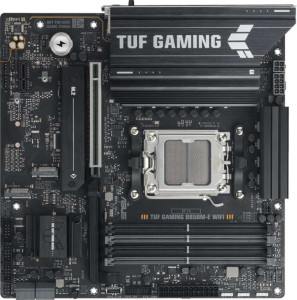
Asus TUF Gaming B850M-E Wi-Fi
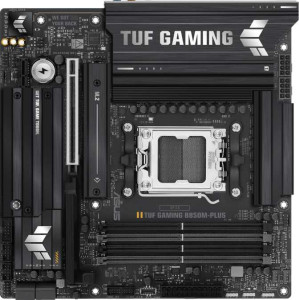
Asus TUF Gaming B850M-Plus

Asus TUF Gaming B850M-E Wi-Fi Asus TUF Gaming B850M-Plus

Overview

This comparison pits the Asus TUF Gaming B850M-E Wi-Fi against the Asus TUF Gaming B850M-Plus, two Micro-ATX motherboards sharing the same AM5 socket and B850 chipset. While their foundations are remarkably alike, the two boards diverge on wireless connectivity, rear USB port layouts, audio options, and maximum memory support. Explore the full breakdown below to find your ideal match.

Common Features

  • Both products use the AM5 CPU socket with the B850 chipset in a Micro-ATX form factor.
  • Both products support HDMI 2.1 and include an HDMI output.
  • Both products support easy overclocking.
  • RGB lighting is available on both products.
  • Neither product supports easy BIOS reset.
  • Both products feature dual BIOS.
  • Both products support overclocked RAM speeds of up to 8000 MHz across 4 DDR5 memory slots in a dual-channel configuration.
  • ECC memory is not supported on either product.
  • Both products include one RJ45 port, an HDMI output, and USB Type-C connectivity, with no USB 3.2 Gen 1 Type-C, USB 4, or Thunderbolt ports.
  • Both products provide 2 USB 3.2 Gen 1 ports and 4 USB 2.0 ports through expansion, along with 4 SATA 3 connectors and 3 M.2 sockets.
  • Neither product has a TPM connector, a U.2 socket, or an mSATA connector.
  • Both products have 1 PCIe 5.0 x16 slot, 1 PCIe x1 slot, and no PCIe 3.0 x16, PCIe 2.0 x16, PCIe x4, PCIe x8, or PCI slots.
  • Both products support 7.1 audio channels.
  • Both products support RAID 0, RAID 1, RAID 5, and RAID 10 (1+0), but neither supports RAID 0+1.

Main Differences

  • Wi-Fi support is present on Asus TUF Gaming B850M-E Wi-Fi but not available on Asus TUF Gaming B850M-Plus.
  • Bluetooth is present on Asus TUF Gaming B850M-E Wi-Fi but not available on Asus TUF Gaming B850M-Plus.
  • Maximum memory capacity is 256 GB on Asus TUF Gaming B850M-E Wi-Fi and 192 GB on Asus TUF Gaming B850M-Plus.
  • USB 3.2 Gen 2 Type-A ports number 1 on Asus TUF Gaming B850M-E Wi-Fi and 3 on Asus TUF Gaming B850M-Plus.
  • USB 3.2 Gen 1 Type-A ports number 2 on Asus TUF Gaming B850M-E Wi-Fi and 4 on Asus TUF Gaming B850M-Plus.
  • USB 3.2 Gen 2 Type-C ports number 1 on Asus TUF Gaming B850M-E Wi-Fi and 0 on Asus TUF Gaming B850M-Plus.
  • USB 2.0 ports number 0 on Asus TUF Gaming B850M-E Wi-Fi and 4 on Asus TUF Gaming B850M-Plus.
  • USB 3.2 Gen 2x2 ports number 0 on Asus TUF Gaming B850M-E Wi-Fi and 1 on Asus TUF Gaming B850M-Plus.
  • DisplayPort outputs number 2 on Asus TUF Gaming B850M-E Wi-Fi and 1 on Asus TUF Gaming B850M-Plus.
  • A PS/2 port is present on Asus TUF Gaming B850M-E Wi-Fi but not available on Asus TUF Gaming B850M-Plus.
  • Fan headers number 4 on Asus TUF Gaming B850M-E Wi-Fi and 5 on Asus TUF Gaming B850M-Plus.
  • An S/PDIF output port is present on Asus TUF Gaming B850M-Plus but not available on Asus TUF Gaming B850M-E Wi-Fi.
  • Audio connectors number 3 on Asus TUF Gaming B850M-E Wi-Fi and 5 on Asus TUF Gaming B850M-Plus.
Specs Comparison
Asus TUF Gaming B850M-E Wi-Fi

Asus TUF Gaming B850M-E Wi-Fi

Asus TUF Gaming B850M-Plus

Asus TUF Gaming B850M-Plus

General info:
CPU socket AM5 AM5
chipset B850 B850
form factor Micro-ATX Micro-ATX
release date September 2025 January 2025
supports Wi-Fi
Has Bluetooth
HDMI version HDMI 2.1 HDMI 2.1
Easy to overclock
has RGB lighting
Easy to reset BIOS
Has dual BIOS
CPU sockets 1 1
Has integrated graphics
warranty period 3 years 3 years
height 244 mm 244 mm
width 244 mm 244 mm
Has integrated CPU

At their core, the Asus TUF Gaming B850M-E Wi-Fi and the Asus TUF Gaming B850M-Plus are near-identical platforms: both use the AM5 socket with a B850 chipset, share the same Micro-ATX 244×244 mm footprint, support overclocking, feature RGB lighting, include dual BIOS, and carry a 3-year warranty. For a buyer evaluating platform capability, longevity, or build compatibility, these two boards are effectively interchangeable.

The one area where they genuinely diverge is connectivity: the B850M-E Wi-Fi ships with integrated Wi-Fi and Bluetooth, while the B850M-Plus has neither. In practical terms, this means the B850M-Plus requires a dedicated PCIe or USB wireless adapter if wireless connectivity is ever needed — adding cost, occupying a slot or port, and potentially introducing driver complexity. The built-in wireless on the B850M-E Wi-Fi is the cleaner, more future-proof solution for any build that isn't guaranteed to be near a wired Ethernet drop.

The B850M-E Wi-Fi has a clear edge in this group purely because of its onboard wireless stack. If your build will always sit next to a router via a cable, the B850M-Plus is a perfectly capable alternative with no real penalty — but for flexibility, the B850M-E Wi-Fi wins without qualification.

Memory:
maximum memory amount 256GB 192GB
overclocked RAM speed 8000 MHz 8000 MHz
memory slots 4 4
DDR memory version 5 5
memory channels 2 2
Supports ECC memory

Both boards share a strong memory foundation: 4 slots, DDR5, dual-channel architecture, and a peak overclocked speed of 8000 MHz — meaning neither board limits your ability to run fast, modern memory kits. For the vast majority of gaming and productivity workloads, these shared traits are what matter most.

Where things diverge is maximum capacity. The B850M-E Wi-Fi supports up to 256 GB of RAM, while the B850M-Plus caps at 192 GB. In everyday gaming or general use, neither ceiling is remotely relevant — most builds top out at 32 or 64 GB. However, for memory-intensive professional workloads like large virtual machines, high-resolution video editing timelines, or data analysis pipelines, the extra 64 GB headroom on the B850M-E Wi-Fi provides meaningful long-term flexibility.

The B850M-E Wi-Fi holds the edge in this group strictly due to its higher memory ceiling. For typical users the difference is academic, but for anyone building a workstation that doubles as a gaming rig — or anticipating heavier workloads down the line — the B850M-E Wi-Fi offers noticeably more room to grow.

Ports:
USB 3.2 Gen 2 ports (USB-A) 1 3
USB 3.2 Gen 1 ports (USB-A) 2 4
USB 3.2 Gen 2 ports (USB-C) 1 0
USB 3.2 Gen 1 ports (USB-C) 0 0
USB 2.0 ports 0 4
USB 3.2 Gen 2x2 ports 0 1
USB 4 40Gbps ports 0 0
USB 4 20Gbps ports 0 0
Thunderbolt 4 ports 0 0
Thunderbolt 3 ports 0 0
has an HDMI output
DisplayPort outputs 2 1
RJ45 ports 1 1
Has USB Type-C
eSATA ports 0 0
DVI outputs 0 0
has a VGA connector
PS/2 ports 1 0

The rear I/O tells two very different stories here. The B850M-Plus is built for sheer port volume: it offers 7 USB Type-A ports across Gen 1 and Gen 2 speeds, plus 4 USB 2.0 ports and a standout USB 3.2 Gen 2x2 port delivering up to 20 Gbps — ideal for connecting the latest high-speed external SSDs without an adapter. If your desk is crowded with peripherals, dongles, and storage devices, this board accommodates them with minimal fuss.

The B850M-E Wi-Fi takes a leaner but arguably more modern approach. It trades raw port count for a USB 3.2 Gen 2 Type-C on the rear panel — something the B850M-Plus entirely lacks — and pairs HDMI with two DisplayPort outputs versus the Plus's single DisplayPort. That dual-DisplayPort configuration is a genuine advantage for users running integrated-graphics-capable CPUs across multiple monitors, while the rear USB-C adds compatibility with contemporary devices and cables.

Neither board dominates unconditionally. The B850M-Plus holds the edge for peripheral-heavy setups thanks to its greater USB port count and Gen 2x2 throughput, while the B850M-E Wi-Fi better suits users who prioritize USB-C connectivity and multi-display flexibility. The right choice depends squarely on which constraint — port quantity or connection modernity — matters more in your specific build.

Connectors:
USB 3.2 Gen 1 ports (through expansion) 2 2
USB 2.0 ports (through expansion) 4 4
SATA 3 connectors 4 4
fan headers 4 5
USB 3.0 ports (through expansion) 2 2
M.2 sockets 3 3
Has TPM connector
U.2 sockets 0 0
Has mSATA connector
SATA 2 connectors 0 0

Internal connectivity is remarkably consistent between these two boards. Both provide 3 M.2 sockets for NVMe storage, 4 SATA 3 connectors for traditional drives, and identical expansion USB headers — giving builders the same storage flexibility and front-panel connectivity options regardless of which board they choose.

The only meaningful difference in this group is fan headers: the B850M-Plus edges ahead with 5 headers versus 4 on the B850M-E Wi-Fi. In practice, that extra header matters most in thermally demanding builds with multiple case fans, a separate radiator pump, and a CPU cooler all needing direct motherboard control. Without it, users on the B850M-E Wi-Fi may need a fan splitter or hub to manage more complex cooling setups — a minor but real inconvenience.

For the vast majority of builds with a CPU cooler and two or three case fans, four headers is entirely sufficient, making this distinction academic. But for builders planning aggressive cooling configurations, the B850M-Plus holds a slim, practical edge in this group.

Expansion slots:
PCIe 5.0 x16 slots 1 1
PCIe 3.0 x16 slots 0 0
PCIe x1 slots 1 1
PCI slots 0 0
PCIe 2.0 x16 slots 0 0
PCIe x4 slots 0 0
PCIe x8 slots 0 0

Expansion slot configuration is a clean tie here. Both boards offer one PCIe 5.0 x16 slot and one PCIe x1 slot — and nothing else. For a Micro-ATX board, this is a sensible and expected layout; the full-bandwidth PCIe 5.0 x16 slot handles a discrete GPU, while the x1 slot covers lower-bandwidth add-in cards like sound cards or network adapters.

The PCIe 5.0 standard is the key highlight shared by both boards. It delivers twice the bandwidth of PCIe 4.0 at the x16 interface, ensuring neither board will bottleneck current or near-future high-end GPUs. Builders investing in a top-tier graphics card today — or planning to upgrade in a couple of years — won't be constrained by the slot specification on either board.

With no differences whatsoever in this group, these two boards are completely tied on expansion. Your decision here has no bearing on which to choose.

Audio:
audio channels 7.1 7.1
Has S/PDIF Out port
audio connectors 3 5

On the surface, both boards deliver 7.1-channel audio — the same surround sound capability on paper. But the implementation differs in ways that matter to audio-conscious users. The B850M-Plus comes equipped with 5 analog audio connectors compared to just 3 on the B850M-E Wi-Fi, meaning the Plus can physically support a full multi-speaker 7.1 surround setup using analog jacks alone, while the E Wi-Fi may require workarounds for the same configuration.

The more significant differentiator is the S/PDIF optical output on the B850M-Plus, which the B850M-E Wi-Fi omits entirely. S/PDIF allows a lossless digital audio signal to be sent directly to an external DAC, AV receiver, or soundbar — bypassing the motherboard's onboard audio circuitry and eliminating potential electrical interference from PC components. For users with quality external audio equipment, this is a genuinely useful port that the B850M-E Wi-Fi simply cannot replicate without an add-in card.

The B850M-Plus holds a clear edge in this group. Its combination of more analog connectors and an S/PDIF output makes it the more capable board for users who take onboard audio seriously, whether they are running a multi-speaker desk setup or routing audio through external hi-fi hardware.

Storage:
Supports RAID 1
Supports RAID 10 (1+0)
Supports RAID 5
Supports RAID 0
Supports RAID 0+1

Storage redundancy support is identical across both boards. Each one covers the practical RAID bases — RAID 0 for striped performance, RAID 1 for mirroring and data protection, RAID 5 for distributed parity, and RAID 10 for the combined speed-and-redundancy sweet spot favored in small workstation or NAS-adjacent builds. Neither board supports RAID 0+1, but that mode is largely redundant given RAID 10 covers the same fundamental use case more efficiently.

This group is a complete tie. No matter which board you choose, your RAID options are exactly the same — storage configuration will not be a factor in distinguishing these two products.

Comparison Summary & Verdict

Both boards offer an impressive shared foundation: AM5 socket, B850 chipset, dual BIOS, RGB lighting, DDR5 support with 8000 MHz overclocking, 3 M.2 sockets, a PCIe 5.0 x16 slot, and RAID 0/1/5/10 support. The Asus TUF Gaming B850M-E Wi-Fi stands out for users who need built-in Wi-Fi and Bluetooth, a USB 3.2 Gen 2 Type-C rear port, 2 DisplayPort outputs, and up to 256 GB of RAM. The Asus TUF Gaming B850M-Plus is the better pick for builders who prefer a wired setup and want more rear USB flexibility, with 3 USB 3.2 Gen 2 Type-A ports, a USB 3.2 Gen 2x2 port, 5 audio connectors with S/PDIF output, and an extra fan header for more elaborate cooling configurations.

Asus TUF Gaming B850M-E Wi-Fi
Buy Asus TUF Gaming B850M-E Wi-Fi if...

Buy the Asus TUF Gaming B850M-E Wi-Fi if you need built-in Wi-Fi and Bluetooth, a USB 3.2 Gen 2 Type-C rear port, dual DisplayPort outputs, and support for up to 256 GB of RAM.

Asus TUF Gaming B850M-Plus
Buy Asus TUF Gaming B850M-Plus if...

Buy the Asus TUF Gaming B850M-Plus if you prefer a wired build with more rear USB ports, a USB 3.2 Gen 2x2 port, 5 audio connectors, an S/PDIF output, and an extra fan header for advanced cooling.