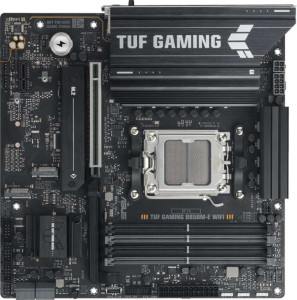
Asus TUF Gaming B850M-E Wi-Fi
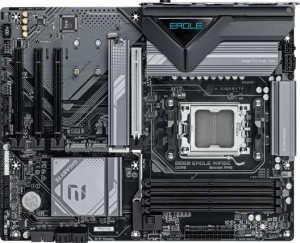
Gigabyte B850 Eagle WiFi6E

Asus TUF Gaming B850M-E Wi-Fi Gigabyte B850 Eagle WiFi6E

Overview

Choosing between the Asus TUF Gaming B850M-E Wi-Fi and the Gigabyte B850 Eagle WiFi6E means deciding between two capable AM5 motherboards built on the same B850 chipset. While they share a strong common foundation, key battlegrounds emerge around form factor and physical footprint, rear USB connectivity options, display output count, and internal expansion flexibility. This comparison breaks down every spec so you can confidently choose the right board for your next build.

Common Features

  • Both boards use the AM5 CPU socket.
  • Both boards feature the B850 chipset.
  • Wi-Fi is supported on both boards, covering Wi-Fi 4, Wi-Fi 5, Wi-Fi 6, and Wi-Fi 6E.
  • Bluetooth 5.3 is available on both boards.
  • Both boards support HDMI 2.1 output.
  • Overclocking is supported on both boards.
  • Both boards support up to 256GB of maximum memory.
  • Both boards have 4 memory slots.
  • Both boards use DDR5 memory.
  • Both boards have 2 memory channels.
  • ECC memory is not supported on either board.
  • Both boards have 2 USB 3.2 Gen 1 Type-A ports.
  • Neither board has USB 3.2 Gen 2x2, USB 4, or Thunderbolt ports.
  • Both boards have an HDMI output.
  • Both boards have 1 RJ45 port.
  • Both boards have 2 USB 3.2 Gen 1 ports through expansion, 4 USB 2.0 ports through expansion, and 2 USB 3.0 ports through expansion.
  • Both boards have 4 SATA 3 connectors and 0 SATA 2 connectors.
  • Both boards have 3 M.2 sockets.
  • Neither board has an mSATA connector.
  • Both boards have 1 PCIe 5.0 x16 slot and no PCIe 3.0 x16, PCIe 2.0 x16, PCI, PCIe x4, or PCIe x8 slots.
  • Both boards support 7.1 audio channels with 3 audio connectors.
  • S/PDIF Out is not available on either board.
  • Both boards support RAID 0, RAID 1, RAID 5, and RAID 10, but not RAID 0+1.

Main Differences

  • The Asus TUF Gaming B850M-E Wi-Fi is Micro-ATX form factor while the Gigabyte B850 Eagle WiFi6E is ATX.
  • The width is 244 mm on the Asus TUF Gaming B850M-E Wi-Fi and 305 mm on the Gigabyte B850 Eagle WiFi6E.
  • RGB lighting is present on the Asus TUF Gaming B850M-E Wi-Fi but not available on the Gigabyte B850 Eagle WiFi6E.
  • Maximum overclocked RAM speed is 8000 MHz on the Asus TUF Gaming B850M-E Wi-Fi and 8200 MHz on the Gigabyte B850 Eagle WiFi6E.
  • USB 3.2 Gen 2 Type-A ports number 1 on the Asus TUF Gaming B850M-E Wi-Fi and 2 on the Gigabyte B850 Eagle WiFi6E.
  • The Asus TUF Gaming B850M-E Wi-Fi has 1 USB 3.2 Gen 2 Type-C port while the Gigabyte B850 Eagle WiFi6E has none.
  • The Gigabyte B850 Eagle WiFi6E has 1 USB 3.2 Gen 1 Type-C port while the Asus TUF Gaming B850M-E Wi-Fi has none.
  • USB 2.0 ports number 0 on the Asus TUF Gaming B850M-E Wi-Fi and 4 on the Gigabyte B850 Eagle WiFi6E.
  • DisplayPort outputs number 2 on the Asus TUF Gaming B850M-E Wi-Fi and 1 on the Gigabyte B850 Eagle WiFi6E.
  • Fan headers number 4 on the Asus TUF Gaming B850M-E Wi-Fi and 6 on the Gigabyte B850 Eagle WiFi6E.
  • A TPM connector is present on the Gigabyte B850 Eagle WiFi6E but not available on the Asus TUF Gaming B850M-E Wi-Fi.
  • PCIe x1 slots number 1 on the Asus TUF Gaming B850M-E Wi-Fi and 3 on the Gigabyte B850 Eagle WiFi6E.
Specs Comparison
Asus TUF Gaming B850M-E Wi-Fi

Asus TUF Gaming B850M-E Wi-Fi

Gigabyte B850 Eagle WiFi6E

Gigabyte B850 Eagle WiFi6E

General info:
CPU socket AM5 AM5
chipset B850 B850
form factor Micro-ATX ATX
release date September 2025 January 2025
supports Wi-Fi
Wi-Fi version Wi-Fi 4 (802.11n), Wi-Fi 5 (802.11ac), Wi-Fi 6 (802.11ax), Wi-Fi 6E (802.11ax) Wi-Fi 4 (802.11n), Wi-Fi 5 (802.11ac), Wi-Fi 6 (802.11ax), Wi-Fi 6E (802.11ax)
Has Bluetooth
Bluetooth version 5.3 5.3
HDMI version HDMI 2.1 HDMI 2.1
Easy to overclock
has RGB lighting
Easy to reset BIOS
Has dual BIOS
has aptX
CPU sockets 1 1
Has integrated graphics
warranty period 3 years 3 years
height 244 mm 244 mm
width 244 mm 305 mm
Has integrated CPU

Both boards share the same AM5 socket and B850 chipset, meaning they target the same generation of AMD processors with identical platform-level capabilities. Connectivity parity is also complete: both offer Wi-Fi 6E (backward-compatible down to Wi-Fi 4), Bluetooth 5.3, and HDMI 2.1 — so neither board holds an advantage in wireless or display output. Overclocker-friendly features like dual BIOS and easy overclocking support are present on both, while neither offers an easy BIOS reset mechanism, which is a minor shared limitation for troubleshooting scenarios.

The single most decisive difference in this group is form factor. The Asus TUF Gaming B850M-E Wi-Fi is a Micro-ATX board measuring 244 × 244 mm, whereas the Gigabyte B850 Eagle WiFi6E is a full ATX board at 244 × 305 mm. In practice, this means the Asus fits into smaller, more compact cases that many builders prefer for space efficiency or desk aesthetics, while the Gigabyte's larger footprint typically allows for more expansion slots, better component spacing, and easier cable management — though those benefits would only be visible in the expansion and layout spec groups. Both carry a 3-year warranty, so long-term support is equal.

A secondary differentiator is that the Asus includes RGB lighting while the Gigabyte does not. For users who prioritize a lit build aesthetic, this gives the Asus a cosmetic edge. Overall, the core platform specs are essentially tied — the choice between these two boards in this group comes down to case size compatibility: pick the Asus TUF B850M-E for a compact Micro-ATX build, or the Gigabyte B850 Eagle for a standard full-ATX chassis.
Memory:
maximum memory amount 256GB 256GB
overclocked RAM speed 8000 MHz 8200 MHz
memory slots 4 4
DDR memory version 5 5
memory channels 2 2
Supports ECC memory

Memory compatibility is almost perfectly matched across these two boards. Both support DDR5 with 4 slots, a 256GB maximum capacity, and a dual-channel configuration — meaning real-world memory bandwidth and multitasking headroom are equivalent out of the box. Neither supports ECC memory, so workstation-grade error correction is off the table for both, which is expected at this chipset tier.

The only measurable difference here is the maximum supported overclocked RAM speed: the Asus TUF B850M-E tops out at 8000 MHz, while the Gigabyte B850 Eagle edges ahead to 8200 MHz. In practical terms, this gap is extremely narrow — the real-world performance difference between 8000 and 8200 MHz is negligible for gaming, content creation, or everyday productivity. Only extreme memory overclockers chasing benchmark records would find that 200 MHz ceiling meaningful.

For the vast majority of users, this group is effectively a tie. The Gigabyte holds a technical edge on paper with its slightly higher overclocked speed ceiling, but it is not a meaningful advantage for most build scenarios.

Ports:
USB 3.2 Gen 2 ports (USB-A) 1 2
USB 3.2 Gen 1 ports (USB-A) 2 2
USB 3.2 Gen 2 ports (USB-C) 1 0
USB 3.2 Gen 1 ports (USB-C) 0 1
USB 2.0 ports 0 4
USB 3.2 Gen 2x2 ports 0 0
USB 4 40Gbps ports 0 0
USB 4 20Gbps ports 0 0
Thunderbolt 4 ports 0 0
Thunderbolt 3 ports 0 0
has an HDMI output
DisplayPort outputs 2 1
RJ45 ports 1 1
Has USB Type-C
eSATA ports 0 0
DVI outputs 0 0
has a VGA connector
PS/2 ports 1 1

The rear I/O layouts diverge in ways that reflect different priorities. The Asus TUF B850M-E stands out with a USB 3.2 Gen 2 Type-C port (10Gbps), making it the faster option for users connecting modern external SSDs or high-speed peripherals via USB-C. The Gigabyte B850 Eagle, by contrast, offers only a USB 3.2 Gen 1 Type-C (5Gbps) — half the throughput — but compensates with an extra USB 3.2 Gen 2 Type-A port and, notably, 4 USB 2.0 ports that the Asus omits entirely. Those USB 2.0 ports are genuinely useful for legacy devices like keyboards, mice, or dongles, freeing up faster ports for bandwidth-hungry hardware.

On video output, the Asus pulls ahead with 2 DisplayPort outputs alongside its HDMI 2.1, enabling a two-monitor setup purely from the board's rear panel without touching the discrete GPU. The Gigabyte is limited to 1 DisplayPort plus HDMI — still adequate for a dual-display configuration, but with less flexibility. Both share a single RJ45 LAN port and a legacy PS/2 port.

Neither board is a clear overall winner here — the choice depends on use case. The Asus TUF B850M-E has the edge for users who prioritize high-speed USB-C throughput and multi-monitor flexibility, while the Gigabyte B850 Eagle is the stronger pick for builders with several legacy USB devices who need more port quantity on the rear panel.

Connectors:
USB 3.2 Gen 1 ports (through expansion) 2 2
USB 2.0 ports (through expansion) 4 4
SATA 3 connectors 4 4
fan headers 4 6
USB 3.0 ports (through expansion) 2 2
M.2 sockets 3 3
Has TPM connector
U.2 sockets 0 0
Has mSATA connector
SATA 2 connectors 0 0

Internal connectivity is largely identical between these two boards: both offer 3 M.2 sockets, 4 SATA 3 connectors, and the same internal USB expansion headers. For storage builders, this parity means neither board has an advantage in how many drives — NVMe or traditional — can be connected internally.

Where they diverge is in fan headers and platform security. The Gigabyte B850 Eagle provides 6 fan headers versus the Asus TUF B850M-E's 4 — a meaningful difference for builders running elaborate cooling setups with multiple case fans, pump headers, or AIO radiator fans. Manually managing fan curves across more headers without a separate fan controller hub is a genuine convenience advantage. Additionally, the Gigabyte includes a TPM connector, which the Asus lacks. A TPM (Trusted Platform Module) header allows a discrete TPM module to be added for hardware-level security features — relevant for enterprise environments, BitLocker encryption, or compliance requirements.

The Gigabyte B850 Eagle holds a clear edge in this group. Its extra fan headers benefit thermal management in more complex builds, and the TPM connector adds a security option the Asus simply cannot match without hardware modification. For straightforward builds these differences may not matter, but for cooling-heavy or security-conscious configurations, the Gigabyte is the stronger choice here.

Expansion slots:
PCIe 5.0 x16 slots 1 1
PCIe 3.0 x16 slots 0 0
PCIe x1 slots 1 3
PCI slots 0 0
PCIe 2.0 x16 slots 0 0
PCIe x4 slots 0 0
PCIe x8 slots 0 0

Both boards provide a single PCIe 5.0 x16 slot for the primary GPU, ensuring full next-generation bandwidth for discrete graphics cards — no compromise there on either side. Where they part ways is in the number of smaller expansion slots: the Asus TUF B850M-E offers just 1 PCIe x1 slot, while the Gigabyte B850 Eagle provides 3 PCIe x1 slots.

Those extra x1 slots matter more than they might initially appear. PCIe x1 slots are the standard home for add-in cards like sound cards, capture cards, additional USB or SATA controller cards, and network adapters. A builder who wants to expand functionality beyond what the board natively offers has significantly more room to do so on the Gigabyte. This is also a natural consequence of the ATX form factor noted in the general specs — the larger PCB simply has the physical space to accommodate more slots.

The Gigabyte B850 Eagle has a clear advantage here for users who anticipate adding expansion cards alongside their GPU. For a straightforward single-GPU gaming build with no add-in cards planned, the Asus TUF B850M-E's single x1 slot is sufficient — but the Gigabyte offers considerably more future flexibility in this group.

Audio:
audio channels 7.1 7.1
Has S/PDIF Out port
audio connectors 3 3

Audio is a clean draw between these two boards. Both deliver 7.1-channel surround sound support through 3 analog audio connectors, and neither includes an S/PDIF optical output — ruling out direct digital passthrough to an external DAC or AV receiver via optical cable for both.

The absence of S/PDIF is a shared limitation worth noting for home theater or audiophile setups that rely on optical connections, but it is not uncommon at this market segment. Users with those requirements would need a discrete sound card or USB DAC regardless of which board they choose. For the vast majority of users — gaming headsets, stereo speakers, or basic surround setups — the onboard 7.1-channel analog output is more than adequate.

This group is a complete tie. There is no differentiator between the Asus TUF B850M-E and the Gigabyte B850 Eagle on audio specifications, and neither board holds any advantage here.

Storage:
Supports RAID 1
Supports RAID 10 (1+0)
Supports RAID 5
Supports RAID 0
Supports RAID 0+1

Storage configuration support is identical across both boards. Each one covers the most practically useful RAID modes: RAID 0 for striped performance, RAID 1 for mirrored redundancy, RAID 5 for distributed parity, and RAID 10 for the combined speed-and-redundancy sweet spot. Neither supports RAID 0+1, though that omission is inconsequential in practice since RAID 10 achieves a functionally equivalent outcome with better fault tolerance.

This group is a complete tie. Regardless of whether a user is building a NAS-style redundant storage array or a performance-striped setup, both the Asus TUF B850M-E and the Gigabyte B850 Eagle offer exactly the same RAID capabilities — no advantage exists on either side.

Comparison Summary & Verdict

The Asus TUF Gaming B850M-E Wi-Fi and the Gigabyte B850 Eagle WiFi6E share an impressive amount of common ground, including AM5 support, Wi-Fi 6E, DDR5 with four slots up to 256GB, three M.2 sockets, and full RAID support. Yet their differences point clearly to different builders. The Asus TUF Gaming B850M-E Wi-Fi stands out for those who need a compact Micro-ATX footprint, want RGB lighting, require a rear USB 3.2 Gen 2 Type-C port, or benefit from dual DisplayPort outputs. The Gigabyte B850 Eagle WiFi6E, on the other hand, is better suited for a full ATX build where more fan headers are needed for advanced cooling, a TPM connector is required for security compliance, higher RAM overclocking headroom matters, and broader PCIe x1 expansion is a priority.

Asus TUF Gaming B850M-E Wi-Fi
Buy Asus TUF Gaming B850M-E Wi-Fi if...

Buy the Asus TUF Gaming B850M-E Wi-Fi if you are building in a compact Micro-ATX case and want RGB lighting, a rear USB 3.2 Gen 2 Type-C port, and dual DisplayPort outputs.

Gigabyte B850 Eagle WiFi6E
Buy Gigabyte B850 Eagle WiFi6E if...

Buy the Gigabyte B850 Eagle WiFi6E if you need a full ATX board with more fan headers for advanced cooling, a TPM connector, slightly higher RAM overclocking support, and more PCIe x1 expansion slots.