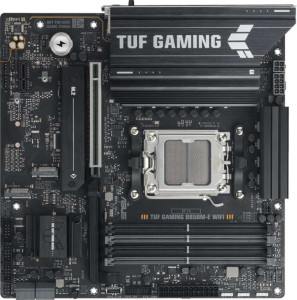
Asus TUF Gaming B850M-E Wi-Fi
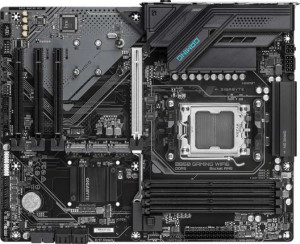
Gigabyte B850 Gaming WiFi6

Asus TUF Gaming B850M-E Wi-Fi Gigabyte B850 Gaming WiFi6

Overview

When building a modern AMD platform, the choice between the Asus TUF Gaming B850M-E Wi-Fi and the Gigabyte B850 Gaming WiFi6 comes down to more than just price. Both boards are built around the AM5 socket and the B850 chipset with DDR5 memory support, yet they take noticeably different approaches to form factor, wireless connectivity, USB layout, and thermal management. Read on to see how every key specification stacks up before you commit to your next build.

Common Features

  • Both boards use the AM5 CPU socket.
  • Both boards feature the B850 chipset.
  • Wi-Fi connectivity is available on both boards.
  • Bluetooth 5.3 is present on both boards.
  • Both boards support HDMI 2.1 output.
  • Overclocking is supported on both boards.
  • Easy BIOS reset is not available on either board.
  • Both boards support up to 256GB of maximum memory.
  • Both boards have 4 memory slots.
  • Both boards use DDR5 memory.
  • Both boards operate in dual-channel memory mode.
  • ECC memory is not supported on either board.
  • Both boards include 2 USB 3.2 Gen 1 Type-A ports.
  • Neither board has USB 3.2 Gen 2x2, USB 4, or Thunderbolt ports.
  • Both boards have an HDMI output.
  • Both boards include 1 RJ45 port.
  • Both boards provide 2 USB 3.2 Gen 1 ports through expansion, 4 USB 2.0 ports through expansion, and 2 USB 3.0 ports through expansion.
  • Both boards have 4 SATA 3 connectors and 3 M.2 sockets.
  • Both boards feature 1 PCIe 5.0 x16 slot.
  • Both boards offer 7.1 audio channels with 3 audio connectors.
  • Both boards support RAID 0, RAID 1, RAID 5, and RAID 10, but do not support RAID 0+1.

Main Differences

  • The Asus TUF Gaming B850M-E Wi-Fi has a Micro-ATX form factor while the Gigabyte B850 Gaming WiFi6 has an ATX form factor.
  • The Asus TUF Gaming B850M-E Wi-Fi is 244 mm wide while the Gigabyte B850 Gaming WiFi6 is 305 mm wide.
  • The Asus TUF Gaming B850M-E Wi-Fi supports Wi-Fi 6E (802.11ax) in addition to Wi-Fi 4, 5, and 6, while the Gigabyte B850 Gaming WiFi6 supports only Wi-Fi 4, 5, and 6.
  • RGB lighting is present on the Asus TUF Gaming B850M-E Wi-Fi but not available on the Gigabyte B850 Gaming WiFi6.
  • The maximum overclocked RAM speed is 8000 MHz on the Asus TUF Gaming B850M-E Wi-Fi and 8200 MHz on the Gigabyte B850 Gaming WiFi6.
  • The Asus TUF Gaming B850M-E Wi-Fi has 1 USB 3.2 Gen 2 Type-A port while the Gigabyte B850 Gaming WiFi6 has 2.
  • The Asus TUF Gaming B850M-E Wi-Fi has 1 USB 3.2 Gen 2 Type-C port while the Gigabyte B850 Gaming WiFi6 has none.
  • The Asus TUF Gaming B850M-E Wi-Fi has no USB 3.2 Gen 1 Type-C port while the Gigabyte B850 Gaming WiFi6 has 1.
  • The Asus TUF Gaming B850M-E Wi-Fi has no rear USB 2.0 ports while the Gigabyte B850 Gaming WiFi6 has 4.
  • The Asus TUF Gaming B850M-E Wi-Fi has 2 DisplayPort outputs while the Gigabyte B850 Gaming WiFi6 has 1.
  • The Asus TUF Gaming B850M-E Wi-Fi has 4 fan headers while the Gigabyte B850 Gaming WiFi6 has 6.
  • A TPM connector is present on the Gigabyte B850 Gaming WiFi6 but not available on the Asus TUF Gaming B850M-E Wi-Fi.
  • The Asus TUF Gaming B850M-E Wi-Fi has 1 PCIe x1 slot while the Gigabyte B850 Gaming WiFi6 has 3.
Specs Comparison
Asus TUF Gaming B850M-E Wi-Fi

Asus TUF Gaming B850M-E Wi-Fi

Gigabyte B850 Gaming WiFi6

Gigabyte B850 Gaming WiFi6

General info:
CPU socket AM5 AM5
chipset B850 B850
form factor Micro-ATX ATX
release date September 2025 January 2025
supports Wi-Fi
Wi-Fi version Wi-Fi 4 (802.11n), Wi-Fi 5 (802.11ac), Wi-Fi 6 (802.11ax), Wi-Fi 6E (802.11ax) Wi-Fi 4 (802.11n), Wi-Fi 5 (802.11ac), Wi-Fi 6 (802.11ax)
Has Bluetooth
Bluetooth version 5.3 5.3
HDMI version HDMI 2.1 HDMI 2.1
Easy to overclock
has RGB lighting
Easy to reset BIOS
Has dual BIOS
has aptX
CPU sockets 1 1
Has integrated graphics
warranty period 3 years 3 years
height 244 mm 244 mm
width 244 mm 305 mm
Has integrated CPU

Both boards share the same AM5 socket and B850 chipset foundation, meaning they support the same range of AMD processors and deliver equivalent overclocking headroom. They also match on several practical features: Bluetooth 5.3, HDMI 2.1, dual BIOS protection, and a 3-year warranty — so neither board has a meaningful edge on core platform compatibility or long-term reliability assurance.

The most impactful differentiator in this group is wireless connectivity. The Asus TUF Gaming B850M-E Wi-Fi supports Wi-Fi 6E (802.11ax), which adds access to the uncongested 6 GHz band for significantly lower latency and less interference in dense environments — a real advantage for competitive gaming or bandwidth-heavy workloads. The Gigabyte B850 Gaming WiFi6 tops out at Wi-Fi 6, which is still capable but limited to the 2.4 GHz and 5 GHz bands. The Asus also includes RGB lighting, which the Gigabyte omits — a purely aesthetic point, but relevant to builders prioritizing a themed build.

The other key split is physical size. The Gigabyte ships in a standard ATX form factor (244 × 305 mm), while the Asus uses a Micro-ATX footprint (244 × 244 mm). This means the Asus fits in smaller cases and is the better pick for compact builds, whereas the Gigabyte's larger PCB typically allows for more expansion slot spacing and better component layout in full-size cases. Overall, the Asus holds a clear edge in this group thanks to its Wi-Fi 6E support — unless your priority is a full ATX build, in which case the Gigabyte's form factor becomes the deciding factor.
Memory:
maximum memory amount 256GB 256GB
overclocked RAM speed 8000 MHz 8200 MHz
memory slots 4 4
DDR memory version 5 5
memory channels 2 2
Supports ECC memory

On paper, the memory configurations of these two boards are nearly identical: both offer 4 DIMM slots, dual-channel DDR5 architecture, a 256 GB capacity ceiling, and no ECC support. For the vast majority of users — gamers, content creators, and enthusiasts alike — this means the practical memory experience will be indistinguishable between the two.

The sole differentiator here is the maximum supported overclocked RAM speed. The Gigabyte B850 Gaming WiFi6 edges ahead with a rated ceiling of 8200 MHz, compared to 8000 MHz on the Asus TUF Gaming B850M-E Wi-Fi. In raw terms, a 200 MHz gap at this frequency tier translates to a marginal bandwidth and latency improvement — one that synthetic benchmarks may detect but that is unlikely to produce noticeable gains in games or most applications.

In practical terms, this group is essentially a tie. Unless you are specifically pairing the board with a DDR5 kit rated above 8000 MHz and intend to run it at its full rated speed, the Gigabyte's 8200 MHz ceiling offers no meaningful real-world advantage. Buyers should weight their decision on other spec groups rather than this one.

Ports:
USB 3.2 Gen 2 ports (USB-A) 1 2
USB 3.2 Gen 1 ports (USB-A) 2 2
USB 3.2 Gen 2 ports (USB-C) 1 0
USB 3.2 Gen 1 ports (USB-C) 0 1
USB 2.0 ports 0 4
USB 3.2 Gen 2x2 ports 0 0
USB 4 40Gbps ports 0 0
USB 4 20Gbps ports 0 0
Thunderbolt 4 ports 0 0
Thunderbolt 3 ports 0 0
has an HDMI output
DisplayPort outputs 2 1
RJ45 ports 1 1
Has USB Type-C
eSATA ports 0 0
DVI outputs 0 0
has a VGA connector
PS/2 ports 1 1

The rear I/O layout reveals two boards with notably different priorities. The Gigabyte B850 Gaming WiFi6 offers a higher raw port count, adding 4 USB 2.0 ports and a second USB 3.2 Gen 2 USB-A port — useful for users who connect many peripherals like keyboards, mice, headset dongles, and USB hubs without sacrificing faster ports. The trade-off is that its single USB-C is only USB 3.2 Gen 1 (5 Gbps), which is slower for external SSDs or high-bandwidth devices connected via Type-C.

The Asus TUF Gaming B850M-E Wi-Fi takes the opposite approach: fewer total ports, but higher quality where it counts. Its USB-C runs at USB 3.2 Gen 2 (10 Gbps), doubling the transfer ceiling of the Gigabyte's Type-C — a meaningful difference when using modern external NVMe enclosures or fast docking stations. Asus also includes 2 DisplayPort outputs versus the Gigabyte's single one, giving it a clear advantage for multi-monitor setups driven by integrated or discrete graphics simultaneously.

Which board wins here depends heavily on use case. Power users with multiple USB devices and simpler display needs will appreciate the Gigabyte's port abundance. But for builders who rely on a high-speed USB-C connection or want more native display outputs, the Asus holds the stronger hand. On balance, the Asus carries a modest edge for modern peripheral workflows, while the Gigabyte suits users who prioritize sheer USB port count.

Connectors:
USB 3.2 Gen 1 ports (through expansion) 2 2
USB 2.0 ports (through expansion) 4 4
SATA 3 connectors 4 4
fan headers 4 6
USB 3.0 ports (through expansion) 2 2
M.2 sockets 3 3
Has TPM connector
U.2 sockets 0 0
Has mSATA connector
SATA 2 connectors 0 0

Internal connectors tell an important story about how each board handles system expansion and thermal management. Storage connectivity is identical across both: 3 M.2 sockets and 4 SATA 3 ports offer the same flexibility for NVMe drives and traditional SSDs or HDDs — neither board is constrained here for typical desktop builds.

Where they diverge is fan headers and enterprise-grade connectivity. The Gigabyte B850 Gaming WiFi6 provides 6 fan headers versus the Asus's 4, which is a tangible advantage in larger, airflow-focused builds running multiple case fans alongside CPU and pump headers. Running out of headers forces users to add fan controllers or splitters, adding cost and complexity. The Gigabyte also includes a TPM connector, which the Asus lacks — relevant for users who need hardware-based security, Windows 11 compliance via a discrete TPM module, or enterprise deployment scenarios.

For most consumer builders the TPM header is a minor point, but the fan header advantage is more broadly useful. The Gigabyte takes a clear edge in this group, particularly for users planning thermally demanding builds with multiple cooling components or those with any need for discrete TPM functionality.

Expansion slots:
PCIe 5.0 x16 slots 1 1
PCIe 3.0 x16 slots 0 0
PCIe x1 slots 1 3
PCI slots 0 0
PCIe 2.0 x16 slots 0 0
PCIe x4 slots 0 0
PCIe x8 slots 0 0

For the primary GPU slot, both boards are evenly matched: a single PCIe 5.0 x16 slot ensures full bandwidth compatibility with current and next-generation graphics cards. Neither board introduces a bottleneck for high-end GPU installations, so gaming and workstation performance at the top slot is equivalent.

The meaningful split comes from the smaller expansion slots. The Gigabyte B850 Gaming WiFi6 offers 3 PCIe x1 slots compared to just 1 on the Asus TUF Gaming B850M-E Wi-Fi. PCIe x1 slots accommodate add-in cards like sound cards, additional USB controllers, capture cards, and network adapters — components that don't require the full bandwidth of an x16 slot. Three slots versus one is a substantial difference for users who plan to expand their system beyond the GPU.

It's worth noting that the Gigabyte's ATX form factor naturally provides more physical board real estate to accommodate those extra slots, while the Asus's Micro-ATX footprint makes the single x1 slot an expected constraint. For builders who anticipate adding multiple expansion cards, the Gigabyte holds a clear advantage here. Those running a straightforward GPU-only build will find no difference between the two.

Audio:
audio channels 7.1 7.1
Has S/PDIF Out port
audio connectors 3 3

Audio is a clean draw between these two boards. Both deliver 7.1-channel surround sound support with 3 analog audio connectors on the rear I/O, and neither includes an S/PDIF optical output — ruling out direct digital passthrough to an external DAC or AV receiver via that interface for both equally.

This is one group where decision-making is straightforward: the provided specs reveal no differentiator whatsoever. Users who rely exclusively on analog audio connections — headphones, speakers, or a headset — will have an identical experience on either board. Those needing optical digital output or more advanced onboard audio features should factor that into their overall build planning regardless of which board they choose.

Storage:
Supports RAID 1
Supports RAID 10 (1+0)
Supports RAID 5
Supports RAID 0
Supports RAID 0+1

Storage redundancy support is identical across both boards. Each covers the practical RAID spectrum — RAID 0 for striped performance, RAID 1 for mirroring, RAID 5 for distributed parity, and RAID 10 for combined redundancy and speed — while neither supports RAID 0+1. This means users with NAS-style or data-protection requirements will have the same options available regardless of which board they choose.

This group is a complete tie. Storage configuration flexibility does not factor into the decision between these two boards at all, and buyers should look to other specification groups to differentiate them.

Comparison Summary & Verdict

After examining the full specification set, each board targets a distinct type of builder. The Asus TUF Gaming B850M-E Wi-Fi is the stronger pick for compact or space-constrained builds, thanks to its Micro-ATX footprint, Wi-Fi 6E support, RGB lighting, a USB 3.2 Gen 2 Type-C rear port, and dual DisplayPort outputs. The Gigabyte B850 Gaming WiFi6, on the other hand, suits enthusiasts who need a full ATX platform with greater expandability: it offers 6 fan headers for complex cooling setups, a TPM connector for enterprise or security-focused builds, three PCIe x1 slots, and a slightly higher maximum overclocked RAM speed of 8200 MHz. Neither board is a clear-cut winner for everyone, but your ideal choice hinges on case size, cooling demands, and how much you value wireless range.

Asus TUF Gaming B850M-E Wi-Fi
Buy Asus TUF Gaming B850M-E Wi-Fi if...

Buy the Asus TUF Gaming B850M-E Wi-Fi if you need a compact Micro-ATX board with Wi-Fi 6E, RGB lighting, a rear USB 3.2 Gen 2 Type-C port, and dual DisplayPort outputs.

Gigabyte B850 Gaming WiFi6
Buy Gigabyte B850 Gaming WiFi6 if...

Buy the Gigabyte B850 Gaming WiFi6 if you want a full ATX board with six fan headers, a TPM connector, three PCIe x1 slots, and support for up to 8200 MHz overclocked RAM.