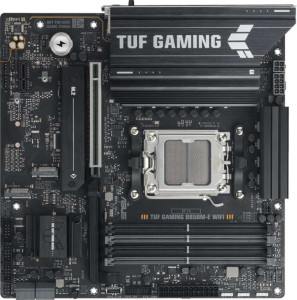
Asus TUF Gaming B850M-E Wi-Fi
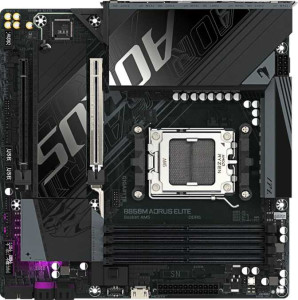
Gigabyte B850M Aorus Elite

Asus TUF Gaming B850M-E Wi-Fi Gigabyte B850M Aorus Elite

Overview

Welcome to our in-depth specification face-off between the Asus TUF Gaming B850M-E Wi-Fi and the Gigabyte B850M Aorus Elite, two Micro-ATX motherboards built on the AM5 platform with the B850 chipset. While they share a strong common foundation, key battlegrounds emerge around wireless connectivity, storage expansion, rear port selection, and fan header counts — differences that could meaningfully shape your build depending on your priorities.

Common Features

  • Both products use the AM5 CPU socket.
  • Both products feature the B850 chipset.
  • Both products have a Micro-ATX form factor.
  • Overclocking is supported on both products.
  • RGB lighting is present on both products.
  • Easy BIOS reset is not available on either product.
  • Both products have a single CPU socket.
  • Integrated graphics are not available on either product.
  • Both products support a maximum memory amount of 256GB.
  • Both products have 4 memory slots.
  • Both products use DDR5 memory.
  • Both products support 2 memory channels.
  • ECC memory support is not available on either product.
  • Both products include 1 USB 3.2 Gen 2 port (USB-C).
  • Neither product includes USB 3.2 Gen 1 ports (USB-C).
  • Neither product includes USB 3.2 Gen 2x2 ports.
  • Neither product includes USB 4 40Gbps ports.
  • Neither product includes USB 4 20Gbps ports.
  • Neither product includes Thunderbolt 4 or Thunderbolt 3 ports.
  • Both products include 1 RJ45 port.
  • Both products provide 2 USB 3.2 Gen 1 ports through expansion.
  • Both products provide 4 USB 2.0 ports through expansion.
  • Both products include 4 SATA 3 connectors.
  • Neither product includes a U.2 socket.
  • An mSATA connector is not present on either product.
  • Neither product has any SATA 2 connectors.
  • Both products include 1 PCIe 5.0 x16 slot.
  • Neither product includes PCIe 3.0 x16, PCIe 2.0 x16, PCIe x8, or PCI slots.
  • Both products support 7.1 audio channels.
  • Both products support RAID 0, RAID 1, RAID 5, and RAID 10 configurations.
  • RAID 0+1 support is not available on either product.

Main Differences

  • Wi-Fi support is present on Asus TUF Gaming B850M-E Wi-Fi but not available on Gigabyte B850M Aorus Elite.
  • Bluetooth support is present on Asus TUF Gaming B850M-E Wi-Fi but not available on Gigabyte B850M Aorus Elite.
  • Dual BIOS is available on Asus TUF Gaming B850M-E Wi-Fi but not present on Gigabyte B850M Aorus Elite.
  • The maximum overclocked RAM speed is 8000 MHz on Asus TUF Gaming B850M-E Wi-Fi and 8200 MHz on Gigabyte B850M Aorus Elite.
  • USB 3.2 Gen 2 ports (USB-A) count is 1 on Asus TUF Gaming B850M-E Wi-Fi and 2 on Gigabyte B850M Aorus Elite.
  • USB 3.2 Gen 1 ports (USB-A) count is 2 on Asus TUF Gaming B850M-E Wi-Fi and 5 on Gigabyte B850M Aorus Elite.
  • USB 2.0 ports are not present on Asus TUF Gaming B850M-E Wi-Fi, while Gigabyte B850M Aorus Elite includes 4.
  • An HDMI output is present on Asus TUF Gaming B850M-E Wi-Fi but not available on Gigabyte B850M Aorus Elite.
  • DisplayPort output count is 2 on Asus TUF Gaming B850M-E Wi-Fi and 1 on Gigabyte B850M Aorus Elite.
  • A PS/2 port is present on Asus TUF Gaming B850M-E Wi-Fi but not available on Gigabyte B850M Aorus Elite.
  • Fan header count is 4 on Asus TUF Gaming B850M-E Wi-Fi and 6 on Gigabyte B850M Aorus Elite.
  • M.2 socket count is 3 on Asus TUF Gaming B850M-E Wi-Fi and 2 on Gigabyte B850M Aorus Elite.
  • A TPM connector is not present on Asus TUF Gaming B850M-E Wi-Fi but is available on Gigabyte B850M Aorus Elite.
  • PCIe x1 slot count is 1 on Asus TUF Gaming B850M-E Wi-Fi and 0 on Gigabyte B850M Aorus Elite.
  • PCIe x4 slot count is 0 on Asus TUF Gaming B850M-E Wi-Fi and 1 on Gigabyte B850M Aorus Elite.
  • An S/PDIF Out port is not present on Asus TUF Gaming B850M-E Wi-Fi but is available on Gigabyte B850M Aorus Elite.
  • Audio connector count is 3 on Asus TUF Gaming B850M-E Wi-Fi and 2 on Gigabyte B850M Aorus Elite.
Specs Comparison
Asus TUF Gaming B850M-E Wi-Fi

Asus TUF Gaming B850M-E Wi-Fi

Gigabyte B850M Aorus Elite

Gigabyte B850M Aorus Elite

General info:
CPU socket AM5 AM5
chipset B850 B850
form factor Micro-ATX Micro-ATX
release date September 2025 January 2025
supports Wi-Fi
Has Bluetooth
Easy to overclock
has RGB lighting
Easy to reset BIOS
Has dual BIOS
CPU sockets 1 1
Has integrated graphics
warranty period 3 years 3 years
height 244 mm 244 mm
width 244 mm 244 mm
Has integrated CPU

Both the Asus TUF Gaming B850M-E Wi-Fi and the Gigabyte B850M Aorus Elite share the same foundational profile: Micro-ATX form factor at an identical 244 × 244 mm footprint, the AM5 socket with the B850 chipset, a single CPU socket with no integrated processor or graphics, and a 3-year warranty. For users building a compact AMD Ryzen system, either board slots into the same cases and targets the same platform, so there is no meaningful divergence at the platform or size level.

The real separation emerges in connectivity and resilience features. The Asus TUF includes Wi-Fi and Bluetooth, which the Gigabyte board entirely omits — a significant practical difference for builders who cannot easily run an Ethernet cable or want wireless peripherals without a separate adapter. Beyond wireless, the Asus also carries a dual BIOS chip, a valuable safety net that allows the board to recover from a failed or corrupted firmware update by falling back to a backup chip. The Gigabyte has neither of these features. Both boards lack an easy BIOS reset mechanism, so neither has an advantage there.

For this spec group, the Asus TUF Gaming B850M-E Wi-Fi holds a clear edge. Its built-in wireless connectivity and dual BIOS protection add tangible real-world value — particularly for less experienced builders or anyone in a setup where wired networking is inconvenient — at what is otherwise an identical platform baseline. The Gigabyte B850M Aorus Elite makes sense only if those features are genuinely unnecessary and a lower price point compensates for their absence.

Memory:
maximum memory amount 256GB 256GB
overclocked RAM speed 8000 MHz 8200 MHz
memory slots 4 4
DDR memory version 5 5
memory channels 2 2
Supports ECC memory

On paper, the memory subsystems of these two boards are nearly identical: both support DDR5 across 4 slots in a dual-channel configuration, cap out at 256 GB of maximum RAM, and exclude ECC memory support — a non-issue for gaming and consumer workloads where ECC is rarely relevant. For the vast majority of users, this shared foundation means either board will deliver the same everyday memory experience.

The only measurable difference is the maximum overclocked RAM speed — 8000 MHz on the Asus TUF versus 8200 MHz on the Gigabyte Aorus Elite. In practice, pushing DDR5 to these extremes requires carefully binned memory kits and significant BIOS tuning, and the performance delta between 8000 and 8200 MHz in real workloads is negligible for most users. It is a spec that matters almost exclusively to dedicated memory overclockers chasing benchmark records.

For this group, the two boards are effectively tied. The Gigabyte's marginally higher overclocked ceiling is a paper advantage that will go unused by nearly everyone. Unless extreme memory overclocking is a specific goal, this category should not influence a purchase decision between these two boards.

Ports:
USB 3.2 Gen 2 ports (USB-A) 1 2
USB 3.2 Gen 1 ports (USB-A) 2 5
USB 3.2 Gen 2 ports (USB-C) 1 1
USB 3.2 Gen 1 ports (USB-C) 0 0
USB 2.0 ports 0 4
USB 3.2 Gen 2x2 ports 0 0
USB 4 40Gbps ports 0 0
USB 4 20Gbps ports 0 0
Thunderbolt 4 ports 0 0
Thunderbolt 3 ports 0 0
has an HDMI output
DisplayPort outputs 2 1
RJ45 ports 1 1
Has USB Type-C
eSATA ports 0 0
DVI outputs 0 0
has a VGA connector
PS/2 ports 1 0

The port selection on these two boards diverges in meaningful ways depending on what a user prioritizes. The Gigabyte B850M Aorus Elite dominates in raw USB connectivity, offering a total of 12 rear USB ports across Gen 2, Gen 1, and USB 2.0 specifications, compared to just 4 on the Asus TUF. For users with a dense peripheral setup — multiple storage devices, controllers, audio interfaces, or hubs — the Gigabyte's abundance of ports reduces dependence on external hubs and keeps the desk cleaner.

Display output tells the opposite story. The Asus TUF provides both an HDMI output and two DisplayPort outputs, enabling up to three simultaneous monitor connections directly from the board — a notable advantage for multi-display productivity builds or anyone using integrated graphics temporarily. The Gigabyte offers only a single DisplayPort and no HDMI, which is a real limitation if display flexibility matters. The Asus also includes a PS/2 port, a niche but occasionally useful legacy connection for certain keyboards or KVM switches.

There is no single winner here — the decision hinges on use case. The Gigabyte holds the edge for peripheral-heavy builds where USB port count is a daily concern, while the Asus is the stronger choice for multi-monitor setups or anyone who values display output flexibility. Users who need both should weigh which constraint is harder to work around.

Connectors:
USB 3.2 Gen 1 ports (through expansion) 2 2
USB 2.0 ports (through expansion) 4 4
SATA 3 connectors 4 4
fan headers 4 6
USB 3.0 ports (through expansion) 2 2
M.2 sockets 3 2
Has TPM connector
U.2 sockets 0 0
Has mSATA connector
SATA 2 connectors 0 0

Much of the internal connector landscape is shared between these boards: both provide 4 SATA 3 connectors, identical USB expansion headers, and no legacy SATA 2 or U.2/mSATA sockets. Where they diverge is in three specific areas that carry real practical weight. The Asus TUF Gaming B850M-E Wi-Fi offers 3 M.2 sockets versus 2 on the Gigabyte Aorus Elite — a meaningful difference for storage-hungry builds. A third M.2 slot allows a user to run a dedicated OS drive, a high-speed scratch or game drive, and a slower bulk storage NVMe simultaneously, all without touching the SATA ports.

Flip the script on fan headers, though, and the Gigabyte takes the lead with 6 fan headers compared to the Asus's 4. In a thermally demanding build — particularly one with multiple case fans, a large CPU cooler, and possibly a radiator — having more native headers means less reliance on fan hubs or splitters, which simplifies wiring and can improve individual fan control. The Gigabyte also includes a TPM connector, absent on the Asus, which is relevant for enterprise environments or users who want to attach a discrete TPM module for hardware-level security features.

This group produces a genuine split depending on priorities. The Asus holds the edge for storage-focused builds thanks to its extra M.2 slot, while the Gigabyte is better suited to cooling-intensive or security-conscious configurations with its additional fan headers and TPM support. Neither board is outright superior here — the right choice depends directly on how the system will be used.

Expansion slots:
PCIe 5.0 x16 slots 1 1
PCIe 3.0 x16 slots 0 0
PCIe x1 slots 1 0
PCI slots 0 0
PCIe 2.0 x16 slots 0 0
PCIe x4 slots 0 1
PCIe x8 slots 0 0

Expansion slot layouts on Micro-ATX boards are inherently constrained by physical space, and both of these boards reflect that reality. Each provides a single PCIe 5.0 x16 slot as the primary GPU interface — the current gold standard for discrete graphics, offering double the bandwidth of PCIe 4.0 and ensuring the board is ready for the fastest current and near-future graphics cards without any bottleneck at the slot level.

The secondary slot is where they part ways. The Asus TUF includes a PCIe x1 slot, while the Gigabyte Aorus Elite instead offers a PCIe x4 slot. This distinction matters in practice: a x1 slot accommodates low-bandwidth add-in cards like sound cards, Wi-Fi adapters, or USB expansion cards, whereas a x4 slot can handle all of those plus higher-bandwidth devices such as capture cards, NVMe expansion cards, or 10GbE networking adapters. The Gigabyte's x4 slot is the more versatile of the two.

For this group, the Gigabyte holds a modest edge. Both boards are equivalent where it counts most — the primary GPU slot — but the Gigabyte's x4 secondary slot is strictly more capable than the Asus's x1, opening the door to a wider range of expansion cards without compromise. Users planning to add only a basic peripheral card will find the difference irrelevant, but anyone considering higher-bandwidth expansion should take note.

Audio:
audio channels 7.1 7.1
Has S/PDIF Out port
audio connectors 3 2

Audio is a category where these two boards swap small advantages rather than one pulling decisively ahead. Both deliver 7.1 surround sound support, meaning neither imposes a ceiling on immersive audio setups for gaming or home theater use. The Asus TUF edges ahead on analog flexibility with 3 rear audio jacks versus 2 on the Gigabyte — a minor but real convenience for users simultaneously connecting headphones, speakers, and a microphone without needing a separate adapter or splitter.

The Gigabyte Aorus Elite counters with an S/PDIF optical output, which the Asus lacks entirely. S/PDIF allows a purely digital audio signal to be sent to an external DAC, AV receiver, or soundbar, bypassing the motherboard's analog circuitry altogether. For users with dedicated audio equipment in their setup, this is a meaningful feature that preserves signal quality over longer cable runs and eliminates potential interference from the electrical environment inside the PC case.

This group is effectively a tie shaped by use case. Analog-first users who rely on multiple simultaneous jack connections will prefer the Asus's extra connector, while anyone routing audio through an external receiver or DAC via optical will find the Gigabyte's S/PDIF output the more valuable differentiator. Neither board has a universal audio advantage over the other.

Storage:
Supports RAID 1
Supports RAID 10 (1+0)
Supports RAID 5
Supports RAID 0
Supports RAID 0+1

Storage configuration support is identical across both boards. Each offers RAID 0, 1, 5, and 10, covering the full practical spectrum of consumer and prosumer RAID use cases — from pure performance striping (RAID 0) to mirrored redundancy (RAID 1), distributed parity (RAID 5), and the combined striping-plus-mirroring of RAID 10. Neither supports RAID 0+1, but that omission is shared and largely inconsequential, as RAID 10 is generally preferred over 0+1 for its superior fault tolerance anyway.

This breadth of RAID support means both boards can serve users who want to pool drives for speed, protect data against a single drive failure, or strike a balance between the two — without needing a discrete RAID controller card. For a Micro-ATX board targeting mainstream and gaming audiences, having RAID 5 available in particular is a welcome inclusion, as it allows redundancy across three or more drives while preserving more usable capacity than a pure mirror.

With every supported RAID level matching exactly, this group is a complete tie. Storage configuration capability gives neither board any advantage over the other, and it should play no role in differentiating these two products.

Comparison Summary & Verdict

Both boards deliver a solid AM5 and B850 foundation with DDR5 support, PCIe 5.0, and comprehensive RAID options, making either a capable choice for a modern mid-range build. However, their strengths diverge clearly. The Asus TUF Gaming B850M-E Wi-Fi stands out with built-in Wi-Fi and Bluetooth, dual BIOS, three M.2 sockets, and richer display output options including two DisplayPorts and an HDMI — making it the stronger pick for self-contained, wireless-ready systems. The Gigabyte B850M Aorus Elite counters with six fan headers, more USB-A ports, a TPM connector, S/PDIF audio output, and a slightly higher overclocked RAM ceiling of 8200 MHz, appealing to builders who prioritize airflow control, legacy audio connectivity, and a denser rear USB layout.

Asus TUF Gaming B850M-E Wi-Fi
Buy Asus TUF Gaming B850M-E Wi-Fi if...

Buy the Asus TUF Gaming B850M-E Wi-Fi if you want built-in Wi-Fi and Bluetooth, dual BIOS protection, and more M.2 slots for a wireless-ready, storage-rich build.

Gigabyte B850M Aorus Elite
Buy Gigabyte B850M Aorus Elite if...

Buy the Gigabyte B850M Aorus Elite if you prioritize more fan headers for advanced cooling control, a higher maximum overclocked RAM speed, and a larger rear USB-A port selection.