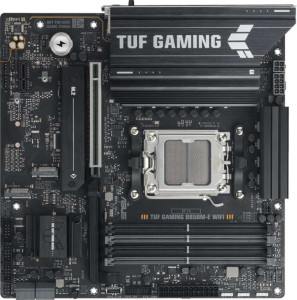
Asus TUF Gaming B850M-E Wi-Fi
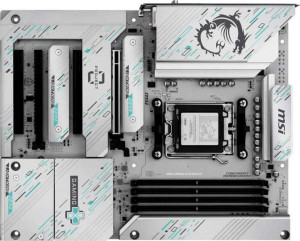
MSI B850 Gaming Plus Wi-Fi PZ

Asus TUF Gaming B850M-E Wi-Fi MSI B850 Gaming Plus Wi-Fi PZ

Common Features

  • Both products support AM5 CPU sockets.
  • Both products use the B850 chipset.
  • Both products support Wi-Fi.
  • Both products have Bluetooth support.
  • Both products are easy to overclock.
  • Both products have RGB lighting.
  • Both products support DDR5 memory.
  • Both products have 4 memory slots.
  • Both products have 256GB maximum memory capacity.
  • Both products support dual memory channels.
  • Both products support RAID 1.
  • Both products support RAID 10 (1+0).
  • Both products support RAID 5.
  • Both products support PCIe 5.0 x16 slots.
  • Both products have 7.1 audio channels.
  • Both products have 3 audio connectors.
  • Both products have 4 SATA 3 connectors.
  • Both products have 3 M.2 sockets.
  • Both products have 4 USB 2.0 ports through expansion.

Main Differences

  • The Asus TUF Gaming B850M-E Wi-Fi has a Micro-ATX form factor while the MSI B850 Gaming Plus Wi-Fi PZ has an ATX form factor.
  • The Wi-Fi version is Wi-Fi 4, Wi-Fi 5, Wi-Fi 6, and Wi-Fi 6E on the Asus TUF Gaming B850M-E Wi-Fi and Wi-Fi 4, Wi-Fi 5, Wi-Fi 6, Wi-Fi 6E, and Wi-Fi 7 on the MSI B850 Gaming Plus Wi-Fi PZ.
  • The Bluetooth version is 5.3 on the Asus TUF Gaming B850M-E Wi-Fi and 5.4 on the MSI B850 Gaming Plus Wi-Fi PZ.
  • The Asus TUF Gaming B850M-E Wi-Fi does not have an easy-to-reset BIOS, but the MSI B850 Gaming Plus Wi-Fi PZ does.
  • The Asus TUF Gaming B850M-E Wi-Fi has dual BIOS, whereas the MSI B850 Gaming Plus Wi-Fi PZ does not.
  • The height of the Asus TUF Gaming B850M-E Wi-Fi is 244 mm, while the height of the MSI B850 Gaming Plus Wi-Fi PZ is 243.8 mm.
  • The width of the Asus TUF Gaming B850M-E Wi-Fi is 244 mm, whereas the width of the MSI B850 Gaming Plus Wi-Fi PZ is 304.8 mm.
  • The overclocked RAM speed is 8000 MHz on the Asus TUF Gaming B850M-E Wi-Fi and 8200 MHz on the MSI B850 Gaming Plus Wi-Fi PZ.
  • The Asus TUF Gaming B850M-E Wi-Fi has 2 USB 3.2 Gen 1 ports (USB-A), while the MSI B850 Gaming Plus Wi-Fi PZ has 1.
  • The Asus TUF Gaming B850M-E Wi-Fi has 1 USB 3.2 Gen 2 port (USB-C), while the MSI B850 Gaming Plus Wi-Fi PZ has 2.
  • The Asus TUF Gaming B850M-E Wi-Fi has no USB 2.0 ports, but the MSI B850 Gaming Plus Wi-Fi PZ has 4.
  • The Asus TUF Gaming B850M-E Wi-Fi has an HDMI output, while the MSI B850 Gaming Plus Wi-Fi PZ does not.
  • The Asus TUF Gaming B850M-E Wi-Fi has 2 DisplayPort outputs, whereas the MSI B850 Gaming Plus Wi-Fi PZ has 1.
  • The Asus TUF Gaming B850M-E Wi-Fi has 1 PS/2 port, while the MSI B850 Gaming Plus Wi-Fi PZ does not have any.
  • The Asus TUF Gaming B850M-E Wi-Fi has 2 USB 3.2 Gen 1 ports through expansion, while the MSI B850 Gaming Plus Wi-Fi PZ has 4.
  • The Asus TUF Gaming B850M-E Wi-Fi has 4 fan headers, while the MSI B850 Gaming Plus Wi-Fi PZ has 6.
  • The Asus TUF Gaming B850M-E Wi-Fi has 2 USB 3.0 ports through expansion, while the MSI B850 Gaming Plus Wi-Fi PZ has 4.
  • The Asus TUF Gaming B850M-E Wi-Fi does not have a TPM connector, but the MSI B850 Gaming Plus Wi-Fi PZ does.
  • The Asus TUF Gaming B850M-E Wi-Fi has 1 PCIe x1 slot, whereas the MSI B850 Gaming Plus Wi-Fi PZ has 2.
  • The Asus TUF Gaming B850M-E Wi-Fi has no PCIe x4 slots, while the MSI B850 Gaming Plus Wi-Fi PZ has 1.
  • The Asus TUF Gaming B850M-E Wi-Fi does not have an S/PDIF Out port, but the MSI B850 Gaming Plus Wi-Fi PZ does.
  • The Asus TUF Gaming B850M-E Wi-Fi has 3 audio connectors, while the MSI B850 Gaming Plus Wi-Fi PZ has 2.
Specs Comparison
Asus TUF Gaming B850M-E Wi-Fi

Asus TUF Gaming B850M-E Wi-Fi

MSI B850 Gaming Plus Wi-Fi PZ

MSI B850 Gaming Plus Wi-Fi PZ

General info:
CPU socket AM5 AM5
chipset B850 B850
form factor Micro-ATX ATX
release date September 2025 June 2025
supports Wi-Fi
Wi-Fi version Wi-Fi 4 (802.11n), Wi-Fi 5 (802.11ac), Wi-Fi 6 (802.11ax), Wi-Fi 6E (802.11ax) Wi-Fi 4 (802.11n), Wi-Fi 5 (802.11ac), Wi-Fi 6 (802.11ax), Wi-Fi 6E (802.11ax), Wi-Fi 7 (802.11be)
Has Bluetooth
Bluetooth version 5.3 5.4
Easy to overclock
has RGB lighting
Easy to reset BIOS
Has dual BIOS
has aptX
CPU sockets 1 1
Has integrated graphics
warranty period 3 years 3 years
height 244 mm 243.8 mm
width 244 mm 304.8 mm
Has integrated CPU

The Asus TUF Gaming B850M-E Wi-Fi and MSI B850 Gaming Plus Wi-Fi PZ share several common features, but there are also a few notable differences. Both motherboards use the AM5 CPU socket and B850 chipset, and both support Wi-Fi 4, Wi-Fi 5, Wi-Fi 6, and Wi-Fi 6E. The MSI board stands out by also supporting the newer Wi-Fi 7 (802.11be), which the Asus board does not. Both motherboards also feature Bluetooth, but the Asus model has Bluetooth 5.3, while the MSI version includes Bluetooth 5.4. Both models come with RGB lighting and support overclocking, but only the Asus model has dual BIOS, whereas the MSI board does not. Additionally, the Asus motherboard lacks an easy BIOS reset function, while the MSI model does provide this feature.

In terms of form factor, the Asus TUF Gaming B850M-E Wi-Fi is a Micro-ATX motherboard, measuring 244 mm by 244 mm, while the MSI B850 Gaming Plus Wi-Fi PZ is an ATX board with a larger footprint of 243.8 mm in height and 304.8 mm in width. Both products have a 3-year warranty period. Neither motherboard offers integrated graphics or an integrated CPU. Both products also support a single CPU socket and have no aptX support.

While both motherboards have similar specifications in many areas, the key differences lie in the Wi-Fi versions, Bluetooth versions, BIOS features, and form factor. The MSI board has the advantage of Wi-Fi 7 and a slightly newer Bluetooth version, but the Asus model provides dual BIOS and lacks the easy BIOS reset feature found in the MSI board.

Memory:
maximum memory amount 256GB 256GB
overclocked RAM speed 8000 MHz 8200 MHz
memory slots 4 4
DDR memory version 5 5
memory channels 2 2
Supports ECC memory

The Asus TUF Gaming B850M-E Wi-Fi and MSI B850 Gaming Plus Wi-Fi PZ are quite similar in terms of memory specifications. Both motherboards support a maximum memory capacity of 256GB, with 4 memory slots and dual-channel memory architecture. They also both use DDR5 memory, so their memory versions align perfectly.

However, there is a slight difference in the supported overclocked RAM speed. The Asus board supports up to 8000 MHz, while the MSI board can go slightly higher at 8200 MHz. Neither board supports ECC memory, which is consistent across both models.

Overall, the memory capabilities are quite similar between the two, with the MSI board offering a slight edge in terms of overclocked RAM speed. Both boards are well-suited for high-performance setups, with a maximum of 256GB of memory and solid support for DDR5 modules.

Ports:
USB 3.2 Gen 2 ports (USB-A) 1 1
USB 3.2 Gen 1 ports (USB-A) 2 1
USB 3.2 Gen 2 ports (USB-C) 1 2
USB 3.2 Gen 1 ports (USB-C) 0 0
USB 2.0 ports 0 4
USB 3.2 Gen 2x2 ports 0 0
USB 4 40Gbps ports 0 0
USB 4 20Gbps ports 0 0
Thunderbolt 4 ports 0 0
Thunderbolt 3 ports 0 0
has an HDMI output
DisplayPort outputs 2 1
RJ45 ports 1 1
Has USB Type-C
eSATA ports 0 0
DVI outputs 0 0
has a VGA connector
PS/2 ports 1 0

The Asus TUF Gaming B850M-E Wi-Fi and MSI B850 Gaming Plus Wi-Fi PZ offer a variety of ports, but there are some differences in the specifics. Both motherboards provide USB 3.2 Gen 2 ports (USB-A), with the Asus board having 1 and the MSI board having 1 as well. The Asus motherboard also offers 2 USB 3.2 Gen 1 (USB-A) ports, while the MSI board has only 1. In terms of USB Type-C, the Asus model provides 1 USB 3.2 Gen 2 Type-C port, while the MSI board offers 2 USB 3.2 Gen 2 Type-C ports. Both models have no USB 3.2 Gen 2x2 or Thunderbolt ports.

When it comes to older USB versions, the Asus board does not include any USB 2.0 ports, whereas the MSI board offers 4 USB 2.0 ports. Both motherboards have 1 RJ45 port for Ethernet, and neither has Thunderbolt 3 or 4 ports. The Asus board includes 2 DisplayPort outputs, while the MSI board has just 1 DisplayPort output. The Asus model features an HDMI output, but the MSI model lacks an HDMI output. Both motherboards do not have VGA connectors or eSATA ports, but only the Asus motherboard includes a PS/2 port for legacy peripherals.

In summary, the Asus TUF Gaming B850M-E Wi-Fi has more USB 2.0 ports and a PS/2 port, as well as an HDMI output and 2 DisplayPorts. The MSI B850 Gaming Plus Wi-Fi PZ offers more USB Type-C ports and a single DisplayPort, but lacks HDMI and PS/2 connectivity.

Connectors:
USB 3.2 Gen 1 ports (through expansion) 2 4
USB 2.0 ports (through expansion) 4 4
SATA 3 connectors 4 4
fan headers 4 6
USB 3.0 ports (through expansion) 2 4
M.2 sockets 3 3
Has TPM connector
U.2 sockets 0 0
Has mSATA connector
SATA 2 connectors 0 0

The Asus TUF Gaming B850M-E Wi-Fi and MSI B850 Gaming Plus Wi-Fi PZ both offer a range of connectors for expansion, but there are a few differences. Both motherboards provide 4 SATA 3 connectors, 3 M.2 sockets, and 4 USB 2.0 ports through expansion. However, the Asus board supports 2 USB 3.2 Gen 1 and 2 USB 3.0 ports through expansion, while the MSI board provides 4 USB 3.2 Gen 1 and 4 USB 3.0 ports through expansion.

The Asus motherboard includes 4 fan headers, whereas the MSI board offers 6 fan headers, providing slightly more flexibility for cooling setups. A notable difference is that the Asus model does not include a TPM connector, while the MSI board does. Both motherboards lack U.2 and mSATA connectors, and neither has SATA 2 connectors.

In summary, the MSI B850 Gaming Plus Wi-Fi PZ has more USB ports through expansion, more fan headers, and includes a TPM connector, whereas the Asus TUF Gaming B850M-E Wi-Fi offers fewer expansion ports and lacks the TPM connector.

Expansion slots:
PCIe 5.0 x16 slots 1 1
PCIe 3.0 x16 slots 0 0
PCIe x1 slots 1 2
PCI slots 0 0
PCIe 2.0 x16 slots 0 0
PCIe x4 slots 0 1
PCIe x8 slots 0 0

The Asus TUF Gaming B850M-E Wi-Fi and MSI B850 Gaming Plus Wi-Fi PZ both offer a variety of expansion slots, but there are some differences in configuration. Both motherboards provide 1 PCIe 5.0 x16 slot, but the Asus model has only 1 PCIe x1 slot, while the MSI board includes 2 PCIe x1 slots. The MSI motherboard also provides 1 PCIe x4 slot, which is not available on the Asus board. Neither motherboard includes PCI slots, PCIe 2.0 x16 slots, or PCIe x8 slots.

In summary, the MSI B850 Gaming Plus Wi-Fi PZ offers more flexibility in expansion with additional PCIe x1 and PCIe x4 slots compared to the Asus TUF Gaming B850M-E Wi-Fi, which has only a single PCIe x1 slot.

Audio:
audio channels 7.1 7.1
Has S/PDIF Out port
audio connectors 3 2

Both the Asus TUF Gaming B850M-E Wi-Fi and MSI B850 Gaming Plus Wi-Fi PZ offer 7.1 audio channels, ensuring high-quality surround sound support. However, there are differences in additional audio features. The Asus motherboard does not have an S/PDIF Out port, while the MSI model includes one. When it comes to audio connectors, the Asus board has 3, whereas the MSI board provides 2 audio connectors.

In summary, the Asus TUF Gaming B850M-E Wi-Fi offers slightly more audio connectors, while the MSI B850 Gaming Plus Wi-Fi PZ adds the benefit of an S/PDIF Out port.

Storage:
Supports RAID 1
Supports RAID 10 (1+0)
Supports RAID 5
Supports RAID 0
Supports RAID 0+1

Both the Asus TUF Gaming B850M-E Wi-Fi and MSI B850 Gaming Plus Wi-Fi PZ support a range of RAID configurations. Both motherboards are capable of supporting RAID 1, RAID 10 (1+0), RAID 5, and RAID 0, allowing for flexible storage setups. Neither motherboard supports RAID 0+1, as both are listed as not having this feature.

Overall, the storage capabilities in terms of RAID configurations are identical between the two products, with both supporting the same set of RAID levels and excluding RAID 0+1.

Comparison Summary

This is a specification comparison between the Asus TUF Gaming B850M-E Wi-Fi and MSI B850 Gaming Plus Wi-Fi PZ. Both motherboards support AM5 CPU sockets, Wi-Fi, and Bluetooth, with a maximum memory capacity of 256GB and 4 memory slots. However, the Asus TUF Gaming B850M-E Wi-Fi has a Micro-ATX form factor, while the MSI B850 Gaming Plus Wi-Fi PZ has an ATX form factor. The Wi-Fi version differs, with the MSI supporting Wi-Fi 7 while the Asus only supports up to Wi-Fi 6E. Additionally, the Asus model features dual BIOS, while the MSI does not, and the MSI offers 4 USB 2.0 ports compared to none on the Asus. The audio connectors also vary, with the Asus having 3 and the MSI having 2.