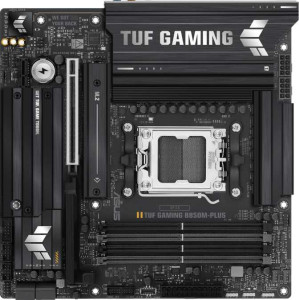
Asus TUF Gaming B850M-Plus
Gigabyte B850M Aorus Elite WiFi6E Ice

Asus TUF Gaming B850M-Plus Gigabyte B850M Aorus Elite WiFi6E Ice

Overview

Choosing between the Asus TUF Gaming B850M-Plus and the Gigabyte B850M Aorus Elite WiFi6E Ice means weighing two capable Micro-ATX motherboards built on the AM5 platform with the B850 chipset. While they share a strong foundation of DDR5 support, dual BIOS, and PCIe 5.0, key battlegrounds emerge around wireless connectivity, storage expansion, maximum memory capacity, and rear-panel port configuration. Read on to see how every specification stacks up side by side.

Common Features

  • Both boards use the AM5 CPU socket.
  • Both boards feature the B850 chipset.
  • Both boards have a Micro-ATX form factor.
  • Overclocking is supported on both boards.
  • RGB lighting is present on both boards.
  • Easy BIOS reset is not available on either board.
  • Both boards feature dual BIOS.
  • Both boards have 1 CPU socket.
  • Both boards have 4 memory slots.
  • Both boards use DDR5 memory.
  • Both boards support 2 memory channels.
  • ECC memory is not supported on either board.
  • Neither board has USB 3.2 Gen 1 ports (USB-C) on the rear panel.
  • Both boards provide 4 USB 2.0 ports on the rear panel.
  • Neither board has USB 4 40Gbps ports.
  • Neither board has USB 4 20Gbps ports.
  • Neither board has Thunderbolt 4 ports.
  • Neither board has Thunderbolt 3 ports.
  • Both boards include 1 DisplayPort output.
  • Both boards include 1 RJ45 port.
  • Both boards provide 2 USB 3.2 Gen 1 ports through expansion.
  • Both boards provide 1 USB 3.2 Gen 2x2 port through expansion.
  • Both boards provide 4 USB 2.0 ports through expansion.
  • Both boards include 4 SATA 3 connectors.
  • Both boards provide 2 USB 3.0 ports through expansion.
  • Neither board has a U.2 socket.
  • Neither board has an mSATA connector.
  • Neither board has SATA 2 connectors.
  • Both boards have 1 PCIe 5.0 x16 slot.
  • Neither board has PCIe 4.0 x16, PCIe 3.0 x16, PCI, PCIe 2.0 x16, or PCIe x8 slots.
  • Both boards support 7.1 audio channels.
  • Both boards include an S/PDIF Out port.
  • Both boards support RAID 0, RAID 1, RAID 5, and RAID 10.
  • RAID 0+1 is not supported on either board.

Main Differences

  • Wi-Fi is available on Gigabyte B850M Aorus Elite WiFi6E Ice but not on Asus TUF Gaming B850M-Plus.
  • Bluetooth is available on Gigabyte B850M Aorus Elite WiFi6E Ice but not on Asus TUF Gaming B850M-Plus.
  • Maximum memory capacity is 192GB on Asus TUF Gaming B850M-Plus and 256GB on Gigabyte B850M Aorus Elite WiFi6E Ice.
  • Overclocked RAM speed reaches 8000 MHz on Asus TUF Gaming B850M-Plus and 8200 MHz on Gigabyte B850M Aorus Elite WiFi6E Ice.
  • USB 3.2 Gen 2 ports (USB-A) count is 3 on Asus TUF Gaming B850M-Plus and 2 on Gigabyte B850M Aorus Elite WiFi6E Ice.
  • USB 3.2 Gen 1 ports (USB-A) count is 4 on Asus TUF Gaming B850M-Plus and 5 on Gigabyte B850M Aorus Elite WiFi6E Ice.
  • A USB 3.2 Gen 2 port (USB-C) is present on Gigabyte B850M Aorus Elite WiFi6E Ice but not on Asus TUF Gaming B850M-Plus.
  • A USB 3.2 Gen 2x2 port is available on Asus TUF Gaming B850M-Plus but not on Gigabyte B850M Aorus Elite WiFi6E Ice.
  • An HDMI output is present on Asus TUF Gaming B850M-Plus but not on Gigabyte B850M Aorus Elite WiFi6E Ice.
  • Fan headers number 5 on Asus TUF Gaming B850M-Plus and 6 on Gigabyte B850M Aorus Elite WiFi6E Ice.
  • M.2 sockets number 3 on Asus TUF Gaming B850M-Plus and 2 on Gigabyte B850M Aorus Elite WiFi6E Ice.
  • A TPM connector is present on Gigabyte B850M Aorus Elite WiFi6E Ice but not on Asus TUF Gaming B850M-Plus.
  • A PCIe x1 slot is available on Asus TUF Gaming B850M-Plus but not on Gigabyte B850M Aorus Elite WiFi6E Ice.
  • A PCIe x4 slot is available on Gigabyte B850M Aorus Elite WiFi6E Ice but not on Asus TUF Gaming B850M-Plus.
  • Audio connectors number 5 on Asus TUF Gaming B850M-Plus and 2 on Gigabyte B850M Aorus Elite WiFi6E Ice.
Specs Comparison
Asus TUF Gaming B850M-Plus

Asus TUF Gaming B850M-Plus

Gigabyte B850M Aorus Elite WiFi6E Ice

Gigabyte B850M Aorus Elite WiFi6E Ice

General info:
CPU socket AM5 AM5
chipset B850 B850
form factor Micro-ATX Micro-ATX
release date January 2025 January 2025
supports Wi-Fi
Has Bluetooth
Easy to overclock
has RGB lighting
Easy to reset BIOS
Has dual BIOS
CPU sockets 1 1
Has integrated graphics
warranty period 3 years 3 years
height 244 mm 244 mm
width 244 mm 244 mm
Has integrated CPU

At their core, the Asus TUF Gaming B850M-Plus and the Gigabyte B850M Aorus Elite WiFi6E Ice are built on the same foundation: both use the AM5 socket with a B850 chipset, share an identical Micro-ATX (244×244 mm) footprint, support overclocking, feature RGB lighting, dual BIOS, and carry a 3-year warranty. For users focused on platform compatibility or physical fit, these two boards are essentially interchangeable.

The only meaningful differentiator in this group is connectivity: the Gigabyte Aorus Elite includes integrated Wi-Fi 6E and Bluetooth, while the Asus TUF Gaming B850M-Plus offers neither. In practice, this matters most for builds in locations where running an Ethernet cable is impractical, or for users who want to connect wireless peripherals without a USB dongle. Wi-Fi 6E in particular brings access to the less-congested 6 GHz band, offering lower latency and higher throughput in dense environments.

The verdict for this spec group is clear: the Gigabyte Aorus Elite has a tangible advantage thanks to its built-in wireless capabilities. The Asus TUF is not at a disadvantage if you plan to use a wired network and have no Bluetooth needs, but for anyone who values out-of-the-box wireless connectivity without extra adapters, the Gigabyte is the stronger choice here.

Memory:
maximum memory amount 192GB 256GB
overclocked RAM speed 8000 MHz 8200 MHz
memory slots 4 4
DDR memory version 5 5
memory channels 2 2
Supports ECC memory

The Asus TUF Gaming B850M-Plus and the Gigabyte B850M Aorus Elite WiFi6E Ice both feature 4 memory slots and support DDR5 memory. They also support dual memory channels, ensuring good bandwidth for most use cases. However, the two motherboards differ in terms of memory capacity and speed. The Asus board supports a maximum of 192GB of memory, while the Gigabyte board supports up to 256GB, offering more headroom for users who require large memory configurations.

In terms of overclocked RAM speed, the Asus TUF Gaming B850M-Plus supports up to 8000 MHz, while the Gigabyte B850M Aorus Elite WiFi6E Ice offers slightly higher overclocked RAM speeds at 8200 MHz. Both motherboards do not support ECC memory, meaning they are geared more towards general consumers and gamers rather than enterprise or high-reliability environments.

Overall, while both motherboards share similar core memory features, the Gigabyte board offers greater memory capacity and a slightly higher overclocked RAM speed, making it a better choice for users who need more performance or larger memory configurations.

Ports:
USB 3.2 Gen 2 ports (USB-A) 3 2
USB 3.2 Gen 1 ports (USB-A) 4 5
USB 3.2 Gen 2 ports (USB-C) 0 1
USB 3.2 Gen 1 ports (USB-C) 0 0
USB 2.0 ports 4 4
USB 3.2 Gen 2x2 ports 1 0
USB 4 40Gbps ports 0 0
USB 4 20Gbps ports 0 0
Thunderbolt 4 ports 0 0
Thunderbolt 3 ports 0 0
has an HDMI output
DisplayPort outputs 1 1
RJ45 ports 1 1
Has USB Type-C
eSATA ports 0 0
DVI outputs 0 0
has a VGA connector
PS/2 ports 0 0

The Asus TUF Gaming B850M-Plus and the Gigabyte B850M Aorus Elite WiFi6E Ice offer a range of ports, with some differences in the specifics. Both motherboards feature 1 RJ45 port and 1 DisplayPort output. However, the Asus board includes an HDMI output, which the Gigabyte board does not offer. In terms of USB ports, the Asus board has 3 USB 3.2 Gen 2 USB-A ports, while the Gigabyte board has 2. The Asus board also provides 4 USB 3.2 Gen 1 USB-A ports, while the Gigabyte board has 5. Additionally, the Asus board features 1 USB 3.2 Gen 2x2 port, which the Gigabyte board lacks. Both boards have 4 USB 2.0 ports and 1 USB Type-C port, though the Asus board does not support USB 3.2 Gen 2 USB-C, while the Gigabyte board does.

Neither motherboard includes USB 4 40Gbps, USB 4 20Gbps, Thunderbolt 3 or Thunderbolt 4 ports, and neither has eSATA, DVI, or VGA connectors. Both boards also lack PS/2 ports. The Asus board is equipped with USB Type-C, while the Gigabyte board similarly supports USB Type-C but with a different combination of USB ports.

Overall, the two motherboards are quite similar in terms of port offerings, with slight differences in the number and types of USB ports, as well as the presence of an HDMI output on the Asus board, which the Gigabyte board lacks. Both boards cater to similar needs in terms of basic connectivity options.

Connectors:
USB 3.2 Gen 1 ports (through expansion) 2 2
USB 3.2 Gen 2x2 ports (through expansion) 1 1
USB 2.0 ports (through expansion) 4 4
SATA 3 connectors 4 4
fan headers 5 6
USB 3.0 ports (through expansion) 2 2
M.2 sockets 3 2
Has TPM connector
U.2 sockets 0 0
Has mSATA connector
SATA 2 connectors 0 0

The Asus TUF Gaming B850M-Plus and the Gigabyte B850M Aorus Elite WiFi6E Ice offer a variety of connectors, though there are some notable differences. Both motherboards provide 2 USB 3.2 Gen 1 ports, 2 USB 3.0 ports, and 4 USB 2.0 ports through expansion. Each also supports 1 USB 3.2 Gen 2x2 port through expansion. In terms of storage connectors, both have 4 SATA 3 connectors, but the Gigabyte board offers a slightly higher number of fan headers (6) compared to the Asus board (5).

For expansion slots, the Asus board includes 3 M.2 sockets, while the Gigabyte board offers 2 M.2 sockets. One key difference is that the Gigabyte board includes a TPM connector, which the Asus board does not have. Neither board features U.2 or mSATA connectors, both of which are not provided. Both motherboards also have 0 SATA 2 connectors.

In summary, while both motherboards offer similar features in terms of expansion and connectivity, the Gigabyte board includes a TPM connector and more fan headers, while the Asus board offers an additional M.2 socket. Both motherboards are well-equipped for general use, but the differences may appeal to users with specific needs like additional fan support or security features like TPM.

Expansion slots:
PCIe 4.0 x16 slots 0 0
PCIe 5.0 x16 slots 1 1
PCIe 3.0 x16 slots 0 0
PCIe x1 slots 1 0
PCI slots 0 0
PCIe 2.0 x16 slots 0 0
PCIe x4 slots 0 1
PCIe x8 slots 0 0

Both the Asus TUF Gaming B850M-Plus and the Gigabyte B850M Aorus Elite WiFi6E Ice feature a PCIe 5.0 x16 slot, offering high-speed connectivity for modern graphics cards. However, the two motherboards differ in their additional expansion slots. The Asus board includes 1 PCIe x1 slot, while the Gigabyte board provides 1 PCIe x4 slot. Neither board has PCIe 4.0 x16 slots, PCIe 3.0 x16 slots, PCI slots, or PCIe 2.0 x16 slots. Additionally, neither board has a PCIe x8 slot.

The key difference is the presence of a PCIe x4 slot on the Gigabyte board, which the Asus board lacks. Both motherboards share the same PCIe 5.0 x16 slot, but the Gigabyte board offers slightly more flexibility for expansion with the x4 slot, allowing it to accommodate more devices that require multiple lanes of bandwidth, like certain high-performance storage cards.

In summary, the primary distinction in expansion slots is that the Gigabyte board provides a PCIe x4 slot, while the Asus board only has a PCIe x1 slot. Both motherboards feature the latest PCIe 5.0 x16 slot, but the Gigabyte board’s additional x4 slot offers more options for users requiring additional bandwidth for expansion cards.

Audio:
audio channels 7.1 7.1
Has S/PDIF Out port
audio connectors 5 2

Both the Asus TUF Gaming B850M-Plus and the Gigabyte B850M Aorus Elite WiFi6E Ice support 7.1 audio channels and include an S/PDIF Out port, ensuring high-quality audio output. However, the two motherboards differ in the number of audio connectors they offer. The Asus board provides 5 audio connectors, while the Gigabyte board has only 2.

While both boards feature the same audio channels and S/PDIF Out support, the Asus TUF Gaming B850M-Plus offers more connectivity options with its additional audio connectors, which may be beneficial for users who need to connect multiple audio devices.

In summary, the main difference between the two is the number of audio connectors, with the Asus board offering more options (5) compared to the Gigabyte board's 2. Both motherboards deliver similar audio performance in terms of channels and S/PDIF support, but the Asus board provides greater flexibility in terms of connectivity.

Storage:
Supports RAID 1
Supports RAID 10 (1+0)
Supports RAID 5
Supports RAID 0
Supports RAID 0+1

Both the Asus TUF Gaming B850M-Plus and the Gigabyte B850M Aorus Elite WiFi6E Ice support the same RAID configurations. Each motherboard supports RAID 1, RAID 10 (1+0), RAID 5, and RAID 0. However, both boards do not support RAID 0+1, a configuration that is typically less common.

With identical RAID support features, there are no differences between these two motherboards in terms of storage configurations. Both offer the same level of flexibility for users looking to configure their storage for performance or redundancy.

In summary, the storage capabilities of both motherboards are identical, with support for RAID 1, RAID 10, RAID 5, and RAID 0, but no support for RAID 0+1.

Comparison Summary & Verdict

Both boards share the same AM5 socket, B850 chipset, and Micro-ATX form factor, making them closely matched at their core. However, the Gigabyte B850M Aorus Elite WiFi6E Ice pulls ahead for wireless-focused builders thanks to integrated Wi-Fi and Bluetooth, a higher maximum memory capacity of 256GB, faster overclocked RAM at 8200 MHz, an extra fan header, a TPM connector, and a USB-C 3.2 Gen 2 rear port. The Asus TUF Gaming B850M-Plus, meanwhile, caters to storage-hungry and multimedia-oriented users with its three M.2 sockets, a dedicated HDMI output, five audio connectors for a richer analog audio setup, and a USB 3.2 Gen 2x2 port for ultra-fast peripheral transfers. Neither board is a clear overall winner; the right choice depends entirely on whether wireless connectivity and memory headroom or NVMe storage expansion and display output flexibility matter most to you.

Asus TUF Gaming B850M-Plus
Buy Asus TUF Gaming B850M-Plus if...

Buy the Asus TUF Gaming B850M-Plus if you need three M.2 sockets for generous NVMe storage expansion, an HDMI output for direct display connectivity, and a richer set of audio connectors.

Gigabyte B850M Aorus Elite WiFi6E Ice
Buy Gigabyte B850M Aorus Elite WiFi6E Ice if...

Buy the Gigabyte B850M Aorus Elite WiFi6E Ice if built-in Wi-Fi and Bluetooth, a higher maximum memory capacity of 256GB, and a USB-C 3.2 Gen 2 rear port are priorities for your build.