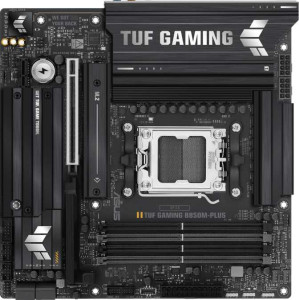
Asus TUF Gaming B850M-Plus
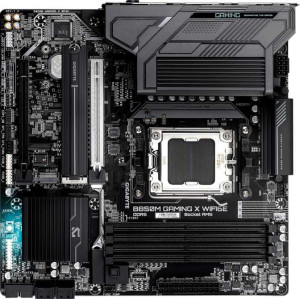
Gigabyte B850M Gaming X WiFi6E

Asus TUF Gaming B850M-Plus Gigabyte B850M Gaming X WiFi6E

Overview

Welcome to our detailed spec comparison between the Asus TUF Gaming B850M-Plus and the Gigabyte B850M Gaming X WiFi6E, two Micro-ATX motherboards sharing the B850 chipset and AM5 socket. While they agree on many fundamentals, key battlegrounds emerge around wireless connectivity, storage and expansion options, USB port configurations, and maximum memory support — making the choice between them far from straightforward.

Common Features

  • Both boards use the AM5 CPU socket.
  • Both boards feature the B850 chipset.
  • Both boards have a Micro-ATX form factor.
  • Both boards support HDMI 2.1.
  • Both boards are easy to overclock.
  • RGB lighting is present on both boards.
  • Easy BIOS reset is not available on either board.
  • Both boards feature dual BIOS.
  • Both boards have 4 memory slots.
  • Both boards support DDR5 memory.
  • Both boards have 2 memory channels.
  • ECC memory is not supported on either board.
  • Neither board has USB 3.2 Gen 1 ports of the USB-C type on the rear.
  • Both boards have 4 USB 2.0 rear ports.
  • Neither board has USB 4 40Gbps, USB 4 20Gbps, Thunderbolt 4, or Thunderbolt 3 ports.
  • Both boards have an HDMI output.
  • Both boards have 1 RJ45 port.
  • Both boards provide 2 USB 3.2 Gen 1 ports through expansion and 4 USB 2.0 ports through expansion.
  • Both boards have 4 SATA 3 connectors and no SATA 2 connectors.
  • Neither board has an mSATA connector or U.2 sockets.
  • Both boards have 1 PCIe 5.0 x16 slot and no PCIe 4.0, 3.0, or 2.0 x16 slots.
  • Both boards support 7.1 audio channels.
  • Both boards support RAID 0, RAID 1, RAID 5, and RAID 10, but neither supports RAID 0+1.

Main Differences

  • Wi-Fi support is present on the Gigabyte B850M Gaming X WiFi6E but not available on the Asus TUF Gaming B850M-Plus.
  • Bluetooth support is present on the Gigabyte B850M Gaming X WiFi6E but not available on the Asus TUF Gaming B850M-Plus.
  • Maximum memory capacity is 192GB on the Asus TUF Gaming B850M-Plus and 256GB on the Gigabyte B850M Gaming X WiFi6E.
  • Maximum overclocked RAM speed is 8000 MHz on the Asus TUF Gaming B850M-Plus and 8200 MHz on the Gigabyte B850M Gaming X WiFi6E.
  • USB 3.2 Gen 2 ports (USB-A) number 3 on the Asus TUF Gaming B850M-Plus and 1 on the Gigabyte B850M Gaming X WiFi6E.
  • USB 3.2 Gen 1 ports (USB-A) number 4 on the Asus TUF Gaming B850M-Plus and 2 on the Gigabyte B850M Gaming X WiFi6E.
  • USB 3.2 Gen 2 ports (USB-C) are absent on the Asus TUF Gaming B850M-Plus but 1 is present on the Gigabyte B850M Gaming X WiFi6E.
  • A USB 3.2 Gen 2x2 port is present on the Asus TUF Gaming B850M-Plus but not available on the Gigabyte B850M Gaming X WiFi6E.
  • DisplayPort outputs number 1 on the Asus TUF Gaming B850M-Plus and 2 on the Gigabyte B850M Gaming X WiFi6E.
  • Fan headers number 5 on the Asus TUF Gaming B850M-Plus and 4 on the Gigabyte B850M Gaming X WiFi6E.
  • M.2 sockets number 3 on the Asus TUF Gaming B850M-Plus and 2 on the Gigabyte B850M Gaming X WiFi6E.
  • A TPM connector is present on the Gigabyte B850M Gaming X WiFi6E but not available on the Asus TUF Gaming B850M-Plus.
  • A PCIe x1 slot is present on the Asus TUF Gaming B850M-Plus but absent on the Gigabyte B850M Gaming X WiFi6E.
  • A PCIe x4 slot is present on the Gigabyte B850M Gaming X WiFi6E but absent on the Asus TUF Gaming B850M-Plus.
  • An S/PDIF Out port is present on the Asus TUF Gaming B850M-Plus but not available on the Gigabyte B850M Gaming X WiFi6E.
  • Audio connectors number 5 on the Asus TUF Gaming B850M-Plus and 3 on the Gigabyte B850M Gaming X WiFi6E.
Specs Comparison
Asus TUF Gaming B850M-Plus

Asus TUF Gaming B850M-Plus

Gigabyte B850M Gaming X WiFi6E

Gigabyte B850M Gaming X WiFi6E

General info:
CPU socket AM5 AM5
chipset B850 B850
form factor Micro-ATX Micro-ATX
release date January 2025 January 2025
supports Wi-Fi
Has Bluetooth
HDMI version HDMI 2.1 HDMI 2.1
Easy to overclock
has RGB lighting
Easy to reset BIOS
Has dual BIOS
CPU sockets 1 1
Has integrated graphics
warranty period 3 years 3 years
height 244 mm 244 mm
width 244 mm 244 mm
Has integrated CPU

Both the Asus TUF Gaming B850M-Plus and the Gigabyte B850M Gaming X WiFi6E share an identical physical and architectural foundation: the same AM5 socket, B850 chipset, Micro-ATX form factor (244 × 244 mm), single CPU socket, HDMI 2.1 output, dual BIOS, RGB lighting, and a 3-year warranty. For builders focused on platform compatibility, display output quality, or BIOS resilience, these two boards are effectively interchangeable.

The one meaningful split between them is wireless connectivity. The Gigabyte includes both Wi-Fi 6E and Bluetooth, while the Asus offers neither. In practice, this matters most for small-form-factor or living-room builds where running an Ethernet cable is inconvenient, or for users who want to connect wireless peripherals, headsets, or controllers without a USB dongle. Users who plan to wire their system directly to a router and rely on wired peripherals will not miss these features — but those who need them would otherwise have to budget for a separate wireless adapter.

The Gigabyte B850M Gaming X WiFi6E holds a clear edge in this group purely because of its integrated Wi-Fi 6E and Bluetooth. All other general specifications are identical, so this advantage comes down entirely to whether wireless connectivity matters to the buyer. If it does, the Gigabyte is the more complete out-of-the-box solution; if it does not, neither board has a structural advantage here.

Memory:
maximum memory amount 192GB 256GB
overclocked RAM speed 8000 MHz 8200 MHz
memory slots 4 4
DDR memory version 5 5
memory channels 2 2
Supports ECC memory

On the shared fundamentals, both boards are aligned: 4 DIMM slots, DDR5, dual-channel architecture, and no ECC support — a standard and expected configuration for consumer B850 motherboards targeting gamers and enthusiasts.

Where they diverge is in ceiling capacity and overclocking headroom. The Gigabyte B850M Gaming X WiFi6E supports up to 256 GB of RAM versus 192 GB on the Asus TUF — a 33% larger ceiling that becomes relevant for memory-intensive workloads like large virtual machines, professional video editing, or heavy multitasking. Similarly, the Gigabyte edges out the Asus on maximum overclocked RAM speed, reaching 8200 MHz compared to 8000 MHz. While the 200 MHz gap is unlikely to produce a noticeable real-world performance difference for most users, it does signal that the Gigabyte's memory controller validation extends slightly further up the frequency curve — useful for enthusiasts pushing bleeding-edge DDR5 kits.

The Gigabyte holds the advantage in this category on both counts. That said, the practical impact depends heavily on the user: for a mainstream gamer running 32–64 GB of DDR5, neither ceiling nor the speed delta will ever be felt. The Gigabyte's edge is most meaningful for power users who anticipate maxing out RAM capacity or who are specifically chasing high-frequency DDR5 overclocks.

Ports:
USB 3.2 Gen 2 ports (USB-A) 3 1
USB 3.2 Gen 1 ports (USB-A) 4 2
USB 3.2 Gen 2 ports (USB-C) 0 1
USB 3.2 Gen 1 ports (USB-C) 0 0
USB 2.0 ports 4 4
USB 3.2 Gen 2x2 ports 1 0
USB 4 40Gbps ports 0 0
USB 4 20Gbps ports 0 0
Thunderbolt 4 ports 0 0
Thunderbolt 3 ports 0 0
has an HDMI output
DisplayPort outputs 1 2
RJ45 ports 1 1
Has USB Type-C
eSATA ports 0 0
DVI outputs 0 0
has a VGA connector
PS/2 ports 0 0

The rear I/O philosophies of these two boards diverge in interesting ways. The Asus TUF Gaming B850M-Plus is decisively more generous with USB-A connectivity, offering a combined 7 high-speed USB-A ports (3× Gen 2 + 4× Gen 1) versus just 3 on the Gigabyte. For users with multiple wired peripherals — keyboards, mice, audio interfaces, external drives, capture cards — this raw port count matters daily and reduces reliance on hubs.

The Gigabyte counters with a different set of priorities. It includes a USB 3.2 Gen 2 Type-C port on the rear panel, which the Asus entirely lacks, making it more compatible with modern accessories and fast external SSDs that use USB-C natively. On the display side, the Gigabyte also pulls ahead with 2 DisplayPort outputs compared to the Asus's single one — a meaningful advantage for users running integrated graphics across dual monitors. The Asus, however, answers back with a USB 3.2 Gen 2x2 port delivering up to 20 Gbps, doubling the throughput of a standard Gen 2 connection and useful for the fastest consumer external storage devices.

Neither board dominates outright — the winner here depends entirely on the use case. The Asus TUF is the stronger choice for peripheral-heavy desks that rely on USB-A, while the Gigabyte is better suited to multi-monitor setups or workflows centered on USB-C devices. Users who need both will find themselves making a genuine trade-off.

Connectors:
USB 3.2 Gen 1 ports (through expansion) 2 2
USB 2.0 ports (through expansion) 4 4
SATA 3 connectors 4 4
fan headers 5 4
USB 3.0 ports (through expansion) 2 2
M.2 sockets 3 2
Has TPM connector
U.2 sockets 0 0
Has mSATA connector
SATA 2 connectors 0 0

Internal expansion connectivity is largely consistent across both boards: identical USB header counts, 4 SATA 3 connectors, and no legacy SATA 2 or U.2 sockets — a clean, modern layout expected at this tier. The meaningful splits come down to three specific areas: M.2 slots, fan headers, and TPM support.

The Asus TUF Gaming B850M-Plus offers 3 M.2 sockets versus 2 on the Gigabyte — a genuine advantage for storage-heavy builds. That extra slot means a user can run a dedicated OS drive, a high-speed scratch or game storage drive, and a third M.2 for backup or additional fast storage, all without touching a single SATA port. The Asus also provides 5 fan headers to the Gigabyte's 4, giving builders slightly more flexibility for complex cooling setups involving multiple case fans, radiator pumps, or AIO headers without requiring a separate fan controller.

The Gigabyte B850M Gaming X WiFi6E responds with a dedicated TPM connector, which the Asus lacks. This is relevant for enterprise environments, Windows 11 compliance via a discrete TPM module, or security-conscious builds that require hardware-based encryption and attestation. For the majority of home users, however, this edge is niche. On balance, the Asus holds the broader advantage here — the extra M.2 slot and additional fan header address more common build scenarios than the Gigabyte's TPM header.

Expansion slots:
PCIe 4.0 x16 slots 0 0
PCIe 5.0 x16 slots 1 1
PCIe 3.0 x16 slots 0 0
PCIe x1 slots 1 0
PCI slots 0 0
PCIe 2.0 x16 slots 0 0
PCIe x4 slots 0 1
PCIe x8 slots 0 0

At the top of the expansion slot hierarchy, both boards are identical: a single PCIe 5.0 x16 slot for the primary GPU, delivering the latest generation bandwidth that future-proofs the platform for current and upcoming graphics cards and high-speed add-in devices. For the vast majority of users, this is the only slot that will ever see use.

The secondary slot is where the two diverge. The Asus TUF Gaming B850M-Plus includes a PCIe x1 slot, while the Gigabyte B850M Gaming X WiFi6E instead offers a PCIe x4 slot. This distinction is more meaningful than it might appear: an x4 slot carries four times the lane bandwidth of an x1, making it capable of hosting a wider range of cards — including certain NVMe expansion cards, 10GbE network adapters, or capture cards that saturate an x1 connection. An x1 slot, while adequate for basic add-in cards like sound cards or simple network adapters, will bottleneck anything that demands higher throughput.

The Gigabyte holds a clear edge here. Its PCIe x4 secondary slot is strictly more capable than the Asus's x1, covering every use case an x1 slot would handle while also accommodating bandwidth-hungry expansion cards that the Asus cannot support without compromise.

Audio:
audio channels 7.1 7.1
Has S/PDIF Out port
audio connectors 5 3

Both the Asus TUF Gaming B850M-Plus and the Gigabyte B850M Gaming X WiFi6E support 7.1 audio channels, providing high-quality surround sound. The Asus board includes an S/PDIF Out port, which is absent on the Gigabyte board. Additionally, the Asus motherboard has 5 audio connectors, while the Gigabyte board has 3 audio connectors.

In summary, the Asus TUF Gaming B850M-Plus offers more audio connectors and includes an S/PDIF Out port, while the Gigabyte B850M Gaming X WiFi6E has fewer audio connectors and lacks the S/PDIF Out port.

Storage:
Supports RAID 1
Supports RAID 10 (1+0)
Supports RAID 5
Supports RAID 0
Supports RAID 0+1

Both the Asus TUF Gaming B850M-Plus and the Gigabyte B850M Gaming X WiFi6E support the same RAID configurations, including RAID 1, RAID 10 (1+0), RAID 5, and RAID 0. Neither motherboard supports RAID 0+1, so both offer identical RAID functionality.

In summary, the storage capabilities for RAID configurations are the same on both boards, with both supporting the common RAID levels but excluding RAID 0+1.

Comparison Summary & Verdict

Both boards deliver a solid B850 foundation with DDR5 support, PCIe 5.0, dual BIOS, and full RAID capability. However, their strengths diverge clearly. The Asus TUF Gaming B850M-Plus stands out with three M.2 sockets, more USB 3.2 Gen 2 Type-A ports, a USB 3.2 Gen 2x2 port, five fan headers, an S/PDIF output, and richer onboard audio connectors — making it the stronger pick for builders who prioritize storage expansion and audio flexibility. The Gigabyte B850M Gaming X WiFi6E counters with built-in Wi-Fi 6E and Bluetooth, a higher 256GB memory ceiling, faster 8200 MHz RAM support, a TPM connector, dual DisplayPort outputs, and a USB-C rear port — suiting users who value wireless connectivity and modern I/O versatility out of the box.

Asus TUF Gaming B850M-Plus
Buy Asus TUF Gaming B850M-Plus if...

Buy the Asus TUF Gaming B850M-Plus if you want more M.2 storage slots, a richer USB rear panel, and better onboard audio options without paying for built-in wireless.

Gigabyte B850M Gaming X WiFi6E
Buy Gigabyte B850M Gaming X WiFi6E if...

Buy the Gigabyte B850M Gaming X WiFi6E if built-in Wi-Fi 6E and Bluetooth, a higher maximum memory capacity, and a TPM connector are priorities for your build.