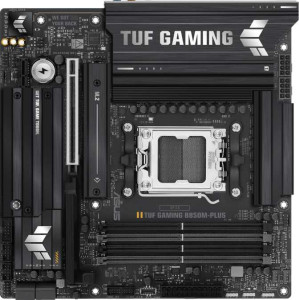
Asus TUF Gaming B850M-Plus
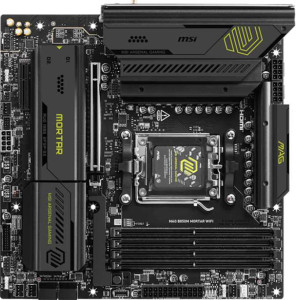
MSI MAG B850M Mortar WiFI

Asus TUF Gaming B850M-Plus MSI MAG B850M Mortar WiFI

Overview

Choosing between the Asus TUF Gaming B850M-Plus and the MSI MAG B850M Mortar WiFi is no simple task — both are Micro-ATX motherboards built on the AM5 socket and B850 chipset, sharing a strong foundation of features. Yet the two boards diverge in meaningful ways across wireless connectivity, maximum memory support, rear port selection, and audio output capabilities, making the right choice highly dependent on your specific build requirements.

Common Features

  • Both boards use the AM5 CPU socket.
  • Both boards feature the B850 chipset.
  • Both boards come in a Micro-ATX form factor.
  • Both boards support HDMI 2.1.
  • Overclocking is supported on both boards.
  • RGB lighting is present on both boards.
  • Dual BIOS is available on both boards.
  • Both boards have a single CPU socket.
  • Both boards have 4 memory slots.
  • Both boards use DDR5 memory.
  • Both boards support 2 memory channels.
  • ECC memory is not supported on either board.
  • Both boards include 3 USB 3.2 Gen 2 Type-A ports.
  • Both boards include 4 USB 3.2 Gen 1 Type-A ports.
  • Neither board has any USB 3.2 Gen 1 Type-C ports.
  • Both boards have 1 USB 3.2 Gen 2x2 port.
  • Neither board has any USB 4 or Thunderbolt ports.
  • Both boards provide 4 SATA 3 connectors.
  • Both boards have 3 M.2 sockets.
  • Both boards offer 2 USB 3.2 Gen 1 ports through expansion.
  • Both boards offer 4 USB 2.0 ports through expansion.
  • Both boards offer 2 USB 3.0 ports through expansion.
  • Neither board has a mSATA connector.
  • Both boards have 1 PCIe 5.0 x16 slot.
  • Neither board has any PCI, PCIe 2.0, PCIe 3.0, or PCIe 4.0 x16 slots.
  • Both boards deliver a 120 dB signal-to-noise ratio on the DAC.
  • Both boards support 7.1 audio channels.
  • Both boards include an S/PDIF Out port.
  • Both boards support RAID 0, RAID 1, RAID 5, and RAID 10.
  • RAID 0+1 is not supported on either board.

Main Differences

  • Wi-Fi is built into the MSI MAG B850M Mortar WiFi but is not available on the Asus TUF Gaming B850M-Plus.
  • Bluetooth is present on the MSI MAG B850M Mortar WiFi but not available on the Asus TUF Gaming B850M-Plus.
  • Easy BIOS reset is supported on the MSI MAG B850M Mortar WiFi but not on the Asus TUF Gaming B850M-Plus.
  • Maximum memory capacity is 256 GB on the MSI MAG B850M Mortar WiFi and 192 GB on the Asus TUF Gaming B850M-Plus.
  • Maximum overclocked RAM speed is 8200 MHz on the MSI MAG B850M Mortar WiFi and 8000 MHz on the Asus TUF Gaming B850M-Plus.
  • The MSI MAG B850M Mortar WiFi has 1 USB 3.2 Gen 2 Type-C port, while the Asus TUF Gaming B850M-Plus has none.
  • The Asus TUF Gaming B850M-Plus has 4 USB 2.0 ports, while the MSI MAG B850M Mortar WiFi has none.
  • The Asus TUF Gaming B850M-Plus includes 1 DisplayPort output, while the MSI MAG B850M Mortar WiFi has none.
  • Fan headers total 6 on the MSI MAG B850M Mortar WiFi and 5 on the Asus TUF Gaming B850M-Plus.
  • A TPM connector is present on the MSI MAG B850M Mortar WiFi but not on the Asus TUF Gaming B850M-Plus.
  • The Asus TUF Gaming B850M-Plus has 1 PCIe x1 slot, while the MSI MAG B850M Mortar WiFi has none.
  • The MSI MAG B850M Mortar WiFi has 1 PCIe x4 slot, while the Asus TUF Gaming B850M-Plus has none.
  • Audio connectors total 5 on the Asus TUF Gaming B850M-Plus and 2 on the MSI MAG B850M Mortar WiFi.
Specs Comparison
Asus TUF Gaming B850M-Plus

Asus TUF Gaming B850M-Plus

MSI MAG B850M Mortar WiFI

MSI MAG B850M Mortar WiFI

General info:
CPU socket AM5 AM5
chipset B850 B850
form factor Micro-ATX Micro-ATX
release date January 2025 March 2025
supports Wi-Fi
Has Bluetooth
HDMI version HDMI 2.1 HDMI 2.1
Easy to overclock
has RGB lighting
Easy to reset BIOS
Has dual BIOS
CPU sockets 1 1
Has integrated graphics
warranty period 3 years 3 years
height 244 mm 244 mm
width 244 mm 244 mm
Has integrated CPU

Both the Asus TUF Gaming B850M-Plus and the MSI MAG B850M Mortar WiFi share the same AM5 socket, B850 chipset, and Micro-ATX form factor at identical 244 × 244 mm dimensions, making them direct platform equivalents. They also match on HDMI 2.1 output, overclocking support, dual BIOS, RGB lighting, a single CPU socket, and a 3-year warranty — so neither holds a structural advantage on those fronts.

The clearest differentiator in this group is connectivity: the MSI Mortar WiFi includes built-in Wi-Fi and Bluetooth, while the Asus TUF B850M-Plus has neither. In a practical build, this means the Asus requires a separate PCIe or USB wireless adapter to achieve the same wireless capability, adding cost and potentially using an expansion slot. The MSI also wins on easy BIOS reset, a small but genuinely useful feature during troubleshooting or after a failed overclock, which the Asus lacks.

For general-use and wireless-dependent builds, the MSI MAG B850M Mortar WiFi holds a clear advantage in this category — its integrated wireless stack and easier BIOS recovery make it the more self-contained and user-friendly option out of the box. The Asus TUF B850M-Plus is not meaningfully inferior on platform fundamentals, but buyers will need to budget for wireless add-ons if connectivity matters.

Memory:
maximum memory amount 192GB 256GB
overclocked RAM speed 8000 MHz 8200 MHz
memory slots 4 4
DDR memory version 5 5
memory channels 2 2
Supports ECC memory

On the shared fundamentals, both boards are identical: four DDR5 slots arranged in a dual-channel configuration, with no ECC support — a standard and expected setup for mainstream B850 builds. Where they diverge is in the ceiling each board sets for your memory.

The MSI MAG B850M Mortar WiFi supports up to 256 GB of RAM versus the Asus TUF B850M-Plus's cap of 192 GB, and it also edges ahead on overclocked memory speeds at 8200 MHz compared to 8000 MHz. The capacity gap matters most for memory-intensive professional workloads — large virtual machines, heavy video editing timelines, or expansive datasets — where headroom above 192 GB becomes relevant. For the vast majority of gaming and general-purpose builds, however, neither limit is practically constraining. The overclocking ceiling difference is similarly narrow; at these frequencies, real-world performance gains between 8000 and 8200 MHz are marginal and unlikely to be perceptible outside synthetic benchmarks.

The MSI Mortar WiFi holds a technical edge in this group, offering more maximum capacity and a slightly higher overclocked frequency ceiling. It is a meaningful advantage only for users who specifically need to push beyond 192 GB or want the absolute highest supported memory frequency — for everyone else, the two boards are functionally equivalent in memory capability.

Ports:
USB 3.2 Gen 2 ports (USB-A) 3 3
USB 3.2 Gen 1 ports (USB-A) 4 4
USB 3.2 Gen 2 ports (USB-C) 0 1
USB 3.2 Gen 1 ports (USB-C) 0 0
USB 2.0 ports 4 0
USB 3.2 Gen 2x2 ports 1 1
USB 4 40Gbps ports 0 0
USB 4 20Gbps ports 0 0
Thunderbolt 4 ports 0 0
Thunderbolt 3 ports 0 0
has an HDMI output
DisplayPort outputs 1 0
RJ45 ports 1 1
Has USB Type-C
eSATA ports 0 0
DVI outputs 0 0
has a VGA connector
PS/2 ports 0 0

The two boards share a solid common foundation: three USB 3.2 Gen 2 (USB-A) ports, four USB 3.2 Gen 1 (USB-A) ports, one USB 3.2 Gen 2x2 port, HDMI output, and a single RJ45 — enough rear I/O for most standard desktop setups. The meaningful divergences come down to three specific areas.

The MSI MAG B850M Mortar WiFi adds a USB 3.2 Gen 2 Type-C port at the rear, which the Asus TUF B850M-Plus entirely lacks on its rear panel. For users connecting modern peripherals, external SSDs, or displays via USB-C, this is a practical convenience that eliminates the need for adapters. On the flip side, the Asus counters with four USB 2.0 ports — absent on the MSI — which, while legacy, remain useful for low-bandwidth devices like keyboards, mice, and dongles without occupying faster ports. The Asus also includes a DisplayPort output, giving it a second video-out option alongside HDMI; the MSI offers only HDMI, which limits display flexibility for users who need to drive a monitor without an HDMI input.

Neither board is strictly superior here — it comes down to use case. The MSI Mortar WiFi is better suited to modern, USB-C-forward peripherals, while the Asus TUF B850M-Plus has the edge for users who need a dedicated DisplayPort output or rely on several USB 2.0 devices simultaneously. Buyers should weigh which of these gaps is more disruptive to their specific setup.

Connectors:
USB 3.2 Gen 1 ports (through expansion) 2 2
USB 2.0 ports (through expansion) 4 4
SATA 3 connectors 4 4
fan headers 5 6
USB 3.0 ports (through expansion) 2 2
M.2 sockets 3 3
Has TPM connector
U.2 sockets 0 0
Has mSATA connector
SATA 2 connectors 0 0

Internal connectivity is nearly identical across these two boards: both offer three M.2 sockets, four SATA 3 connectors, and the same expansion USB headers — a well-rounded internal layout for a Micro-ATX build. For storage-focused users, three M.2 slots is a generous allocation at this form factor, and four SATA ports leaves room for traditional drives or SSDs without compromise.

Two differences stand out. The MSI MAG B850M Mortar WiFi provides six fan headers versus five on the Asus TUF B850M-Plus — a small but real advantage in builds with more demanding cooling setups, such as those using multiple case fans alongside a CPU cooler and radiator pump, potentially eliminating the need for a fan hub. More notably, the MSI also includes a TPM connector, which the Asus omits entirely. A dedicated TPM header is relevant for users deploying hardware-based security, BitLocker encryption, or enterprise environments where a discrete TPM module is required or preferred over firmware-based alternatives.

The MSI Mortar WiFi has the edge in this group. The extra fan header is a convenience for thermally ambitious builds, and the TPM connector is a meaningful addition for security-conscious or professional deployments — neither feature is niche enough to dismiss, and the Asus offers no comparable differentiator to offset them.

Expansion slots:
PCIe 4.0 x16 slots 0 0
PCIe 5.0 x16 slots 1 1
PCIe 3.0 x16 slots 0 0
PCIe x1 slots 1 0
PCI slots 0 0
PCIe 2.0 x16 slots 0 0
PCIe x4 slots 0 1
PCIe x8 slots 0 0

Both boards lead with a single PCIe 5.0 x16 slot — the primary GPU slot — which is the expected and correct configuration for a modern AM5 B850 platform. This ensures full-bandwidth compatibility with current and next-generation discrete graphics cards on either board, so there is no differentiation to speak of there.

The secondary slot is where the two diverge. The Asus TUF B850M-Plus includes a PCIe x1 slot, while the MSI MAG B850M Mortar WiFi instead offers a PCIe x4 slot. In practice, an x4 slot is significantly more versatile: it can accommodate x1 cards just as well as an x1 slot can, but it also supports higher-bandwidth add-in cards such as NVMe expansion cards, 10GbE network adapters, capture cards, or USB expansion controllers that require more than a single lane. An x1 slot, by contrast, limits secondary expansion to lower-bandwidth peripherals only.

The MSI Mortar WiFi has a clear advantage here. The PCIe x4 secondary slot is a strict superset of what the Asus x1 slot offers — it covers the same use cases and opens up several more, making the MSI the more flexible choice for users who anticipate adding a high-bandwidth expansion card alongside their GPU.

Audio:
Signal-to-Noise ratio (DAC) 120 dB 120 dB
audio channels 7.1 7.1
Has S/PDIF Out port
audio connectors 5 2

At the codec level, these boards are evenly matched: both deliver a 120 dB signal-to-noise ratio, 7.1-channel audio, and an S/PDIF optical output. A 120 dB SNR is a strong result for onboard audio, meaning clean, low-noise output suitable for high-impedance headphones and quality speakers without audible hiss — neither board compromises here.

The practical gap opens up at the rear panel: the Asus TUF B850M-Plus provides 5 analog audio connectors, while the MSI MAG B850M Mortar WiFi offers just 2. Five connectors typically covers the full analog 7.1 multi-channel output — front, rear, center/sub, and side surround — enabling a direct analog connection to a discrete surround sound speaker system. Two connectors, by contrast, generally covers only stereo output and a microphone input, meaning users who want analog multi-channel audio on the MSI would need an external DAC or audio interface to achieve it.

For audio connectivity, the Asus TUF B850M-Plus has a clear advantage. Users with analog surround sound setups or those who simply want more flexible headphone and line-in options will find it meaningfully more capable out of the box. The MSI's two-connector layout is adequate for stereo headset users but restrictive for anyone moving beyond that.

Storage:
Supports RAID 1
Supports RAID 10 (1+0)
Supports RAID 5
Supports RAID 0
Supports RAID 0+1

RAID support is identical across both boards: RAID 0, 1, 5, and 10 are all supported, while RAID 0+1 is absent on both. This covers the full range of configurations relevant to a desktop platform — RAID 0 for performance striping, RAID 1 for mirroring and redundancy, RAID 5 for a balance of performance and fault tolerance across three or more drives, and RAID 10 for combined striping and mirroring in larger arrays.

This is a complete tie. There is no differentiator to analyze in this group — both boards offer the same RAID capabilities and the same omission, leaving storage array configuration as a neutral factor in any decision between them.

Comparison Summary & Verdict

Both the Asus TUF Gaming B850M-Plus and the MSI MAG B850M Mortar WiFi deliver a well-rounded B850 Micro-ATX platform with shared strengths such as PCIe 5.0 support, three M.2 sockets, and 7.1 audio. However, their differences point them toward distinct audiences. The MSI MAG B850M Mortar WiFi is the stronger pick for builders who prioritize built-in Wi-Fi and Bluetooth, a higher maximum memory capacity of 256 GB at up to 8200 MHz, a TPM connector, a USB 3.2 Gen 2 Type-C rear port, and an additional fan header for more complex cooling setups. The Asus TUF Gaming B850M-Plus appeals to those who value a more robust analog audio setup with 5 connectors, a dedicated DisplayPort output, legacy USB 2.0 rear ports, and a PCIe x1 expansion slot for add-in cards. Neither board is a clear overall winner — your ideal choice hinges entirely on whether wireless connectivity or audio and display flexibility top your priority list.

Asus TUF Gaming B850M-Plus
Buy Asus TUF Gaming B850M-Plus if...

Buy the Asus TUF Gaming B850M-Plus if you do not need built-in wireless connectivity and want a richer rear audio setup, a dedicated DisplayPort output, legacy USB 2.0 ports, and a PCIe x1 slot for add-in cards.

MSI MAG B850M Mortar WiFI
Buy MSI MAG B850M Mortar WiFI if...

Buy the MSI MAG B850M Mortar WiFi if built-in Wi-Fi and Bluetooth are essential, or if you need a higher maximum memory capacity of 256 GB, a TPM connector, and a USB 3.2 Gen 2 Type-C rear port.