Asus TUF Gaming B850M-Plus Wi-Fi7
Gigabyte B850M Aorus Pro Wi-Fi7

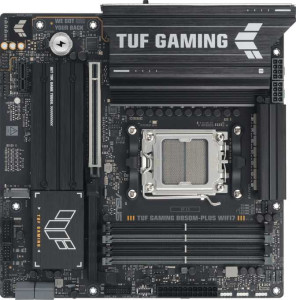
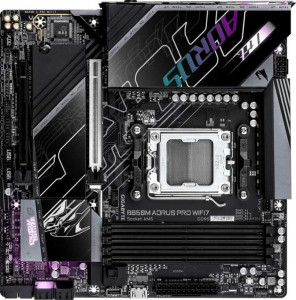
Asus TUF Gaming B850M-Plus Wi-Fi7 Gigabyte B850M Aorus Pro Wi-Fi7

Overview

Welcome to our in-depth specification comparison between the Asus TUF Gaming B850M-Plus Wi-Fi7 and the Gigabyte B850M Aorus Pro Wi-Fi7 — two compelling Micro-ATX motherboards built on the AM5 platform with the B850 chipset. Both boards share a strong foundation of Wi-Fi 7 connectivity and DDR5 memory support, yet they diverge in meaningful ways across storage options, rear port configuration, and key BIOS and expansion features. Read on to find out which board better suits your build.

Common Features

  • Both boards use the AM5 CPU socket.
  • Both boards feature the B850 chipset.
  • Both boards use the Micro-ATX form factor.
  • Wi-Fi is supported on both boards, covering Wi-Fi 4, Wi-Fi 5, Wi-Fi 6, Wi-Fi 6E, and Wi-Fi 7.
  • Bluetooth 5.4 is available on both boards.
  • Both boards include an HDMI 2.1 output.
  • Both boards support up to 256GB of maximum memory.
  • Both boards have 4 memory slots.
  • Both boards use DDR5 memory.
  • Both boards support 2 memory channels.
  • ECC memory is not supported on either board.
  • Neither board has USB 3.2 Gen 1 ports of the USB-C type on the rear panel.
  • Both boards provide 4 USB 2.0 rear ports.
  • Neither board includes USB 4 40Gbps, USB 4 20Gbps, Thunderbolt 4, or Thunderbolt 3 ports.
  • Both boards include 1 RJ45 port.
  • Both boards provide 2 USB 3.2 Gen 1 ports through expansion headers.
  • Both boards provide 2 USB 3.0 ports through expansion headers.
  • Both boards have 4 SATA 3 connectors and no SATA 2 connectors.
  • Neither board includes a U.2 socket or an mSATA connector.
  • Both boards feature 1 PCIe 5.0 x16 slot and no PCIe 4.0 x16, PCIe 3.0 x16, PCIe 2.0 x16, or PCI slots.
  • Both boards deliver a 120 dB Signal-to-Noise ratio on the DAC.
  • Both boards support 7.1 audio channels.
  • Both boards support RAID 0, RAID 1, RAID 5, and RAID 10, but neither supports RAID 0+1.

Main Differences

  • Easy BIOS reset is supported on Asus TUF Gaming B850M-Plus Wi-Fi7 but not available on Gigabyte B850M Aorus Pro Wi-Fi7.
  • Dual BIOS is present on Asus TUF Gaming B850M-Plus Wi-Fi7 but not available on Gigabyte B850M Aorus Pro Wi-Fi7.
  • Maximum overclocked RAM speed is 8000 MHz on Asus TUF Gaming B850M-Plus Wi-Fi7 and 8600 MHz on Gigabyte B850M Aorus Pro Wi-Fi7.
  • USB 3.2 Gen 2 rear ports (USB-A) total 3 on Asus TUF Gaming B850M-Plus Wi-Fi7 and 2 on Gigabyte B850M Aorus Pro Wi-Fi7.
  • USB 3.2 Gen 1 rear ports (USB-A) total 4 on Asus TUF Gaming B850M-Plus Wi-Fi7 and 5 on Gigabyte B850M Aorus Pro Wi-Fi7.
  • A USB 3.2 Gen 2 rear port of the USB-C type is not present on Asus TUF Gaming B850M-Plus Wi-Fi7 but is available on Gigabyte B850M Aorus Pro Wi-Fi7.
  • A USB 3.2 Gen 2x2 port is present on Asus TUF Gaming B850M-Plus Wi-Fi7 but not available on Gigabyte B850M Aorus Pro Wi-Fi7.
  • A DisplayPort output is present on Asus TUF Gaming B850M-Plus Wi-Fi7 but not available on Gigabyte B850M Aorus Pro Wi-Fi7.
  • USB 2.0 expansion header ports total 3 on Asus TUF Gaming B850M-Plus Wi-Fi7 and 4 on Gigabyte B850M Aorus Pro Wi-Fi7.
  • Fan headers total 5 on Asus TUF Gaming B850M-Plus Wi-Fi7 and 6 on Gigabyte B850M Aorus Pro Wi-Fi7.
  • M.2 sockets total 3 on Asus TUF Gaming B850M-Plus Wi-Fi7 and 2 on Gigabyte B850M Aorus Pro Wi-Fi7.
  • A TPM connector is not present on Asus TUF Gaming B850M-Plus Wi-Fi7 but is available on Gigabyte B850M Aorus Pro Wi-Fi7.
  • A PCIe x1 slot is present on Asus TUF Gaming B850M-Plus Wi-Fi7 but not available on Gigabyte B850M Aorus Pro Wi-Fi7.
  • A PCIe x4 slot is not present on Asus TUF Gaming B850M-Plus Wi-Fi7 but is available on Gigabyte B850M Aorus Pro Wi-Fi7.
  • An S/PDIF Out port is not present on Asus TUF Gaming B850M-Plus Wi-Fi7 but is available on Gigabyte B850M Aorus Pro Wi-Fi7.
  • Audio connectors total 3 on Asus TUF Gaming B850M-Plus Wi-Fi7 and 2 on Gigabyte B850M Aorus Pro Wi-Fi7.
Specs Comparison
Asus TUF Gaming B850M-Plus Wi-Fi7

Asus TUF Gaming B850M-Plus Wi-Fi7

Gigabyte B850M Aorus Pro Wi-Fi7

Gigabyte B850M Aorus Pro Wi-Fi7

General info:
CPU socket AM5 AM5
chipset B850 B850
form factor Micro-ATX Micro-ATX
release date July 2025 January 2025
supports Wi-Fi
Wi-Fi version Wi-Fi 4 (802.11n), Wi-Fi 5 (802.11ac), Wi-Fi 6 (802.11ax), Wi-Fi 6E (802.11ax), Wi-Fi 7 (802.11be) Wi-Fi 4 (802.11n), Wi-Fi 5 (802.11ac), Wi-Fi 6 (802.11ax), Wi-Fi 6E (802.11ax), Wi-Fi 7 (802.11be)
Has Bluetooth
Bluetooth version 5.4 5.4
HDMI version HDMI 2.1 HDMI 2.1
Easy to overclock
has RGB lighting
Easy to reset BIOS
Has dual BIOS
has aptX
CPU sockets 1 1
Has integrated graphics
warranty period 3 years 3 years
height 244 mm 244 mm
width 244 mm 244 mm
Has integrated CPU

At the platform level, the Asus TUF Gaming B850M-Plus Wi-Fi 7 and the Gigabyte B850M Aorus Pro Wi-Fi 7 are virtually identical: both use the AM5 socket with the B850 chipset, share the same Micro-ATX footprint (244 × 244 mm), and support the full Wi-Fi stack up to Wi-Fi 7 (802.11be) alongside Bluetooth 5.4. Both also output video via HDMI 2.1, support overclocking, feature RGB lighting, and carry identical 3-year warranties. For the vast majority of general-use considerations, these two boards are on equal footing.

The only meaningful differentiators in this group fall under BIOS resilience. The Asus TUF offers both easy BIOS reset and a dual BIOS chip, while the Gigabyte Aorus Pro has neither. In practice, dual BIOS acts as a hardware safety net: if a failed flash or corrupted firmware renders the primary BIOS unbootable, the board automatically falls back to a backup copy. Easy BIOS reset further simplifies recovery without needing to clear CMOS manually. These are not features most users will ever need — but when they do, their absence on the Gigabyte can mean a bricked board rather than a quick recovery.

Based strictly on the general info specs provided, the Asus TUF Gaming B850M-Plus Wi-Fi 7 holds a clear edge. Its dual BIOS and easy reset functionality add a layer of fault tolerance that the Gigabyte simply lacks, making it the safer long-term choice — particularly for users who plan to experiment with BIOS updates or overclocking profiles.
Memory:
maximum memory amount 256GB 256GB
overclocked RAM speed 8000 MHz 8600 MHz
memory slots 4 4
DDR memory version 5 5
memory channels 2 2
Supports ECC memory

The memory foundations of both boards are structurally identical: four DDR5 slots arranged in a dual-channel configuration with a 256GB capacity ceiling. For most desktop builds — even RAM-hungry workloads like video editing or large virtual machines — 256GB is a ceiling that will never realistically be reached, so neither board creates a practical constraint here.

Where they diverge is overclocked RAM support. The Asus TUF tops out at 8000 MHz for EXPO/XMP profiles, while the Gigabyte Aorus Pro pushes that ceiling to 8600 MHz. The 600 MHz gap matters primarily to enthusiasts chasing peak memory bandwidth — tasks like high-resolution texture streaming, large dataset processing, or simply extracting the last few percentage points of performance from an AMD Ryzen build. For everyday gaming or productivity use, the real-world difference between these two figures is negligible, as most users will run memory well below either limit.

On a strict spec basis, the Gigabyte B850M Aorus Pro Wi-Fi 7 holds a narrow edge in this category, courtesy of its higher overclocked memory ceiling. It is not a gap that will affect typical users, but for builders specifically targeting extreme memory frequencies, the Gigabyte offers a bit more headroom.

Ports:
USB 3.2 Gen 2 ports (USB-A) 3 2
USB 3.2 Gen 1 ports (USB-A) 4 5
USB 3.2 Gen 2 ports (USB-C) 0 1
USB 3.2 Gen 1 ports (USB-C) 0 0
USB 2.0 ports 4 4
USB 3.2 Gen 2x2 ports 1 0
USB 4 40Gbps ports 0 0
USB 4 20Gbps ports 0 0
Thunderbolt 4 ports 0 0
Thunderbolt 3 ports 0 0
has an HDMI output
DisplayPort outputs 1 0
RJ45 ports 1 1
Has USB Type-C
eSATA ports 0 0
DVI outputs 0 0
has a VGA connector
PS/2 ports 0 0

Rear I/O layouts tell a story about who each board is designed for. Both share a sensible baseline — four USB 2.0 ports for peripherals like keyboards and mice, a single RJ45 Ethernet jack, and HDMI video output — but they diverge meaningfully in their higher-bandwidth offerings. The Asus TUF counters with a USB 3.2 Gen 2x2 port running at 20 Gbps, while the Gigabyte Aorus Pro instead provides a USB 3.2 Gen 2 Type-C port at 10 Gbps. For users transferring large files to an external NVMe enclosure, the Asus's Gen 2x2 delivers twice the theoretical throughput — a real, measurable advantage in that specific scenario.

The video output situation also splits the two boards. The Asus TUF pairs its HDMI with a DisplayPort output, enabling easy dual-monitor setups directly from the rear I/O when using a CPU with integrated graphics. The Gigabyte offers only HDMI, which limits native multi-display flexibility without a discrete GPU. For builders planning a GPU-less or iGPU-based secondary display configuration, this is a tangible gap.

Taken together, the Asus TUF Gaming B850M-Plus Wi-Fi 7 edges ahead in this category. Its combination of a faster Gen 2x2 port and an additional DisplayPort output provides more versatility and raw bandwidth than the Gigabyte's single Gen 2 Type-C substitution, making it the stronger choice for users who prioritize rear I/O flexibility.

Connectors:
USB 3.2 Gen 1 ports (through expansion) 2 2
USB 2.0 ports (through expansion) 3 4
SATA 3 connectors 4 4
fan headers 5 6
USB 3.0 ports (through expansion) 2 2
M.2 sockets 3 2
Has TPM connector
U.2 sockets 0 0
Has mSATA connector
SATA 2 connectors 0 0

Internal connectivity is where build flexibility is often decided, and here the two boards trade blows in different areas. The most impactful divergence is in M.2 sockets: the Asus TUF provides three versus the Gigabyte Aorus Pro's two. In practical terms, that extra slot means one more high-speed NVMe drive without touching the four shared SATA 3 ports — a genuine advantage for content creators, power users, or anyone building a storage-heavy system who wants to avoid the latency penalty of SATA-based SSDs.

The Gigabyte pushes back in thermal and security management. Its six fan headers versus the Asus's five give builders slightly more granular airflow control in a multi-fan Micro-ATX chassis, where every header can matter. More distinctively, the Gigabyte is the only one here with a dedicated TPM connector — relevant for enterprise environments, Windows 11 compliance, or users who rely on hardware-backed encryption and security features. The Asus omits this entirely.

Neither board dominates outright, but the deciding factor comes down to use case. For storage-focused builds, the Asus TUF Gaming B850M-Plus Wi-Fi 7 has a clear structural advantage with its additional M.2 slot. For security-conscious or professionally managed deployments, the Gigabyte's TPM connector and extra fan header tip the balance its way. On balance, the Asus's M.2 advantage is likely to matter to a broader range of users, giving it a slight overall edge in this group.

Expansion slots:
PCIe 4.0 x16 slots 0 0
PCIe 5.0 x16 slots 1 1
PCIe 3.0 x16 slots 0 0
PCIe x1 slots 1 0
PCI slots 0 0
PCIe 2.0 x16 slots 0 0
PCIe x4 slots 0 1
PCIe x8 slots 0 0

Both boards allocate their primary expansion slot identically — a single PCIe 5.0 x16 slot for the discrete GPU, delivering the full bandwidth of the current generation standard. For any modern graphics card, this is all that matters, and neither board creates any limitation here.

The secondary slot is where they part ways. The Asus TUF includes a PCIe x1 slot, suited for low-bandwidth add-in cards like sound cards, USB expansion cards, or simple network adapters. The Gigabyte Aorus Pro instead offers a PCIe x4 slot, which carries four times the lane bandwidth of an x1. That wider pipe opens the door to more demanding expansion cards — such as additional NVMe controllers, capture cards, or higher-throughput networking adapters — that would either bottleneck or be outright incompatible with an x1 slot.

For users who only ever plan to install a GPU and perhaps one simple peripheral card, the distinction is academic. But for anyone eyeing a more capable secondary expansion card, the Gigabyte B850M Aorus Pro Wi-Fi 7 holds the clear advantage here, offering meaningfully more headroom in its secondary slot without sacrificing primary GPU bandwidth.

Audio:
Signal-to-Noise ratio (DAC) 120 dB 120 dB
audio channels 7.1 7.1
Has S/PDIF Out port
audio connectors 3 2

On the core audio quality metrics, these two boards are indistinguishable: both deliver 7.1-channel surround sound with a 120 dB signal-to-noise ratio on the DAC. A 120 dB SNR is a strong figure for onboard audio, meaning the analog output is clean enough to satisfy all but the most demanding audiophiles using high-impedance headphones or studio monitors.

The split comes down to connectivity philosophy. The Asus TUF provides three analog audio jacks but no digital output, while the Gigabyte Aorus Pro offers a S/PDIF optical out port at the cost of one fewer analog connector — just two jacks. S/PDIF is significant for users routing audio to an AV receiver, a soundbar, or an external DAC via optical cable, as it passes a clean digital signal that bypasses the motherboard's analog circuitry entirely. For home theater-adjacent setups, that single port is genuinely useful.

The verdict here depends on the user's audio chain. Those plugging headphones or speakers directly into the board will prefer the Asus TUF's extra analog jack. Users with an external receiver or optical-capable DAC will find the Gigabyte B850M Aorus Pro Wi-Fi 7's S/PDIF output a more valuable feature — giving it the edge for anyone invested in a digital audio setup.

Storage:
Supports RAID 1
Supports RAID 10 (1+0)
Supports RAID 5
Supports RAID 0
Supports RAID 0+1

RAID support is identical across both boards. Each supports RAID 0 (striping for maximum throughput), RAID 1 (mirroring for redundancy), RAID 5 (distributed parity balancing speed and fault tolerance), and RAID 10 (a combined stripe-and-mirror configuration requiring four drives). Neither supports RAID 0+1, though in practice RAID 10 is the more commonly implemented alternative that achieves similar goals with better fault tolerance, so the omission is inconsequential for most users.

This is a complete tie. There is no differentiator to analyze in this group — every supported and unsupported RAID mode is shared between the two boards. Whether a user is building a redundant home NAS, a high-speed scratch disk array, or a mixed-use storage setup, both boards offer exactly the same configuration options.

Comparison Summary & Verdict

Both the Asus TUF Gaming B850M-Plus Wi-Fi7 and the Gigabyte B850M Aorus Pro Wi-Fi7 are well-equipped Micro-ATX boards sharing the same AM5 socket, B850 chipset, DDR5 support, and full Wi-Fi 7 connectivity. Where they diverge is telling. The Asus board stands out with its dual BIOS and easy BIOS reset, a larger three M.2 socket count, a DisplayPort output, a USB 3.2 Gen 2x2 port, and an extra PCIe x1 slot — making it the stronger pick for builders who value redundancy and storage flexibility. The Gigabyte board counters with a higher overclocked RAM speed ceiling of 8600 MHz, an additional fan header, a USB-C Gen 2 rear port, a TPM connector, an S/PDIF Out port, and support for a PCIe x4 slot — appealing to users who prioritize memory performance and broader peripheral connectivity.

Asus TUF Gaming B850M-Plus Wi-Fi7
Buy Asus TUF Gaming B850M-Plus Wi-Fi7 if...

Buy the Asus TUF Gaming B850M-Plus Wi-Fi7 if you want the added security of dual BIOS, need three M.2 slots for extensive storage expansion, or require a DisplayPort output alongside HDMI.

Gigabyte B850M Aorus Pro Wi-Fi7
Buy Gigabyte B850M Aorus Pro Wi-Fi7 if...

Buy the Gigabyte B850M Aorus Pro Wi-Fi7 if you want to push overclocked RAM speeds up to 8600 MHz, need a TPM connector, or prefer a rear USB-C Gen 2 port and an S/PDIF digital audio output.