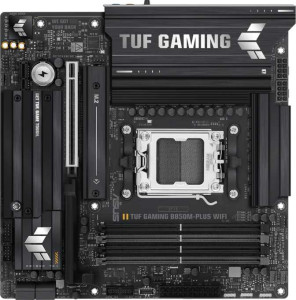
Asus TUF Gaming B850M-Plus WiFi
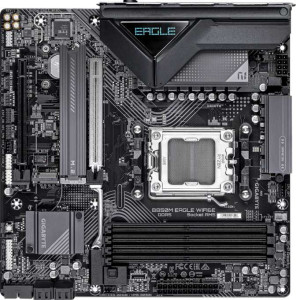
Gigabyte B850M Eagle Wi-Fi6E

Asus TUF Gaming B850M-Plus WiFi Gigabyte B850M Eagle Wi-Fi6E

Overview

Welcome to our in-depth specification comparison between the Asus TUF Gaming B850M-Plus WiFi and the Gigabyte B850M Eagle Wi-Fi6E, two Micro-ATX motherboards built on the AM5 platform with the B850 chipset. While they share a strong common foundation, key battlegrounds emerge around USB connectivity and rear port selection, memory capacity limits, storage expansion options, and audio features. Read on to see which board better fits your build.

Common Features

  • Both boards use the AM5 CPU socket.
  • Both boards feature the B850 chipset.
  • Both boards have a Micro-ATX form factor.
  • Wi-Fi is available on both boards, supporting Wi-Fi 4 (802.11n), Wi-Fi 5 (802.11ac), Wi-Fi 6 (802.11ax), and Wi-Fi 6E (802.11ax).
  • Bluetooth 5.3 is present on both boards.
  • Both boards include an HDMI 2.1 output.
  • Both boards have 4 memory slots supporting DDR5 in a dual-channel configuration.
  • ECC memory is not supported on either board.
  • Neither board has USB 3.2 Gen 1 Type-C rear ports, USB 4 ports, or Thunderbolt ports.
  • Both boards provide 4 USB 2.0 rear ports and 1 RJ45 port.
  • Both boards offer 2 USB 3.2 Gen 1 ports and 2 USB 3.0 ports through internal expansion headers.
  • Both boards provide 4 USB 2.0 ports through internal expansion headers.
  • Both boards include 4 SATA 3 connectors and no SATA 2 connectors.
  • Neither board has a U.2 socket or an mSATA connector.
  • Both boards feature 1 PCIe 5.0 x16 slot and no PCIe 4.0 x16, PCIe 3.0 x16, PCIe 2.0 x16, or PCI slots.
  • Neither board has PCIe x8 slots.
  • Both boards support 7.1 audio channels.
  • Both boards support RAID 0, RAID 1, RAID 5, and RAID 10 (1+0), but neither supports RAID 0+1.

Main Differences

  • Dual BIOS is present on the Asus TUF Gaming B850M-Plus WiFi but not available on the Gigabyte B850M Eagle Wi-Fi6E.
  • Maximum memory capacity is 192GB on the Asus TUF Gaming B850M-Plus WiFi and 256GB on the Gigabyte B850M Eagle Wi-Fi6E.
  • Maximum overclocked RAM speed is 8000 MHz on the Asus TUF Gaming B850M-Plus WiFi and 8200 MHz on the Gigabyte B850M Eagle Wi-Fi6E.
  • USB 3.2 Gen 2 Type-A rear ports number 3 on the Asus TUF Gaming B850M-Plus WiFi and 1 on the Gigabyte B850M Eagle Wi-Fi6E.
  • USB 3.2 Gen 1 Type-A rear ports number 4 on the Asus TUF Gaming B850M-Plus WiFi and 2 on the Gigabyte B850M Eagle Wi-Fi6E.
  • A USB 3.2 Gen 2 Type-C rear port is present on the Gigabyte B850M Eagle Wi-Fi6E but not available on the Asus TUF Gaming B850M-Plus WiFi.
  • A USB 3.2 Gen 2x2 rear port is present on the Asus TUF Gaming B850M-Plus WiFi but not available on the Gigabyte B850M Eagle Wi-Fi6E.
  • DisplayPort outputs number 1 on the Asus TUF Gaming B850M-Plus WiFi and 2 on the Gigabyte B850M Eagle Wi-Fi6E.
  • A PS/2 port is present on the Gigabyte B850M Eagle Wi-Fi6E but not available on the Asus TUF Gaming B850M-Plus WiFi.
  • Fan headers number 5 on the Asus TUF Gaming B850M-Plus WiFi and 4 on the Gigabyte B850M Eagle Wi-Fi6E.
  • M.2 sockets number 3 on the Asus TUF Gaming B850M-Plus WiFi and 2 on the Gigabyte B850M Eagle Wi-Fi6E.
  • A TPM connector is present on the Gigabyte B850M Eagle Wi-Fi6E but not available on the Asus TUF Gaming B850M-Plus WiFi.
  • A PCIe x1 slot is present on the Asus TUF Gaming B850M-Plus WiFi, while the Gigabyte B850M Eagle Wi-Fi6E has none.
  • A PCIe x4 slot is present on the Gigabyte B850M Eagle Wi-Fi6E, while the Asus TUF Gaming B850M-Plus WiFi has none.
  • An S/PDIF Out port is present on the Asus TUF Gaming B850M-Plus WiFi but not available on the Gigabyte B850M Eagle Wi-Fi6E.
  • Audio connectors number 5 on the Asus TUF Gaming B850M-Plus WiFi and 3 on the Gigabyte B850M Eagle Wi-Fi6E.
Specs Comparison
Asus TUF Gaming B850M-Plus WiFi

Asus TUF Gaming B850M-Plus WiFi

Gigabyte B850M Eagle Wi-Fi6E

Gigabyte B850M Eagle Wi-Fi6E

General info:
CPU socket AM5 AM5
chipset B850 B850
form factor Micro-ATX Micro-ATX
release date January 2025 January 2025
supports Wi-Fi
Wi-Fi version Wi-Fi 4 (802.11n), Wi-Fi 5 (802.11ac), Wi-Fi 6 (802.11ax), Wi-Fi 6E (802.11ax) Wi-Fi 4 (802.11n), Wi-Fi 5 (802.11ac), Wi-Fi 6 (802.11ax), Wi-Fi 6E (802.11ax)
Has Bluetooth
Bluetooth version 5.3 5.3
HDMI version HDMI 2.1 HDMI 2.1
Easy to overclock
has RGB lighting
Easy to reset BIOS
Has dual BIOS
has aptX
CPU sockets 1 1
Has integrated graphics
warranty period 3 years 3 years
height 244 mm 244 mm
width 244 mm 244 mm
Has integrated CPU

The Asus TUF Gaming B850M-Plus WiFi and the Gigabyte B850M Eagle Wi-Fi6E are remarkably similar at their foundation: both use the AM5 socket with a B850 chipset, share the same Micro-ATX form factor and identical 244 × 244 mm dimensions, and offer the same wireless stack — Wi-Fi 6E plus Bluetooth 5.3 — alongside HDMI 2.1 output, RGB lighting, and a 3-year warranty. For the vast majority of build decisions, these two boards are effectively interchangeable on paper.

The one meaningful differentiator in this group is dual BIOS: the Asus TUF has it, the Gigabyte Eagle does not. In practice, dual BIOS acts as a hardware safety net — if a firmware update goes wrong or the BIOS becomes corrupted, the board can automatically fall back to a backup chip, recovering without user intervention or a trip to the shop. This is particularly relevant given that both boards support overclocking, where BIOS flashing is a common activity that carries a small but real risk of failure.

Based solely on the specs in this group, the Asus TUF Gaming B850M-Plus WiFi holds a clear, if narrow, advantage thanks to its dual BIOS implementation. It is the more resilient option for users who plan to actively tune their system, while the Gigabyte Eagle offers no compensating advantage in this category to offset that omission.

Memory:
maximum memory amount 192GB 256GB
overclocked RAM speed 8000 MHz 8200 MHz
memory slots 4 4
DDR memory version 5 5
memory channels 2 2
Supports ECC memory

The Asus TUF Gaming B850M-Plus WiFi and the Gigabyte B850M Eagle Wi-Fi6E differ slightly in their memory specifications. The Asus board supports a maximum memory amount of 192GB, while the Gigabyte board can handle up to 256GB of memory, offering a higher capacity for users requiring more RAM. Both motherboards feature four memory slots and support DDR5 memory, with a dual-channel memory configuration in place for both models.

Regarding overclocked RAM speeds, the Asus TUF Gaming board can reach a maximum of 8000 MHz, while the Gigabyte board slightly surpasses this with an overclocked RAM speed of 8200 MHz. Both motherboards do not support ECC memory, making them less suited for error-correction needs.

In summary, the main differences between these two motherboards lie in their maximum memory capacity and overclocked RAM speed, with the Gigabyte board offering higher values in both areas.

Ports:
USB 3.2 Gen 2 ports (USB-A) 3 1
USB 3.2 Gen 1 ports (USB-A) 4 2
USB 3.2 Gen 2 ports (USB-C) 0 1
USB 3.2 Gen 1 ports (USB-C) 0 0
USB 2.0 ports 4 4
USB 3.2 Gen 2x2 ports 1 0
USB 4 40Gbps ports 0 0
USB 4 20Gbps ports 0 0
Thunderbolt 4 ports 0 0
Thunderbolt 3 ports 0 0
has an HDMI output
DisplayPort outputs 1 2
RJ45 ports 1 1
Has USB Type-C
eSATA ports 0 0
DVI outputs 0 0
has a VGA connector
PS/2 ports 0 1

The Asus TUF Gaming B850M-Plus WiFi and the Gigabyte B850M Eagle Wi-Fi6E provide different port configurations. The Asus board offers more USB 3.2 Gen 2 (USB-A) ports, with a total of 3, compared to the Gigabyte board’s 1. Additionally, the Asus board includes 4 USB 3.2 Gen 1 (USB-A) ports, while the Gigabyte board has only 2. However, the Gigabyte model includes 1 USB 3.2 Gen 2 (USB-C) port, whereas the Asus board lacks any USB-C ports of this type. Both motherboards offer 4 USB 2.0 ports.

In terms of video outputs, the Asus TUF Gaming board provides 1 DisplayPort output and has an HDMI output. In contrast, the Gigabyte B850M Eagle includes 2 DisplayPort outputs and also features an HDMI output. Neither board offers eSATA ports, DVI outputs, or a VGA connector. The Gigabyte board is the only one to include a PS/2 port.

Both motherboards come with 1 RJ45 port, supporting wired networking. Both also include USB Type-C support, though the Asus board offers it with a USB 3.2 Gen 1 port, while the Gigabyte board provides it as a USB 3.2 Gen 2 port. Neither motherboard features Thunderbolt 3 or 4 ports, nor USB 4 40Gbps or 20Gbps ports.

Connectors:
USB 3.2 Gen 1 ports (through expansion) 2 2
USB 2.0 ports (through expansion) 4 4
SATA 3 connectors 4 4
fan headers 5 4
USB 3.0 ports (through expansion) 2 2
M.2 sockets 3 2
Has TPM connector
U.2 sockets 0 0
Has mSATA connector
SATA 2 connectors 0 0

Both the Asus TUF Gaming B850M-Plus WiFi and the Gigabyte B850M Eagle Wi-Fi6E offer similar connectors, with minor differences. Both motherboards feature 2 USB 3.2 Gen 1 ports and 4 USB 2.0 ports through expansion. They also both have 4 SATA 3 connectors and 2 USB 3.0 ports through expansion. As for fan headers, the Asus board includes 5, while the Gigabyte board has 4, offering one less fan header.

Regarding M.2 sockets, the Asus board offers 3 M.2 sockets, whereas the Gigabyte board has 2 M.2 sockets. The Gigabyte board stands out with its inclusion of a TPM connector, which the Asus board lacks. Neither board provides a U.2 socket or an mSATA connector, and both lack SATA 2 connectors.

In summary, the main differences between these two motherboards are the number of fan headers and M.2 sockets, as well as the presence of a TPM connector on the Gigabyte board.

Expansion slots:
PCIe 4.0 x16 slots 0 0
PCIe 5.0 x16 slots 1 1
PCIe 3.0 x16 slots 0 0
PCIe x1 slots 1 0
PCI slots 0 0
PCIe 2.0 x16 slots 0 0
PCIe x4 slots 0 1
PCIe x8 slots 0 0

Both the Asus TUF Gaming B850M-Plus WiFi and the Gigabyte B850M Eagle Wi-Fi6E motherboards feature one PCIe 5.0 x16 slot, but neither offers any PCIe 4.0 x16 slots or PCIe 3.0 x16 slots. The Asus board includes one PCIe x1 slot, while the Gigabyte board does not include any PCIe x1 slots. The Gigabyte board also offers one PCIe x4 slot, which is not present on the Asus board. Neither motherboard includes any PCI slots or PCIe 2.0 x16 slots, further aligning their slot configurations.

In summary, the main differences in expansion slots between the two motherboards are the presence of a PCIe x4 slot on the Gigabyte board and the PCIe x1 slot on the Asus board.

Audio:
audio channels 7.1 7.1
Has S/PDIF Out port
audio connectors 5 3

Both the Asus TUF Gaming B850M-Plus WiFi and the Gigabyte B850M Eagle Wi-Fi6E support 7.1 audio channels, offering high-quality audio output. However, they differ in some audio features. The Asus board includes an S/PDIF Out port, which the Gigabyte board lacks. Additionally, the Asus board has 5 audio connectors, while the Gigabyte board provides only 3 audio connectors.

In summary, the Asus board provides more audio connectors and includes an S/PDIF Out port, making it more versatile for audio connectivity compared to the Gigabyte board.

Storage:
Supports RAID 1
Supports RAID 10 (1+0)
Supports RAID 5
Supports RAID 0
Supports RAID 0+1

Both the Asus TUF Gaming B850M-Plus WiFi and the Gigabyte B850M Eagle Wi-Fi6E support the same RAID configurations, including RAID 1, RAID 10 (1+0), RAID 5, and RAID 0. Neither motherboard supports RAID 0+1, which is the same for both products.

In summary, the storage features of both motherboards are identical, with no differences in RAID support.

Comparison Summary & Verdict

Both boards are compelling AM5 Micro-ATX options, but they cater to slightly different builder profiles. The Asus TUF Gaming B850M-Plus WiFi stands out with its dual BIOS safety net, a greater number of USB 3.2 Gen 2 Type-A ports, a USB 3.2 Gen 2x2 port, three M.2 sockets, more fan headers, an S/PDIF Out port, and five audio connectors, making it a strong choice for enthusiasts who want richer connectivity and storage flexibility. The Gigabyte B850M Eagle Wi-Fi6E, on the other hand, offers a higher maximum memory capacity of 256GB, faster overclocked RAM support at 8200 MHz, two DisplayPort outputs, a USB 3.2 Gen 2 Type-C rear port, and a TPM connector, appealing to users who prioritize memory headroom, video output variety, and security features. Neither board is a clear-cut winner; your ideal choice depends entirely on which advantages matter most for your specific workload and build goals.

Asus TUF Gaming B850M-Plus WiFi
Buy Asus TUF Gaming B850M-Plus WiFi if...

Buy the Asus TUF Gaming B850M-Plus WiFi if you want the added reliability of dual BIOS, more USB 3.2 Gen 2 Type-A ports, a USB 3.2 Gen 2x2 connection, three M.2 slots, and a more comprehensive audio output setup.

Gigabyte B850M Eagle Wi-Fi6E
Buy Gigabyte B850M Eagle Wi-Fi6E if...

Buy the Gigabyte B850M Eagle Wi-Fi6E if you need a higher maximum memory capacity of 256GB, faster overclocked RAM support, dual DisplayPort outputs, a rear USB 3.2 Gen 2 Type-C port, or an onboard TPM connector.