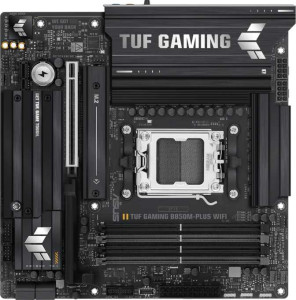
Asus TUF Gaming B850M-Plus WiFi
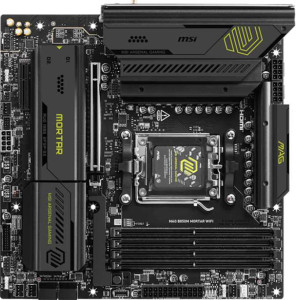
MSI MAG B850M Mortar WiFI

Asus TUF Gaming B850M-Plus WiFi MSI MAG B850M Mortar WiFI

Overview

Welcome to our in-depth spec comparison between the Asus TUF Gaming B850M-Plus WiFi and the MSI MAG B850M Mortar WiFi — two Micro-ATX motherboards built on the AM5 platform with the B850 chipset. While they share a strong common foundation, key battlegrounds emerge around memory capacity and speed, wireless connectivity, rear port selection, and expansion slot configuration. Read on to see which board edges ahead for your specific build.

Common Features

  • Both boards use the AM5 CPU socket.
  • Both boards feature the B850 chipset.
  • Both boards share a Micro-ATX form factor.
  • Wi-Fi connectivity is available on both boards.
  • Bluetooth is available on both boards.
  • Both boards output video via HDMI 2.1.
  • Overclocking support is present on both boards.
  • RGB lighting is featured on both boards.
  • Both boards have 4 memory slots.
  • Both boards use DDR5 memory.
  • Both boards support dual-channel memory.
  • ECC memory is not supported on either board.
  • Both boards provide 3 USB 3.2 Gen 2 Type-A ports.
  • Both boards provide 4 USB 3.2 Gen 1 Type-A ports.
  • Neither board has a USB 3.2 Gen 1 Type-C port.
  • Both boards include 1 USB 3.2 Gen 2x2 port.
  • Neither board has USB 4, Thunderbolt 3, or Thunderbolt 4 ports.
  • Both boards provide 2 USB 3.2 Gen 1 ports through expansion.
  • Both boards provide 4 USB 2.0 ports through expansion.
  • Both boards include 4 SATA 3 connectors and 3 M.2 sockets.
  • Neither board has an mSATA connector or U.2 sockets.
  • Both boards have no SATA 2 connectors.
  • Both boards feature 1 PCIe 5.0 x16 slot and no PCIe 4.0 or 3.0 x16 slots.
  • Both boards have a 120 dB signal-to-noise ratio on the DAC.
  • Both boards support 7.1 audio channels.
  • An S/PDIF output port is present on both boards.
  • Both boards support RAID 0, RAID 1, RAID 5, and RAID 10.
  • RAID 0+1 is not supported on either board.

Main Differences

  • Wi-Fi version goes up to Wi-Fi 6E on the Asus TUF Gaming B850M-Plus WiFi, while the MSI MAG B850M Mortar WiFI also adds Wi-Fi 7 (802.11be) support.
  • Bluetooth version is 5.3 on the Asus TUF Gaming B850M-Plus WiFi and 5.4 on the MSI MAG B850M Mortar WiFI.
  • Easy BIOS reset is not available on the Asus TUF Gaming B850M-Plus WiFi but is present on the MSI MAG B850M Mortar WiFI.
  • Maximum supported memory is 192 GB on the Asus TUF Gaming B850M-Plus WiFi and 256 GB on the MSI MAG B850M Mortar WiFI.
  • Maximum overclocked RAM speed is 8000 MHz on the Asus TUF Gaming B850M-Plus WiFi and 8200 MHz on the MSI MAG B850M Mortar WiFI.
  • USB 3.2 Gen 2 Type-C ports number 0 on the Asus TUF Gaming B850M-Plus WiFi and 1 on the MSI MAG B850M Mortar WiFI.
  • USB 2.0 rear ports number 4 on the Asus TUF Gaming B850M-Plus WiFi and 0 on the MSI MAG B850M Mortar WiFI.
  • DisplayPort outputs number 1 on the Asus TUF Gaming B850M-Plus WiFi and 0 on the MSI MAG B850M Mortar WiFI.
  • Fan headers number 5 on the Asus TUF Gaming B850M-Plus WiFi and 6 on the MSI MAG B850M Mortar WiFI.
  • A TPM connector is absent on the Asus TUF Gaming B850M-Plus WiFi but present on the MSI MAG B850M Mortar WiFI.
  • PCIe x1 slots number 1 on the Asus TUF Gaming B850M-Plus WiFi and 0 on the MSI MAG B850M Mortar WiFI.
  • PCIe x4 slots number 0 on the Asus TUF Gaming B850M-Plus WiFi and 1 on the MSI MAG B850M Mortar WiFI.
  • Audio connectors number 5 on the Asus TUF Gaming B850M-Plus WiFi and 2 on the MSI MAG B850M Mortar WiFI.
Specs Comparison
Asus TUF Gaming B850M-Plus WiFi

Asus TUF Gaming B850M-Plus WiFi

MSI MAG B850M Mortar WiFI

MSI MAG B850M Mortar WiFI

General info:
CPU socket AM5 AM5
chipset B850 B850
form factor Micro-ATX Micro-ATX
release date January 2025 March 2025
supports Wi-Fi
Wi-Fi version Wi-Fi 4 (802.11n), Wi-Fi 5 (802.11ac), Wi-Fi 6 (802.11ax), Wi-Fi 6E (802.11ax) Wi-Fi 4 (802.11n), Wi-Fi 5 (802.11ac), Wi-Fi 6 (802.11ax), Wi-Fi 6E (802.11ax), Wi-Fi 7 (802.11be)
Has Bluetooth
Bluetooth version 5.3 5.4
HDMI version HDMI 2.1 HDMI 2.1
Easy to overclock
has RGB lighting
Easy to reset BIOS
Has dual BIOS
has aptX
CPU sockets 1 1
Has integrated graphics
warranty period 3 years 3 years
height 244 mm 244 mm
width 244 mm 244 mm
Has integrated CPU

Both boards share the same core identity: AM5 socket, B850 chipset, and a Micro-ATX form factor at an identical 244 × 244 mm footprint. They both support Wi-Fi, Bluetooth, RGB lighting, dual BIOS, and carry a 3-year warranty — so the platform fundamentals are essentially a tie. Neither board has integrated graphics or an integrated CPU, which is expected at this tier.

The meaningful differences emerge in the details. The MSI MAG B850M Mortar WiFi supports Wi-Fi 7 (802.11be), while the Asus TUF tops out at Wi-Fi 6E. In practice, Wi-Fi 7 delivers significantly higher theoretical throughput and lower latency, particularly on the new 320 MHz channels — relevant if you have a Wi-Fi 7 router today or plan to upgrade soon. The MSI also edges ahead with Bluetooth 5.4 versus the Asus's 5.3, bringing minor improvements in connection reliability and energy efficiency. On top of that, the MSI offers an easy BIOS reset mechanism, while the Asus does not — a small but genuinely useful convenience during troubleshooting or after a failed overclock.

For this spec group, the MSI MAG B850M Mortar WiFi holds a clear advantage. Its Wi-Fi 7 support is the single most impactful differentiator — it is a forward-looking feature the Asus simply lacks — and the easier BIOS reset adds practical value. The Asus TUF is not meaningfully weaker in day-to-day use if you have no Wi-Fi 7 infrastructure, but on paper the MSI offers more for the same form factor and chipset.
Memory:
maximum memory amount 192GB 256GB
overclocked RAM speed 8000 MHz 8200 MHz
memory slots 4 4
DDR memory version 5 5
memory channels 2 2
Supports ECC memory

The memory foundation is identical between the two: four DDR5 slots arranged in a dual-channel configuration, with no ECC support — all standard and expected for a consumer B850 board. Where they diverge is in the ceiling. The MSI MAG B850M Mortar WiFi tops out at 256 GB of maximum RAM versus the Asus TUF's 192 GB — a 33% higher capacity limit that matters most for memory-intensive workloads like large virtual machines, professional video editing, or heavily loaded development environments.

On the overclocking side, the MSI also has a slight edge, supporting validated RAM speeds up to 8200 MHz compared to the Asus's 8000 MHz. The real-world performance gap between those two frequencies is marginal in gaming or everyday productivity, but it signals that the MSI's memory controller tuning and trace routing are certified for a slightly more aggressive memory profile — potentially useful if you are pushing a high-end DDR5 kit to its limits.

The MSI MAG B850M Mortar WiFi wins this category. Its higher maximum capacity gives it a tangible long-term advantage for power users who may scale their RAM over time, and the incrementally higher overclock ceiling adds a small but real edge for enthusiast memory configurations. The Asus TUF is not deficient for mainstream use, but if memory headroom is a priority, the MSI is the stronger choice here.

Ports:
USB 3.2 Gen 2 ports (USB-A) 3 3
USB 3.2 Gen 1 ports (USB-A) 4 4
USB 3.2 Gen 2 ports (USB-C) 0 1
USB 3.2 Gen 1 ports (USB-C) 0 0
USB 2.0 ports 4 0
USB 3.2 Gen 2x2 ports 1 1
USB 4 40Gbps ports 0 0
USB 4 20Gbps ports 0 0
Thunderbolt 4 ports 0 0
Thunderbolt 3 ports 0 0
has an HDMI output
DisplayPort outputs 1 0
RJ45 ports 1 1
Has USB Type-C
eSATA ports 0 0
DVI outputs 0 0
has a VGA connector
PS/2 ports 0 0

The rear I/O layout of these two boards tells a story about different priorities. High-speed connectivity is largely shared — both offer three USB 3.2 Gen 2 (10Gbps) Type-A ports, four Gen 1 Type-A ports, one USB 3.2 Gen 2x2 (20Gbps) port, HDMI, and a single RJ45 jack. Neither board includes Thunderbolt or USB4, which is typical at this chipset tier.

The trade-offs diverge in two areas. The Asus TUF Gaming B850M-Plus WiFi includes a DisplayPort output and four USB 2.0 ports, but offers no rear USB-C connectivity. The MSI MAG B850M Mortar WiFi drops DisplayPort and USB 2.0 entirely, replacing them with a USB 3.2 Gen 2 Type-C port. The MSI's choice is arguably more forward-looking — USB-C is increasingly the standard for modern peripherals and fast storage — while the Asus's USB 2.0 ports, though legacy, add plug-and-forget convenience for mice, keyboards, and dongles without consuming higher-bandwidth ports. The Asus's DisplayPort is also meaningful for users who need a second video output from the board's integrated display path.

This category is a near tie with a slight edge to the MSI for users building modern setups. Its USB-C rear port is more useful than four USB 2.0 legacy ports for most contemporary peripherals. However, if you rely on a DisplayPort monitor or have several older USB devices, the Asus's I/O layout is the more practical choice.

Connectors:
USB 3.2 Gen 1 ports (through expansion) 2 2
USB 2.0 ports (through expansion) 4 4
SATA 3 connectors 4 4
fan headers 5 6
USB 3.0 ports (through expansion) 2 2
M.2 sockets 3 3
Has TPM connector
U.2 sockets 0 0
Has mSATA connector
SATA 2 connectors 0 0

Internal connector layouts are nearly identical across these two boards: both provide three M.2 sockets, four SATA 3 ports, and the same internal USB expansion headers. For storage builders, this parity is reassuring — you get the same NVMe and SATA flexibility regardless of which board you choose.

Two differences are worth noting. The MSI MAG B850M Mortar WiFi includes a TPM connector while the Asus TUF does not. For most home users this is irrelevant, but in a business or security-conscious environment where firmware-level encryption and Windows 11 TPM requirements need a dedicated hardware module, that header has real value. MSI also offers one additional fan header — six versus the Asus's five — which is a modest but practical advantage in a compact Micro-ATX chassis where thermal management headroom is tighter and every controllable header counts for achieving a quiet, well-cooled build without a separate fan hub.

The MSI MAG B850M Mortar WiFi takes this category. Its extra fan header provides genuine flexibility for cooling configurations, and the TPM connector adds enterprise and security utility that the Asus simply cannot match. Neither difference is a dealbreaker for a typical gaming or home build, but the MSI is the more versatile board for a wider range of use cases.

Expansion slots:
PCIe 4.0 x16 slots 0 0
PCIe 5.0 x16 slots 1 1
PCIe 3.0 x16 slots 0 0
PCIe x1 slots 1 0
PCI slots 0 0
PCIe 2.0 x16 slots 0 0
PCIe x4 slots 0 1
PCIe x8 slots 0 0

Expansion slot configurations on Micro-ATX boards are inherently constrained, and these two are no exception. Both feature a single PCIe 5.0 x16 slot as the primary GPU lane — the current gold standard for discrete graphics, delivering the full bandwidth headroom that next-generation cards can demand.

The only divergence is in the secondary slot. The Asus TUF Gaming B850M-Plus WiFi provides a PCIe x1 slot, suited for low-profile add-in cards like sound cards, Wi-Fi adapters, or capture cards. The MSI MAG B850M Mortar WiFi instead offers a PCIe x4 slot — a meaningfully wider lane that can accommodate higher-bandwidth peripherals such as dedicated USB expansion cards, NVMe add-in cards, or capture hardware that saturates x1 bandwidth. That extra lane width makes the secondary slot genuinely more versatile.

The MSI MAG B850M Mortar WiFi has the edge here. While a single GPU is the primary use case for either board, the x4 secondary slot opens the door to faster and more capable expansion cards that would bottleneck on the Asus's x1 slot. For users planning to add high-throughput peripherals beyond the primary GPU, that distinction is practical and real.

Audio:
Signal-to-Noise ratio (DAC) 120 dB 120 dB
audio channels 7.1 7.1
Has S/PDIF Out port
audio connectors 5 2

At the quality level, these boards are perfectly matched: both deliver a 120 dB signal-to-noise ratio from their onboard DAC, support 7.1 channel audio, and include an S/PDIF optical output for routing audio to an external receiver or DAC. A 120 dB SNR is a strong result for integrated audio, placing both boards well above the threshold where most listeners would notice any background hiss or noise floor.

The practical split comes down to analog connectivity. The Asus TUF Gaming B850M-Plus WiFi provides 5 audio jacks on the rear panel, giving users the full complement needed to physically wire a 7.1 analog surround setup or simultaneously connect multiple analog devices — headphones, front speakers, and a microphone — without an adapter. The MSI MAG B850M Mortar WiFi offers just 2 audio jacks, which limits direct analog hookup to a stereo pair and a single additional input or output. Users wanting multi-channel analog audio on the MSI would need to rely on the S/PDIF output or a USB audio solution instead.

For this group, the Asus TUF Gaming B850M-Plus WiFi has a clear advantage. Audio quality on paper is identical, but the Asus's five-jack layout translates directly into greater real-world flexibility — particularly for users running analog surround speakers or multiple simultaneous audio devices without additional hardware.

Storage:
Supports RAID 1
Supports RAID 10 (1+0)
Supports RAID 5
Supports RAID 0
Supports RAID 0+1

RAID support is a complete tie between these two boards. Both offer RAID 0 for pure performance striping, RAID 1 for mirroring and data redundancy, RAID 5 for the balanced parity-based approach that combines usable capacity with fault tolerance, and RAID 10 for users who want both speed and redundancy simultaneously. Neither board supports RAID 0+1, though in practice RAID 10 covers the same intent more efficiently and its absence is inconsequential.

This spec group requires no trade-off analysis — every configuration available on one board is equally available on the other. Whether you are building a NAS-adjacent workstation that needs drive redundancy, or a content creation rig using RAID 0 to maximize sequential throughput across multiple SATA drives, both boards accommodate the same range of setups without distinction.

This category is a dead tie. Storage RAID capability should not factor into the decision between these two boards.

Comparison Summary & Verdict

Both boards deliver a solid AM5, B850-chipset foundation with DDR5 support, PCIe 5.0, triple M.2 sockets, and capable onboard audio. However, meaningful distinctions set them apart. The MSI MAG B850M Mortar WiFi pulls ahead for future-focused builders thanks to Wi-Fi 7, a higher 256 GB memory ceiling, faster 8200 MHz RAM overclocking, an extra fan header, a TPM connector, and a USB 3.2 Gen 2 Type-C rear port. The Asus TUF Gaming B850M-Plus WiFi, on the other hand, is better suited to users who need a dedicated DisplayPort output, more analog audio connectors, legacy USB 2.0 rear ports, or a PCIe x1 slot for add-in cards. Neither board is a clear universal winner — your ideal choice hinges on your connectivity priorities and peripheral needs.

Asus TUF Gaming B850M-Plus WiFi
Buy Asus TUF Gaming B850M-Plus WiFi if...

Buy the Asus TUF Gaming B850M-Plus WiFi if you need a dedicated DisplayPort output, more analog audio connectors for a multi-jack audio setup, or a PCIe x1 slot for a legacy add-in card.

MSI MAG B850M Mortar WiFI
Buy MSI MAG B850M Mortar WiFI if...

Buy the MSI MAG B850M Mortar WiFi if you want cutting-edge Wi-Fi 7, a higher 256 GB memory ceiling, faster RAM overclocking, a TPM connector, or a rear USB 3.2 Gen 2 Type-C port.