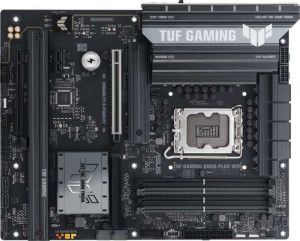
Asus TUF Gaming B860-Plus WiFi
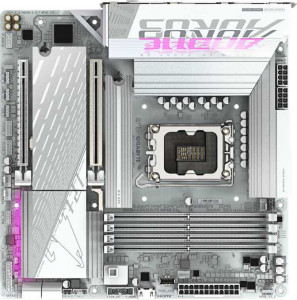
Gigabyte B860M Aorus Elite WiFi6E Ice

Asus TUF Gaming B860-Plus WiFi Gigabyte B860M Aorus Elite WiFi6E Ice

Overview

Welcome to our in-depth spec comparison between the Asus TUF Gaming B860-Plus WiFi and the Gigabyte B860M Aorus Elite WiFi6E Ice. Both boards share the same LGA 1851 socket and B860 chipset, but they take notably different paths when it comes to form factor, connectivity options, and expansion slots. Whether you are building a full-sized ATX rig or a compact Micro-ATX system, understanding where these two boards diverge is essential to making the right choice for your build.

Common Features

  • Both boards use the LGA 1851 CPU socket.
  • Both boards are based on the B860 chipset.
  • Wi-Fi connectivity is available on both products.
  • Bluetooth is available on both products.
  • Both boards output HDMI 2.1.
  • Memory overclocking capability is present on both products.
  • RGB lighting is featured on both products.
  • Dual BIOS is present on both products.
  • Both boards support a maximum of 256 GB of memory.
  • Both boards have 4 memory slots.
  • Both boards use DDR5 memory.
  • Both boards operate in dual-channel memory mode.
  • ECC memory is not supported on either product.
  • Both boards provide 2 USB 3.2 Gen 2 Type-A ports on the rear panel.
  • Neither board has a USB 3.2 Gen 2 Type-C rear port.
  • Neither board has a USB 3.2 Gen 1 Type-C rear port.
  • Neither board features USB 4 20 Gbps ports.
  • Neither board features Thunderbolt 3 ports.
  • Both boards include an HDMI output.
  • Both boards have 1 DisplayPort output.
  • Both boards have 1 RJ45 port.
  • Both boards provide 2 USB 3.2 Gen 1 ports through expansion headers.
  • Both boards provide 1 USB-C 3.2 Gen 2 port through expansion headers.
  • Both boards have 4 SATA 3 connectors.
  • Both boards have 6 fan headers.
  • Both boards include 3 M.2 sockets.
  • Neither board has a U.2 socket.
  • Neither board has an mSATA connector.
  • Both boards have 1 PCIe 5.0 x16 slot.
  • Neither board has PCIe 3.0 x16, PCIe 2.0 x16, PCI, or PCIe x8 slots.
  • Both boards support 7.1 audio channels.
  • Both boards include an S/PDIF Out port.
  • RAID 0, RAID 1, RAID 5, and RAID 10 are supported on both products.
  • RAID 0+1 is not supported on either product.

Main Differences

  • The form factor is ATX on Asus TUF Gaming B860-Plus WiFi and Micro-ATX on Gigabyte B860M Aorus Elite WiFi6E Ice.
  • Wi-Fi 7 (802.11be) support is present on Asus TUF Gaming B860-Plus WiFi but not available on Gigabyte B860M Aorus Elite WiFi6E Ice.
  • Bluetooth version is 5.4 on Asus TUF Gaming B860-Plus WiFi and 5.3 on Gigabyte B860M Aorus Elite WiFi6E Ice.
  • Easy BIOS reset is supported on Asus TUF Gaming B860-Plus WiFi but not available on Gigabyte B860M Aorus Elite WiFi6E Ice.
  • Board width is 305 mm on Asus TUF Gaming B860-Plus WiFi and 244 mm on Gigabyte B860M Aorus Elite WiFi6E Ice.
  • Maximum overclocked RAM speed is 8666 MHz on Asus TUF Gaming B860-Plus WiFi and 9200 MHz on Gigabyte B860M Aorus Elite WiFi6E Ice.
  • USB 3.2 Gen 1 Type-A rear ports number 3 on Asus TUF Gaming B860-Plus WiFi and 4 on Gigabyte B860M Aorus Elite WiFi6E Ice.
  • USB 2.0 rear ports number 2 on Asus TUF Gaming B860-Plus WiFi and 4 on Gigabyte B860M Aorus Elite WiFi6E Ice.
  • A USB 3.2 Gen 2x2 rear port is present on Asus TUF Gaming B860-Plus WiFi but not available on Gigabyte B860M Aorus Elite WiFi6E Ice.
  • A USB 4 40 Gbps port is present on Gigabyte B860M Aorus Elite WiFi6E Ice but not available on Asus TUF Gaming B860-Plus WiFi.
  • A Thunderbolt 4 port is present on Gigabyte B860M Aorus Elite WiFi6E Ice but not available on Asus TUF Gaming B860-Plus WiFi.
  • USB 2.0 ports through expansion number 2 on Asus TUF Gaming B860-Plus WiFi and 4 on Gigabyte B860M Aorus Elite WiFi6E Ice.
  • A TPM connector is present on Gigabyte B860M Aorus Elite WiFi6E Ice but not available on Asus TUF Gaming B860-Plus WiFi.
  • A PCIe 4.0 x16 slot is present on Asus TUF Gaming B860-Plus WiFi but not available on Gigabyte B860M Aorus Elite WiFi6E Ice.
  • A PCIe x1 slot is present on Asus TUF Gaming B860-Plus WiFi but not available on Gigabyte B860M Aorus Elite WiFi6E Ice.
  • A PCIe x4 slot is present on Gigabyte B860M Aorus Elite WiFi6E Ice but not available on Asus TUF Gaming B860-Plus WiFi.
  • Audio connectors number 5 on Asus TUF Gaming B860-Plus WiFi and 2 on Gigabyte B860M Aorus Elite WiFi6E Ice.
Specs Comparison
Asus TUF Gaming B860-Plus WiFi

Asus TUF Gaming B860-Plus WiFi

Gigabyte B860M Aorus Elite WiFi6E Ice

Gigabyte B860M Aorus Elite WiFi6E Ice

General info:
CPU socket LGA 1851 LGA 1851
chipset B860 B860
form factor ATX Micro-ATX
release date January 2025 January 2025
supports Wi-Fi
Wi-Fi version Wi-Fi 4 (802.11n), Wi-Fi 5 (802.11ac), Wi-Fi 6 (802.11ax), Wi-Fi 6E (802.11ax), Wi-Fi 7 (802.11be) Wi-Fi 4 (802.11n), Wi-Fi 5 (802.11ac), Wi-Fi 6 (802.11ax), Wi-Fi 6E (802.11ax)
Has Bluetooth
Bluetooth version 5.4 5.3
HDMI version HDMI 2.1 HDMI 2.1
Easy to overclock
has RGB lighting
Easy to reset BIOS
Has dual BIOS
has aptX
CPU sockets 1 1
Has integrated graphics
warranty period 3 years 3 years
height 244 mm 244 mm
width 305 mm 244 mm
Has integrated CPU

Both boards share the same foundation: the LGA 1851 socket with a B860 chipset, identical HDMI 2.1 output, dual BIOS, RGB lighting, and a 3-year warranty. For the target buyer, this means neither board cuts corners on the essentials — both support the same CPU generation and offer a safety net for failed BIOS updates through their dual-BIOS implementations.

The most meaningful divergence lies in form factor and wireless capability. The Asus TUF is a full ATX board (305 mm wide), offering more PCIe slots, VRM headroom, and expansion potential, while the Gigabyte is a Micro-ATX design (244 mm wide), suited for smaller cases where footprint matters. On wireless, the Asus pulls ahead with Wi-Fi 7 (802.11be) support versus the Gigabyte's maximum of Wi-Fi 6E — a real-world difference if you plan to use a Wi-Fi 7 router, as Wi-Fi 7 delivers lower latency and higher throughput. The Asus also carries Bluetooth 5.4 versus 5.3 on the Gigabyte, a minor but measurable improvement in connection stability and range. Additionally, the Asus includes a dedicated easy BIOS reset mechanism that the Gigabyte lacks, which is a practical convenience during troubleshooting or overclocking.

Overall, the Asus TUF Gaming B860-Plus WiFi holds a clear edge in this group: it offers a more future-proof wireless stack with Wi-Fi 7, a slightly newer Bluetooth revision, greater expandability via ATX, and a more user-friendly BIOS reset option. The Gigabyte B860M Aorus Elite WiFi6E Ice is the right pick only if compact Micro-ATX sizing is a hard requirement for your build.
Memory:
maximum memory amount 256GB 256GB
overclocked RAM speed 8666 MHz 9200 MHz
memory slots 4 4
DDR memory version 5 5
memory channels 2 2
Supports ECC memory

On paper, the memory configurations of these two boards look nearly identical: both support DDR5, offer 4 slots across a dual-channel architecture, cap out at 256GB maximum, and exclude ECC memory — a reasonable omission for consumer-grade motherboards. For most users, this means either board will handle high-capacity builds and benefit equally from DDR5's inherent bandwidth advantages over the previous generation.

The single differentiator in this group is the maximum supported overclocked RAM speed. The Gigabyte B860M Aorus Elite reaches 9200 MHz, while the Asus TUF tops out at 8666 MHz. In practice, pushing RAM to these extremes requires premium, specifically validated memory kits, and real-world gains at the application level are typically marginal beyond a certain threshold. That said, for users who prioritize memory overclocking headroom — particularly in latency-sensitive workloads or competitive gaming scenarios — the Gigabyte′s higher ceiling does represent a tangible, if niche, advantage.

The Gigabyte B860M Aorus Elite WiFi6E Ice takes a narrow edge here strictly on overclocking ceiling. However, for the vast majority of users who will run memory at standard or moderately boosted profiles, this distinction carries little practical weight, and the two boards are effectively equivalent in day-to-day memory performance.

Ports:
USB 3.2 Gen 2 ports (USB-A) 2 2
USB 3.2 Gen 1 ports (USB-A) 3 4
USB 3.2 Gen 2 ports (USB-C) 0 0
USB 3.2 Gen 1 ports (USB-C) 0 0
USB 2.0 ports 2 4
USB 3.2 Gen 2x2 ports 1 0
USB 4 40Gbps ports 0 1
USB 4 20Gbps ports 0 0
Thunderbolt 4 ports 0 1
Thunderbolt 3 ports 0 0
has an HDMI output
DisplayPort outputs 1 1
RJ45 ports 1 1
Has USB Type-C
eSATA ports 0 0
DVI outputs 0 0
has a VGA connector
PS/2 ports 0 0

Where the two boards share common ground — matched USB 3.2 Gen 2 Type-A counts, identical video outputs (HDMI + DisplayPort), and a single RJ45 — the high-speed connectivity story diverges sharply. The Gigabyte B860M Aorus Elite brings a Thunderbolt 4 port paired with a USB 4 40Gbps connection, while the Asus TUF counters with a USB 3.2 Gen 2x2 port (20Gbps) but offers neither Thunderbolt nor USB 4. This is not a minor gap: Thunderbolt 4 enables daisy-chaining multiple high-speed peripherals, connecting external GPU enclosures, and driving high-resolution displays from a single cable — capabilities the Asus simply cannot match.

The Gigabyte also edges ahead in raw port count, offering more USB 3.2 Gen 1 and USB 2.0 rear outputs, which matters when connecting multiple legacy peripherals like keyboards, mice, or audio interfaces without reaching for a hub. The Asus′s Gen 2x2 port does deliver 20Gbps throughput — useful for the fastest external NVMe enclosures — but this is a narrower use case than the broad ecosystem compatibility Thunderbolt 4 unlocks.

The Gigabyte B860M Aorus Elite WiFi6E Ice holds a decisive advantage in this group. Thunderbolt 4 and USB 4 40Gbps represent a substantially higher connectivity ceiling, making the Gigabyte the stronger choice for users who rely on professional peripherals, high-speed storage, or multi-device workflows — a notable achievement for a Micro-ATX board.

Connectors:
USB 3.2 Gen 1 ports (through expansion) 2 2
USB-C 3.2 Gen 2 ports (through expansion) 1 1
USB 2.0 ports (through expansion) 2 4
SATA 3 connectors 4 4
fan headers 6 6
USB 3.0 ports (through expansion) 2 2
M.2 sockets 3 3
Has TPM connector
U.2 sockets 0 0
Has mSATA connector
SATA 2 connectors 0 0

Internally, these two boards are remarkably well-matched. Both provide 3 M.2 sockets, 4 SATA 3 connectors, 6 fan headers, and identical high-speed expansion header counts — meaning builders on either platform have the same foundation for NVMe storage arrays, multi-drive SATA setups, and thorough cooling management. For a system integrator or enthusiast planning a fully loaded build, neither board imposes a meaningful constraint in this regard.

Two distinctions are worth noting. The Gigabyte B860M Aorus Elite offers 4 USB 2.0 expansion ports versus the Asus TUF′s 2, which translates to more front-panel USB flexibility — useful when a case has multiple USB 2.0 headers for ports, fan controllers, or RGB hubs. More significantly, the Gigabyte includes a dedicated TPM connector, which the Asus lacks. A TPM header allows for the addition of a discrete TPM module, relevant for enterprise environments, hardware-level encryption, or stricter security compliance requirements.

The Gigabyte B860M Aorus Elite WiFi6E Ice takes a modest but real advantage here. The TPM connector is a meaningful addition for security-conscious users or business deployments, and the extra USB 2.0 expansion capacity adds practical flexibility. Neither difference is critical for a typical gaming or consumer build, but the Gigabyte covers more edge-case needs within this connector set.

Expansion slots:
PCIe 4.0 x16 slots 1 0
PCIe 5.0 x16 slots 1 1
PCIe 3.0 x16 slots 0 0
PCIe x1 slots 1 0
PCI slots 0 0
PCIe 2.0 x16 slots 0 0
PCIe x4 slots 0 1
PCIe x8 slots 0 0

A shared PCIe 5.0 x16 primary slot means both boards are equally equipped for the latest discrete GPUs, delivering the full bandwidth that current and near-future graphics cards can leverage. That parity, however, is where the similarity ends.

Beyond the primary slot, the Asus TUF Gaming B860-Plus WiFi offers considerably more flexibility: an additional PCIe 4.0 x16 slot and a PCIe x1 slot, totaling three expansion slots. The secondary x16 slot is practically valuable for adding a dedicated capture card, a high-end networking card, or even a secondary GPU in compute configurations — all at PCIe 4.0 speeds, which remain more than adequate for those use cases. The x1 slot further accommodates smaller add-in cards like sound cards or USB expansion controllers. The Gigabyte B860M Aorus Elite, by contrast, pairs its PCIe 5.0 x16 with only a single PCIe x4 slot — a narrower option that limits both the type and performance tier of secondary peripherals.

The Asus TUF Gaming B860-Plus WiFi holds a clear advantage here. Its three-slot layout with a full-speed secondary x16 lane gives builders meaningfully more room to grow, while the Gigabyte′s compact Micro-ATX design inevitably constrains expansion to a more minimal configuration.

Audio:
audio channels 7.1 7.1
Has S/PDIF Out port
audio connectors 5 2

Both boards support 7.1 surround sound and include an S/PDIF optical output — the latter being relevant for users routing audio to an external DAC, AV receiver, or home theater system via digital coaxial or optical cable. At this level, either board is a capable foundation for immersive audio setups.

The practical gap opens up with analog connectors. The Asus TUF Gaming B860-Plus WiFi provides 5 audio jacks, enabling a full multi-channel analog speaker configuration alongside simultaneous headphone and microphone connections — without any compromise or sharing of ports. The Gigabyte B860M Aorus Elite, with just 2 audio connectors, is effectively limited to a stereo headset setup on the analog side, making it a less convenient option for users with dedicated speakers, microphones, or multi-channel analog audio equipment.

The Asus TUF Gaming B860-Plus WiFi wins this group outright. Five analog connectors versus two is a substantial difference that matters to anyone planning to use the onboard audio beyond a simple headset — whether for a surround speaker array, studio monitoring, or a combined headphone-plus-microphone setup. The Gigabyte′s dual-connector design is an expected concession of its compact form factor, but it does leave analog audio flexibility on the table.

Storage:
Supports RAID 1
Supports RAID 10 (1+0)
Supports RAID 5
Supports RAID 0
Supports RAID 0+1

Storage redundancy and performance configurations are identical across both boards. Support for RAID 0, 1, 5, and 10 covers the full practical range for consumer and prosumer use cases: RAID 0 for striped performance gains, RAID 1 for straightforward mirroring and data protection, RAID 5 for a balance of redundancy and usable capacity across three or more drives, and RAID 10 for those who want both speed and fault tolerance. Neither board supports RAID 0+1, but this mode is rarely implemented in consumer platforms given that RAID 10 addresses the same goals more efficiently.

There is simply no differentiator to extract in this group. Every supported and unsupported RAID mode is shared equally between the two boards, making storage configuration a non-factor in any decision between them.

This group is a complete tie. Buyers with specific RAID requirements can confidently choose either board without compromise, and this spec group should carry no weight in the overall purchase decision.

Comparison Summary & Verdict

After examining every specification, it is clear that these two B860 motherboards serve distinct builder profiles. The Asus TUF Gaming B860-Plus WiFi stands out with its full ATX form factor, Wi-Fi 7 support, a USB 3.2 Gen 2x2 port, more audio connectors, an additional PCIe 4.0 x16 and PCIe x1 slot, and an easy BIOS reset feature — making it the stronger pick for enthusiasts who want maximum expandability and future-proof wireless connectivity. The Gigabyte B860M Aorus Elite WiFi6E Ice, on the other hand, counters with a higher overclocked RAM speed of 9200 MHz, a Thunderbolt 4 port, a USB 4 40 Gbps port, a TPM connector, and more USB 2.0 availability — all in a compact Micro-ATX footprint. Choose the Asus board if space and slot count are no concern; choose the Gigabyte if you need a small form factor with bleeding-edge memory speeds and premium high-speed port options.

Asus TUF Gaming B860-Plus WiFi
Buy Asus TUF Gaming B860-Plus WiFi if...

Buy the Asus TUF Gaming B860-Plus WiFi if you want a full ATX build with Wi-Fi 7 support, greater PCIe expansion, more audio connectors, and an easy BIOS reset feature.

Gigabyte B860M Aorus Elite WiFi6E Ice
Buy Gigabyte B860M Aorus Elite WiFi6E Ice if...

Buy the Gigabyte B860M Aorus Elite WiFi6E Ice if you need a compact Micro-ATX board with higher RAM overclocking speeds, a Thunderbolt 4 port, and a USB 4 40 Gbps connection.