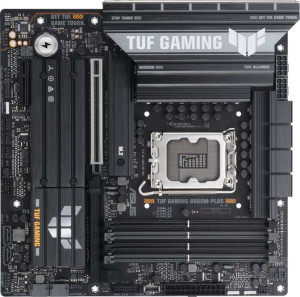
Asus TUF Gaming B860M-Plus
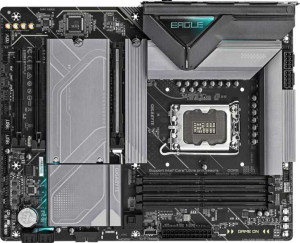
Gigabyte Z890 Eagle

Asus TUF Gaming B860M-Plus Gigabyte Z890 Eagle

Overview

Welcome to our in-depth specification comparison between the Asus TUF Gaming B860M-Plus and the Gigabyte Z890 Eagle. Both boards share the LGA 1851 socket and DDR5 memory support, but they diverge in meaningful ways across form factor, chipset capability, connectivity, and storage expansion. Whether you are building a compact powerhouse or a full-sized feature-rich system, understanding these distinctions will be key to making the right choice.

Common Features

  • Both motherboards use the LGA 1851 CPU socket.
  • Neither board includes built-in Wi-Fi.
  • Neither board includes Bluetooth.
  • Both boards support overclocking.
  • RGB lighting is present on both boards.
  • Each board has a single CPU socket.
  • Neither board has integrated graphics.
  • Both boards come with a 3-year warranty.
  • Both boards support a maximum of 256GB of RAM.
  • Both boards support an overclocked RAM speed of up to 8800 MHz.
  • Both boards have 4 memory slots.
  • Both boards use DDR5 memory.
  • Both boards operate on a dual-channel memory configuration.
  • Neither board supports ECC memory.
  • Both boards have 2 USB 3.2 Gen 2 Type-A ports.
  • Neither board has USB 3.2 Gen 2 Type-C ports on the rear panel.
  • Neither board has USB 4 20Gbps ports.
  • Neither board has Thunderbolt 3 ports.
  • Both boards have 1 DisplayPort output.
  • Both boards have 1 RJ45 ethernet port.
  • Both boards include at least one USB Type-C connector.
  • Both boards provide 2 USB 3.2 Gen 1 ports through expansion headers.
  • Both boards provide 1 USB-C 3.2 Gen 2 port through expansion.
  • Both boards have 4 SATA 3 connectors.
  • Neither board has SATA 2 connectors.
  • Neither board has an mSATA connector.
  • Neither board has U.2 sockets.
  • Both boards have 1 PCIe 5.0 x16 slot.
  • Neither board has PCIe 4.0 x16, PCIe 3.0 x16, PCIe 2.0 x16, PCIe x1, PCIe x8, or PCI slots.
  • Both boards support 7.1 audio channels.
  • Both boards support RAID 0, RAID 1, RAID 5, and RAID 10.
  • Neither board supports RAID 0+1.

Main Differences

  • The chipset is B860 on the Asus TUF Gaming B860M-Plus and Z890 on the Gigabyte Z890 Eagle.
  • The form factor is Micro-ATX on the Asus TUF Gaming B860M-Plus and ATX on the Gigabyte Z890 Eagle.
  • The board width is 244 mm on the Asus TUF Gaming B860M-Plus and 305 mm on the Gigabyte Z890 Eagle.
  • Easy BIOS reset is supported on the Asus TUF Gaming B860M-Plus but not available on the Gigabyte Z890 Eagle.
  • Dual BIOS is present on the Asus TUF Gaming B860M-Plus but not available on the Gigabyte Z890 Eagle.
  • USB 3.2 Gen 1 Type-A ports number 4 on the Asus TUF Gaming B860M-Plus and 3 on the Gigabyte Z890 Eagle.
  • USB 2.0 rear ports number 1 on the Asus TUF Gaming B860M-Plus and 4 on the Gigabyte Z890 Eagle.
  • USB 3.2 Gen 2x2 ports number 1 on the Asus TUF Gaming B860M-Plus and 0 on the Gigabyte Z890 Eagle.
  • USB 4 40Gbps port support is absent on the Asus TUF Gaming B860M-Plus but present on the Gigabyte Z890 Eagle.
  • An HDMI output is present on the Asus TUF Gaming B860M-Plus but not available on the Gigabyte Z890 Eagle.
  • USB 2.0 expansion headers support 2 ports on the Asus TUF Gaming B860M-Plus and 4 ports on the Gigabyte Z890 Eagle.
  • Fan headers number 5 on the Asus TUF Gaming B860M-Plus and 6 on the Gigabyte Z890 Eagle.
  • M.2 sockets number 3 on the Asus TUF Gaming B860M-Plus and 4 on the Gigabyte Z890 Eagle.
  • A TPM connector is absent on the Asus TUF Gaming B860M-Plus but present on the Gigabyte Z890 Eagle.
  • PCIe x4 slots number 1 on the Asus TUF Gaming B860M-Plus and 2 on the Gigabyte Z890 Eagle.
  • An S/PDIF Out port is present on the Asus TUF Gaming B860M-Plus but not available on the Gigabyte Z890 Eagle.
  • Audio connectors number 5 on the Asus TUF Gaming B860M-Plus and 3 on the Gigabyte Z890 Eagle.
Specs Comparison
Asus TUF Gaming B860M-Plus

Asus TUF Gaming B860M-Plus

Gigabyte Z890 Eagle

Gigabyte Z890 Eagle

General info:
CPU socket LGA 1851 LGA 1851
chipset B860 Z890
form factor Micro-ATX ATX
release date January 2025 October 2025
supports Wi-Fi
Has Bluetooth
Easy to overclock
has RGB lighting
Easy to reset BIOS
Has dual BIOS
CPU sockets 1 1
Has integrated graphics
warranty period 3 years 3 years
height 244 mm 244 mm
width 244 mm 305 mm
Has integrated CPU

Both the Asus TUF Gaming B860M-Plus and the Gigabyte Z890 Eagle share the same LGA 1851 CPU socket, making them compatible with the same generation of Intel processors. However, the chipset difference is the most consequential distinction here: the Z890 Eagle runs on Intel's Z890 chipset, the flagship tier, while the TUF Gaming B860M-Plus uses the mid-range B860. In practice, the Z890 unlocks more PCIe lanes, greater memory flexibility, and broader platform headroom — though both boards are listed as easy to overclock, so the gap in tuning accessibility is narrower than the chipset tier alone might suggest.

Form factor is the other major dividing line. The B860M-Plus is Micro-ATX (244 × 244 mm), while the Z890 Eagle is a full ATX board (244 × 305 mm). This means the TUF fits in smaller cases and is the better choice for compact builds, whereas the Z890 Eagle's larger PCB typically accommodates more expansion slots, heavier VRM layouts, and additional connectivity headers. Neither board includes Wi-Fi or Bluetooth, which is notable at this price tier and means users of both will need an add-in card or USB adapter for wireless connectivity.

Where the Asus TUF Gaming B860M-Plus earns a clear edge in this group is BIOS resilience: it offers both easy BIOS reset and a dual BIOS, providing a safety net if a firmware update goes wrong — a meaningful real-world advantage for enthusiasts who update frequently or push system stability limits. The Gigabyte Z890 Eagle has neither. Overall, the Z890 Eagle holds the platform-level advantage thanks to its superior chipset, but the TUF's smaller footprint and BIOS redundancy make it the more practical and forgiving choice for builders who prioritize reliability and compact sizing.
Memory:
maximum memory amount 256GB 256GB
overclocked RAM speed 8800 MHz 8800 MHz
memory slots 4 4
DDR memory version 5 5
memory channels 2 2
Supports ECC memory

On memory, these two boards are in complete lockstep. Both support DDR5 RAM across 4 slots in a dual-channel configuration, top out at 256GB maximum capacity, and push overclocked speeds up to 8800 MHz. For the vast majority of users — from gamers to content creators to developers — this headroom is more than sufficient, and neither board offers any memory-related advantage over the other.

The 8800 MHz overclocked ceiling is particularly noteworthy: reaching those speeds requires carefully selected high-binned DDR5 kits and precise tuning, but the fact that both boards support it means neither is a bottleneck for enthusiasts chasing extreme memory performance. The dual-channel architecture also ensures solid bandwidth for CPU-intensive workloads, and 256GB max capacity leaves ample room for professional-grade use cases like large virtual machines or in-memory databases.

This group is a clear tie. Every meaningful memory specification — DDR version, slot count, channel count, max capacity, and peak overclock speed — is identical. A buyer choosing between these two boards should look entirely to other spec groups to make their decision here, as memory capability offers zero differentiation.

Ports:
USB 3.2 Gen 2 ports (USB-A) 2 2
USB 3.2 Gen 1 ports (USB-A) 4 3
USB 3.2 Gen 2 ports (USB-C) 0 0
USB 3.2 Gen 1 ports (USB-C) 0 0
USB 2.0 ports 1 4
USB 3.2 Gen 2x2 ports 1 0
USB 4 40Gbps ports 0 1
USB 4 20Gbps ports 0 0
Thunderbolt 3 ports 0 0
has an HDMI output
DisplayPort outputs 1 1
RJ45 ports 1 1
Has USB Type-C
eSATA ports 0 0
DVI outputs 0 0
has a VGA connector
PS/2 ports 0 0

The rear I/O panel is where these two boards diverge most interestingly. The standout difference is that the Gigabyte Z890 Eagle includes a USB 4 40Gbps port — the fastest connection available on either board — which enables blazing-fast external NVMe enclosures, high-bandwidth docking stations, and future-proof peripherals at up to 40Gbps throughput. The Asus TUF Gaming B860M-Plus counters with a USB 3.2 Gen 2x2 port at 20Gbps, which is respectable but delivers only half the peak bandwidth of USB 4. For users who regularly move large files to external storage or rely on a single-cable docking solution, the Z890 Eagle's USB 4 port is a tangible day-to-day advantage.

Display output tells a different story. The TUF B860M-Plus offers both HDMI and DisplayPort, while the Z890 Eagle provides only a DisplayPort output and no HDMI at all. This gives the TUF greater monitor compatibility out of the box, since HDMI remains the more universally supported connector across TVs, budget monitors, and KVM switches. Beyond that, both boards share the same two USB 3.2 Gen 2 Type-A ports, one RJ45 ethernet jack, and a USB-C rear connector — so the mid-tier USB landscape is largely equivalent.

Taken together, this group has a split character: the Z890 Eagle wins on peak connectivity bandwidth thanks to USB 4, while the TUF B860M-Plus wins on display versatility with its HDMI output. Neither dominates outright, but users who prioritize high-speed external storage or docking will find the Z890 Eagle the stronger choice here, whereas those who value broad display compatibility will prefer the TUF.

Connectors:
USB 3.2 Gen 1 ports (through expansion) 2 2
USB-C 3.2 Gen 2 ports (through expansion) 1 1
USB 2.0 ports (through expansion) 2 4
SATA 3 connectors 4 4
fan headers 5 6
USB 3.0 ports (through expansion) 2 2
M.2 sockets 3 4
Has TPM connector
U.2 sockets 0 0
Has mSATA connector
SATA 2 connectors 0 0

Internal storage expansion is where the Gigabyte Z890 Eagle pulls ahead most clearly: it offers 4 M.2 sockets versus the TUF B860M-Plus's 3. That extra slot is meaningful for builders who want to run multiple NVMe drives simultaneously — for example, a dedicated OS drive, a game library drive, and a high-speed scratch disk for creative work — without consuming any of the shared 4 SATA 3 ports that both boards provide equally. For storage-heavy builds, the Z890 Eagle simply offers more room to grow.

Thermal management also leans in the Z890 Eagle's favor, with 6 fan headers compared to the TUF's 5. In a well-ventilated mid-tower or full-tower build with multiple case fans, radiator pumps, and CPU cooler headers to manage, that additional header removes the need for a fan hub — a small but genuine convenience. The Z890 Eagle also includes a TPM connector, which the TUF lacks; while TPM functionality is often handled on-die by modern Intel platforms, a dedicated header adds flexibility for specific enterprise or security-focused configurations.

The internal USB headers and SATA counts are effectively equivalent between the two boards, so those shared specs offer no differentiating value. Overall, the Z890 Eagle holds a clear edge in this group — more M.2 slots, an extra fan header, and a TPM connector collectively make it the more expandable and feature-complete option for builders planning a storage-rich or thermally demanding system.

Expansion slots:
PCIe 4.0 x16 slots 0 0
PCIe 5.0 x16 slots 1 1
PCIe 3.0 x16 slots 0 0
PCIe x1 slots 0 0
PCI slots 0 0
PCIe 2.0 x16 slots 0 0
PCIe x4 slots 1 2
PCIe x8 slots 0 0

Both boards anchor their expansion layouts with a single PCIe 5.0 x16 slot — the current generational standard for discrete GPUs, delivering up to 128GB/s of bandwidth and ensuring full-speed compatibility with the latest graphics cards. For the overwhelming majority of users running a single-GPU setup, this shared specification means neither board offers any advantage in primary graphics performance.

The meaningful difference lies in secondary expansion: the Gigabyte Z890 Eagle provides 2 PCIe x4 slots, while the Asus TUF Gaming B860M-Plus has just 1. These lower-bandwidth slots are typically used for add-in cards such as capture cards, additional NVMe adapters, 10GbE network cards, or USB expansion controllers. Having two of them gives the Z890 Eagle significantly more flexibility for multi-card builds or specialized workstation configurations, without any trade-off to the primary GPU slot.

The Z890 Eagle takes the edge here, and it matters most for users planning anything beyond a standard GPU-only build. The TUF's single x4 slot is adequate for typical gaming rigs, but anyone who expects to populate the board with multiple add-in cards will find the Z890 Eagle the more capable platform — a finding consistent with its ATX form factor and broader expansion philosophy.

Audio:
audio channels 7.1 7.1
Has S/PDIF Out port
audio connectors 5 3

Surround sound support is identical on paper — both boards deliver 7.1-channel audio — but the analog output hardware tells a different story. The Asus TUF Gaming B860M-Plus includes 5 audio connectors on the rear panel, while the Gigabyte Z890 Eagle offers only 3. More connectors mean more simultaneously usable analog ports, which is directly relevant for users running a full 7.1 speaker setup through analog jacks, or those who want to connect both front and rear speakers alongside a dedicated microphone input without adapters or splitters.

The TUF also includes an S/PDIF optical output, a feature the Z890 Eagle entirely omits. S/PDIF is the standard digital audio connection for external receivers, soundbars, and home theater amplifiers, allowing a lossless digital signal to bypass the motherboard's onboard audio circuitry altogether. For anyone routing PC audio through an AV receiver or a dedicated DAC via optical, the absence of S/PDIF on the Z890 Eagle is a genuine limitation that would require a workaround or additional hardware.

The Asus TUF Gaming B860M-Plus holds a clear advantage in this group. Its broader analog connector array and S/PDIF output give it meaningfully more audio versatility — particularly for home theater setups, multi-speaker configurations, and users who prefer digital passthrough to an external audio device.

Storage:
Supports RAID 1
Supports RAID 10 (1+0)
Supports RAID 5
Supports RAID 0
Supports RAID 0+1

RAID support is perfectly matched across these two boards. Both offer RAID 0 for pure performance striping, RAID 1 for mirrored redundancy, RAID 5 for the balanced parity-based middle ground, and RAID 10 for the combined speed-and-redundancy configuration favored in demanding workstation environments. Neither board supports RAID 0+1, but given that RAID 10 accomplishes a functionally similar outcome with better fault tolerance, that omission is inconsequential for virtually all users.

This is a straightforward tie. Every supported and unsupported RAID mode is identical between the two products, meaning storage redundancy and array configuration capability offer no basis for choosing one board over the other. Buyers prioritizing RAID flexibility should look to the physical drive connectivity — particularly the M.2 and SATA port counts covered in the Connectors group — rather than this spec group when assessing which board better serves a multi-drive storage strategy.

Comparison Summary & Verdict

After examining all the evidence, both boards serve the LGA 1851 platform well but clearly target different builders. The Asus TUF Gaming B860M-Plus is the stronger pick for those working within a Micro-ATX compact build, thanks to its HDMI output, dual BIOS, easy BIOS reset, S/PDIF Out port, and more audio connectors — making it particularly well-suited for home theater or media-adjacent setups. The Gigabyte Z890 Eagle, on the other hand, excels as a full-sized ATX platform for power users, offering an extra M.2 socket, a USB 4 40Gbps port, a TPM connector, more fan headers, and additional PCIe x4 slots — giving it a clear edge in storage scalability and advanced connectivity. Both boards are evenly matched on memory capability and RAID support, so your decision will ultimately come down to size constraints and the specific features your build demands.

Asus TUF Gaming B860M-Plus
Buy Asus TUF Gaming B860M-Plus if...

Buy the Asus TUF Gaming B860M-Plus if you need a compact Micro-ATX board with dual BIOS, HDMI output, and S/PDIF audio support for a smaller or media-oriented build.

Gigabyte Z890 Eagle
Buy Gigabyte Z890 Eagle if...

Buy the Gigabyte Z890 Eagle if you want a full ATX platform with more M.2 slots, a USB 4 40Gbps port, a TPM connector, and greater fan and PCIe expansion headroom.