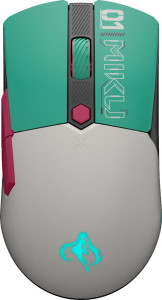
Asus TUF Gaming Mini Hatsune Miku Edition
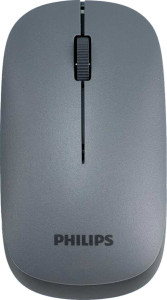
Philips Professional Business Mouse (Wireless)

Asus TUF Gaming Mini Hatsune Miku Edition Philips Professional Business Mouse (Wireless)

Overview

Welcome to our detailed specification comparison between the Asus TUF Gaming Mini Hatsune Miku Edition and the Philips Professional Business Mouse (Wireless). These two mice come from very different worlds — one built for high-performance gaming, the other designed for productive office use. In this comparison, we examine key battlegrounds including DPI range and polling rate, battery life, button count, and overall design dimensions to help you decide which mouse best fits your needs.

Common Features

  • Neither product has onboard memory profiles.
  • Gesture support is not available on either product.
  • A profile switching button is not present on either product.
  • Neither product has a tilting scroll wheel.
  • Neither product has a thumb scroll wheel.
  • Neither product has extra weights.

Main Differences

  • Polling rate is 1000 Hz on Asus TUF Gaming Mini Hatsune Miku Edition and 125 Hz on Philips Professional Business Mouse (Wireless).
  • Maximum DPI is 12000 on Asus TUF Gaming Mini Hatsune Miku Edition and 1600 on Philips Professional Business Mouse (Wireless).
  • Minimum DPI is 100 on Asus TUF Gaming Mini Hatsune Miku Edition and 1600 on Philips Professional Business Mouse (Wireless).
  • Adjustable DPI is available on Asus TUF Gaming Mini Hatsune Miku Edition but not on Philips Professional Business Mouse (Wireless).
  • The type is Gaming for Asus TUF Gaming Mini Hatsune Miku Edition and Productivity for Philips Professional Business Mouse (Wireless).
  • Connection type is USB, Bluetooth, and 2.4GHz wireless on Asus TUF Gaming Mini Hatsune Miku Edition and 2.4GHz wireless and Bluetooth on Philips Professional Business Mouse (Wireless).
  • Bluetooth version is 5.1 on Asus TUF Gaming Mini Hatsune Miku Edition and 5 on Philips Professional Business Mouse (Wireless).
  • Battery life is 134 hours on Asus TUF Gaming Mini Hatsune Miku Edition and 8760 hours on Philips Professional Business Mouse (Wireless).
  • Charging while in use is supported on Asus TUF Gaming Mini Hatsune Miku Edition but not on Philips Professional Business Mouse (Wireless).
  • A rechargeable battery is present on Asus TUF Gaming Mini Hatsune Miku Edition but not on Philips Professional Business Mouse (Wireless).
  • A removable battery is available on Philips Professional Business Mouse (Wireless) but not on Asus TUF Gaming Mini Hatsune Miku Edition.
  • Number of buttons is 6 on Asus TUF Gaming Mini Hatsune Miku Edition and 3 on Philips Professional Business Mouse (Wireless).
  • Number of side buttons is 2 on Asus TUF Gaming Mini Hatsune Miku Edition and 0 on Philips Professional Business Mouse (Wireless).
  • Number of programmable buttons is 6 on Asus TUF Gaming Mini Hatsune Miku Edition and 0 on Philips Professional Business Mouse (Wireless).
  • A DPI switching button is present on Asus TUF Gaming Mini Hatsune Miku Edition but not on Philips Professional Business Mouse (Wireless).
  • Orientation is right-handed on Asus TUF Gaming Mini Hatsune Miku Edition and ambidextrous on Philips Professional Business Mouse (Wireless).
  • Weight is 65 g on Asus TUF Gaming Mini Hatsune Miku Edition and 55 g on Philips Professional Business Mouse (Wireless).
  • RGB lighting is featured on Asus TUF Gaming Mini Hatsune Miku Edition but not on Philips Professional Business Mouse (Wireless).
  • Volume is 273.4125 cm³ on Asus TUF Gaming Mini Hatsune Miku Edition and 199.02 cm³ on Philips Professional Business Mouse (Wireless).
  • Dimensions differ, with Asus TUF Gaming Mini Hatsune Miku Edition measuring 115 mm in height, 63.4 mm in width, and 37.5 mm in thickness, while Philips Professional Business Mouse (Wireless) measures 107 mm in height, 60 mm in width, and 31 mm in thickness.
Specs Comparison
Asus TUF Gaming Mini Hatsune Miku Edition

Asus TUF Gaming Mini Hatsune Miku Edition

Philips Professional Business Mouse (Wireless)

Philips Professional Business Mouse (Wireless)

Performance:
polling rate 1000 Hz 125 Hz
maximum DPI 12000 DPI 1600 DPI
minimum DPI 100 DPI 1600 DPI
has adjustable DPI

The performance gap between these two mice is substantial and immediately apparent. The Asus TUF Gaming Mini Hatsune Miku Edition operates at a 1000 Hz polling rate, meaning it reports its position to the system 1000 times per second. The Philips Professional Business Mouse clocks in at just 125 Hz — eight times slower. In practice, a higher polling rate translates to lower input latency and smoother cursor tracking, a difference that is most noticeable during fast, precise movements.

The DPI range tells an equally one-sided story. The Asus spans from 100 DPI to 12000 DPI and offers fully adjustable sensitivity, letting users fine-tune tracking speed to their exact preference — whether for pixel-precise work at low DPI or sweeping movements at high DPI. The Philips, by contrast, is locked at a fixed 1600 DPI with no adjustment whatsoever. For general office navigation 1600 DPI is workable, but the complete absence of customization means users cannot adapt the mouse to different tasks, screen resolutions, or personal preferences.

The Asus TUF Gaming Mini Hatsune Miku Edition holds a clear and decisive advantage in this category across every measured dimension — polling rate, DPI ceiling, DPI floor, and adjustability. The Philips is designed for basic productivity use where raw tracking performance is not a priority, and its specs reflect exactly that positioning.

General info:
Type Gaming Productivity
connection type USB, Bluetooth, 2.4GHz wireless 2.4GHz wireless, Bluetooth
onboard memory profiles 0 0
Bluetooth version 5.1 5
has gesture support
Battery life 134 hours 8760 hours
can use while charging
has a rechargeable battery
has a removable battery
release date July 2025 February 2025

Battery philosophy is where these two mice diverge most sharply. The Philips Professional Business Mouse runs on a removable (non-rechargeable) battery rated for a staggering 8760 hours — roughly a full year of use — meaning downtime is essentially never a concern; when power finally runs out, a fresh battery restores it instantly. The Asus TUF Gaming Mini Hatsune Miku Edition takes the opposite approach: a built-in rechargeable battery rated at 134 hours, which is respectable for a wireless gaming mouse but naturally requires periodic recharging. Crucially, the Asus supports use while charging, eliminating interruptions during sessions — a meaningful practical advantage the Philips cannot match.

Connectivity is another meaningful differentiator. The Asus offers three simultaneous connection options — USB, 2.4GHz wireless, and Bluetooth 5.1 — making it exceptionally flexible across different devices and workflows. The Philips covers the two wireless modes (2.4GHz and Bluetooth 5.0) but omits wired USB entirely. The Asus also runs the slightly newer Bluetooth 5.1 versus the Philips's Bluetooth 5.0, though the real-world difference between these two versions is minimal.

Neither mouse includes onboard memory profiles or gesture support, so those dimensions are a wash. Overall, the advantage here is nuanced and user-dependent: the Philips wins outright on raw battery longevity and zero-charging-hassle convenience, while the Asus counters with greater connectivity versatility and the safety net of pass-through charging. Users who prioritize ″set it and forget it″ battery management will lean toward the Philips; those who value multi-device flexibility and a rechargeable ecosystem will find the Asus more compelling.

Buttons:
number of buttons 6 3
number of side buttons 2 0
number of programmable buttons 6 0
has a DPI switching button
has a profile switching button

Button count and customization tell a clear story here. The Asus TUF Gaming Mini Hatsune Miku Edition packs 6 buttons total, all of which are programmable, plus 2 dedicated side buttons — inputs that power users typically bind to high-frequency actions like forward/back navigation, weapon switching, or macro execution. The Philips Professional Business Mouse offers just 3 buttons (the standard left-click, right-click, and scroll wheel click) with no programmable buttons and no side buttons at all. For a productivity-oriented device, this is a deliberate minimalist design — but it does mean users have no ability to customize behavior beyond what the hardware provides out of the box.

The Asus also includes a dedicated DPI switching button, which allows on-the-fly sensitivity adjustments without diving into software — a practical feature even outside of gaming, useful when switching between tasks that demand different levels of precision. The Philips offers no equivalent, which is consistent with its fixed DPI design noted in the performance specs.

The Asus holds an unambiguous advantage in this category. Whether or not a user needs all six buttons depends entirely on their workflow, but the flexibility is there when needed. The Philips, by design, offers nothing beyond the bare minimum — a trade-off that suits users who prefer simplicity but leaves little room for personalization or efficiency shortcuts.

Design:
Orientation Right-handed Ambidextrous
weight 65 g 55 g
has RGB lighting
has a tilting scroll wheel
has a thumb scroll wheel
has extra weights
volume 273.4125 cm³ 199.02 cm³
thickness 37.5 mm 31 mm
height 115 mm 107 mm
width 63.4 mm 60 mm

Physically, the Philips Professional Business Mouse is the more compact and lighter of the two. At 55 g and a volume of roughly 199 cm³, it is noticeably smaller and lighter than the Asus TUF Gaming Mini Hatsune Miku Edition, which weighs 65 g and occupies about 273 cm³. A 10-gram difference may sound trivial, but over long work sessions it can meaningfully reduce hand and wrist fatigue — a genuine practical benefit for all-day office use. The Philips is also shallower at 31 mm thick versus the Asus's 37.5 mm, contributing to its lower-profile feel on the desk.

Ergonomic reach is where the Philips pulls ahead in a different sense: its ambidextrous orientation makes it accessible to both left- and right-handed users, while the Asus is strictly right-handed. For shared workspaces or left-handed users, this distinction is disqualifying for the Asus regardless of its other merits. The Asus does counter with RGB lighting — the Philips has none — which is largely an aesthetic consideration but a defining characteristic of the Asus's gaming identity.

Neither mouse offers a tilting scroll wheel, thumb scroll wheel, or adjustable weights, so those dimensions are equal. On balance, the Philips has a functional edge in design for general use: it is lighter, more compact, and universally handed. The Asus is larger and heavier but brings RGB aesthetics that will matter to its intended audience. The ″better″ design here is genuinely use-case dependent — left-handed users and those prioritizing portability favor the Philips, while users who want a more substantial feel with visual flair will prefer the Asus.

Comparison Summary & Verdict

After reviewing all available specifications, it is clear that each mouse excels in its intended domain. The Asus TUF Gaming Mini Hatsune Miku Edition stands out with its 12000 DPI range, 1000 Hz polling rate, 6 programmable buttons, and RGB lighting, making it the obvious choice for gamers who demand precision and customization. On the other hand, the Philips Professional Business Mouse (Wireless) impresses with an extraordinary 8760-hour battery life, a lighter 55 g ambidextrous body, and a removable battery — qualities that make it exceptionally practical for professionals and frequent travelers. Neither mouse is strictly superior; the right pick depends entirely on whether your priority is gaming performance or long-term, low-maintenance productivity.

Asus TUF Gaming Mini Hatsune Miku Edition
Buy Asus TUF Gaming Mini Hatsune Miku Edition if...

Buy the Asus TUF Gaming Mini Hatsune Miku Edition if you are a gamer who needs a high-precision mouse with adjustable DPI up to 12000, a 1000 Hz polling rate, programmable buttons, and RGB lighting.

Philips Professional Business Mouse (Wireless)
Buy Philips Professional Business Mouse (Wireless) if...

Buy the Philips Professional Business Mouse (Wireless) if you prioritize an exceptionally long battery life, an ambidextrous design, and a lightweight build for everyday professional use.