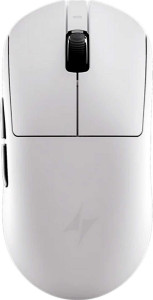
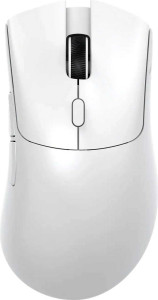
ATK Dragonfly A9
Attack Shark X1

ATK Dragonfly A9 Attack Shark X1

Overview

Welcome to our detailed spec comparison between the ATK Dragonfly A9 and the Attack Shark X1, two lightweight gaming mice that share the same 53 g frame but diverge in some meaningful ways. In this head-to-head, we examine key battlegrounds including sensor capability, connectivity options, battery endurance, and ergonomic design to help you decide which mouse best fits your setup and playstyle.

Common Features

  • Both mice have a polling rate of 1000 Hz.
  • The minimum DPI on both mice is 50 DPI.
  • Both mice support adjustable DPI.
  • Both mice are gaming type peripherals.
  • Neither mouse has onboard memory profiles.
  • Neither mouse supports gesture control.
  • Neither mouse can be used while charging.
  • Neither mouse supports wireless charging.
  • Both mice have a rechargeable battery.
  • Neither mouse has a removable battery.
  • Both mice come with a 1-year warranty.
  • Both mice have 2 side buttons.
  • Both mice have 5 programmable buttons.
  • Both mice include a DPI switching button.
  • Neither mouse has a profile switching button.
  • Both mice weigh 53 g.
  • Neither mouse has RGB lighting.
  • Neither mouse has a tilting scroll wheel.
  • Neither mouse has a thumb scroll wheel.
  • Neither mouse has extra weights.
  • Both mice have a cable length of 1.8 m.

Main Differences

  • Maximum speed is 650 IPS on ATK Dragonfly A9 and 700 IPS on Attack Shark X1.
  • Maximum acceleration is 50G on ATK Dragonfly A9 and 60G on Attack Shark X1.
  • Maximum DPI is 26000 DPI on ATK Dragonfly A9 and 40000 DPI on Attack Shark X1.
  • The ATK Dragonfly A9 connects via USB and Bluetooth, while the Attack Shark X1 also adds 2.4GHz wireless connectivity.
  • The sensor is a PixArt PAW3395 SE on ATK Dragonfly A9 and a PixArt PAW3950 Pro on Attack Shark X1.
  • Bluetooth version is 5 on ATK Dragonfly A9 and 5.4 on Attack Shark X1.
  • Battery life is 120 hours on ATK Dragonfly A9 and 192 hours on Attack Shark X1.
  • Total number of buttons is 5 on ATK Dragonfly A9 and 6 on Attack Shark X1.
  • The ATK Dragonfly A9 is right-handed, while the Attack Shark X1 is ambidextrous.
  • Volume is 320 cm³ on ATK Dragonfly A9 and 283.25808 cm³ on Attack Shark X1.
  • Thickness is 40 mm on ATK Dragonfly A9 and 38 mm on Attack Shark X1.
  • Height is 125 mm on ATK Dragonfly A9 and 121.8 mm on Attack Shark X1.
  • Width is 64 mm on ATK Dragonfly A9 and 61.2 mm on Attack Shark X1.
Specs Comparison
ATK Dragonfly A9

ATK Dragonfly A9

Attack Shark X1

Attack Shark X1

Performance:
polling rate 1000 Hz 1000 Hz
maximum speed 650 IPS 700 IPS
maximum acceleration 50G 60G
maximum DPI 26000 DPI 40000 DPI
minimum DPI 50 DPI 50 DPI
has adjustable DPI

Both mice share a 1000 Hz polling rate and a 50 DPI minimum with fully adjustable DPI stepping, meaning their responsiveness and low-end precision are on equal footing for everyday use. The real divergence lies in the ceiling of their tracking engines.

The Attack Shark X1 pulls ahead in every raw tracking metric: its 700 IPS maximum speed and 60G maximum acceleration outpace the Dragonfly A9's 650 IPS and 50G, and its sensor tops out at 40000 DPI versus the A9's 26000 DPI. In practice, higher IPS and G-force limits mean the sensor is less likely to lose tracking during sudden, explosive flick movements — relevant for fast-paced FPS gameplay. The DPI ceiling difference is largely academic for most users, since very few go beyond 3200–6400 DPI in real use, but the acceleration and speed gap is a genuine hardware distinction.

Overall, the Attack Shark X1 holds a clear edge in this group. While neither mouse should struggle with normal or even competitive use cases at 1000 Hz, the X1's superior motion tolerance gives it a measurable advantage for users who make high-speed, erratic movements and want a sensor with more headroom before it breaks tracking.

General info:
Type Gaming Gaming
connection type USB, Bluetooth USB, Bluetooth, 2.4GHz wireless
sensor PixArt PAW3395 SE PixArt PAW3950 Pro
onboard memory profiles 0 0
Bluetooth version 5 5.4
has gesture support
Battery life 120 hours 192 hours
can use while charging
has wireless charging
has a rechargeable battery
has a removable battery
warranty period 1 years 1 years
release date March 2025 March 2025

The most consequential difference in connectivity is that the Attack Shark X1 supports 2.4GHz wireless in addition to USB and Bluetooth, while the Dragonfly A9 is limited to USB and Bluetooth only. For competitive gaming, this matters significantly — 2.4GHz wireless delivers near-wired latency with the freedom of a cable-free setup, a combination Bluetooth simply cannot replicate due to its higher and less consistent latency.

On the sensor front, the X1 carries the PixArt PAW3950 Pro against the A9's PixArt PAW3395 SE. The PAW3950 Pro is a newer, higher-tier sensor in PixArt's lineup, which aligns with the X1's stronger tracking specs seen in the Performance group. The A9's PAW3395 SE is still a highly capable sensor used in many well-regarded gaming mice, so this gap is meaningful but not disqualifying. Additionally, the X1's Bluetooth 5.4 offers incremental improvements in connection stability and power efficiency over the A9's Bluetooth 5.0, though the real-world difference for mouse use is modest.

Battery life is another area where the X1 leads decisively — 192 hours versus the A9's 120 hours, a 60% advantage that translates to noticeably longer stretches between charges. With both mice sharing the same warranty period and lacking onboard memory profiles, the Attack Shark X1 holds a clear overall edge in this group, driven primarily by its 2.4GHz support, superior sensor, and substantially longer battery endurance.

Buttons:
number of buttons 5 6
number of side buttons 2 2
number of programmable buttons 5 5
has a DPI switching button
has a profile switching button

These two mice are closely matched in button layout, with the most notable difference being that the Attack Shark X1 offers 6 total buttons compared to the Dragonfly A9's 5. Both share identical side button counts and the same 5 programmable buttons, meaning the X1's extra button adds an input option without expanding the programmable pool — worth noting for users who want to map that sixth button to a custom action via software.

Where they converge entirely: both include a dedicated DPI switching button and neither has a profile switching button. The absence of profile switching on both means users cannot hot-swap between saved configurations on the fly, which is a limitation for those who switch between different games or applications requiring distinct setups. The shared 5 programmable buttons keeps customization potential equal despite the total button count difference.

The X1 holds a narrow edge here purely by virtue of its additional button, which gives users one more physical input to work with. That said, this is a minimal advantage — the two mice are functionally near-identical in this category, and neither stands out as significantly more versatile from a button-layout perspective.

Design:
Orientation Right-handed Ambidextrous
weight 53 g 53 g
has RGB lighting
has a tilting scroll wheel
has a thumb scroll wheel
has extra weights
cable length 1.8 m 1.8 m
volume 320 cm³ 283.25808 cm³
thickness 40 mm 38 mm
height 125 mm 121.8 mm
width 64 mm 61.2 mm

At an identical 53 g, both mice land in ultralight territory — a weight class that reduces hand fatigue during long sessions and allows for faster, more effortless cursor movement. Neither features RGB lighting or extra weights, so what you see is what you get: lean, no-frills builds focused on functional performance rather than aesthetics or customization of heft.

The most meaningful design distinction is orientation. The Dragonfly A9 is right-handed only, with a shape contoured specifically for that grip, while the Attack Shark X1 is ambidextrous, making it accessible to left-handed users and those who switch hands. Beyond that, the X1 is also the more compact mouse across every physical dimension — slightly narrower, shorter, and thinner — resulting in a noticeably smaller overall volume (~283 cm³ vs. 320 cm³). For users with smaller hands or those who prefer a lower-profile, tighter grip, the X1's footprint is a practical advantage.

Choosing between them in this category comes down to hand dominance and size preference. Left-handed users have no choice but the X1. For right-handed users, the A9's dedicated ergonomic shaping may feel more natural, but the X1's more compact and ambidextrous form gives it broader appeal overall, earning it a slight edge in this group.

Comparison Summary & Verdict

After reviewing every specification, both mice stand out as capable, ultralight gaming peripherals at 53 g, but they cater to slightly different users. The ATK Dragonfly A9 is a strong pick for right-handed gamers who want a proven, reliable package with a PixArt PAW3395 SE sensor, solid Bluetooth 5 connectivity, and a 120-hour battery life. The Attack Shark X1, however, pulls ahead with a more powerful PixArt PAW3950 Pro sensor, a higher 40000 DPI ceiling, faster 60G acceleration, Bluetooth 5.4, tri-mode connectivity including 2.4GHz wireless, a longer 192-hour battery life, an extra button, and an ambidextrous shape that welcomes both hand orientations. If raw performance headroom and versatility are your priority, the Attack Shark X1 is the stronger technical choice.

ATK Dragonfly A9
Buy ATK Dragonfly A9 if...

Buy the ATK Dragonfly A9 if you are a right-handed gamer who values a familiar ergonomic shape and has no need for 2.4GHz wireless connectivity or the highest possible DPI ceiling.

Attack Shark X1
Buy Attack Shark X1 if...

Buy the Attack Shark X1 if you want a more powerful sensor, tri-mode wireless connectivity including 2.4GHz, a longer battery life, and an ambidextrous design that suits both hand orientations.