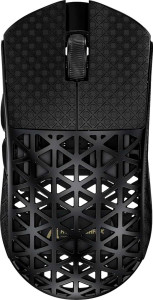
Attack Shark R5 Ultra
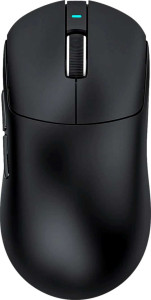
Attack Shark X8 Pro

Attack Shark R5 Ultra Attack Shark X8 Pro

Overview

Welcome to our in-depth spec comparison between the Attack Shark R5 Ultra and the Attack Shark X8 Pro — two wireless gaming mice from the same brand, each taking a different approach to performance and design. While both share a solid foundation of tri-mode connectivity and an 8000 Hz polling rate, key battlegrounds emerge around sensor technology, battery endurance, physical dimensions, and overall build priorities. Read on to see which mouse fits your gaming setup best.

Common Features

  • Both mice have a polling rate of 8000 Hz.
  • The minimum DPI is 800 DPI on both products.
  • Both products support adjustable DPI.
  • Both are gaming-type mice.
  • Both support USB, Bluetooth, and 2.4GHz wireless connection types.
  • Neither product has onboard memory profiles.
  • Neither product supports gesture control.
  • Neither product supports wireless charging.
  • Both products have a rechargeable battery.
  • Neither product has a removable battery.
  • Both products carry a 1-year warranty.
  • Both mice have 6 buttons in total.
  • Both mice have 2 side buttons.
  • Both mice have 6 programmable buttons.
  • Both products include a DPI switching button.
  • Neither product has a profile switching button.
  • Both mice have an ambidextrous orientation.
  • Neither product has a tilting scroll wheel.
  • Neither product has a thumb scroll wheel.
  • Neither product includes extra weights.
  • Both mice come with a 1.8 m cable.

Main Differences

  • Maximum speed is 650 IPS on Attack Shark R5 Ultra and 700 IPS on Attack Shark X8 Pro.
  • Maximum acceleration is 50G on Attack Shark R5 Ultra and 60G on Attack Shark X8 Pro.
  • Maximum DPI is 42000 DPI on Attack Shark R5 Ultra and 40000 DPI on Attack Shark X8 Pro.
  • The sensor is PixArt PAW3950 Max on Attack Shark R5 Ultra and PixArt PAW3395 Pro on Attack Shark X8 Pro.
  • Bluetooth version is 5 on Attack Shark R5 Ultra and 5.4 on Attack Shark X8 Pro.
  • Battery life is 65 hours on Attack Shark R5 Ultra and 192 hours on Attack Shark X8 Pro.
  • The ability to use while charging is available on Attack Shark R5 Ultra but not on Attack Shark X8 Pro.
  • Weight is 39 g on Attack Shark R5 Ultra and 55 g on Attack Shark X8 Pro.
  • RGB lighting is present on Attack Shark R5 Ultra but not available on Attack Shark X8 Pro.
  • Volume is 264.60885 cm³ on Attack Shark R5 Ultra and 316.26 cm³ on Attack Shark X8 Pro.
  • Thickness is 36.3 mm on Attack Shark R5 Ultra and 40 mm on Attack Shark X8 Pro.
  • Height is 119.5 mm on Attack Shark R5 Ultra and 125.5 mm on Attack Shark X8 Pro.
  • Width is 61 mm on Attack Shark R5 Ultra and 63 mm on Attack Shark X8 Pro.
Specs Comparison
Attack Shark R5 Ultra

Attack Shark R5 Ultra

Attack Shark X8 Pro

Attack Shark X8 Pro

Performance:
polling rate 8000 Hz 8000 Hz
maximum speed 650 IPS 700 IPS
maximum acceleration 50G 60G
maximum DPI 42000 DPI 40000 DPI
minimum DPI 800 DPI 800 DPI
has adjustable DPI

Both the Attack Shark R5 Ultra and the X8 Pro share a 8000 Hz polling rate, meaning both report their position to the system 8,000 times per second — a high-end feature that minimizes input latency and delivers exceptionally smooth cursor tracking for competitive use. At this level, polling rate is effectively a non-differentiator between the two.

Where they diverge is in raw tracking capability. The X8 Pro pulls ahead with a 700 IPS maximum speed and 60G maximum acceleration, compared to the R5 Ultra's 650 IPS and 50G. In practice, this means the X8 Pro can accurately register faster, more explosive wrist movements without losing tracking — a meaningful advantage for players who use low DPI with large, aggressive flicks. The R5 Ultra, while still highly capable, is marginally more likely to lose accuracy at the absolute extremes of fast motion. On the DPI side, the R5 Ultra edges out with a 42,000 DPI ceiling versus the X8 Pro's 40,000 DPI, though both figures far exceed anything usable in real scenarios — this distinction has no practical impact for any user.

Overall, the X8 Pro holds a clear performance edge in this group. Its superior speed and acceleration ratings make it the stronger choice for users who prioritize tracking fidelity during rapid, high-velocity movements, while the R5 Ultra's marginally higher DPI maximum is a paper spec with no real-world consequence.

General info:
Type Gaming Gaming
connection type USB, Bluetooth, 2.4GHz wireless USB, Bluetooth, 2.4GHz wireless
sensor PixArt PAW3950 Max PixArt PAW3395 Pro
onboard memory profiles 0 0
Bluetooth version 5 5.4
has gesture support
Battery life 65 hours 192 hours
can use while charging
has wireless charging
has a rechargeable battery
has a removable battery
warranty period 1 years 1 years
release date March 2025 July 2025

The sensor choice is one of the most telling differentiators here. The R5 Ultra runs on the PixArt PAW3950 Max, a newer and higher-tier sensor compared to the X8 Pro's PixArt PAW3395 Pro. The PAW3950 Max sits at the top of PixArt's current lineup, offering superior tracking consistency and lower latency — which is what enables the R5 Ultra's higher performance ceiling seen in the specs. For users prioritizing absolute tracking precision, the R5 Ultra has a meaningful sensor advantage.

Battery life tells a very different story. The X8 Pro's 192-hour rated battery life is nearly three times that of the R5 Ultra's 65 hours — a substantial gap that translates to weeks of typical use between charges versus roughly a week. However, the R5 Ultra counters with one practical advantage: it can be used while charging, meaning a dead battery never forces a pause in play. The X8 Pro offers no such fallback, so users must plan their charging around sessions. Which trade-off matters more depends entirely on usage habits.

On balance, this group does not have a single clear overall winner — it depends on priorities. The R5 Ultra leads on sensor quality, while the X8 Pro dominates on battery endurance. The minor Bluetooth version difference (5.0 vs 5.4) has negligible real-world impact for most users. Gamers who want top-tier tracking should lean toward the R5 Ultra; those who value low-maintenance, long-interval charging will find the X8 Pro more convenient.

Buttons:
number of buttons 6 6
number of side buttons 2 2
number of programmable buttons 6 6
has a DPI switching button
has a profile switching button

This is one of the rare spec groups where both mice are in complete lockstep. The R5 Ultra and the X8 Pro share an identical button layout: 6 total buttons, 2 of which are side buttons, with all 6 being fully programmable. For gaming mice in this tier, that level of customization coverage is exactly what you'd expect — every button can be remapped, so users are not locked into any default function assignment.

Neither mouse includes a dedicated profile switching button, which means swapping between saved configurations on the fly requires either a software shortcut or a workaround via the DPI button if the software permits it. This is a minor limitation for users who frequently switch between game-specific profiles, but it keeps the physical layout clean and uncluttered for those who don't.

Given that every measured spec in this group is identical, the button category is a complete tie. Neither the R5 Ultra nor the X8 Pro holds any advantage here, and this group should not be a deciding factor when choosing between the two.

Design:
Orientation Ambidextrous Ambidextrous
weight 39 g 55 g
has RGB lighting
has a tilting scroll wheel
has a thumb scroll wheel
has extra weights
cable length 1.8 m 1.8 m
volume 264.60885 cm³ 316.26 cm³
thickness 36.3 mm 40 mm
height 119.5 mm 125.5 mm
width 61 mm 63 mm

Weight is the headline story in this group. At just 39 g, the R5 Ultra is remarkably light — even by the standards of ultralight gaming mice — while the X8 Pro comes in at 55 g, a 16-gram difference that is immediately noticeable in hand. For competitive gamers who favor low-effort, high-speed mouse movements, that gap translates directly to reduced fatigue during long sessions and faster directional changes. The R5 Ultra's weight class puts it firmly in ultralight territory; the X8 Pro, while not heavy, is a more conventionally weighted device.

The size difference follows a similar pattern. The X8 Pro is larger across all dimensions — slightly taller, wider, and thicker — which corresponds to its higher volume of 316 cm³ versus the R5 Ultra's 265 cm³. Both are ambidextrous in orientation, so neither has an inherent grip-style advantage over the other, but users with smaller hands may find the R5 Ultra's more compact footprint a better natural fit. The X8 Pro's larger shell may suit those who prefer a fuller palm grip.

One additional differentiator worth noting: the R5 Ultra includes RGB lighting, while the X8 Pro does not. For users who care about aesthetics and desk setup cohesion, this is a tangible advantage for the R5 Ultra. Taking the group as a whole, the R5 Ultra holds a clear edge in design — its significantly lower weight and more compact dimensions make it the stronger option for performance-oriented users, with RGB as a bonus for those who value it.

Comparison Summary & Verdict

After examining every spec, these two mice serve distinct types of players. The Attack Shark R5 Ultra stands out with its featherlight 39 g weight, compact dimensions, RGB lighting, and the ability to charge and play simultaneously — making it the go-to choice for gamers who value portability and uninterrupted sessions. Its PixArt PAW3950 Max sensor also pushes the DPI ceiling higher at 42000 DPI. The Attack Shark X8 Pro, on the other hand, counters with a significantly longer 192-hour battery life, a newer Bluetooth 5.4 standard, higher top speed and acceleration, and a larger frame that may suit players with bigger hands. Neither mouse is objectively superior — the right pick comes down to whether you prioritize a lightweight, RGB-equipped daily driver or a long-lasting, endurance-focused performer.

Attack Shark R5 Ultra
Buy Attack Shark R5 Ultra if...

Buy the Attack Shark R5 Ultra if you want an ultra-lightweight mouse with RGB lighting, a higher DPI ceiling, and the convenience of using it while it charges.

Attack Shark X8 Pro
Buy Attack Shark X8 Pro if...

Buy the Attack Shark X8 Pro if you prioritize an exceptional battery life of 192 hours, a newer Bluetooth 5.4 connection, and higher maximum speed and acceleration.