Attack Shark R5 Ultra
Razer DeathAdder V4 Pro

Attack Shark R5 Ultra Razer DeathAdder V4 Pro

Overview

Welcome to our in-depth specification comparison between the Attack Shark R5 Ultra and the Razer DeathAdder V4 Pro, two wireless gaming mice with very different design philosophies. Both share an impressive 8000 Hz polling rate and fully programmable button layouts, yet they diverge sharply when it comes to weight, battery life, sensor performance, and ergonomic orientation. Whether you prioritize a featherlight build or extended endurance, this breakdown will help you find the right fit.

Common Features

  • Both mice have a polling rate of 8000 Hz.
  • Both mice support adjustable DPI.
  • Both mice are gaming-type peripherals.
  • Neither mouse has gesture support.
  • Both mice can be used while charging.
  • Neither mouse supports wireless charging.
  • Both mice have a rechargeable battery.
  • Neither mouse has a removable battery.
  • Both mice have 6 buttons total.
  • Both mice have 2 side buttons.
  • Both mice have 6 programmable buttons.
  • Both mice include a DPI switching button.
  • Neither mouse has a tilting scroll wheel.
  • Neither mouse has a thumb scroll wheel.
  • Both mice have a cable length of 1.8 m.

Main Differences

  • Maximum speed is 650 IPS on Attack Shark R5 Ultra and 900 IPS on Razer DeathAdder V4 Pro.
  • Maximum acceleration is 50G on Attack Shark R5 Ultra and 85G on Razer DeathAdder V4 Pro.
  • Maximum DPI is 42000 on Attack Shark R5 Ultra and 45000 on Razer DeathAdder V4 Pro.
  • Minimum DPI is 800 on Attack Shark R5 Ultra and 100 on Razer DeathAdder V4 Pro.
  • Connection type is USB, Bluetooth, and 2.4GHz wireless on Attack Shark R5 Ultra and 2.4GHz wireless and USB on Razer DeathAdder V4 Pro.
  • The sensor is PixArt PAW3950 Max on Attack Shark R5 Ultra and Razer Focus Pro 45K Gen-2 on Razer DeathAdder V4 Pro.
  • Onboard memory profiles total 0 on Attack Shark R5 Ultra and 1 on Razer DeathAdder V4 Pro.
  • Battery life is 65 hours on Attack Shark R5 Ultra and 150 hours on Razer DeathAdder V4 Pro.
  • Warranty period is 1 year on Attack Shark R5 Ultra and 2 years on Razer DeathAdder V4 Pro.
  • A profile switching button is present on Razer DeathAdder V4 Pro but not available on Attack Shark R5 Ultra.
  • Orientation is ambidextrous on Attack Shark R5 Ultra and right-handed on Razer DeathAdder V4 Pro.
  • Weight is 39 g on Attack Shark R5 Ultra and 63 g on Razer DeathAdder V4 Pro.
  • RGB lighting is present on Attack Shark R5 Ultra but not available on Razer DeathAdder V4 Pro.
  • Extra weights are available on Razer DeathAdder V4 Pro but not present on Attack Shark R5 Ultra.
  • Volume is 264.61 cm³ on Attack Shark R5 Ultra and 382.98 cm³ on Razer DeathAdder V4 Pro.
  • Thickness is 36.3 mm on Attack Shark R5 Ultra and 44 mm on Razer DeathAdder V4 Pro.
  • Height is 119.5 mm on Attack Shark R5 Ultra and 128 mm on Razer DeathAdder V4 Pro.
  • Width is 61 mm on Attack Shark R5 Ultra and 68 mm on Razer DeathAdder V4 Pro.
Specs Comparison
Attack Shark R5 Ultra

Attack Shark R5 Ultra

Razer DeathAdder V4 Pro

Razer DeathAdder V4 Pro

Performance:
polling rate 8000 Hz 8000 Hz
maximum speed 650 IPS 900 IPS
maximum acceleration 50G 85G
maximum DPI 42000 DPI 45000 DPI
minimum DPI 800 DPI 100 DPI
has adjustable DPI

Both mice share an identical 8000 Hz polling rate, meaning they report their position to the system up to eight thousand times per second — a high-end specification that minimizes input lag to imperceptible levels for virtually all users. On this front, neither product has an edge.

Where the two diverge meaningfully is in raw tracking capability. The Razer DeathAdder V4 Pro supports a significantly higher maximum speed of 900 IPS and a maximum acceleration of 85G, compared to the R5 Ultra's 650 IPS and 50G. In practice, this means the DeathAdder V4 Pro's sensor can keep up with far more aggressive, explosive wrist movements without losing tracking accuracy — a concrete advantage for fast-paced competitive play. The R5 Ultra's ceiling, while solid, would begin to show tracking errors under the most violent swipe gestures. On DPI range, the DeathAdder also edges ahead with a lower minimum of 100 DPI versus the R5 Ultra's 800 DPI floor, offering far greater flexibility for users who prefer very low-sensitivity configurations.

The Razer DeathAdder V4 Pro holds a clear performance edge in this group. Its superior IPS and G-force ratings translate to more reliable tracking at extreme movement speeds, and its broader DPI range accommodates a wider spectrum of playstyles. The R5 Ultra remains competitive for casual to moderate use cases, but for high-level competitive gaming, the DeathAdder V4 Pro's sensor specifications are the stronger choice.

General info:
Type Gaming Gaming
connection type USB, Bluetooth, 2.4GHz wireless 2.4GHz wireless, USB
sensor PixArt PAW3950 Max Razer Focus Pro 45K Gen-2
onboard memory profiles 0 1
has gesture support
Battery life 65 hours 150 hours
can use while charging
has wireless charging
has a rechargeable battery
has a removable battery
warranty period 1 years 2 years
release date March 2025 July 2025

The most striking difference in this group is battery life. The Razer DeathAdder V4 Pro is rated for 150 hours of use on a single charge — more than double the R5 Ultra's 65 hours. For a wireless gaming mouse, this is a substantial real-world gap: the DeathAdder can go weeks between charges for typical daily users, while the R5 Ultra will demand more frequent top-ups. Both support use while charging, which softens the inconvenience, but the DeathAdder's advantage here is hard to dismiss.

On connectivity, the R5 Ultra pulls ahead by also offering Bluetooth alongside its 2.4 GHz wireless and wired USB modes, giving it three connection options versus the DeathAdder's two. Bluetooth is rarely the choice for competitive gaming due to latency, but it adds genuine versatility — useful when connecting to a secondary device like a laptop without a USB dongle. The DeathAdder, by contrast, stores 1 onboard memory profile while the R5 Ultra stores none, meaning the DeathAdder can retain your DPI and settings when moving between systems without software.

Overall, the Razer DeathAdder V4 Pro holds the stronger position in this group. Its dramatically longer battery life and onboard profile storage are practical, everyday advantages. The R5 Ultra's added Bluetooth connectivity is a legitimate differentiator for multi-device users, and its warranty period of 1 year trails the DeathAdder's 2 years — a further point in the DeathAdder's favor for long-term value.

Buttons:
number of buttons 6 6
number of side buttons 2 2
number of programmable buttons 6 6
has a DPI switching button
has a profile switching button

In terms of button layout, these two mice are nearly identical — both offer 6 total buttons, 2 side buttons, all 6 fully programmable, and a dedicated DPI switching button. For the vast majority of users, this parity means neither mouse has a meaningful structural advantage in how many actions can be mapped or accessed on the fly.

The one concrete differentiator is the Razer DeathAdder V4 Pro's dedicated profile switching button, which the R5 Ultra lacks. This is most relevant for users who maintain multiple configuration profiles — for example, switching between settings optimized for different game genres without opening any software. Combined with its onboard memory (noted in the General Info group), the DeathAdder's profile switching button forms a cohesive system for portable, software-free customization. On the R5 Ultra, profile changes require alternative methods, which is a minor but real friction point in multi-profile workflows.

The Razer DeathAdder V4 Pro takes a narrow edge here solely due to its profile switching button. For users who operate from a single profile, this distinction is essentially irrelevant and the two mice are evenly matched. But for those who regularly switch between configurations, the DeathAdder's hardware-level profile control adds a layer of convenience the R5 Ultra cannot match from its button set alone.

Design:
Orientation Ambidextrous Right-handed
weight 39 g 63 g
has RGB lighting
has a tilting scroll wheel
has a thumb scroll wheel
has extra weights
cable length 1.8 m 1.8 m
volume 264.60885 cm³ 382.976 cm³
thickness 36.3 mm 44 mm
height 119.5 mm 128 mm
width 61 mm 68 mm

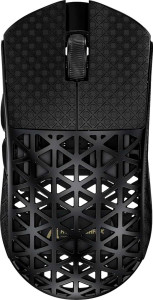
Weight is arguably the most impactful design spec for a gaming mouse, and the gap here is significant. The Attack Shark R5 Ultra weighs just 39 g, making it an exceptionally lightweight mouse — ideal for low-sensitivity players who cover large distances on their mousepad, as less mass reduces fatigue during extended sessions. The Razer DeathAdder V4 Pro comes in at 63 g, which is a more traditional weight that some users prefer for added stability and control. Notably, the DeathAdder includes extra weights, allowing users to tune the feel to their preference — a flexibility the R5 Ultra does not offer.

Form factor and orientation split the audience further. The R5 Ultra's ambidextrous design opens it up to both left- and right-handed users, while the DeathAdder is strictly right-handed. Dimensionally, the DeathAdder is the larger mouse across every axis — taller, wider, and thicker — with a volume of roughly 383 cm³ versus the R5 Ultra's 265 cm³. This makes the DeathAdder a better fit for larger hands or palm-grip users, while the R5 Ultra's compact profile suits smaller hands or claw/fingertip grip styles.

Design preference here is highly user-dependent, but a few conclusions are clear. Left-handed users have only one option: the R5 Ultra. For right-handed users prioritizing minimal weight and a smaller footprint, the R5 Ultra again leads. The DeathAdder counters with a larger, more ergonomic shell for big-hand palm grippers and the added versatility of adjustable weight. Neither mouse is a universal winner — the right choice depends entirely on hand size, grip style, and weight preference.
Comparison Summary & Verdict

After examining every spec, these two mice clearly target different types of players. The Attack Shark R5 Ultra stands out with its remarkably lightweight 39 g body, ambidextrous design, built-in RGB lighting, and Bluetooth connectivity, making it an excellent choice for gamers who value portability and multi-device flexibility. The Razer DeathAdder V4 Pro, on the other hand, dominates in raw performance metrics, offering a higher 900 IPS maximum speed, 85G acceleration, a superior 150-hour battery life, and a longer 2-year warranty — advantages that will appeal to competitive right-handed players who demand endurance and precision above all else.

Attack Shark R5 Ultra
Buy Attack Shark R5 Ultra if...

Buy the Attack Shark R5 Ultra if you want an ultra-lightweight, ambidextrous mouse with RGB lighting and Bluetooth support for flexible multi-device use.

Razer DeathAdder V4 Pro
Buy Razer DeathAdder V4 Pro if...

Buy the Razer DeathAdder V4 Pro if you are a right-handed competitive gamer who needs superior tracking speed, significantly longer battery life, and a 2-year warranty.