Attack Shark X8 Pro
Attack Shark X8 Ultra

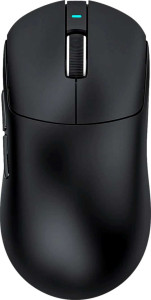
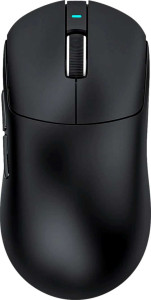
Attack Shark X8 Pro Attack Shark X8 Ultra

Overview

Welcome to our in-depth specification comparison between the Attack Shark X8 Pro and the Attack Shark X8 Ultra. Both mice share a remarkable amount of common ground, from their lightweight 55 g ambidextrous build to their blazing 8000 Hz polling rate and versatile tri-mode connectivity. Yet, key distinctions in sensor technology and peak tracking performance set them apart. Read on to see which model best suits your gaming needs.

Common Features

  • Both mice have a polling rate of 8000 Hz.
  • Both mice have a maximum acceleration of 60G.
  • Both mice have a minimum DPI of 800 DPI.
  • Adjustable DPI is supported on both products.
  • Both mice are classified as gaming mice.
  • Both mice support USB, Bluetooth, and 2.4GHz wireless connection.
  • Neither mouse includes onboard memory profiles.
  • Both mice use Bluetooth version 5.4.
  • Gesture support is not available on either product.
  • Both mice offer a battery life of 192 hours.
  • Neither mouse can be used while charging.
  • Wireless charging is not available on either product.
  • Both mice have 6 buttons in total.
  • Both mice have 2 side buttons.
  • Both mice have 6 programmable buttons.
  • Both mice include a DPI switching button.
  • Neither mouse includes a profile switching button.
  • Both mice have an ambidextrous orientation.
  • Both mice weigh 55 g.
  • RGB lighting is not available on either product.
  • Neither mouse has a tilting scroll wheel.
  • Neither mouse has a thumb scroll wheel.
  • Neither mouse includes extra weights.
  • Both mice have a cable length of 1.8 m.
  • Both mice have a volume of 316.26 cm³.

Main Differences

  • Maximum speed is 700 IPS on Attack Shark X8 Pro and 750 IPS on Attack Shark X8 Ultra.
  • Maximum DPI is 40000 DPI on Attack Shark X8 Pro and 42000 DPI on Attack Shark X8 Ultra.
  • The sensor is the PixArt PAW3395 Pro on Attack Shark X8 Pro and the PixArt PAW3950 Max on Attack Shark X8 Ultra.
Specs Comparison
Attack Shark X8 Pro

Attack Shark X8 Pro

Attack Shark X8 Ultra

Attack Shark X8 Ultra

Performance:
polling rate 8000 Hz 8000 Hz
maximum speed 700 IPS 750 IPS
maximum acceleration 60G 60G
maximum DPI 40000 DPI 42000 DPI
minimum DPI 800 DPI 800 DPI
has adjustable DPI

Both the Attack Shark X8 Pro and X8 Ultra share a strong performance foundation: an 8000 Hz polling rate, 60G maximum acceleration, and the same DPI floor of 800 DPI with full adjustability. The 8000 Hz polling rate is notably high — most mainstream gaming mice top out at 1000 Hz — meaning the cursor position is reported to the system every 0.125 milliseconds, delivering exceptionally smooth and responsive tracking that competitive players will appreciate.

Where the two models diverge is at the ceiling of their tracking capabilities. The X8 Ultra pulls ahead with a 750 IPS maximum speed versus the X8 Pro's 700 IPS, and a slightly higher 42000 DPI maximum compared to 40000 DPI. In practice, the IPS difference matters more than the DPI gap: a higher IPS threshold means the sensor is less likely to lose tracking accuracy during extremely fast, sweeping movements. The DPI delta, while measurable, is largely academic — no real-world use case demands sensitivity above 20000 DPI, let alone the difference between 40K and 42K.

Overall, the two mice are very evenly matched on performance. The X8 Ultra holds a narrow technical edge on paper thanks to its higher speed ceiling, which could theoretically benefit users with highly erratic, fast-paced movement styles. For the vast majority of users, however, both mice will perform identically in practice, and the performance group alone is unlikely to be a decisive factor in choosing between them.
General info:
Type Gaming Gaming
connection type USB, Bluetooth, 2.4GHz wireless USB, Bluetooth, 2.4GHz wireless
sensor PixArt PAW3395 Pro PixArt PAW3950 Max
onboard memory profiles 0 0
Bluetooth version 5.4 5.4
has gesture support
Battery life 192 hours 192 hours
can use while charging
has wireless charging
has a rechargeable battery
has a removable battery
warranty period 1 years 1 years
release date July 2025 July 2025

The most meaningful distinction in this group comes down to the sensor. The X8 Pro uses the PixArt PAW3395 Pro, while the X8 Ultra steps up to the PixArt PAW3950 Max — a newer, higher-tier optical sensor. The PAW3950 Max sits at the top of PixArt's current lineup, designed for reduced motion latency and improved accuracy at extreme speeds, which aligns with the Ultra's higher IPS ceiling noted in the performance group. For most users the difference will be subtle, but competitive players who demand the absolute best tracking fidelity will find the Ultra's sensor the more capable of the two.

On connectivity and battery, the two mice are identical: both support USB, Bluetooth, and 2.4GHz wireless with Bluetooth 5.4, and both deliver a rated 192 hours of battery life — an impressive figure that translates to weeks of typical daily use between charges. Neither model supports wireless charging or pass-through wired play while charging, so users will need to pause during charging sessions.

With no onboard memory profiles on either model and matching warranty, connectivity, and battery specs across the board, the X8 Ultra holds the clear edge in this group solely due to its superior sensor. Everything else is a tie, making the sensor the decisive differentiator for buyers weighing general feature parity against technical capability.

Buttons:
number of buttons 6 6
number of side buttons 2 2
number of programmable buttons 6 6
has a DPI switching button
has a profile switching button

The button configuration is identical across both mice. Each offers 6 total buttons, including 2 side buttons, all of which are fully programmable — meaning every button can be remapped to macros, application shortcuts, or game-specific actions. This level of flexibility is standard for gaming mice at this tier and covers the needs of most users without overwhelming them with excess inputs.

A dedicated DPI switching button is present on both, allowing on-the-fly sensitivity adjustments without entering software — useful for switching between tasks like sniping and general movement in FPS games. Neither model includes a profile switching button, so cycling between saved configuration profiles requires software interaction rather than a hardware shortcut.

This group is a complete tie. There is no difference whatsoever between the X8 Pro and X8 Ultra in button count, programmability, or layout. Buyers for whom button configuration is a priority can choose between these two models entirely on other criteria.

Design:
Orientation Ambidextrous Ambidextrous
weight 55 g 55 g
has RGB lighting
has a tilting scroll wheel
has a thumb scroll wheel
has extra weights
cable length 1.8 m 1.8 m
volume 316.26 cm³ 316.26 cm³
thickness 40 mm 40 mm
height 125.5 mm 125.5 mm
width 63 mm 63 mm

Physically, the X8 Pro and X8 Ultra are indistinguishable. Every dimension is shared: 125.5 mm long, 63 mm wide, 40 mm thick, with an identical volume and a 55 g weight. At 55 grams, both mice sit firmly in the ultra-lightweight category — a deliberate choice that reduces fatigue during long sessions and allows for faster, more controlled movements, particularly in low-sensitivity FPS scenarios.

The ambidextrous orientation broadens the audience for both mice equally, accommodating left- and right-handed users without compromise. Neither model features RGB lighting, a tilting or thumb scroll wheel, or adjustable weights — a design philosophy that prioritizes simplicity and low mass over customization flair. The 1.8 m cable is generously long and shared across both, ensuring comfortable desk setups regardless of tower placement.

This group is an absolute tie — every measurable design attribute is identical. The choice between the X8 Pro and X8 Ultra cannot be informed by physical design alone, and buyers should look to other specification groups, particularly performance and general info, to differentiate the two.

Comparison Summary & Verdict

After a thorough look at the specs, both the Attack Shark X8 Pro and the Attack Shark X8 Ultra are highly competitive lightweight gaming mice that share the same ambidextrous 55 g design, tri-mode connectivity, 8000 Hz polling rate, and an impressive 192-hour battery life. The core distinction lies in their sensors and peak performance: the Ultra steps ahead with the PixArt PAW3950 Max, a higher 42000 DPI ceiling, and a faster 750 IPS maximum tracking speed, making it the stronger choice for users who demand absolute top-tier precision. The X8 Pro, equipped with the capable PixArt PAW3395 Pro at 40000 DPI and 700 IPS, remains an excellent option for gamers who want flagship-class performance without necessarily needing the very latest sensor generation.

Attack Shark X8 Pro
Buy Attack Shark X8 Pro if...

Buy the Attack Shark X8 Pro if you want flagship-level performance with the proven PixArt PAW3395 Pro sensor and do not require the absolute highest DPI or tracking speed ceiling.

Attack Shark X8 Ultra
Buy Attack Shark X8 Ultra if...

Buy the Attack Shark X8 Ultra if you want the most advanced sensor available in this lineup, with a higher 42000 DPI ceiling and a faster 750 IPS maximum tracking speed for peak competitive precision.