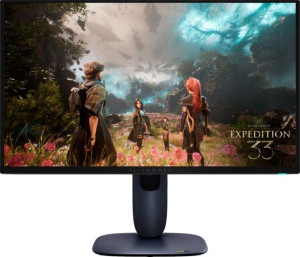
Dell Alienware AW2725Q 27"
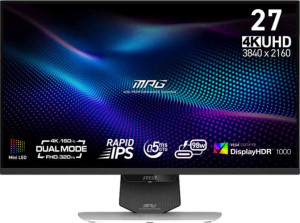
MSI MPG 274URDFW E16M 27"

Dell Alienware AW2725Q 27" MSI MPG 274URDFW E16M 27"

Common Features

  • Both products have a resolution of 3840 x 2160 px.
  • Both products have anti-glare coating.
  • Both products have a maximum horizontal viewing angle of 178º.
  • Both products have a maximum vertical viewing angle of 178º.
  • Both products have a matte panel.
  • Both products do not have a glossy panel.
  • Both products do not have a touch screen.
  • Both products are gaming monitors.
  • Both products have a swivel stand.
  • Both products support VESA mount.
  • Both products support VESA Adaptive Sync.
  • Both products have HDMI version 2.1.
  • Both products have 2 HDMI ports.
  • Both products have 1 DisplayPort output.
  • Both products do not support Thunderbolt.
  • Both products do not have a DVI connector.
  • Both products have USB Type-C.
  • Both products do not support Ethernet.
  • Both products do not support Wi-Fi.
  • Both products have PiP support.

Main Differences

  • The display type is QD-OLED on Dell Alienware AW2725Q 27″ and IPS LCD LED-backlit on MSI MPG 274URDFW E16M 27″.
  • The response time is 0.03 ms on Dell Alienware AW2725Q 27″ and 0.5 ms on MSI MPG 274URDFW E16M 27″.
  • The screen size is 26.7″ on Dell Alienware AW2725Q 27″ and 27″ on MSI MPG 274URDFW E16M 27″.
  • The pixel density is 166 ppi on Dell Alienware AW2725Q 27″ and 163 ppi on MSI MPG 274URDFW E16M 27″.
  • The adaptive synchronization features include AMD FreeSync Premium Pro, Nvidia G-Sync Compatible, and VESA Adaptive Sync on Dell Alienware AW2725Q 27″, while MSI MPG 274URDFW E16M 27″ only supports VESA Adaptive Sync.
  • The refresh rate is 240Hz on Dell Alienware AW2725Q 27″ and 160Hz on MSI MPG 274URDFW E16M 27″.
  • The total tilt support is not available on Dell Alienware AW2725Q 27″ but is available on MSI MPG 274URDFW E16M 27″.
  • The height is 355.97 mm on Dell Alienware AW2725Q 27″ and 375.31 mm on MSI MPG 274URDFW E16M 27″.
  • The width is 609.51 mm on Dell Alienware AW2725Q 27″ and 613.1 mm on MSI MPG 274URDFW E16M 27″.
  • The thickness is 72.63 mm on Dell Alienware AW2725Q 27″ and 68.77 mm on MSI MPG 274URDFW E16M 27″.
  • The weight is 6370 g on Dell Alienware AW2725Q 27″ and 8200 g on MSI MPG 274URDFW E16M 27″.
  • Portrait mode is not supported on Dell Alienware AW2725Q 27″ but is supported on MSI MPG 274URDFW E16M 27″.
  • The volume is 15758.333161461 cm³ on Dell Alienware AW2725Q 27″ and 15824.15311997 cm³ on MSI MPG 274URDFW E16M 27″.
  • The brightness (typical) is 250 nits on Dell Alienware AW2725Q 27″ and 400 nits on MSI MPG 274URDFW E16M 27″.
  • Color calibration support is not available on Dell Alienware AW2725Q 27″ but is available on MSI MPG 274URDFW E16M 27″.
  • The contrast ratio is 1500000:1 on Dell Alienware AW2725Q 27″ and 1000:1 on MSI MPG 274URDFW E16M 27″.
  • The DisplayPort version is 1.4 on Dell Alienware AW2725Q 27″ and 1.2 on MSI MPG 274URDFW E16M 27″.
  • A socket for a 3.5 mm audio jack is not available on Dell Alienware AW2725Q 27″ but is available on MSI MPG 274URDFW E16M 27″.
  • The number of USB ports is 5 on Dell Alienware AW2725Q 27″ and 1 on MSI MPG 274URDFW E16M 27″.
Specs Comparison
Dell Alienware AW2725Q 27"

Dell Alienware AW2725Q 27"

MSI MPG 274URDFW E16M 27"

MSI MPG 274URDFW E16M 27"

Display:
Display type QD-OLED, OLED/AMOLED IPS, LCD, LED-backlit
response time 0.03 ms 0.5 ms
screen size 26.7" 27"
resolution 3840 x 2160 px 3840 x 2160 px
pixel density 166 ppi 163 ppi
Adaptive synchronization AMD FreeSync Premium Pro, Nvidia G-Sync Compatible, VESA Adaptive Sync VESA Adaptive Sync
has anti-glare coating
refresh rate 240Hz 160Hz
maximum horizontal viewing angle 178º 178º
maximum vertical viewing angle 178º 178º
has a matte panel
has a glossy panel
has a touch screen

The Dell Alienware AW2725Q 27″ and MSI MPG 274URDFW E16M 27″ both offer 4K resolution (3840 x 2160 px), ensuring crisp, detailed images. The Alienware model features a QD-OLED display type, while the MSI model uses an IPS LCD with LED backlighting. This gives the Alienware a potential edge in contrast and color richness, thanks to OLED technology. In terms of screen size, the Alienware is slightly smaller at 26.7″, compared to the MSI's 27″, but the difference is minimal. The Alienware also has a slightly higher pixel density at 166 ppi, compared to the MSI's 163 ppi, which could lead to a marginally sharper image on the Alienware.

When it comes to response time, the Alienware boasts an impressive 0.03 ms, significantly lower than the MSI's 0.5 ms. This makes the Alienware potentially better for fast-paced gaming where lower response time is crucial. Both monitors support anti-glare coating, and neither has a glossy panel, so reflections should be minimized in both cases. Both have a matte panel finish, with no touch screen functionality on either model.

In terms of refresh rate, the Alienware outperforms the MSI with a 240Hz refresh rate, compared to the MSI's 160Hz. The Alienware also supports a wider range of adaptive sync technologies, including AMD FreeSync Premium Pro, Nvidia G-Sync Compatible, and VESA Adaptive Sync, while the MSI supports only VESA Adaptive Sync. Both monitors have wide 178º horizontal and vertical viewing angles, ensuring consistent image quality from different positions.

General info:
Type Gaming Gaming
release date May 2025 October 2025
supports total tilt
Has a swivel stand
Supports VESA mount
height 355.97 mm 375.31 mm
width 609.51 mm 613.1 mm
thickness 72.63 mm 68.77 mm
weight 6370 g 8200 g
supports portrait mode
volume 15758.333161461 cm³ 15824.15311997 cm³

Both the Dell Alienware AW2725Q 27″ and MSI MPG 274URDFW E16M 27″ are gaming monitors, designed for immersive experiences. The Alienware model does not support total tilt, while the MSI monitor does. However, both models feature a swivel stand and support VESA mounting, giving users flexibility in adjusting or mounting the screens.

In terms of physical dimensions, the Alienware is slightly shorter in height at 355.97 mm compared to the MSI's 375.31 mm. The Alienware is also a bit thicker at 72.63 mm, while the MSI is thinner at 68.77 mm. The Alienware is lighter, weighing 6370 g, whereas the MSI weighs 8200 g, making the Alienware easier to handle and move around.

As for supporting portrait mode, the Alienware does not support this feature, while the MSI does. Both models have similar volume measurements, with the Alienware at 15758.33 cm³ and the MSI at 15824.15 cm³, showing a minimal difference in overall size.

Colors:
brightness (typical) 250 nits 400 nits
supports color calibration
display colors 1070 million 1070 million
contrast ratio 1500000:1 1000:1

The Dell Alienware AW2725Q 27″ and MSI MPG 274URDFW E16M 27″ both offer 1070 million display colors, providing a broad color spectrum. The Alienware model has a typical brightness of 250 nits, while the MSI model offers a significantly higher typical brightness of 400 nits, which could make the MSI more suitable for well-lit environments.

In terms of contrast ratio, the Alienware stands out with a much higher 1500000:1 ratio, compared to the MSI's 1000:1. This means the Alienware can potentially display deeper blacks and more vibrant contrasts. Additionally, the Alienware does not support color calibration, whereas the MSI does, which could provide more precise color accuracy for users who need it.

Connectivity:
HDMI ports 2 2
supports Thunderbolt
DisplayPort outputs 1 1
DisplayPort version DisplayPort 1.4 DisplayPort 1.2
has a socket for a 3.5 mm audio jack
has a DVI connector
USB ports 5 1
Has USB Type-C
HDMI version HDMI 2.1 HDMI 2.1
supports Ethernet
supports Wi-Fi
has AirPlay
mini DisplayPort outputs 0 0
has a VGA connector

Both the Dell Alienware AW2725Q 27″ and MSI MPG 274URDFW E16M 27″ feature 2 HDMI ports and 1 DisplayPort output, but the Alienware supports DisplayPort 1.4, while the MSI supports DisplayPort 1.2. Both monitors also have HDMI 2.1 ports, making them suitable for high-bandwidth video signals. The Alienware has 5 USB ports, while the MSI offers just 1 USB port. Both monitors include USB Type-C support, allowing for modern connectivity options.

In terms of audio connectivity, the Alienware does not have a socket for a 3.5 mm audio jack, whereas the MSI does. Neither model includes a DVI connector, mini DisplayPort outputs, or a VGA connector. Both monitors lack support for Ethernet, Wi-Fi, and AirPlay.

Neither product supports Thunderbolt, though both offer similar HDMI port configurations. Overall, the Alienware provides more USB ports for additional peripherals, while the MSI offers audio jack support that the Alienware does not.

Features:
has PiP
has stereo speakers
has built-in smart TV
has a remote control
supports Dolby Digital
supports Dolby Digital Plus
has DTS Surround
has an ambient light sensor
has a front camera

Both the Dell Alienware AW2725Q 27″ and MSI MPG 274URDFW E16M 27″ feature Picture-in-Picture (PiP) functionality, allowing users to view multiple input sources simultaneously. Neither monitor includes stereo speakers, built-in smart TV capabilities, or a remote control, meaning external devices would be needed for audio or TV-like functionality. Both monitors also lack support for Dolby Digital, Dolby Digital Plus, and DTS Surround, which means they do not offer integrated advanced audio processing.

Neither model has an ambient light sensor or a front camera, which are features that might be found in some other display types for automatic brightness adjustment or video calls. Overall, the feature sets of these two monitors are quite similar, with both offering PiP but lacking in other multimedia and convenience features.

Comparison Summary

This is a specification comparison between Dell Alienware AW2725Q 27″ and MSI MPG 274URDFW E16M 27″. Both monitors share a 3840 x 2160 px resolution, anti-glare coating, and support VESA mount. However, they differ in key aspects: the Dell model features a QD-OLED display with a 240Hz refresh rate, while the MSI model has an IPS LCD and a 160Hz refresh rate. The Dell Alienware model has a 0.03 ms response time, in contrast to the MSI model’s 0.5 ms. Additionally, the MSI model supports portrait mode and has more USB ports than the Dell model.