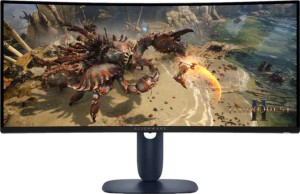
Dell Alienware AW3425DWM 34"
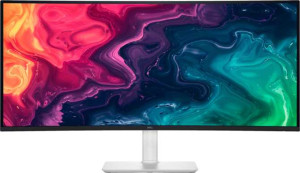
Dell Plus S3425DW 34"

Dell Alienware AW3425DWM 34" Dell Plus S3425DW 34"

Overview

Welcome to our in-depth comparison of the Dell Alienware AW3425DWM 34″ and the Dell Plus S3425DW 34″ — two ultrawide 34-inch monitors that share the same screen size and resolution, yet target very different audiences. From refresh rate and brightness to connectivity options and ergonomic flexibility, these two displays diverge in meaningful ways that could make one a far better fit for your needs than the other. Read on to discover how they stack up across every major specification.

Common Features

  • Both monitors use a VA, LCD, LED-backlit display type.
  • Both monitors have a screen size of 34″.
  • Both monitors share a resolution of 3440 x 1440 px.
  • AMD FreeSync adaptive synchronization is supported on both monitors.
  • An anti-glare coating is present on both monitors.
  • The maximum horizontal viewing angle is 178º on both monitors.
  • The maximum vertical viewing angle is 178º on both monitors.
  • Neither monitor has a matte panel.
  • Neither monitor has a swivel stand.
  • Both monitors support VESA mounting.
  • Neither monitor supports portrait mode.
  • The maximum operating temperature is 40 °C on both monitors.
  • The lowest potential operating temperature is 0 °C on both monitors.
  • Both monitors display 1070 million colors.
  • The contrast ratio is 3000:1 on both monitors.
  • Both monitors have 2 HDMI ports.
  • Thunderbolt support is not available on either monitor.
  • Neither monitor has a 3.5 mm audio jack socket.
  • Neither monitor has a DVI connector.
  • Picture-in-Picture (PiP) is available on both monitors.
  • Built-in smart TV functionality is not present on either monitor.
  • Neither monitor includes a remote control.
  • Neither monitor has an ambient light sensor.
  • Neither monitor has a front camera.

Main Differences

  • The response time is 4 ms on the Dell Alienware AW3425DWM 34″ and 5 ms on the Dell Plus S3425DW 34″.
  • The pixel density is 110 ppi on the Dell Alienware AW3425DWM 34″ and 109 ppi on the Dell Plus S3425DW 34″.
  • The refresh rate is 180Hz on the Dell Alienware AW3425DWM 34″ and 120Hz on the Dell Plus S3425DW 34″.
  • The Dell Alienware AW3425DWM 34″ is categorized as an Ultrawide Gaming monitor, while the Dell Plus S3425DW 34″ is categorized as an Ultrawide Standard monitor.
  • Tilt adjustment is supported on the Dell Alienware AW3425DWM 34″ but not on the Dell Plus S3425DW 34″.
  • The height is 360.85 mm on the Dell Alienware AW3425DWM 34″ and 355.77 mm on the Dell Plus S3425DW 34″.
  • The width is 805.45 mm on the Dell Alienware AW3425DWM 34″ and 807.32 mm on the Dell Plus S3425DW 34″.
  • The thickness is 132.46 mm on the Dell Alienware AW3425DWM 34″ and 116.89 mm on the Dell Plus S3425DW 34″.
  • The weight is 9090 g on the Dell Alienware AW3425DWM 34″ and 9130 g on the Dell Plus S3425DW 34″.
  • The volume is 38499.05 cm³ on the Dell Alienware AW3425DWM 34″ and 33573.17 cm³ on the Dell Plus S3425DW 34″.
  • The typical brightness is 400 nits on the Dell Alienware AW3425DWM 34″ and 300 nits on the Dell Plus S3425DW 34″.
  • Color calibration support is present on the Dell Alienware AW3425DWM 34″ but not available on the Dell Plus S3425DW 34″.
  • The Dell Alienware AW3425DWM 34″ has 1 DisplayPort output, while the Dell Plus S3425DW 34″ has none.
  • The Dell Alienware AW3425DWM 34″ has 3 USB ports, while the Dell Plus S3425DW 34″ has 4 USB ports.
  • The operating power consumption is 32W on the Dell Alienware AW3425DWM 34″ and 31W on the Dell Plus S3425DW 34″.
  • The standby power consumption is 0.3W on the Dell Alienware AW3425DWM 34″ and 0.4W on the Dell Plus S3425DW 34″.
  • Stereo speakers are present on the Dell Plus S3425DW 34″ but not available on the Dell Alienware AW3425DWM 34″.
Specs Comparison
Dell Alienware AW3425DWM 34"

Dell Alienware AW3425DWM 34"

Dell Plus S3425DW 34"

Dell Plus S3425DW 34"

Display:
Display type VA, LCD, LED-backlit VA, LCD, LED-backlit
response time 4 ms 5 ms
screen size 34" 34"
resolution 3440 x 1440 px 3440 x 1440 px
pixel density 110 ppi 109 ppi
Adaptive synchronization AMD FreeSync AMD FreeSync
has anti-glare coating
refresh rate 180Hz 120Hz
maximum horizontal viewing angle 178º 178º
maximum vertical viewing angle 178º 178º
has a matte panel
has a glossy panel
has a touch screen

Both monitors share the same fundamental panel DNA — a 34″ VA, LED-backlit LCD at 3440 x 1440 ultrawide resolution — and their pixel densities of 110 ppi and 109 ppi are effectively identical. Viewing angles, adaptive sync (AMD FreeSync), and surface treatment (glossy, anti-glare coating) are also matched, meaning neither panel has an inherent edge in color geometry or reflectivity management.

Where the two monitors meaningfully diverge is in motion performance. The Alienware AW3425DWM runs at 180Hz with a 4 ms response time, while the Dell Plus S3425DW tops out at 120Hz with a 5 ms response time. In practice, the 60Hz gap is perceptible: fast-paced gaming and rapid cursor movement will appear noticeably smoother on the Alienware. The 1 ms response time advantage also reduces the risk of ghosting on VA panel transitions, which is a known weakness of the technology at lower refresh rates.

For productivity-focused or casual users, the S3425DW′s 120Hz refresh rate is still a comfortable step above standard 60Hz displays and will feel fluid in everyday use. But for anyone prioritizing gaming fluency or high-frame-rate content, the Alienware AW3425DWM holds a clear display performance edge by every motion-related metric provided.

General info:
Type Ultrawide, Gaming Ultrawide, Standard
release date March 2025 March 2025
supports total tilt
Has a swivel stand
Supports VESA mount
height 360.85 mm 355.77 mm
width 805.45 mm 807.32 mm
thickness 132.46 mm 116.89 mm
weight 9090 g 9130 g
supports portrait mode
maximum operating temperature 40 °C 40 °C
lowest potential operating temperature 0 °C 0 °C
volume 38499.05294095 cm³ 33573.173432796 cm³

Classified as a Gaming ultrawide, the Alienware AW3425DWM signals its intended audience immediately — and that distinction carries into the stand design. It supports tilt adjustment, which the Dell Plus S3425DW (categorized as a Standard ultrawide) notably lacks. For a monitor at this size, the ability to angle the panel toward or away from the viewer is a meaningful ergonomic feature, particularly during long sessions where eye strain and neck fatigue become real concerns.

Physically, the two monitors occupy nearly the same desk footprint — width and height are within a few millimeters of each other — but the Alienware is 15.57 mm thicker (132.46 mm vs 116.89 mm), which accounts for its substantially larger volume despite the similar silhouette. Weight is essentially a wash at roughly 9.1 kg for both, so neither has an advantage when it comes to mounting or repositioning.

Both monitors support VESA mounting, giving users the option to ditch the stand entirely for an arm — at which point the S3425DW′s lack of tilt becomes irrelevant. But for stand-only setups, the Alienware AW3425DWM holds a practical ergonomic edge thanks to its tilt support, making it the more adaptable option out of the box.

Colors:
brightness (typical) 400 nits 300 nits
supports color calibration
display colors 1070 million 1070 million
contrast ratio 3000:1 3000:1

On contrast ratio and color depth, these two monitors are perfectly matched — both deliver a 3000:1 contrast ratio and 1.07 billion colors, which means the depth of blacks, the richness of gradients, and the overall tonal range coming off the VA panel are identical. For color-sensitive work or immersive gaming visuals, neither has an inherent advantage at the panel level.

Brightness is where the gap opens. The Alienware AW3425DWM outputs 400 nits typical brightness versus the S3425DW′s 300 nits — a 33% difference that matters most in well-lit environments. A brighter panel holds up better against ambient light, preserving perceived contrast and color saturation without forcing the user to dim their surroundings. For the S3425DW in a bright office or near a window, image washout becomes a more realistic concern.

The more decisive differentiator, though, is color calibration support. The Alienware offers it; the S3425DW does not. For creative professionals or anyone who needs verified color accuracy — whether for photo editing, video work, or simply ensuring what they see matches what they produce — this is a significant functional gap. Combined with the brightness advantage, the Alienware AW3425DWM holds a clear edge in this group for any user where color fidelity and adaptability to varied lighting conditions matter.

Connectivity:
HDMI ports 2 2
supports Thunderbolt
DisplayPort outputs 1 0
has a socket for a 3.5 mm audio jack
has a DVI connector
USB ports 3 4
supports Ethernet
supports Wi-Fi
has AirPlay
mini DisplayPort outputs 0 0
has a VGA connector

The most consequential difference here is video input selection. The Alienware AW3425DWM offers one DisplayPort output alongside its two HDMI ports, while the Dell Plus S3425DW relies entirely on its two HDMI ports with no DisplayPort at all. This matters because DisplayPort is generally the preferred connection for high-refresh-rate gaming — capable of handling the bandwidth demands of ultrawide resolutions at elevated frame rates more reliably than HDMI in many configurations. Users pairing the S3425DW with a modern discrete GPU may find themselves limited by HDMI version bandwidth depending on the source device.

Flip the advantage, and the S3425DW pulls ahead on USB hub utility, offering 4 USB ports to the Alienware′s 3. For a desk setup where the monitor doubles as a central hub for peripherals — keyboard, mouse, headset dongle, storage — that extra port can eliminate the need for a separate hub entirely. It is a modest but practical win for the productivity-oriented user the S3425DW is designed for.

Neither monitor includes an audio jack, Ethernet, or wireless connectivity, so those omissions are a wash. On balance, the Alienware AW3425DWM holds the stronger connectivity profile for its target audience: the DisplayPort input is a meaningful advantage for PC gamers running high refresh rates, and one fewer USB port is an easy trade-off in that context.

Power:
operating power consumption 32W 31W
standby power consumption 0.3W 0.4W

Power consumption is essentially a non-issue in this comparison. The Alienware AW3425DWM draws 32W during operation and the Dell Plus S3425DW draws 31W — a 1W difference that is functionally imperceptible in any real-world context, whether measured in electricity costs or thermal output. Running either monitor for eight hours a day, the annual energy difference between the two amounts to less than a few cents.

Standby figures flip the result just as marginally: the Alienware idles at 0.3W versus the S3425DW′s 0.4W, a 0.1W gap that is similarly inconsequential over time. Neither number is cause for concern from an efficiency standpoint, and neither monitor distinguishes itself here.

This group is effectively a tie. Given that the Alienware offers higher brightness and a faster refresh rate — both of which typically drive up power draw — its near-identical consumption to the S3425DW is mildly noteworthy, but not a decisive factor in any purchasing decision.

Features:
has PiP
has stereo speakers
has built-in smart TV
has a remote control
supports Dolby Digital
supports Dolby Digital Plus
has DTS Surround
has an ambient light sensor
has a front camera

Across most feature categories, these two monitors are identical — both support Picture-in-Picture, and neither includes smart TV functionality, a remote control, surround sound formats, an ambient light sensor, or a front camera. The shared PiP support is worth noting as a genuine productivity tool, allowing users to display input from two sources simultaneously on the ultrawide canvas, which is particularly useful in multi-device workflows.

The sole differentiator in this group is that the Dell Plus S3425DW includes stereo speakers, while the Alienware AW3425DWM does not. For a monitor aimed at productivity users, built-in speakers offer a convenient baseline audio solution — video calls, background music, or casual media playback without requiring a separate speaker setup. Gamers and audio enthusiasts on either monitor will almost certainly use dedicated headsets or external speakers, but the absence of any speakers on the Alienware means users have no fallback option at all if needed.

For this group, the S3425DW has a narrow but clear edge: built-in speakers add flexibility at no cost to the user, and no other feature in this category offsets that gap for the Alienware.

Comparison Summary & Verdict

After a thorough side-by-side review, it is clear that both monitors share a strong foundation: identical 34-inch VA panels at 3440 x 1440 resolution, AMD FreeSync support, and a 3000:1 contrast ratio. However, their differences reveal two distinct identities. The Dell Alienware AW3425DWM 34″ stands out with a faster 180Hz refresh rate, higher 400-nit brightness, a dedicated DisplayPort output, color calibration support, and tilt adjustment — making it the stronger choice for performance-focused users and content creators. The Dell Plus S3425DW 34″, on the other hand, offers built-in stereo speakers, one additional USB port, a slimmer and lighter chassis, and a lower price tier, making it well-suited for everyday productivity and office use where gaming-grade specs are unnecessary.

Dell Alienware AW3425DWM 34
Buy Dell Alienware AW3425DWM 34" if...

Buy the Dell Alienware AW3425DWM 34″ if you want a high-performance gaming monitor with a faster 180Hz refresh rate, brighter 400-nit display, color calibration support, and a DisplayPort output.

Dell Plus S3425DW 34
Buy Dell Plus S3425DW 34" if...

Buy the Dell Plus S3425DW 34″ if you need a productivity-focused ultrawide with built-in stereo speakers, an extra USB port, and a more compact build for everyday office use.