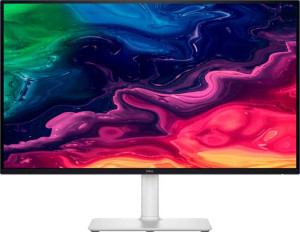
Dell Plus S2725QC 27"
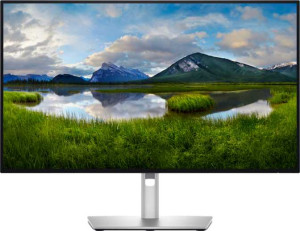
Dell UltraSharp U2725QE 27"

Dell Plus S2725QC 27" Dell UltraSharp U2725QE 27"

Common Features

  • Both monitors use an IPS, LCD, LED-backlit display type.
  • Both monitors have a response time of 8 ms.
  • Both monitors feature a 27″ screen size.
  • Both monitors have a resolution of 3840 x 2160 px.
  • Both monitors have a pixel density of 163 ppi.
  • Anti-glare coating is present on both monitors.
  • Both monitors support a 120Hz refresh rate.
  • Both monitors have a maximum horizontal viewing angle of 178º.
  • Both monitors display 1070 million colors.
  • Both monitors are classified as Standard type.
  • Tilt adjustment is supported on both monitors.
  • Both monitors have a swivel stand.
  • VESA mount is supported on both monitors.
  • Portrait mode is supported on both monitors.
  • Both monitors have a maximum operating temperature of 40 °C and a minimum of 0 °C.
  • Thunderbolt is not supported on either monitor.
  • Neither monitor has a DVI connector.
  • Both monitors have USB 3.1 ports.
  • Both monitors feature a USB Type-C connector.
  • Both monitors include HDMI 2.1.
  • Ethernet connectivity is not available on either monitor.
  • Wi-Fi is not supported on either monitor.
  • AirPlay is not supported on either monitor.
  • Picture-in-Picture is not available on either monitor.
  • Neither monitor has built-in smart TV functionality.
  • A remote control is not included with either monitor.
  • Dolby Digital support is not available on either monitor.
  • Dolby Digital Plus support is not available on either monitor.
  • DTS Surround is not available on either monitor.
  • An ambient light sensor is not present on either monitor.
  • A front camera is not included on either monitor.

Main Differences

  • Adaptive synchronization is AMD FreeSync on Dell Plus S2725QC 27″ but not available on Dell UltraSharp U2725QE 27″.
  • A matte panel is present on Dell Plus S2725QC 27″ but not on Dell UltraSharp U2725QE 27″.
  • Height is 355.98 mm on Dell Plus S2725QC 27″ and 353.51 mm on Dell UltraSharp U2725QE 27″.
  • Width is 611.54 mm on Dell Plus S2725QC 27″ and 612.44 mm on Dell UltraSharp U2725QE 27″.
  • Thickness is 60 mm on Dell Plus S2725QC 27″ and 55.6 mm on Dell UltraSharp U2725QE 27″.
  • Weight is 6500 g on Dell Plus S2725QC 27″ and 6740 g on Dell UltraSharp U2725QE 27″.
  • Volume is 13061.76 cm³ on Dell Plus S2725QC 27″ and 12037.60 cm³ on Dell UltraSharp U2725QE 27″.
  • Typical brightness is 350 nits on Dell Plus S2725QC 27″ and 450 nits on Dell UltraSharp U2725QE 27″.
  • Color calibration support is available on Dell UltraSharp U2725QE 27″ but not on Dell Plus S2725QC 27″.
  • Contrast ratio is 1500:1 on Dell Plus S2725QC 27″ and 3000:1 on Dell UltraSharp U2725QE 27″.
  • HDMI port count is 2 on Dell Plus S2725QC 27″ and 1 on Dell UltraSharp U2725QE 27″.
  • DisplayPort outputs number 0 on Dell Plus S2725QC 27″ and 1 on Dell UltraSharp U2725QE 27″.
  • A 3.5 mm audio jack is present on Dell UltraSharp U2725QE 27″ but not on Dell Plus S2725QC 27″.
  • USB port count is 3 on Dell Plus S2725QC 27″ and 10 on Dell UltraSharp U2725QE 27″.
  • Operating power consumption is 25.2W on Dell Plus S2725QC 27″ and 25.4W on Dell UltraSharp U2725QE 27″.
  • Standby power consumption is 0.4W on Dell Plus S2725QC 27″ and 0.5W on Dell UltraSharp U2725QE 27″.
  • Stereo speakers are built into Dell Plus S2725QC 27″ but are not present on Dell UltraSharp U2725QE 27″.
Specs Comparison
Dell Plus S2725QC 27"

Dell Plus S2725QC 27"

Dell UltraSharp U2725QE 27"

Dell UltraSharp U2725QE 27"

Display:
Display type IPS, LCD, LED-backlit IPS, LCD, LED-backlit
response time 8 ms 8 ms
screen size 27" 27"
resolution 3840 x 2160 px 3840 x 2160 px
pixel density 163 ppi 163 ppi
Adaptive synchronization AMD FreeSync None
has anti-glare coating
refresh rate 120Hz 120Hz
maximum horizontal viewing angle 178º 178º
maximum vertical viewing angle 178º 178º
has a matte panel
has a glossy panel
has a touch screen

Both the Dell Plus S2725QC and the Dell UltraSharp U2725QE share the same core display foundation: a 27″ IPS, LED-backlit LCD panel running at 3840 x 2160 (4K) resolution with a pixel density of 163 ppi, an 8 ms response time, a 120 Hz refresh rate, and identical 178° viewing angles in both directions. In practical terms, this means both screens deliver sharp, color-accurate imagery with wide off-axis visibility — the kind of panel quality you would expect from serious productivity monitors.

The one meaningful differentiator in this group is adaptive sync support. The S2725QC includes AMD FreeSync, which dynamically synchronizes the display′s refresh rate with a compatible GPU′s output to eliminate screen tearing and reduce stutter — useful for anyone who occasionally games or works with motion-heavy content. The U2725QE lists None for adaptive synchronization, meaning it offers no such feature. Separately, the S2725QC is confirmed to have a matte panel, while the U2725QE′s panel is marked as neither matte nor glossy — a subtle but potentially relevant distinction for users sensitive to reflections in bright environments.

For pure display specifications, these monitors are essentially evenly matched on every metric that matters for image quality and daily use. However, the S2725QC holds a narrow edge in this category thanks to its FreeSync support and explicitly confirmed matte coating — advantages that will matter most to users who value versatility beyond standard office work.

General info:
Type Standard Standard
release date March 2025 March 2025
supports total tilt
Has a swivel stand
Supports VESA mount
height 355.98 mm 353.51 mm
width 611.54 mm 612.44 mm
thickness 60 mm 55.6 mm
weight 6500 g 6740 g
supports portrait mode
maximum operating temperature 40 °C 40 °C
lowest potential operating temperature 0 °C 0 °C
volume 13061.760552 cm³ 12037.60374064 cm³

From an ergonomics standpoint, both monitors are well-equipped for a professional desk setup: each supports tilt, swivel, portrait mode, and VESA mounting, giving users broad flexibility in positioning regardless of which model they choose. Neither has a meaningful edge in adjustability — the feature set is identical.

Where the two diverge slightly is in physical dimensions and weight. The S2725QC is marginally thinner on paper but actually occupies a larger overall volume (approximately 13,062 cm³ vs. 12,038 cm³), suggesting a slightly bulkier chassis distribution. More notably, the U2725QE is heavier at 6,740 g compared to the S2725QC′s 6,500 g — a difference of 240 g. While neither monitor is designed to be moved frequently, the extra weight of the U2725QE is a minor consideration if repositioning or mounting is part of the setup process.

Overall, this group is essentially a tie in terms of what matters most — both monitors offer the same ergonomic capabilities and operate across the same temperature range. The S2725QC has a slight edge in being lighter and more compact by volume, but the differences are minor enough that they are unlikely to influence a purchasing decision on their own.

Colors:
brightness (typical) 350 nits 450 nits
supports color calibration
display colors 1070 million 1070 million
contrast ratio 1500:1 3000:1

Both monitors reproduce the same 1.07 billion colors, so color depth is not a differentiator here. The real story lies in the two specs that directly shape how vivid and lifelike the image looks in practice: brightness and contrast ratio — and on both counts, the U2725QE pulls ahead decisively.

At 450 nits of typical brightness versus the S2725QC′s 350 nits, the UltraSharp is noticeably better suited to bright office environments where ambient light can wash out a dimmer panel. The contrast ratio gap is even more striking: 3000:1 on the U2725QE versus 1500:1 on the S2725QC. A higher contrast ratio means deeper perceived blacks and more visual separation between dark and light elements — a difference that is clearly visible when working with dark-themed interfaces, video content, or detailed imagery. Doubling the contrast ratio is a meaningful, real-world upgrade, not a marginal one. On top of that, the U2725QE supports color calibration, while the S2725QC does not — a critical feature for designers, photographers, or anyone whose workflow depends on color accuracy they can verify and trust.

The U2725QE holds a clear advantage in this category. Its higher brightness, doubled contrast ratio, and factory calibration support make it the stronger choice for color-critical work and challenging lighting conditions. The S2725QC′s specs are adequate for general use, but it cannot match the UltraSharp′s overall color performance credentials.

Connectivity:
HDMI ports 2 1
supports Thunderbolt
DisplayPort outputs 0 1
has a socket for a 3.5 mm audio jack
has a DVI connector
USB ports 3 10
USB version 3.1 3.1
Has USB Type-C
HDMI version HDMI 2.1 HDMI 2.1
supports Ethernet
supports Wi-Fi
has AirPlay
mini DisplayPort outputs 0 0
has a VGA connector

Connectivity is where the gap between these two monitors becomes most practical. Both share a common baseline — USB-C, HDMI 2.1, and USB 3.1 — but the way each monitor builds on that foundation tells a different story about who it is designed for. The S2725QC offers 2 HDMI ports versus the U2725QE′s single HDMI, which is a minor convenience for users switching between two HDMI sources. The U2725QE counters with a dedicated DisplayPort output, adding flexibility for systems or setups that rely on DP rather than HDMI.

The most dramatic difference is in USB expansion. The U2725QE provides 10 USB ports compared to just 3 on the S2725QC — a gap that is hard to overstate for desk productivity. A monitor with 10 downstream USB ports effectively acts as a hub, eliminating the need for a separate dock when connecting keyboards, mice, drives, and other peripherals. The U2725QE also includes a 3.5 mm audio jack, which the S2725QC lacks entirely, giving it a clear advantage for users who connect headphones or speakers directly to their display.

The U2725QE wins this category convincingly. Its vastly larger USB port count, added DisplayPort input, and audio jack make it a far more capable connectivity hub for a busy workstation. The S2725QC′s dual HDMI is the only area where it has a marginal edge, but that advantage does not come close to offsetting the UltraSharp′s overall connectivity depth.

Power:
operating power consumption 25.2W 25.4W
standby power consumption 0.4W 0.5W

Power consumption is essentially a non-issue when comparing these two monitors. The S2725QC draws 25.2W during operation while the U2725QE draws 25.4W — a difference of just 0.2W that is imperceptible in any real-world scenario, whether measured in electricity costs or thermal output. Standby figures are similarly close at 0.4W and 0.5W respectively.

This category is a clear tie. Neither monitor has any meaningful advantage in power efficiency, and the marginal differences shown are unlikely to ever factor into a purchasing decision.

Features:
has PiP
has stereo speakers
has built-in smart TV
has a remote control
supports Dolby Digital
supports Dolby Digital Plus
has DTS Surround
has an ambient light sensor
has a front camera

Across this feature set, the two monitors are nearly identical — neither offers PiP, a remote control, ambient light sensing, a front camera, or any form of surround sound support. These omissions are typical for productivity-focused monitors and unlikely to surprise buyers in this category.

The one meaningful distinction is that the S2725QC includes built-in stereo speakers, while the U2725QE has none. For users who prefer a cleaner desk without a separate speaker setup, this gives the S2725QC a practical convenience advantage — particularly in setups where audio quality is secondary to simply having sound without extra hardware. It is worth noting, however, that the U2725QE compensates somewhat by offering a 3.5 mm audio jack (as seen in the connectivity specs), making it straightforward to connect external speakers or headphones.

The S2725QC holds a narrow edge here solely on the strength of its integrated speakers. Whether that matters depends entirely on the user′s audio setup — those already using external speakers or headphones will find this difference irrelevant, while those wanting an out-of-the-box audio solution will appreciate the S2725QC′s inclusion.

Comparison Summary & Verdict

This is a specification comparison between Dell Plus S2725QC 27″ and Dell UltraSharp U2725QE 27″. Both monitors feature a 27″ IPS, LCD, LED-backlit display with a 3840 x 2160 px resolution, 163 ppi pixel density, and 120Hz refresh rate. However, the Dell Plus S2725QC 27″ supports AMD FreeSync, has a matte panel, and includes stereo speakers, while the Dell UltraSharp U2725QE 27″ offers a higher brightness of 450 nits, supports color calibration, and features a 3000:1 contrast ratio. Additionally, the Dell Plus S2725QC 27″ has two HDMI ports, while the Dell UltraSharp U2725QE 27″ has one HDMI port and a DisplayPort output.