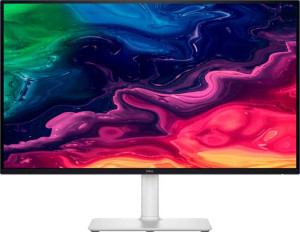
Dell Plus S2725QC 27"
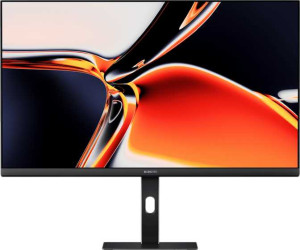
Xiaomi 4K Monitor A27Ui 27"

Dell Plus S2725QC 27" Xiaomi 4K Monitor A27Ui 27"

Common Features

  • Both monitors have a screen size of 27″.
  • Both monitors have a resolution of 3840 x 2160 px.
  • Both monitors have a pixel density of 163 ppi.
  • Both monitors have a maximum horizontal viewing angle of 178º.
  • Both monitors have a maximum vertical viewing angle of 178º.
  • Neither monitor has a touch screen.
  • Both monitors are LCD displays.
  • Both monitors are LED-backlit.
  • Both monitors support tilt adjustment.
  • Both monitors support VESA mounting.
  • Both monitors support portrait mode.
  • Both monitors have 2 HDMI ports.
  • Both monitors have 3 USB ports.
  • Both monitors have a USB Type-C port.
  • Both monitors do not support Thunderbolt.
  • Both monitors do not have a DVI connector.
  • Both monitors do not support Ethernet.
  • Both monitors do not support Wi-Fi.
  • Both monitors do not have AirPlay.
  • Both monitors do not have a front camera.

Main Differences

  • The Dell Plus S2725QC 27″ has an IPS display type, while the Xiaomi 4K Monitor A27Ui 27″ has a LED-backlit display type.
  • The Dell Plus S2725QC 27″ has a response time of 8 ms, while the Xiaomi 4K Monitor A27Ui 27″ has a response time of 6 ms.
  • The Dell Plus S2725QC 27″ supports AMD FreeSync, while the Xiaomi 4K Monitor A27Ui 27″ does not support any adaptive synchronization.
  • The Dell Plus S2725QC 27″ has an anti-glare coating, while the Xiaomi 4K Monitor A27Ui 27″ does not have an anti-glare coating.
  • The Dell Plus S2725QC 27″ has a 120Hz refresh rate, while the Xiaomi 4K Monitor A27Ui 27″ has a 60Hz refresh rate.
  • The Dell Plus S2725QC 27″ has a matte panel, while the Xiaomi 4K Monitor A27Ui 27″ has a glossy panel.
  • The Dell Plus S2725QC 27″ has a swivel stand, while the Xiaomi 4K Monitor A27Ui 27″ does not have a swivel stand.
  • The Dell Plus S2725QC 27″ has a height of 355.98 mm, while the Xiaomi 4K Monitor A27Ui 27″ has a height of 511 mm.
  • The Dell Plus S2725QC 27″ has a width of 611.54 mm, while the Xiaomi 4K Monitor A27Ui 27″ has a width of 613 mm.
  • The Dell Plus S2725QC 27″ has a thickness of 60 mm, while the Xiaomi 4K Monitor A27Ui 27″ has a thickness of 185 mm.
  • The Dell Plus S2725QC 27″ weighs 6500 g, while the Xiaomi 4K Monitor A27Ui 27″ weighs 5500 g.
  • The Dell Plus S2725QC 27″ has a volume of 13061.760552 cm³, while the Xiaomi 4K Monitor A27Ui 27″ has a volume of 57949.955 cm³.
  • The Dell Plus S2725QC 27″ has a brightness of 350 nits, while the Xiaomi 4K Monitor A27Ui 27″ has a brightness of 360 nits.
  • The Dell Plus S2725QC 27″ does not support color calibration, while the Xiaomi 4K Monitor A27Ui 27″ supports color calibration.
  • The Dell Plus S2725QC 27″ has a contrast ratio of 1500:1, while the Xiaomi 4K Monitor A27Ui 27″ has a contrast ratio of 1200:1.
  • The Dell Plus S2725QC 27″ does not have a DisplayPort output, while the Xiaomi 4K Monitor A27Ui 27″ has one DisplayPort output.
  • The Dell Plus S2725QC 27″ does not have a socket for a 3.5 mm audio jack, while the Xiaomi 4K Monitor A27Ui 27″ has one.
  • The Dell Plus S2725QC 27″ has stereo speakers, while the Xiaomi 4K Monitor A27Ui 27″ does not have stereo speakers.
Specs Comparison
Dell Plus S2725QC 27"

Dell Plus S2725QC 27"

Xiaomi 4K Monitor A27Ui 27"

Xiaomi 4K Monitor A27Ui 27"

Display:
Display type IPS, LCD, LED-backlit LED-backlit, LCD, IPS
response time 8 ms 6 ms
screen size 27" 27"
resolution 3840 x 2160 px 3840 x 2160 px
pixel density 163 ppi 163 ppi
Adaptive synchronization AMD FreeSync None
has anti-glare coating
refresh rate 120Hz 60Hz
maximum horizontal viewing angle 178º 178º
maximum vertical viewing angle 178º 178º
has a matte panel
has a glossy panel
has a touch screen

The Dell Plus S2725QC 27″ and the Xiaomi 4K Monitor A27Ui 27″ both feature a 27″ screen size with a 3840 x 2160 px resolution, delivering a pixel density of 163 ppi. Both displays use IPS technology, ensuring vibrant colors and wide viewing angles. However, the Dell model has an 8 ms response time, while the Xiaomi offers a faster 6 ms response time, which may be beneficial for fast-moving visuals.

When it comes to adaptive synchronization, the Dell Plus S2725QC supports AMD FreeSync, whereas the Xiaomi A27Ui has no adaptive sync feature. The Dell also has a 120Hz refresh rate, offering a smoother experience compared to the Xiaomi's 60Hz. Additionally, the Dell display has an anti-glare coating and a matte panel, while the Xiaomi lacks the anti-glare coating and features a glossy panel, which may impact reflections in bright environments.

Both displays offer identical maximum horizontal and vertical viewing angles of 178º, ensuring consistent image quality from wide angles. In terms of touch functionality, neither monitor has a touchscreen feature.

General info:
Type Standard Standard
release date March 2025 May 2025
supports total tilt
Has a swivel stand
Supports VESA mount
height 355.98 mm 511 mm
width 611.54 mm 613 mm
thickness 60 mm 185 mm
weight 6500 g 5500 g
supports portrait mode
volume 13061.760552 cm³ 57949.955 cm³

Both the Dell Plus S2725QC 27″ and the Xiaomi 4K Monitor A27Ui 27″ are standard-type monitors, offering some similar features and distinct differences in their design and size. The Dell model supports both tilt and swivel adjustments, whereas the Xiaomi A27Ui supports tilt but does not have a swivel stand.

In terms of size, the Dell is more compact, measuring 355.98 mm in height, 611.54 mm in width, and 60 mm in thickness, weighing 6500 g. On the other hand, the Xiaomi is larger, with a height of 511 mm, width of 613 mm, and thickness of 185 mm, but it is lighter, weighing 5500 g.

Both monitors support portrait mode and VESA mounting. When it comes to volume, the Dell Plus S2725QC has a volume of 13061.760552 cm³, while the Xiaomi’s larger design results in a significantly higher volume of 57949.955 cm³.

Colors:
brightness (typical) 350 nits 360 nits
supports color calibration
display colors 1070 million 1070 million
contrast ratio 1500:1 1200:1

The Dell Plus S2725QC 27″ and the Xiaomi 4K Monitor A27Ui 27″ both support 1070 million display colors, offering vibrant and accurate color reproduction. However, their brightness levels differ slightly, with the Dell model offering 350 nits of typical brightness, while the Xiaomi reaches 360 nits.

In terms of contrast ratio, the Dell has a ratio of 1500:1, whereas the Xiaomi has a lower ratio of 1200:1, meaning the Dell might provide slightly more distinction between light and dark areas on screen.

Additionally, the Xiaomi supports color calibration, but the Dell does not, allowing the Xiaomi to potentially offer more precise color adjustments if needed.

Connectivity:
HDMI ports 2 2
supports Thunderbolt
DisplayPort outputs 0 1
has a socket for a 3.5 mm audio jack
has a DVI connector
USB ports 3 3
Has USB Type-C
supports Ethernet
supports Wi-Fi
has AirPlay
mini DisplayPort outputs 0 0
has a VGA connector

Both the Dell Plus S2725QC 27″ and the Xiaomi 4K Monitor A27Ui 27″ offer 2 HDMI ports and 3 USB ports, as well as USB Type-C connectivity. Neither product supports Thunderbolt. The Dell model does not have a DisplayPort output, while the Xiaomi features a DisplayPort output, providing more versatility in display connections.

In terms of audio, the Dell does not have a socket for a 3.5 mm audio jack, whereas the Xiaomi includes this feature. Both models lack a DVI connector, mini DisplayPort output, VGA connector, Ethernet support, Wi-Fi, and AirPlay functionality.

Both monitors provide the same USB port count and Type-C connection, making them equally equipped for modern USB peripherals, though the Xiaomi’s additional DisplayPort output may be helpful for users with compatible devices.

Features:
has PiP
has stereo speakers
has built-in smart TV
has a remote control
supports Dolby Digital
supports Dolby Digital Plus
has DTS Surround
has an ambient light sensor
has a front camera

Both the Dell Plus S2725QC 27″ and the Xiaomi 4K Monitor A27Ui 27″ lack PiP (Picture-in-Picture) functionality, built-in smart TV features, remote control support, and an ambient light sensor. Neither model supports Dolby Digital, Dolby Digital Plus, or DTS Surround sound. Additionally, neither monitor includes a front camera.

However, the Dell Plus S2725QC 27″ stands out by having stereo speakers, while the Xiaomi A27Ui 27″ does not offer this feature.

Comparison Summary

This is a specification comparison between the Dell Plus S2725QC 27″ and Xiaomi 4K Monitor A27Ui 27″. Both monitors share a 27″ screen size, 3840 x 2160 px resolution, and 163 ppi pixel density. However, the Dell Plus S2725QC 27″ has a higher refresh rate of 120Hz, supports AMD FreeSync, and has a matte panel, while the Xiaomi 4K Monitor A27Ui 27″ features a 60Hz refresh rate, lacks adaptive synchronization, and has a glossy panel. Additionally, the Dell model includes stereo speakers, while the Xiaomi model does not. The Dell Plus S2725QC 27″ is smaller and lighter, with a height of 355.98 mm and a weight of 6500 g, compared to the Xiaomi’s height of 511 mm and weight of 5500 g.