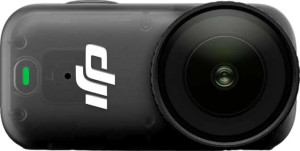
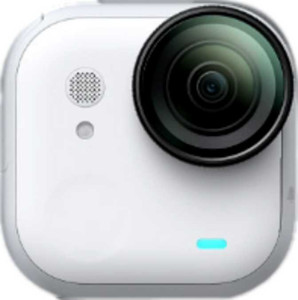
DJI Osmo Nano
Insta360 Go Ultra

DJI Osmo Nano Insta360 Go Ultra

Common Features

  • Both products have an external memory slot.
  • Both products have a display.
  • Both products have a maximum operating temperature of 40 °C.
  • Both products have a lowest potential operating temperature of -20 °C.
  • Neither product has a secondary screen.
  • Both products are waterproof up to 10 m.
  • Both products are compatible with Android.
  • Both products are compatible with iOS.
  • Both products have first-party support for live streaming.
  • Both products have USB Type-C.
  • Both products have a remote control.
  • Neither product has an HDMI output.
  • Neither product has GPS.
  • Neither product is DLNA-certified.
  • Both products have a rechargeable battery.
  • Both products have a battery level indicator.
  • Both products have an adjustable field of view.
  • Both products have a CMOS sensor.
  • Neither product has a flash.
  • Both products can record vertical video.

Main Differences

  • The DJI Osmo Nano has a touch screen while the Insta360 Go Ultra does not.
  • The DJI Osmo Nano is waterproof, whereas the Insta360 Go Ultra is water resistant.
  • The DJI Osmo Nano has a volume of 47.3298 cm³, while the Insta360 Go Ultra has a volume of 38.47026 cm³.
  • The DJI Osmo Nano weighs 52 g, whereas the Insta360 Go Ultra weighs 52.9 g.
  • The DJI Osmo Nano has a thickness of 28 mm, while the Insta360 Go Ultra has a thickness of 18.3 mm.
  • The DJI Osmo Nano is 57.3 mm wide, while the Insta360 Go Ultra is 46 mm wide.
  • The DJI Osmo Nano has a height of 29.5 mm, whereas the Insta360 Go Ultra has a height of 45.7 mm.
  • The DJI Osmo Nano uses Bluetooth version 5.1, while the Insta360 Go Ultra uses Bluetooth version 5.4.
  • The DJI Osmo Nano has a USB version 3.1, while the Insta360 Go Ultra has a USB version 2.
  • The DJI Osmo Nano has a battery life of 1.5 hours, while the Insta360 Go Ultra has a battery life of 1.15 hours.
  • The DJI Osmo Nano has a battery power of 530 mAh, whereas the Insta360 Go Ultra has a battery power of 500 mAh.
  • The DJI Osmo Nano supports shooting raw, while the Insta360 Go Ultra does not.
  • The DJI Osmo Nano has a 35 MP main camera, while the Insta360 Go Ultra has a 50 MP main camera.
  • The DJI Osmo Nano has a 2.8f wide aperture, whereas the Insta360 Go Ultra has a 2.85f wide aperture.
  • The DJI Osmo Nano has a movie bitrate of 120 Mbps, while the Insta360 Go Ultra has a movie bitrate of 180 Mbps.
Specs Comparison
DJI Osmo Nano

DJI Osmo Nano

Insta360 Go Ultra

Insta360 Go Ultra

Design:
has a touch screen
has an external memory slot
Has a display
water resistance Waterproof Water resistant
maximum operating temperature 40 °C 40 °C
lowest potential operating temperature -20 °C -20 °C
Has a secondary screen
waterproof depth rating 10 m 10 m
volume 47.3298 cm³ 38.47026 cm³
weight 52 g 52.9 g
thickness 28 mm 18.3 mm
width 57.3 mm 46 mm
height 29.5 mm 45.7 mm

The DJI Osmo Nano features a touch screen, whereas the Insta360 Go Ultra does not. Both devices include a display, but only the Osmo Nano offers a touch screen for direct interaction.

When it comes to external memory, both products offer an external memory slot, so you can expand storage as needed. The Osmo Nano is waterproof with a depth rating of 10 meters, while the Go Ultra is water-resistant, also rated for 10 meters of waterproofing, but lacks the same explicit waterproof claim.

In terms of size and weight, the DJI Osmo Nano is slightly larger, with a volume of 47.33 cm³, weight of 52 g, and dimensions of 57.3 mm in width, 28 mm in thickness, and 29.5 mm in height. The Insta360 Go Ultra is a bit more compact, with a volume of 38.47 cm³, weighing 52.9 g, and measuring 46 mm in width, 18.3 mm in thickness, and 45.7 mm in height. Despite the difference in size, the weight is almost identical, with the Osmo Nano being marginally lighter by 0.9 g.

Connectivity & Features:
release date September 2025 August 2025
Is compatible with Android
Is compatible with iOS
Bluetooth version 5.1 5.4
has first-party support for live streaming
USB version 3.1 2
Has USB Type-C
has a remote control
has an HDMI output
has GPS
is DLNA-certified
supports a remote smartphone

Both the DJI Osmo Nano and Insta360 Go Ultra are compatible with Android and iOS devices. However, the two differ in their Bluetooth versions; the Osmo Nano supports Bluetooth 5.1, while the Go Ultra has Bluetooth 5.4, offering a slightly newer version for potentially improved connectivity.

Both products also support first-party live streaming, and both feature USB Type-C connections. The Osmo Nano, however, uses USB version 3.1, while the Go Ultra supports the older USB version 2. Both products include a remote control and support a remote smartphone, making them convenient for various types of operation.

Neither product has an HDMI output, GPS, or DLNA certification, so there are no significant differences in those areas. Overall, the key distinctions lie in Bluetooth and USB versions, with the Go Ultra having the more recent Bluetooth version, while the Osmo Nano features a faster USB connection.

Battery:
Battery life 1.5 hours 1.15 hours
battery power 530 mAh 500 mAh
has a rechargeable battery
has a battery level indicator

The DJI Osmo Nano offers a battery life of 1.5 hours, while the Insta360 Go Ultra has a slightly shorter battery life of 1.15 hours. In terms of battery power, the Osmo Nano has a 530 mAh battery, compared to the Go Ultra’s 500 mAh battery, indicating that the Osmo Nano has a slightly larger capacity.

Both products feature rechargeable batteries and include a battery level indicator, so you can easily monitor the remaining power during use. These shared features ensure that users of either device can keep track of battery status and recharge when needed.

While both devices are quite similar in terms of battery features, the Osmo Nano offers a bit more usage time and a larger battery capacity than the Go Ultra, though the difference is not drastic.

Audio:
has a microphone input
has a socket for a 3.5 mm audio jack

Both the DJI Osmo Nano and the Insta360 Go Ultra lack a microphone input and do not feature a socket for a 3.5 mm audio jack. These audio-related specs are identical for both devices, so there are no differences in their audio connectivity capabilities.

As a result, neither product provides the option for external microphones or additional audio input devices, which could be a limitation for users who require more advanced audio features.

In conclusion, both products offer the same audio setup with no external microphone or audio jack options.

Optics:
megapixels (main camera) 35 MP 50 MP
has an adjustable field of view
wide aperture (main camera) 2.8f 2.85f
Has a dual-lens (or multi-lens) main camera
has a CMOS sensor
has a flash

The DJI Osmo Nano features a 35 MP main camera, while the Insta360 Go Ultra offers a higher 50 MP main camera. Both devices have an adjustable field of view, allowing flexibility in framing shots, and both are equipped with a CMOS sensor for capturing images. The wide apertures are slightly different, with the Osmo Nano having a 2.8f aperture and the Go Ultra offering a marginally wider 2.85f aperture, which may allow for slightly better low-light performance.

Neither device has a dual-lens or multi-lens setup, meaning both rely on a single lens for imaging. Both cameras lack a built-in flash, so additional lighting may be necessary in low-light environments.

Overall, the Go Ultra has a higher megapixel count, while both devices share similar features like the adjustable field of view, CMOS sensor, and lack of flash or multi-lens cameras.

Videography:
video recording (main camera) 2160 x 60 fps 2160 x 60 fps
Has timelapse function
supports slow-motion video recording
has continuous autofocus when recording movies
supports horizon leveling
has a 24p cinema mode
movie bitrate 120 Mbps 180 Mbps
shoots raw
has AF tracking
has a video light

Both the DJI Osmo Nano and the Insta360 Go Ultra offer the same video recording resolution of 2160 x 60 fps, providing high-quality footage at a smooth frame rate. Both devices include similar videography features such as a timelapse function, slow-motion video recording, continuous autofocus during filming, horizon leveling support, and a 24p cinema mode for a cinematic feel.

One key difference between the two is the movie bitrate: the Osmo Nano records at 120 Mbps, while the Go Ultra records at a higher 180 Mbps, potentially offering more detail in its video output. The Osmo Nano also has the capability to shoot raw footage, whereas the Go Ultra does not support raw shooting, which may limit editing flexibility for those who prefer post-processing control.

Both devices feature AF tracking to maintain focus on moving subjects, but neither includes a video light for low-light filming scenarios. Overall, both offer similar features for video recording, with the Go Ultra having a higher bitrate and lacking raw video shooting capabilities.

Miscellaneous:
can record vertical video

Both the DJI Osmo Nano and the Insta360 Go Ultra are capable of recording vertical video. This feature ensures that users can create content specifically designed for social media platforms that favor vertical orientation, like Instagram or TikTok.

As both products support vertical video recording, there are no differences between them in this regard.

In conclusion, both devices offer the same vertical video recording capability, making them suitable for users focused on creating vertical-format content.

Comparison Summary

This is a specification comparison between the DJI Osmo Nano and the Insta360 Go Ultra. Both products feature an external memory slot, a display, and compatibility with both Android and iOS. They also share support for live streaming, USB Type-C, and have a rechargeable battery with a battery level indicator. However, the DJI Osmo Nano has a touch screen, is waterproof, and offers longer battery life compared to the Insta360 Go Ultra. The Insta360 Go Ultra has a 50 MP camera, uses Bluetooth 5.4, and offers a higher movie bitrate of 180 Mbps, whereas the DJI Osmo Nano has a 35 MP camera, uses Bluetooth 5.1, and supports raw video shooting.