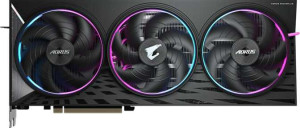
Gigabyte Aorus Radeon RX 9070 XT Elite
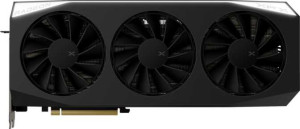
XFX Mercury Radeon RX 9070 XT Gaming Edition

Gigabyte Aorus Radeon RX 9070 XT Elite XFX Mercury Radeon RX 9070 XT Gaming Edition

Overview

Welcome to our in-depth specification comparison between the Gigabyte Aorus Radeon RX 9070 XT Elite and the XFX Mercury Radeon RX 9070 XT Gaming Edition. Both cards share the same RDNA 4.0 architecture and 16GB GDDR6 memory, yet they diverge in meaningful ways across clock speeds, display output configurations, and physical dimensions. Read on to discover which card best suits your setup and performance needs.

Common Features

  • Both cards share the same GPU memory speed of 2518 MHz.
  • Both cards feature 4096 shading units.
  • Both cards have 256 texture mapping units (TMUs).
  • Both cards have 128 render output units (ROPs).
  • Double Precision Floating Point (DPFP) is supported on both cards.
  • Both cards have an effective memory speed of 20000 MHz.
  • Both cards come with 16GB of VRAM.
  • Both cards use GDDR6 memory.
  • Both cards have a 256-bit memory bus width.
  • ECC memory is supported on both cards.
  • Both cards support DirectX 12 Ultimate.
  • Both cards support OpenGL version 4.6.
  • Both cards support OpenCL version 2.2.
  • Multi-display technology is supported on both cards.
  • Ray tracing is supported on both cards.
  • 3D support is available on both cards.
  • DLSS is not supported on either card.
  • FSR4 is available on both cards.
  • Both cards have an HDMI 2.1b output.
  • Neither card has USB-C ports, DVI outputs, or mini DisplayPort outputs.
  • Both cards are built on the RDNA 4.0 GPU architecture.
  • Both cards have a Thermal Design Power (TDP) of 304W.
  • Both cards use PCIe version 5.
  • Both cards are manufactured on a 4 nm semiconductor process.
  • Both cards feature 53900 million transistors.
  • Neither card uses air-water cooling.

Main Differences

  • GPU base clock speed is 1870 MHz on the Gigabyte Aorus Radeon RX 9070 XT Elite and 1660 MHz on the XFX Mercury Radeon RX 9070 XT Gaming Edition.
  • GPU turbo clock speed is 3100 MHz on the Gigabyte Aorus Radeon RX 9070 XT Elite and 2970 MHz on the XFX Mercury Radeon RX 9070 XT Gaming Edition.
  • Pixel rate is 396.8 GPixel/s on the Gigabyte Aorus Radeon RX 9070 XT Elite and 380.2 GPixel/s on the XFX Mercury Radeon RX 9070 XT Gaming Edition.
  • Floating-point performance is 50.79 TFLOPS on the Gigabyte Aorus Radeon RX 9070 XT Elite and 48.66 TFLOPS on the XFX Mercury Radeon RX 9070 XT Gaming Edition.
  • Texture rate is 793.6 GTexels/s on the Gigabyte Aorus Radeon RX 9070 XT Elite and 760.3 GTexels/s on the XFX Mercury Radeon RX 9070 XT Gaming Edition.
  • Maximum memory bandwidth is 644.6 GB/s on the Gigabyte Aorus Radeon RX 9070 XT Elite and 640 GB/s on the XFX Mercury Radeon RX 9070 XT Gaming Edition.
  • The Gigabyte Aorus Radeon RX 9070 XT Elite has 2 HDMI ports, while the XFX Mercury Radeon RX 9070 XT Gaming Edition has 1 HDMI port.
  • The Gigabyte Aorus Radeon RX 9070 XT Elite has 2 DisplayPort outputs, while the XFX Mercury Radeon RX 9070 XT Gaming Edition has 3 DisplayPort outputs.
  • Card width is 339 mm on the Gigabyte Aorus Radeon RX 9070 XT Elite and 360 mm on the XFX Mercury Radeon RX 9070 XT Gaming Edition.
  • Card height is 136 mm on the Gigabyte Aorus Radeon RX 9070 XT Elite and 155 mm on the XFX Mercury Radeon RX 9070 XT Gaming Edition.
Specs Comparison
Gigabyte Aorus Radeon RX 9070 XT Elite

Gigabyte Aorus Radeon RX 9070 XT Elite

XFX Mercury Radeon RX 9070 XT Gaming Edition

XFX Mercury Radeon RX 9070 XT Gaming Edition

Performance:
GPU clock speed 1870 MHz 1660 MHz
GPU turbo 3100 MHz 2970 MHz
pixel rate 396.8 GPixel/s 380.2 GPixel/s
floating-point performance 50.79 TFLOPS 48.66 TFLOPS
texture rate 793.6 GTexels/s 760.3 GTexels/s
GPU memory speed 2518 MHz 2518 MHz
shading units 4096 4096
texture mapping units (TMUs) 256 256
render output units (ROPs) 128 128
Has Double Precision Floating Point (DPFP)

Both cards share identical underlying silicon: the same 4096 shading units, 256 TMUs, and 128 ROPs, meaning any performance gap between them comes down entirely to clock speeds. This is a classic factory-overclock story. The Gigabyte Aorus RX 9070 XT Elite runs a base clock of 1870 MHz and a boost of 3100 MHz, while the XFX Mercury RX 9070 XT Gaming Edition ships at 1660 MHz base and 2970 MHz boost — a meaningful 130 MHz gap at peak.

That clock advantage flows directly into every derived throughput figure. The Aorus delivers 50.79 TFLOPS of floating-point compute versus 48.66 TFLOPS for the XFX — roughly a 4.4% lead — and a similar margin holds for pixel fill rate (396.8 vs. 380.2 GPixel/s) and texture throughput (793.6 vs. 760.3 GTexels/s). In real-world terms, this translates to a modest but measurable frame-rate edge in GPU-bound scenarios, particularly at higher resolutions where shader and texel throughput are the limiting factors. Memory bandwidth is a non-issue here, as both cards use the same 2518 MHz memory speed. Both also support Double Precision Floating Point, relevant for compute workloads beyond gaming.

The Aorus Elite holds a clear performance edge in this group, strictly based on its higher factory clocks and the throughput figures that follow from them. The XFX Mercury is not slow — it is reference-adjacent — but buyers prioritizing out-of-the-box peak performance will find the Aorus the stronger option here.

Memory:
effective memory speed 20000 MHz 20000 MHz
maximum memory bandwidth 644.6 GB/s 640 GB/s
VRAM 16GB 16GB
GDDR version GDDR6 GDDR6
memory bus width 256-bit 256-bit
Supports ECC memory

On paper, the memory configurations of these two cards are nearly indistinguishable. Both pack 16GB of GDDR6 across a 256-bit bus at an effective speed of 20000 MHz, and both support ECC memory — a feature rarely relevant for gaming but valuable in professional compute workloads where data integrity matters. At this VRAM capacity and bus width, neither card is likely to face memory pressure even in demanding 4K titles or VRAM-heavy creative applications.

The one numerical difference — 644.6 GB/s of peak bandwidth for the Aorus versus 640 GB/s for the XFX Mercury — is a rounding-level gap almost certainly attributable to the slightly higher GPU clock on the Aorus influencing how bandwidth is reported, rather than any physical difference in the memory subsystem itself. A difference of under 1% in memory bandwidth has no discernible real-world impact on frame rates or compute throughput.

This group is effectively a tie. Memory configuration is not a differentiator between these two cards — buyers should look to other spec groups to find meaningful separators.

Features:
DirectX version DirectX 12 Ultimate DirectX 12 Ultimate
OpenGL version 4.6 4.6
OpenCL version 2.2 2.2
Supports multi-display technology
supports ray tracing
Supports 3D
supports DLSS
has FSR4
has XeSS (XMX)
AMD SAM / Intel Resizable BAR AMD SAM AMD SAM
has LHR
has RGB lighting
supported displays 4 4

Feature parity is absolute here. Both cards share an identical software and API footprint: DirectX 12 Ultimate, OpenGL 4.6, OpenCL 2.2, ray tracing support, and up to 4 simultaneous displays. Critically, both support FSR4 — AMD's latest upscaling generation — which is the most consequential feature on this list for gamers, as it enables AI-driven frame generation and quality upscaling that can significantly boost perceived frame rates at higher resolutions. Neither card supports DLSS, which is expected given these are AMD GPUs.

AMD SAM (Smart Access Memory) is present on both, allowing a compatible AMD CPU to access the full VRAM pool for small but real performance gains in supported titles. The absence of LHR (Lite Hash Rate) limiters on both is a neutral data point in today's context. RGB lighting is confirmed on both, though its implementation quality is a physical rather than spec-sheet distinction.

This group is a complete tie — every feature listed is shared identically between the two cards. Buyers for whom software capabilities, API support, or upscaling technology are deciding factors will find no reason to favor one over the other based on this data alone.

Ports:
has an HDMI output
HDMI ports 2 1
HDMI version HDMI 2.1b HDMI 2.1b
DisplayPort outputs 2 3
USB-C ports 0 0
DVI outputs 0 0
mini DisplayPort outputs 0 0

Both cards top out at four supported displays and use HDMI 2.1b — capable of 4K at high refresh rates and 8K output — so the version parity means neither has a bandwidth or compatibility advantage at the port level. Where they diverge is in how those four connections are distributed. The Aorus Elite offers 2 HDMI + 2 DisplayPort, while the XFX Mercury goes 1 HDMI + 3 DisplayPort.

In practice, this distinction matters depending on your display setup. Users with multiple HDMI-only devices — such as TVs, capture cards, or older monitors — will find the Aorus more accommodating with its dual HDMI outputs. Conversely, professional or enthusiast multi-monitor setups built around DisplayPort — which supports daisy-chaining and higher refresh rates more broadly — will benefit from the XFX's three DisplayPort outputs. Neither configuration is objectively superior; it is a question of which connector mix aligns with a given user's peripherals.

There is no clear overall winner in this group — the Aorus holds an edge for HDMI-heavy setups, while the XFX Mercury is better suited for DisplayPort-centric configurations. Buyers should match the port layout directly to their existing or planned display ecosystem.

General info:
GPU architecture RDNA 4.0 RDNA 4.0
release date March 2025 March 2025
Thermal Design Power (TDP) 304W 304W
PCI Express (PCIe) version 5 5
semiconductor size 4 nm 4 nm
number of transistors 53900 million 53900 million
Has air-water cooling
width 339 mm 360 mm
height 136 mm 155 mm

At their core, these two cards are built on identical silicon: the same RDNA 4.0 architecture, fabricated on a 4nm process with 53.9 billion transistors, running over PCIe 5.0, and rated at an identical 304W TDP. That shared power envelope is significant — it means both cards will draw the same amount from your PSU and generate comparable heat loads under full load, regardless of the Aorus's higher clock speeds noted in performance specs.

Where this group surfaces a real, practical difference is physical size. The Aorus Elite measures 339 × 136 mm, while the XFX Mercury is noticeably larger at 360 × 155 mm — that is 21mm longer and 19mm taller. For users with smaller mid-tower cases or builds where clearance is tight, this gap is meaningful. The Aorus's more compact footprint makes it the more case-friendly option, potentially fitting in enclosures where the XFX would not.

The Aorus Elite holds a practical edge here solely on physical dimensions — its smaller size offers greater compatibility across a wider range of PC cases. On every other general specification, the two cards are identical, reflecting their common underlying chip and design constraints.

Comparison Summary & Verdict

After examining every specification, both cards prove to be strong contenders built on the same RDNA 4.0 foundation with identical 16GB GDDR6 memory, 304W TDP, and full support for ray tracing and FSR4. The key distinction lies in raw performance and form factor. The Gigabyte Aorus Radeon RX 9070 XT Elite holds a clear edge in GPU turbo clock speed (3100 MHz), floating-point performance (50.79 TFLOPS), and texture rate, while also being the more compact card at 339x136 mm and offering dual HDMI outputs. The XFX Mercury Radeon RX 9070 XT Gaming Edition, on the other hand, favors users who need greater display flexibility with three DisplayPort outputs, though it trades slightly lower clock speeds for that configuration and occupies a larger physical footprint.

Gigabyte Aorus Radeon RX 9070 XT Elite
Buy Gigabyte Aorus Radeon RX 9070 XT Elite if...

Buy the Gigabyte Aorus Radeon RX 9070 XT Elite if you want the highest clock speeds and floating-point performance, or if you need dual HDMI outputs and prefer a more compact card that fits tighter cases.

XFX Mercury Radeon RX 9070 XT Gaming Edition
Buy XFX Mercury Radeon RX 9070 XT Gaming Edition if...

Buy the XFX Mercury Radeon RX 9070 XT Gaming Edition if your setup demands three DisplayPort outputs for a multi-monitor configuration and you can accommodate its larger physical dimensions.