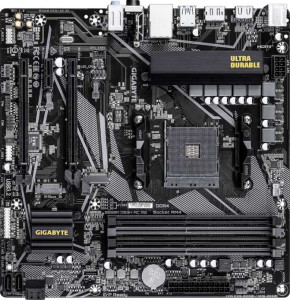
Gigabyte B550M DS3H AC R2
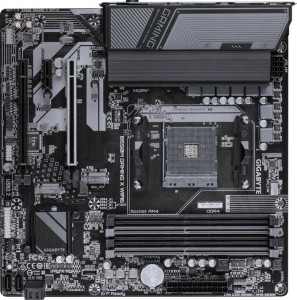
Gigabyte B550M Gaming X Wi-Fi6

Gigabyte B550M DS3H AC R2 Gigabyte B550M Gaming X Wi-Fi6

Overview

Welcome to our detailed specification comparison between the Gigabyte B550M DS3H AC R2 and the Gigabyte B550M Gaming X Wi-Fi6. Both are Micro-ATX motherboards built on the B550 chipset with AM4 socket support, sharing a surprisingly similar feature set. Yet key distinctions in wireless connectivity and audio output may tip the scales depending on your build priorities. Read on to see exactly where these two boards align and where they diverge.

Common Features

  • Both products use the AM4 CPU socket.
  • Both products feature the B550 chipset.
  • Both products use the Micro-ATX form factor.
  • Wi-Fi connectivity is available on both products.
  • Bluetooth is available on both products.
  • Both products feature HDMI 2.1.
  • Overclocking is supported on both products.
  • RGB lighting is present on both products.
  • Both products support a maximum memory amount of 128GB.
  • Both products support a maximum RAM speed of 3200 MHz.
  • Both products have 4 memory slots.
  • Both products use DDR4 memory.
  • Both products support dual-channel memory.
  • ECC memory is not supported on either product.
  • Both products have 4 USB 3.2 Gen 1 ports (USB-A) and 2 USB 2.0 ports on the rear panel.
  • Both products have 4 SATA 3 connectors.
  • Both products have 3 fan headers.
  • Both products feature a Signal-to-Noise ratio of 120 dB and 7.1 audio channels.
  • S/PDIF Out port is not available on either product.
  • Both products have 1 PCIe 4.0 x16 slot, 1 PCIe 3.0 x16 slot, and 1 PCIe x1 slot.
  • RAID 0, RAID 1, and RAID 10 are supported on both products, while RAID 5 and RAID 0+1 are not supported on either.

Main Differences

  • Wi-Fi 6 (802.11ax) support is present on Gigabyte B550M Gaming X Wi-Fi6 but not available on Gigabyte B550M DS3H AC R2.
  • Bluetooth version is 5.3 on Gigabyte B550M Gaming X Wi-Fi6 and 5 on Gigabyte B550M DS3H AC R2.
  • Audio connectors number 3 on Gigabyte B550M Gaming X Wi-Fi6 and 0 on Gigabyte B550M DS3H AC R2.
Specs Comparison
Gigabyte B550M DS3H AC R2

Gigabyte B550M DS3H AC R2

Gigabyte B550M Gaming X Wi-Fi6

Gigabyte B550M Gaming X Wi-Fi6

General info:
CPU socket AM4 AM4
chipset B550 B550
form factor Micro-ATX Micro-ATX
release date June 2025 July 2025
supports Wi-Fi
Wi-Fi version Wi-Fi 4 (802.11n), Wi-Fi 5 (802.11ac) Wi-Fi 4 (802.11n), Wi-Fi 5 (802.11ac), Wi-Fi 6 (802.11ax)
Has Bluetooth
Bluetooth version 5 5.3
HDMI version HDMI 2.1 HDMI 2.1
Easy to overclock
has RGB lighting
Easy to reset BIOS
Has dual BIOS
has aptX
CPU sockets 1 1
Has integrated graphics
warranty period 3 years 3 years
height 244 mm 244 mm
width 244 mm 244 mm
Has integrated CPU

Both the Gigabyte B550M DS3H AC R2 and the Gigabyte B550M Gaming X Wi-Fi6 share the same foundational platform: an AM4 socket, B550 chipset, and Micro-ATX form factor at identical 244 × 244 mm dimensions. They both support overclocking, include RGB lighting, carry a 3-year warranty, and output video via HDMI 2.1 — meaning neither board offers a meaningful edge in build compatibility, physical footprint, or core feature set.

The only real differentiators in this group are wireless connectivity standards. The DS3H AC R2 tops out at Wi-Fi 5 (802.11ac) and Bluetooth 5.0, while the Gaming X Wi-Fi6 adds Wi-Fi 6 (802.11ax) support and bumps Bluetooth to 5.3. In practice, Wi-Fi 6 delivers higher throughput, lower latency, and better performance in congested multi-device environments — a tangible advantage for users on a modern router. Bluetooth 5.3 similarly improves connection stability and energy efficiency over 5.0, which matters if you use wireless peripherals or audio.

For this spec group, the Gaming X Wi-Fi6 holds a clear edge purely on wireless capabilities. If your setup involves a Wi-Fi 6 router or you rely on Bluetooth peripherals, the Gaming X Wi-Fi6 is the more future-proof choice. For users indifferent to wireless standards, the two boards are otherwise effectively identical in general characteristics.

Memory:
maximum memory amount 128GB 128GB
RAM speed (max) 3200 MHz 3200 MHz
memory slots 4 4
DDR memory version 4 4
memory channels 2 2
Supports ECC memory

Across every memory specification in this group, the DS3H AC R2 and the Gaming X Wi-Fi6 are identical. Both boards offer 4 DDR4 slots arranged in a dual-channel configuration, support up to 128GB of total RAM, and cap native memory speeds at 3200 MHz. Neither supports ECC memory, which is expected at this chipset tier and is unlikely to matter for the gaming and mainstream workstation audiences these boards target.

The dual-channel setup is worth highlighting: running matched pairs of DIMMs in the correct slots unlocks noticeably higher memory bandwidth compared to single-channel, which translates to real performance gains in CPU-intensive and memory-bound tasks. The 128GB ceiling and four physical slots also give users meaningful room to grow — starting with 16GB or 32GB today and expanding later without replacing existing modules.

This group is a complete tie. There is no basis in the provided data to favor either board on memory capability, and neither product offers any differentiating advantage here. Your choice between the two should rest entirely on other specification groups.

Ports:
USB 3.2 Gen 2 ports (USB-A) 0 0
USB 3.2 Gen 1 ports (USB-A) 4 4
USB 3.2 Gen 2 ports (USB-C) 0 0
USB 3.2 Gen 1 ports (USB-C) 0 0
USB 2.0 ports 2 2
USB 3.2 Gen 2x2 ports 0 0
USB 4 40Gbps ports 0 0
USB 4 20Gbps ports 0 0
Thunderbolt 4 ports 0 0
Thunderbolt 3 ports 0 0
has an HDMI output
DisplayPort outputs 1 1
RJ45 ports 1 1
Has USB Type-C
eSATA ports 0 0
DVI outputs 0 0
has a VGA connector
PS/2 ports 1 1

The rear I/O layouts of the DS3H AC R2 and the Gaming X Wi-Fi6 are identical in every measurable way. Both deliver 4 USB 3.2 Gen 1 (USB-A) ports alongside 2 USB 2.0 ports — a practical mix that covers most peripherals without issue, though neither board steps up to the faster Gen 2 (10Gbps) standard. The absence of any USB-C connectivity on either board is a notable limitation for users who rely on modern peripherals or external storage that increasingly defaults to that connector.

On the video output side, both boards provide an HDMI output and one DisplayPort, enabling dual-monitor setups when paired with a CPU that has integrated graphics. Networking is handled by a single RJ45 port on each, complemented by the wireless capabilities covered in the General Info group. One legacy curiosity shared by both is the inclusion of a PS/2 port, which remains useful for older keyboards or mice and carries no real cost for users who do not need it.

This group is another complete tie. The port configurations are spec-for-spec identical, so connectivity alone offers no reason to prefer one board over the other. Users who prioritize USB-C or faster USB 3.2 Gen 2 ports should be aware that neither option provides them.

Connectors:
USB 3.2 Gen 1 ports (through expansion) 2 2
USB 3.2 Gen 2 ports (through expansion) 0 0
USB 3.2 Gen 2x2 ports (through expansion) 0 0
USB-C 3.2 Gen 2 ports (through expansion) 0 0
USB 2.0 ports (through expansion) 2 2
SATA 3 connectors 4 4
fan headers 3 3
USB 3.0 ports (through expansion) 2 2
M.2 sockets 2 2
Has TPM connector
U.2 sockets 0 0
Has mSATA connector
SATA 2 connectors 0 0

Internal connectivity tells much the same story as the rear I/O: the DS3H AC R2 and the Gaming X Wi-Fi6 share an identical internal connector layout. The storage backbone consists of 4 SATA 3 ports and 2 M.2 sockets — a well-rounded combination that supports both traditional drives and fast NVMe SSDs simultaneously. For most builds, two M.2 slots is the sweet spot, allowing a primary NVMe boot drive and a secondary slot for additional fast storage without consuming any SATA ports.

Thermal management is handled by 3 fan headers on both boards — adequate for a Micro-ATX build with a CPU cooler and one or two case fans, though users planning more elaborate cooling setups may find themselves relying on a fan hub. Both boards also include a TPM connector, which is relevant for Windows 11 compatibility and hardware-based security features. Expansion USB is capped at Gen 1 speeds on both, with no Gen 2 or USB-C headers available internally.

Once again, this group is a complete tie — every connector type and count is mirrored exactly across both boards. Storage flexibility and internal expandability are equally matched, and neither product offers an advantage here.

Expansion slots:
PCIe 4.0 x16 slots 1 1
PCIe 5.0 x16 slots 0 0
PCIe 3.0 x16 slots 1 1
PCIe x1 slots 1 1
PCI slots 0 0
PCIe 2.0 x16 slots 0 0
PCIe x4 slots 0 0
PCIe x8 slots 0 0

Expansion slot configurations are identical on both the DS3H AC R2 and the Gaming X Wi-Fi6. Each board provides one PCIe 4.0 x16 slot as the primary GPU lane, one PCIe 3.0 x16 slot for secondary expansion, and one PCIe x1 slot for smaller add-in cards. The primary PCIe 4.0 x16 slot is the critical one for GPU users — it delivers double the bandwidth of PCIe 3.0, which becomes relevant for high-end graphics cards that can saturate the older standard.

The secondary PCIe 3.0 x16 slot is a practical addition for users who want to install a capture card, additional NIC, or other expansion hardware without sacrificing the primary GPU lane. The single PCIe x1 slot rounds out the options for compact peripherals. Neither board reaches PCIe 5.0, but that is consistent with the B550 chipset generation and poses no real-world disadvantage for current hardware.

This group is a complete tie. Slot layout, generations, and counts are perfectly mirrored across both boards, meaning expansion capability plays no role in differentiating the two.

Audio:
Signal-to-Noise ratio (DAC) 120 dB 120 dB
audio channels 7.1 7.1
Has S/PDIF Out port
audio connectors 0 3

Audio quality on paper is identical between the two boards — both deliver a 120 dB signal-to-noise ratio and support 7.1-channel output, which represents a solid onboard audio implementation capable of satisfying most mainstream and gaming use cases. However, the specs diverge in one practically significant way: physical audio connectors.

The Gaming X Wi-Fi6 provides 3 rear audio jacks, giving users direct access to analog outputs for headphones, speakers, and microphone at the back panel. The DS3H AC R2, by contrast, lists 0 audio connectors — meaning users of that board would need to rely on front-panel audio headers or a discrete sound card for analog connectivity. For anyone using wired headsets or desktop speakers plugged directly into the motherboard, this is a meaningful day-to-day inconvenience on the DS3H AC R2.

Despite identical audio quality specs, the Gaming X Wi-Fi6 holds a clear practical edge here. The presence of rear audio jacks makes it immediately usable with standard analog peripherals out of the box, while the DS3H AC R2's lack of rear audio connectors adds friction for users who depend on them.

Storage:
Supports RAID 1
Supports RAID 10 (1+0)
Supports RAID 5
Supports RAID 0
Supports RAID 0+1

RAID support is evenly matched across both boards. The DS3H AC R2 and the Gaming X Wi-Fi6 each support RAID 0, RAID 1, and RAID 10 — covering the configurations most relevant to consumer and prosumer use cases. RAID 0 stripes data across drives for increased throughput, RAID 1 mirrors drives for redundancy, and RAID 10 combines both for a balance of performance and fault tolerance. Neither board supports RAID 5, which requires a minimum of three drives and is more commonly found in NAS or server-oriented platforms.

For the target audience of these Micro-ATX B550 boards, the supported RAID modes are more than sufficient. RAID 5 omission is unlikely to be a deciding factor for mainstream builders, and its absence is consistent with the consumer positioning of the B550 chipset.

This group is a complete tie — RAID capabilities are identical on both boards, and storage redundancy or performance configuration offers no grounds to favor either product.

Comparison Summary & Verdict

After a thorough side-by-side review, the Gigabyte B550M DS3H AC R2 and the Gigabyte B550M Gaming X Wi-Fi6 prove to be closely matched boards sharing the same chipset, form factor, memory support, expansion slots, and port layout. The differences come down to a handful of meaningful details. The Gigabyte B550M Gaming X Wi-Fi6 pulls ahead with Wi-Fi 6 (802.11ax) support, a more modern Bluetooth 5.3 standard, and 3 rear audio connectors for a richer analog audio setup. The Gigabyte B550M DS3H AC R2, limited to Wi-Fi 5 and Bluetooth 5, may suit builders who primarily rely on wired connections and do not require onboard analog audio outputs. Choose the Gaming X Wi-Fi6 for a more future-proof wireless and audio experience; opt for the DS3H AC R2 if those extras are not central to your build.

Gigabyte B550M DS3H AC R2
Buy Gigabyte B550M DS3H AC R2 if...

Buy the Gigabyte B550M DS3H AC R2 if you rely primarily on a wired network connection and have no need for onboard analog audio connectors or the latest Wi-Fi 6 standard.

Gigabyte B550M Gaming X Wi-Fi6
Buy Gigabyte B550M Gaming X Wi-Fi6 if...

Buy the Gigabyte B550M Gaming X Wi-Fi6 if you want the fastest available Wi-Fi 6 wireless connectivity, the newer Bluetooth 5.3 standard, and built-in rear audio connectors for a complete analog audio setup.