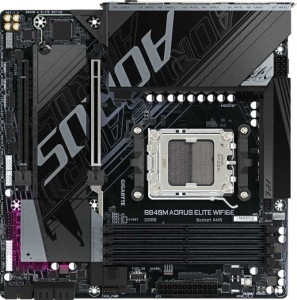
Gigabyte B840M Aorus Elite WiFi6E
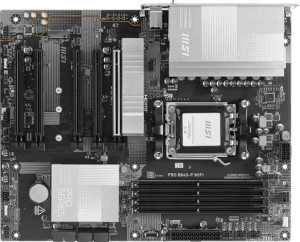
MSI Pro B840-P WiFi

Gigabyte B840M Aorus Elite WiFi6E MSI Pro B840-P WiFi

Overview

Choosing between the Gigabyte B840M Aorus Elite WiFi6E and the MSI Pro B840-P WiFi means deciding between a compact, efficient build and a full-sized, feature-rich platform. Both motherboards share the AM5 socket, DDR5 memory support, and dual BIOS, but they diverge meaningfully on form factor, wireless standards, rear port selection, and expansion slot configuration. This side-by-side breakdown covers every key specification so you can confidently choose the right board for your next build.

Common Features

  • Both products use the AM5 CPU socket.
  • Both products support Wi-Fi.
  • Both products have Bluetooth.
  • Both products include HDMI 2.1.
  • Both products support overclocking.
  • Both products feature a dual BIOS.
  • aptX support is not available on either product.
  • Both products have 1 CPU socket.
  • Both products support up to 256GB of maximum memory.
  • Both products have 4 memory slots.
  • Both products use DDR5 memory.
  • Both products have 2 memory channels.
  • ECC memory support is not available on either product.
  • Both products have 1 USB 3.2 Gen 2 port (USB-A).
  • Both products have 2 USB 3.2 Gen 1 ports (USB-A).
  • Both products have 4 USB 2.0 ports.
  • USB 3.2 Gen 2x2, USB 4 40Gbps, USB 4 20Gbps, Thunderbolt 4, and Thunderbolt 3 ports are not available on either product.
  • Both products have 2 USB 3.2 Gen 1 ports and 4 USB 2.0 ports available through expansion.
  • Both products have 4 SATA 3 connectors.
  • Both products have 6 fan headers.
  • Both products have 2 M.2 sockets.
  • Both products include a TPM connector.
  • Neither product has U.2 sockets.
  • Both products have 1 PCIe 4.0 x16 slot.
  • PCIe 5.0 x16, PCI, PCIe 2.0 x16, and PCIe x8 slots are not available on either product.
  • Both products support 7.1 audio channels.
  • S/PDIF Out port is not available on either product.
  • Both products have 3 audio connectors.
  • Both products support RAID 0, RAID 1, and RAID 10.
  • RAID 0+1 support is not available on either product.

Main Differences

  • The form factor is Micro-ATX on Gigabyte B840M Aorus Elite WiFi6E and ATX on MSI Pro B840-P WiFi.
  • Wi-Fi 7 (802.11be) support is present on MSI Pro B840-P WiFi but not available on Gigabyte B840M Aorus Elite WiFi6E.
  • The Bluetooth version is 5.3 on Gigabyte B840M Aorus Elite WiFi6E and 5.4 on MSI Pro B840-P WiFi.
  • RGB lighting is present on MSI Pro B840-P WiFi but not available on Gigabyte B840M Aorus Elite WiFi6E.
  • Easy BIOS reset is supported on MSI Pro B840-P WiFi but not on Gigabyte B840M Aorus Elite WiFi6E.
  • The height is 244 mm on Gigabyte B840M Aorus Elite WiFi6E and 243.8 mm on MSI Pro B840-P WiFi.
  • The width is 244 mm on Gigabyte B840M Aorus Elite WiFi6E and 304.8 mm on MSI Pro B840-P WiFi.
  • The maximum native RAM speed is 5200 MHz on Gigabyte B840M Aorus Elite WiFi6E and 5600 MHz on MSI Pro B840-P WiFi.
  • The maximum overclocked RAM speed is 8200 MHz on Gigabyte B840M Aorus Elite WiFi6E and 8000 MHz on MSI Pro B840-P WiFi.
  • USB 3.2 Gen 2 ports (USB-C) count is 0 on Gigabyte B840M Aorus Elite WiFi6E and 1 on MSI Pro B840-P WiFi.
  • USB 3.2 Gen 1 ports (USB-C) count is 1 on Gigabyte B840M Aorus Elite WiFi6E and 0 on MSI Pro B840-P WiFi.
  • DisplayPort output is present on Gigabyte B840M Aorus Elite WiFi6E but not available on MSI Pro B840-P WiFi.
  • A PS/2 port is present on Gigabyte B840M Aorus Elite WiFi6E but not available on MSI Pro B840-P WiFi.
  • PCIe 3.0 x16 slot count is 0 on Gigabyte B840M Aorus Elite WiFi6E and 1 on MSI Pro B840-P WiFi.
  • PCIe x1 slot count is 0 on Gigabyte B840M Aorus Elite WiFi6E and 3 on MSI Pro B840-P WiFi.
  • PCIe x4 slot count is 1 on Gigabyte B840M Aorus Elite WiFi6E and 0 on MSI Pro B840-P WiFi.
  • RAID 5 support is present on Gigabyte B840M Aorus Elite WiFi6E but not available on MSI Pro B840-P WiFi.
Specs Comparison
Gigabyte B840M Aorus Elite WiFi6E

Gigabyte B840M Aorus Elite WiFi6E

MSI Pro B840-P WiFi

MSI Pro B840-P WiFi

General info:
CPU socket AM5 AM5
form factor Micro-ATX ATX
release date January 2025 January 2025
supports Wi-Fi
Wi-Fi version Wi-Fi 4 (802.11n), Wi-Fi 5 (802.11ac), Wi-Fi 6 (802.11ax), Wi-Fi 6E (802.11ax) Wi-Fi 4 (802.11n), Wi-Fi 5 (802.11ac), Wi-Fi 6 (802.11ax), Wi-Fi 6E (802.11ax), Wi-Fi 7 (802.11be)
Has Bluetooth
Bluetooth version 5.3 5.4
HDMI version HDMI 2.1 HDMI 2.1
Easy to overclock
has RGB lighting
Easy to reset BIOS
Has dual BIOS
has aptX
CPU sockets 1 1
Has integrated graphics
warranty period 3 years 3 years
height 244 mm 243.8 mm
width 244 mm 304.8 mm
Has integrated CPU

Both boards share the same AM5 socket, a single-CPU layout, HDMI 2.1 output, overclock support, dual BIOS, and a 3-year warranty, making their common foundation equally solid. The most immediate physical difference is form factor: the Gigabyte B840M Aorus Elite WiFi6E is a Micro-ATX board (244 × 244 mm), while the MSI Pro B840-P WiFi is a full ATX board (243.8 × 304.8 mm). This means the Gigabyte fits smaller cases and is the only realistic choice for a compact build, whereas the MSI demands a mid- or full-tower and in return offers more slot and expansion room.

On connectivity, both support Wi-Fi through Wi-Fi 6E, but the MSI goes one step further with Wi-Fi 7 (802.11be) support, which delivers significantly higher throughput and lower latency on compatible routers — a tangible future-proofing advantage. The MSI also edges ahead on Bluetooth, shipping with version 5.4 versus the Gigabyte's 5.3, a modest but real improvement in connection stability and energy efficiency for wireless peripherals.

In usability features, the MSI holds two additional advantages: it includes RGB lighting for users who care about aesthetics, and critically, it offers an easy BIOS reset mechanism that the Gigabyte lacks — a practical convenience during initial builds or troubleshooting. Overall, the MSI Pro B840-P WiFi has a clear general-info edge thanks to superior wireless standards, newer Bluetooth, and better build-time usability, provided you have the case space for an ATX footprint. The Gigabyte is the better pick only if a compact Micro-ATX form factor is a hard requirement.
Memory:
maximum memory amount 256GB 256GB
RAM speed (max) 5200 MHz 5600 MHz
overclocked RAM speed 8200 MHz 8000 MHz
memory slots 4 4
DDR memory version 5 5
memory channels 2 2
Supports ECC memory

The Gigabyte B840M Aorus Elite WiFi6E and MSI Pro B840-P WiFi are quite similar in their memory capabilities, with both supporting up to 256GB of RAM. Both motherboards also feature four memory slots and support DDR5 memory, with two memory channels. However, they do differ in their maximum and overclocked RAM speeds. The Gigabyte B840M Aorus Elite WiFi6E supports a maximum RAM speed of 5200 MHz and can handle overclocked speeds up to 8200 MHz. In comparison, the MSI Pro B840-P WiFi supports a slightly faster maximum RAM speed of 5600 MHz and can overclock up to 8000 MHz.

Both motherboards do not support ECC memory, so neither product is designed for error-correcting memory setups. The overall memory configurations, including the number of slots, DDR version, and memory channels, are identical between the two, with no significant differences in this regard.

In summary, while both motherboards are quite similar in terms of their memory specifications, the MSI Pro B840-P WiFi offers a slight advantage in maximum RAM speed and overclocking potential, with speeds of 5600 MHz and 8000 MHz, compared to the Gigabyte B840M Aorus Elite WiFi6E’s 5200 MHz and 8200 MHz.

Ports:
USB 3.2 Gen 2 ports (USB-A) 1 1
USB 3.2 Gen 1 ports (USB-A) 2 2
USB 3.2 Gen 2 ports (USB-C) 0 1
USB 3.2 Gen 1 ports (USB-C) 1 0
USB 2.0 ports 4 4
USB 3.2 Gen 2x2 ports 0 0
USB 4 40Gbps ports 0 0
USB 4 20Gbps ports 0 0
Thunderbolt 4 ports 0 0
Thunderbolt 3 ports 0 0
has an HDMI output
DisplayPort outputs 1 0
RJ45 ports 1 1
Has USB Type-C
eSATA ports 0 0
DVI outputs 0 0
has a VGA connector
PS/2 ports 1 0

The Gigabyte B840M Aorus Elite WiFi6E and MSI Pro B840-P WiFi offer a similar range of ports, but there are a few differences worth noting. Both motherboards include 1 USB 3.2 Gen 2 port (USB-A), 2 USB 3.2 Gen 1 ports (USB-A), and 4 USB 2.0 ports. They also each provide 1 USB 3.2 Gen 1 port (USB-C) and have USB Type-C support. The Gigabyte model does not have any USB 3.2 Gen 2x2 or USB 4 ports, just like the MSI Pro B840-P, which also lacks Thunderbolt 3 and Thunderbolt 4 ports.

Both motherboards come with an HDMI output, but there is a difference in the display outputs. The Gigabyte B840M Aorus Elite WiFi6E offers 1 DisplayPort output, while the MSI Pro B840-P does not have any DisplayPort outputs. Both products have 1 RJ45 Ethernet port for wired network connectivity. The Gigabyte B840M Aorus Elite WiFi6E includes a PS/2 port, which the MSI Pro B840-P lacks.

Finally, both boards do not offer eSATA ports, DVI outputs, or a VGA connector. The MSI Pro B840-P has no PS/2 port, while the Gigabyte B840M Aorus Elite WiFi6E includes one for legacy peripherals. Overall, while the two motherboards offer similar connectivity options, the Gigabyte model has the added benefit of DisplayPort and PS/2 support, while the MSI Pro B840-P features one USB 3.2 Gen 2 (USB-C) port not found on the Gigabyte board.

Connectors:
USB 3.2 Gen 1 ports (through expansion) 2 2
USB 2.0 ports (through expansion) 4 4
SATA 3 connectors 4 4
fan headers 6 6
USB 3.0 ports (through expansion) 2 2
M.2 sockets 2 2
Has TPM connector
U.2 sockets 0 0
Has mSATA connector
SATA 2 connectors 0 0

The Gigabyte B840M Aorus Elite WiFi6E and MSI Pro B840-P WiFi offer identical specifications in terms of connectors. Both motherboards feature the same number of USB 3.2 Gen 1 and USB 3.0 ports through expansion, with 2 USB 3.2 Gen 1 ports and 2 USB 3.0 ports. They also provide 4 USB 2.0 ports through expansion. Additionally, both models come with 4 SATA 3 connectors, 6 fan headers, and 2 M.2 sockets, ensuring similar expansion capabilities for storage and cooling solutions.

Both motherboards include a TPM connector for enhanced security and lack U.2 sockets. Neither model offers an mSATA connector or SATA 2 connectors, both of which are omitted from their design.

In summary, the Gigabyte B840M Aorus Elite WiFi6E and MSI Pro B840-P WiFi are exactly alike in their connector specifications, providing the same number of USB, SATA, fan headers, and M.2 sockets, as well as the inclusion of a TPM connector and the absence of U.2, mSATA, and SATA 2 connectors.

Expansion slots:
PCIe 4.0 x16 slots 1 1
PCIe 5.0 x16 slots 0 0
PCIe 3.0 x16 slots 0 1
PCIe x1 slots 0 3
PCI slots 0 0
PCIe 2.0 x16 slots 0 0
PCIe x4 slots 1 0
PCIe x8 slots 0 0

The Gigabyte B840M Aorus Elite WiFi6E and MSI Pro B840-P WiFi offer similar expansion slot configurations, but with a few key differences. Both motherboards feature 1 PCIe 4.0 x16 slot, allowing for high-speed GPU installation. However, the Gigabyte model lacks any PCIe 3.0 x16 slots, while the MSI Pro B840-P includes 1 PCIe 3.0 x16 slot, providing an additional option for older GPUs or cards that support PCIe 3.0.

In terms of other PCIe slots, the Gigabyte B840M Aorus Elite WiFi6E has 1 PCIe x4 slot, while the MSI Pro B840-P WiFi offers 3 PCIe x1 slots, allowing for more flexibility with smaller expansion cards. Neither motherboard includes PCI slots or PCIe 2.0 x16 slots. The Gigabyte model does not include any PCIe x8 slots, whereas the MSI Pro B840-P lacks PCIe x4 and PCIe x8 slots.

In summary, the Gigabyte B840M Aorus Elite WiFi6E offers a simpler expansion setup with 1 PCIe x4 slot and no PCIe x1 slots, while the MSI Pro B840-P WiFi provides more flexibility with 3 PCIe x1 slots in addition to its PCIe 4.0 x16 and PCIe 3.0 x16 slots.

Audio:
audio channels 7.1 7.1
Has S/PDIF Out port
audio connectors 3 3

The Gigabyte B840M Aorus Elite WiFi6E and MSI Pro B840-P WiFi have identical audio specifications. Both motherboards support 7.1 audio channels, providing a high-quality surround sound experience. Neither model includes an S/PDIF Out port for digital audio output, and both offer 3 audio connectors for additional audio device connections.

Overall, the audio features of these two motherboards are virtually identical, with no differences in audio channels, connectors, or the presence of an S/PDIF Out port.

Storage:
Supports RAID 1
Supports RAID 10 (1+0)
Supports RAID 5
Supports RAID 0
Supports RAID 0+1

The Gigabyte B840M Aorus Elite WiFi6E and MSI Pro B840-P WiFi are similar in their RAID support, though there is one key difference. Both motherboards support RAID 1 (mirroring) and RAID 10 (1+0, combining mirroring and striping). The Gigabyte board also supports RAID 5 (striped and parity-based), while the MSI Pro B840-P does not include support for RAID 5. Neither board supports RAID 0+1 (a combination of striping and mirroring in a nested configuration).

In summary, the main distinction between the two models in terms of storage support is that the Gigabyte B840M Aorus Elite WiFi6E offers RAID 5, while the MSI Pro B840-P WiFi does not.

Comparison Summary & Verdict

After a thorough comparison, both boards serve the AM5 platform well but cater to distinctly different builders. The Gigabyte B840M Aorus Elite WiFi6E is the stronger pick for compact and space-conscious builds, offering a Micro-ATX footprint, a dedicated DisplayPort output, RAID 5 support, and the higher overclocked RAM ceiling of 8200 MHz. The MSI Pro B840-P WiFi appeals to enthusiasts who want more room to expand and cutting-edge wireless, backed by its full ATX layout, Wi-Fi 7 connectivity, Bluetooth 5.4, an easy BIOS reset button, RGB lighting, a USB 3.2 Gen 2 Type-C rear port, and a higher native RAM speed of 5600 MHz. In short, choose the Gigabyte for a smaller yet capable system with strong storage flexibility, and opt for the MSI when future-proof wireless and a wider PCIe slot selection are your top priorities.

Gigabyte B840M Aorus Elite WiFi6E
Buy Gigabyte B840M Aorus Elite WiFi6E if...

Buy the Gigabyte B840M Aorus Elite WiFi6E if you are building a compact Micro-ATX system and need a DisplayPort output, RAID 5 support, or the highest possible overclocked RAM speed.

MSI Pro B840-P WiFi
Buy MSI Pro B840-P WiFi if...

Buy the MSI Pro B840-P WiFi if you want a full ATX board with Wi-Fi 7, a USB 3.2 Gen 2 Type-C port, easy BIOS reset, and a higher native RAM speed for a more future-proof and expandable build.