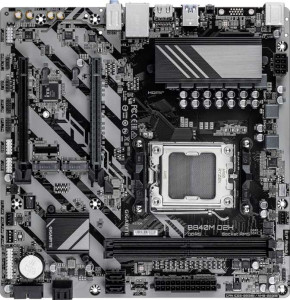
Gigabyte B840M D2H
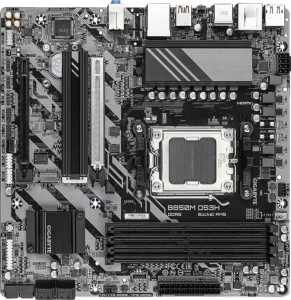
Gigabyte B850M DS3H

Gigabyte B840M D2H Gigabyte B850M DS3H

Overview

Welcome to our in-depth specification comparison between the Gigabyte B840M D2H and the Gigabyte B850M DS3H. Both boards share the Micro-ATX form factor and AM5 socket, making them natural rivals for AMD platform builds, yet they diverge in meaningful ways around memory capacity and slot count, rear port selection, and the generation of their primary PCIe x16 slot. Read on to see how these two motherboards stack up across every key category.

Common Features

  • Both products use the AM5 CPU socket.
  • Both products share the Micro-ATX form factor.
  • Neither product supports Wi-Fi.
  • Neither product has Bluetooth.
  • Both products feature HDMI 2.1.
  • Both products are easy to overclock.
  • Neither product has RGB lighting.
  • Neither product supports easy BIOS reset.
  • Both products support a maximum RAM speed of 5200 MHz.
  • Both products use DDR5 memory.
  • Both products have 2 memory channels.
  • Neither product supports ECC memory.
  • Both products have 2 USB 3.2 Gen 1 Type-A ports on the rear.
  • Neither product has USB 3.2 Gen 1 Type-C, USB 2.0, USB 3.2 Gen 2x2, USB 4, or Thunderbolt ports.
  • Both products provide 2 USB 3.2 Gen 1 ports and 4 USB 2.0 ports through expansion headers.
  • Both products include 4 SATA 3 connectors.
  • Both products feature 2 M.2 sockets.
  • Both products have a TPM connector and no mSATA connector.
  • Both products offer 7.1 audio channels with 3 audio connectors and no S/PDIF Out port.
  • Both products support RAID 0, RAID 1, RAID 5, and RAID 10, but neither supports RAID 0+1.
  • Both products have 1 PCIe x4 slot and no PCIe x1, x8, PCI, PCIe 2.0 x16, or PCIe 3.0 x16 slots.

Main Differences

  • Maximum memory capacity is 128GB on Gigabyte B840M D2H and 256GB on Gigabyte B850M DS3H.
  • Overclocked RAM speed reaches 7200 MHz on Gigabyte B840M D2H and 8200 MHz on Gigabyte B850M DS3H.
  • Memory slots number 2 on Gigabyte B840M D2H and 4 on Gigabyte B850M DS3H.
  • USB 3.2 Gen 2 Type-A ports number 0 on Gigabyte B840M D2H and 1 on Gigabyte B850M DS3H.
  • USB 3.2 Gen 2 Type-C ports number 0 on Gigabyte B840M D2H and 1 on Gigabyte B850M DS3H.
  • USB Type-C connectivity is present on Gigabyte B850M DS3H but not available on Gigabyte B840M D2H.
  • DisplayPort outputs number 0 on Gigabyte B840M D2H and 2 on Gigabyte B850M DS3H.
  • Fan headers number 3 on Gigabyte B840M D2H and 4 on Gigabyte B850M DS3H.
  • The primary x16 expansion slot is PCIe 4.0 on Gigabyte B840M D2H and PCIe 5.0 on Gigabyte B850M DS3H.
Specs Comparison
Gigabyte B840M D2H

Gigabyte B840M D2H

Gigabyte B850M DS3H

Gigabyte B850M DS3H

General info:
CPU socket AM5 AM5
form factor Micro-ATX Micro-ATX
release date January 2025 January 2025
supports Wi-Fi
Has Bluetooth
HDMI version HDMI 2.1 HDMI 2.1
Easy to overclock
has RGB lighting
Easy to reset BIOS
Has dual BIOS
CPU sockets 1 1
Has integrated graphics
warranty period 3 years 3 years
height 244 mm 244 mm
width 244 mm 244 mm
Has integrated CPU

In terms of general characteristics, the Gigabyte B840M D2H and the Gigabyte B850M DS3H are virtually identical across every provided spec. Both adopt the Micro-ATX form factor at 244 × 244 mm, use the AM5 socket, support overclocking, include dual BIOS, output via HDMI 2.1, and carry a 3-year warranty — making them direct siblings in Gigabyte's lineup rather than true competitors on paper.

Neither board offers Wi-Fi, Bluetooth, RGB lighting, an easy BIOS reset mechanism, integrated graphics, or an integrated CPU, so users on both platforms will need to source discrete components for networking and graphics independently. The lack of wireless connectivity on both is a practical consideration for builders who prefer a clean, cable-managed setup without a separate Wi-Fi adapter.

Based strictly on the general info specs provided, these two boards are in a complete tie — there is no differentiating factor in this category. A buying decision between them must rely entirely on other spec groups such as memory support, I/O, or power delivery, as the general profile offers no advantage to either side.

Memory:
maximum memory amount 128GB 256GB
RAM speed (max) 5200 MHz 5200 MHz
overclocked RAM speed 7200 MHz 8200 MHz
memory slots 2 4
DDR memory version 5 5
memory channels 2 2
Supports ECC memory

The memory specifications reveal the most meaningful separation between these two boards so far. The B850M DS3H offers 4 DIMM slots and a maximum capacity of 256 GB, compared to just 2 slots and 128 GB on the B840M D2H. In practical terms, this doubles both the upgrade ceiling and the physical expansion room — a significant advantage for users who anticipate heavy multitasking, content creation workloads, or future memory upgrades without replacing their kit entirely.

The overclocking headroom also diverges noticeably. Both boards share a native DDR5 base speed of 5200 MHz, but the DS3H pushes its overclocked ceiling to 8200 MHz versus 7200 MHz on the D2H. That 1000 MHz gap matters for enthusiasts chasing peak throughput in memory-bandwidth-sensitive tasks like video encoding or large dataset processing, where higher frequencies translate directly into measurable performance gains.

The B850M DS3H holds a clear edge in this category on every differentiating metric — more slots, higher capacity, and a faster overclocking ceiling — while both boards remain equal on architecture fundamentals like dual-channel DDR5 and the absence of ECC support. Builders who need room to grow or want to push memory clocks hard should lean toward the DS3H; the D2H is adequate for straightforward two-stick builds but leaves less runway.

Ports:
USB 3.2 Gen 2 ports (USB-A) 0 1
USB 3.2 Gen 1 ports (USB-A) 2 2
USB 3.2 Gen 2 ports (USB-C) 0 1
USB 3.2 Gen 1 ports (USB-C) 0 0
USB 2.0 ports 0 0
USB 3.2 Gen 2x2 ports 0 0
USB 4 40Gbps ports 0 0
USB 4 20Gbps ports 0 0
Thunderbolt 4 ports 0 0
Thunderbolt 3 ports 0 0
has an HDMI output
DisplayPort outputs 0 2
RJ45 ports 1 1
Has USB Type-C
eSATA ports 0 0
DVI outputs 0 0
has a VGA connector
PS/2 ports 1 1

The rear I/O tells a telling story about each board's intended audience. The B850M DS3H adds a USB 3.2 Gen 2 Type-A port and a USB 3.2 Gen 2 Type-C port on top of the shared pair of Gen 1 Type-A ports, meaning it can transfer data at up to 10 Gbps on multiple connectors simultaneously — a practical win for anyone regularly moving large files to fast external SSDs or modern peripherals. The B840M D2H, by contrast, tops out at USB 3.2 Gen 1 (5 Gbps) across all its USB ports and offers no Type-C connectivity whatsoever, which is an increasingly noticeable omission as Type-C becomes the dominant connector on external drives, docks, and accessories.

The display output gap is equally significant. The DS3H pairs its HDMI with two DisplayPort outputs, enabling up to three simultaneous monitor connections from the board's rear alone — a setup that content creators and multitasking power users will find genuinely useful. The D2H is limited to a single HDMI output with no DisplayPort at all, restricting multi-monitor configurations without additional hardware.

Both boards share a single RJ45 Ethernet port and a legacy PS/2 port, and neither offers Thunderbolt or eSATA. Still, the B850M DS3H wins this category outright — it delivers faster USB speeds, modern Type-C connectivity, and substantially broader display output options, making it the stronger pick for any build that demands a well-equipped rear I/O panel.

Connectors:
USB 3.2 Gen 1 ports (through expansion) 2 2
USB 2.0 ports (through expansion) 4 4
SATA 3 connectors 4 4
fan headers 3 4
USB 3.0 ports (through expansion) 2 2
M.2 sockets 2 2
Has TPM connector
U.2 sockets 0 0
Has mSATA connector
SATA 2 connectors 0 0

Internal connectivity is nearly a mirror image across both boards. Each provides 4 SATA 3 connectors, 2 M.2 sockets, identical front-panel USB expansion headers, and a TPM connector — meaning storage configurations, NVMe drive support, and security module options are functionally equivalent. For the vast majority of builds, neither board creates a bottleneck or advantage in terms of drive and expansion header availability.

The one concrete differentiator is fan header count. The B850M DS3H offers 4 fan headers versus 3 on the B840M D2H. That extra header may seem minor, but in practice it matters for thermally demanding builds — particularly those running a CPU cooler, multiple case fans, and a radiator pump simultaneously without relying on a separate fan hub. Builders prioritizing quiet, well-controlled airflow will find the additional native header a genuine convenience.

Overall, this category is close to a tie, with a narrow edge to the B850M DS3H solely on the basis of that additional fan header. Shared storage capacity, M.2 support, and expansion options mean neither board restricts a typical build, but the DS3H gives slightly more thermal management flexibility out of the box.

Expansion slots:
PCIe 4.0 x16 slots 1 0
PCIe 5.0 x16 slots 0 1
PCIe 3.0 x16 slots 0 0
PCIe x1 slots 0 0
PCI slots 0 0
PCIe 2.0 x16 slots 0 0
PCIe x4 slots 1 1
PCIe x8 slots 0 0

The primary expansion slot is where these two boards make a definitive architectural statement. The B850M DS3H equips its main x16 slot with PCIe 5.0, while the B840M D2H uses PCIe 4.0 for the same slot. PCIe 5.0 doubles the available bandwidth over PCIe 4.0 — from roughly 32 GB/s to 64 GB/s on a full x16 connection — which is directly relevant for next-generation GPUs and high-throughput add-in cards designed to saturate that additional headroom.

For current mainstream graphics cards, the real-world gaming performance difference between PCIe 4.0 and 5.0 at x16 is negligible, as most GPUs are not yet bandwidth-limited at PCIe 4.0 speeds. However, the DS3H's PCIe 5.0 slot represents meaningful future-proofing: as GPU architectures advance and workloads like AI inference or professional visualization grow more demanding, having the faster interface already in place avoids a platform bottleneck down the line. Both boards share a secondary PCIe x4 slot, keeping parity for additional cards or adapters.

The B850M DS3H takes a clear win here on forward compatibility. Builders who plan to hold onto their platform for several years or intend to pair it with upcoming high-end GPUs will benefit from the PCIe 5.0 slot, whereas the D2H's PCIe 4.0 implementation, while entirely capable today, offers less runway for future hardware generations.

Audio:
audio channels 7.1 7.1
Has S/PDIF Out port
audio connectors 3 3

Audio is a non-issue for differentiation here — both the B840M D2H and the B850M DS3H are identical across every provided spec. Each delivers 7.1-channel onboard audio through 3 analog connectors, and neither includes an S/PDIF optical output. The 7.1 channel support is adequate for surround sound headsets and speaker systems connected via the analog jacks, covering the needs of most everyday users and gamers.

The absence of S/PDIF on both boards means users who want to route audio digitally to an AV receiver or DAC will need a dedicated sound card or USB audio interface. This is a shared limitation rather than a drawback unique to either product, and it is consistent with the budget-to-midrange positioning of both boards.

This category is a complete tie — there is no basis for preferring one board over the other on audio grounds alone. Users with serious audio requirements will likely look beyond onboard solutions regardless of which board they choose.

Storage:
Supports RAID 1
Supports RAID 10 (1+0)
Supports RAID 5
Supports RAID 0
Supports RAID 0+1

Storage redundancy support is identical across both boards. The B840M D2H and B850M DS3H each support RAID 0, 1, 5, and 10, covering the full practical range of consumer and prosumer configurations — from pure performance striping to mirrored redundancy to the balanced protection of RAID 10. Neither board supports RAID 0+1, though this omission is inconsequential in practice since RAID 10 achieves the same outcome more efficiently and is the universally preferred standard.

The supported RAID modes mean both boards are equally capable for users who want to combine multiple SATA or compatible drives into a redundant or performance-optimized array — useful for small home servers, NAS-adjacent workstation builds, or anyone who wants drive-level data protection without a dedicated RAID controller card.

This category is a complete tie. Every supported and unsupported mode is identical between the two, so storage configuration flexibility plays no role in differentiating them. The choice between these boards must rest on the advantages identified in other spec groups.

Comparison Summary & Verdict

After examining every specification, a clear picture emerges for each board. The Gigabyte B840M D2H is a focused, no-frills option suited to builders who need a compact AM5 board with a PCIe 4.0 x16 slot and are working with a single-channel or dual-stick memory kit capped at 128 GB — an efficient choice for everyday desktop and light workstation builds. The Gigabyte B850M DS3H, on the other hand, steps up with a PCIe 5.0 x16 slot, support for up to 256 GB across four memory slots, a higher overclocked RAM ceiling of 8200 MHz, extra USB 3.2 Gen 2 connectivity including a rear Type-C port, two DisplayPort outputs, and an additional fan header — making it the stronger platform for power users, content creators, and those planning future hardware upgrades.

Gigabyte B840M D2H
Buy Gigabyte B840M D2H if...

Buy the Gigabyte B840M D2H if you only need two memory slots and a PCIe 4.0 x16 slot, and want a straightforward, budget-friendly AM5 Micro-ATX build without extra rear USB or DisplayPort outputs.

Gigabyte B850M DS3H
Buy Gigabyte B850M DS3H if...

Buy the Gigabyte B850M DS3H if you want a future-ready platform with a PCIe 5.0 x16 slot, four memory slots supporting up to 256 GB, faster overclocked RAM speeds, and a richer rear I/O including USB 3.2 Gen 2 Type-C and dual DisplayPort outputs.