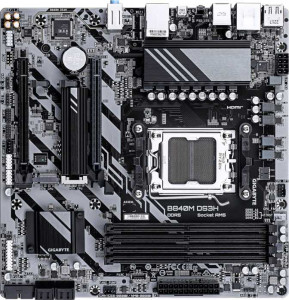
Gigabyte B840M DS3H
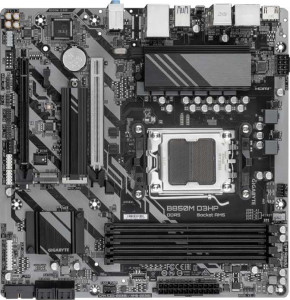
Gigabyte B850M D3HP

Gigabyte B840M DS3H Gigabyte B850M D3HP

Overview

Welcome to our in-depth specification comparison between the Gigabyte B840M DS3H and the Gigabyte B850M D3HP. Both are Micro-ATX motherboards built on the AM5 platform with DDR5 support, making them compelling choices for AMD-based builds. The key battlegrounds in this head-to-head include their PCIe slot generations, USB port configurations, and chipset differences — factors that can significantly impact upgrade flexibility and day-to-day connectivity for any PC builder.

Common Features

  • Both products use the AM5 CPU socket.
  • Both products have a Micro-ATX form factor.
  • Neither product supports Wi-Fi.
  • Neither product has Bluetooth.
  • Both products have an HDMI 2.1 output.
  • Both products support overclocking.
  • Neither product has RGB lighting.
  • Neither product offers an easy BIOS reset.
  • Both products support a maximum memory amount of 256GB.
  • Both products have a maximum RAM speed of 5200 MHz and an overclocked RAM speed of 8200 MHz.
  • Both products have 4 memory slots and support DDR5 memory in dual-channel configuration.
  • Neither product supports ECC memory.
  • Neither product has USB 3.2 Gen 2 USB-C ports, USB 3.2 Gen 2x2 ports, USB 4, or Thunderbolt ports.
  • Both products have an HDMI output and 2 DisplayPort outputs.
  • Both products have 2 USB 3.2 Gen 1 ports available through expansion and 4 USB 2.0 ports through expansion.
  • Both products have 4 SATA 3 connectors, 4 fan headers, 2 M.2 sockets, and no U.2 sockets.
  • Both products include a TPM connector.
  • Both products support 7.1 audio channels with 3 audio connectors, and neither has an S/PDIF Out port.
  • Both products support RAID 0, RAID 1, RAID 5, and RAID 10, but neither supports RAID 0+1.
  • Both products have 1 PCIe x4 slot and no PCIe x1, x8, PCI, PCIe 2.0 x16, or PCIe 3.0 x16 slots.

Main Differences

  • The chipset is B840 on the Gigabyte B840M DS3H and B850 on the Gigabyte B850M D3HP.
  • There is 1 USB 3.2 Gen 2 USB-A port on the Gigabyte B840M DS3H, while the Gigabyte B850M D3HP has none.
  • There are 2 USB 3.2 Gen 1 USB-A ports on the Gigabyte B840M DS3H, compared to 3 on the Gigabyte B850M D3HP.
  • A USB 3.2 Gen 1 USB-C port is present on the Gigabyte B850M D3HP but not available on the Gigabyte B840M DS3H.
  • There are 4 USB 2.0 ports on the Gigabyte B840M DS3H, while the Gigabyte B850M D3HP has none.
  • A PCIe 4.0 x16 slot is present on the Gigabyte B840M DS3H but not available on the Gigabyte B850M D3HP.
  • A PCIe 5.0 x16 slot is present on the Gigabyte B850M D3HP but not available on the Gigabyte B840M DS3H.
Specs Comparison
Gigabyte B840M DS3H

Gigabyte B840M DS3H

Gigabyte B850M D3HP

Gigabyte B850M D3HP

General info:
CPU socket AM5 AM5
chipset B840 B850
form factor Micro-ATX Micro-ATX
release date January 2025 January 2025
supports Wi-Fi
Has Bluetooth
HDMI version HDMI 2.1 HDMI 2.1
Easy to overclock
has RGB lighting
Easy to reset BIOS
Has dual BIOS
CPU sockets 1 1
Has integrated graphics
warranty period 3 years 3 years
height 244 mm 244 mm
width 244 mm 244 mm
Has integrated CPU

The Gigabyte B840M DS3H and Gigabyte B850M D3HP share a remarkably similar general profile: both are Micro-ATX boards with an AM5 socket, identical 244×244 mm dimensions, a 3-year warranty, dual BIOS, and HDMI 2.1 output. Neither board offers Wi-Fi, Bluetooth, RGB lighting, or an easy BIOS reset mechanism, so users coming from either product will experience the same baseline feature set in day-to-day use.

The one meaningful distinction in this group is the chipset: the DS3H runs on B840 while the D3HP steps up to B850. Within AMD's current lineup, B850 sits above B840 and generally unlocks broader overclocking support, more PCIe lanes, and greater connectivity headroom — though both boards are marked as easy to overclock, suggesting Gigabyte has enabled at least memory overclocking (EXPO/XMP) on both. The real-world implications of that chipset gap become more apparent when examining memory, storage, and connectivity specs, which fall outside this group.

For this group alone, the boards are nearly evenly matched on form factor, physical size, warranty, and core features. The B850M D3HP holds a nominal edge by virtue of its higher-tier chipset, which typically signals greater long-term platform flexibility — but buyers focused purely on general characteristics will find little to separate the two here.

Memory:
maximum memory amount 256GB 256GB
RAM speed (max) 5200 MHz 5200 MHz
overclocked RAM speed 8200 MHz 8200 MHz
memory slots 4 4
DDR memory version 5 5
memory channels 2 2
Supports ECC memory

The Gigabyte B840M DS3H and Gigabyte B850M D3HP motherboards offer identical memory specifications. Both boards support a maximum memory amount of 256GB and feature a maximum RAM speed of 5200 MHz. They also both support overclocked RAM speeds of up to 8200 MHz, allowing for enhanced memory performance when overclocking is utilized.

Each motherboard comes with 4 memory slots, providing ample capacity for memory expansion. Additionally, both boards support DDR5 memory and have 2 memory channels, optimizing data transfer and bandwidth across the system.

Neither motherboard supports ECC (Error-Correcting Code) memory, meaning they are not designed for environments where data integrity is critical, such as servers or workstations.

Ports:
USB 3.2 Gen 2 ports (USB-A) 1 0
USB 3.2 Gen 1 ports (USB-A) 2 3
USB 3.2 Gen 2 ports (USB-C) 0 0
USB 3.2 Gen 1 ports (USB-C) 0 1
USB 2.0 ports 4 0
USB 3.2 Gen 2x2 ports 0 0
USB 4 40Gbps ports 0 0
USB 4 20Gbps ports 0 0
Thunderbolt 4 ports 0 0
Thunderbolt 3 ports 0 0
has an HDMI output
DisplayPort outputs 2 2
RJ45 ports 1 1
Has USB Type-C
eSATA ports 0 0
DVI outputs 0 0
has a VGA connector
PS/2 ports 1 1

The Gigabyte B840M DS3H and Gigabyte B850M D3HP have several similarities and differences in their port offerings. Both motherboards feature HDMI outputs for video, along with two DisplayPort outputs, allowing for multiple display configurations. They also share a single RJ45 port for wired network connectivity and a PS/2 port for legacy peripherals.

In terms of USB ports, the B840M DS3H offers 1 USB 3.2 Gen 2 port (USB-A), 2 USB 3.2 Gen 1 ports (USB-A), and 4 USB 2.0 ports. The B850M D3HP, on the other hand, provides 3 USB 3.2 Gen 1 ports (USB-A) and 1 USB 3.2 Gen 1 port (USB-C), with no USB 2.0 ports. Neither motherboard supports USB 3.2 Gen 2x2, USB 4 40Gbps, or Thunderbolt ports, and both lack eSATA, DVI, and VGA connectors.

Additionally, both boards include USB Type-C support, but the B840M DS3H offers no USB 3.2 Gen 1 Type-C ports, while the B850M D3HP provides 1 USB 3.2 Gen 1 USB-C port. Both motherboards do not support Thunderbolt 3 or Thunderbolt 4 ports, and neither includes any USB 4 20Gbps or 40Gbps ports.

Connectors:
USB 3.2 Gen 1 ports (through expansion) 2 2
USB 2.0 ports (through expansion) 4 4
SATA 3 connectors 4 4
fan headers 4 4
USB 3.0 ports (through expansion) 2 2
M.2 sockets 2 2
Has TPM connector
U.2 sockets 0 0
Has mSATA connector
SATA 2 connectors 0 0

The Gigabyte B840M DS3H and Gigabyte B850M D3HP motherboards share identical connector configurations. Both feature 2 USB 3.2 Gen 1 ports and 4 USB 2.0 ports through expansion. Additionally, each motherboard provides 2 USB 3.0 ports via expansion, offering ample connectivity for older USB devices.

Both motherboards also come with 4 SATA 3 connectors, ensuring support for multiple storage devices. They include 4 fan headers for cooling solutions and 2 M.2 sockets for high-speed storage options. Neither board supports U.2 sockets, but both feature TPM connectors for enhanced security features.

Neither the B840M DS3H nor the B850M D3HP includes mSATA connectors or SATA 2 connectors, so all storage expansion options are based on SATA 3 and M.2 connections.

Expansion slots:
PCIe 4.0 x16 slots 1 0
PCIe 5.0 x16 slots 0 1
PCIe 3.0 x16 slots 0 0
PCIe x1 slots 0 0
PCI slots 0 0
PCIe 2.0 x16 slots 0 0
PCIe x4 slots 1 1
PCIe x8 slots 0 0

The Gigabyte B840M DS3H and Gigabyte B850M D3HP have distinct configurations when it comes to expansion slots. The B840M DS3H features 1 PCIe 4.0 x16 slot and 1 PCIe x4 slot, but lacks support for PCIe 5.0 or 3.0 x16 slots, as well as PCIe x1 or PCI slots.

In contrast, the B850M D3HP provides 1 PCIe 5.0 x16 slot and also includes 1 PCIe x4 slot, but it lacks a PCIe 4.0 x16 slot. Like the B840M DS3H, it does not include PCIe x1 or PCI slots. Both motherboards do not offer any PCIe x8 slots, which may limit options for certain expansion cards.

Overall, the key difference between these two motherboards is the PCIe version, with the B840M DS3H supporting PCIe 4.0 and the B850M D3HP supporting PCIe 5.0 for the primary x16 slot, which could be important for users looking for the latest PCIe technology.

Audio:
audio channels 7.1 7.1
Has S/PDIF Out port
audio connectors 3 3

The Gigabyte B840M DS3H and Gigabyte B850M D3HP both provide 7.1-channel audio, ensuring support for high-quality surround sound systems. Neither motherboard features an S/PDIF Out port, which could be a consideration for users looking for optical audio output. Both motherboards are equipped with 3 audio connectors, allowing for a standard audio setup, including options for line-in, line-out, and microphone connections.

Overall, the audio specifications of both motherboards are identical, with no significant differences between them in terms of the number of channels, audio connectors, or S/PDIF support.

Storage:
Supports RAID 1
Supports RAID 10 (1+0)
Supports RAID 5
Supports RAID 0
Supports RAID 0+1

The Gigabyte B840M DS3H and Gigabyte B850M D3HP motherboards have identical RAID support features. Both motherboards support RAID 1, RAID 10 (1+0), and RAID 5 configurations, offering flexibility for users who want to configure their storage arrays for redundancy or performance. Additionally, both motherboards do not support RAID 0+1, which is a less commonly used RAID configuration.

In terms of RAID capabilities, there are no differences between the two motherboards, with both providing the same set of supported RAID levels, ensuring reliable storage performance options.

Comparison Summary & Verdict

After examining the full specification set, both boards share a strong foundation: AM5 socket compatibility, DDR5 memory support up to 256GB, dual M.2 sockets, and identical audio and storage capabilities. However, their differences reveal clearly distinct target audiences. The Gigabyte B840M DS3H, with its PCIe 4.0 x16 slot and broader USB port variety including a USB 3.2 Gen 2 Type-A connector and four USB 2.0 ports, suits builders who value current-gen GPU compatibility and maximum rear-panel device connectivity. The Gigabyte B850M D3HP, on the other hand, steps ahead with a PCIe 5.0 x16 slot for next-generation GPU readiness, a USB 3.2 Gen 1 Type-C rear port, and a cleaner high-speed USB layout — making it the stronger pick for builders investing in a future-proof platform.

Gigabyte B840M DS3H
Buy Gigabyte B840M DS3H if...

Buy the Gigabyte B840M DS3H if you want a PCIe 4.0 x16 slot for current-gen GPUs and need a wider variety of rear USB ports, including USB 3.2 Gen 2 Type-A and multiple USB 2.0 connections.

Gigabyte B850M D3HP
Buy Gigabyte B850M D3HP if...

Buy the Gigabyte B850M D3HP if you want a PCIe 5.0 x16 slot for next-generation GPU support and prefer a modern USB layout that includes a rear USB 3.2 Gen 1 Type-C port.