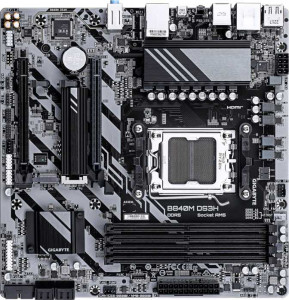
Gigabyte B840M DS3H
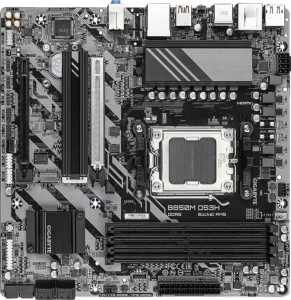
Gigabyte B850M DS3H

Gigabyte B840M DS3H Gigabyte B850M DS3H

Overview

Welcome to our detailed spec comparison between the Gigabyte B840M DS3H and the Gigabyte B850M DS3H — two Micro-ATX motherboards built on the AM5 platform that share a surprising amount of common ground. While both boards target budget-conscious builders with DDR5 support and solid connectivity, key battlegrounds emerge around their PCIe slot generations, rear USB port configurations, and chipset capabilities. Read on to see which board better suits your next build.

Common Features

  • Both boards use the AM5 CPU socket.
  • Both boards have a Micro-ATX form factor.
  • Neither board supports Wi-Fi.
  • Neither board has Bluetooth.
  • Both boards feature HDMI 2.1.
  • Both boards are easy to overclock.
  • Neither board has RGB lighting.
  • Neither board supports easy BIOS reset.
  • Both boards support a maximum memory amount of 256GB.
  • Both boards have a maximum RAM speed of 5200 MHz.
  • Both boards support overclocked RAM speeds up to 8200 MHz.
  • Both boards have 4 memory slots.
  • Both boards use DDR5 memory.
  • Both boards support 2 memory channels.
  • ECC memory is not supported on either board.
  • Both boards have 1 USB 3.2 Gen 2 port (USB-A).
  • Both boards have 2 USB 3.2 Gen 1 ports (USB-A).
  • Neither board has USB 3.2 Gen 1 ports (USB-C).
  • Neither board has USB 3.2 Gen 2x2, USB 4, Thunderbolt 3, or Thunderbolt 4 ports.
  • Both boards provide 2 USB 3.2 Gen 1 ports through expansion.
  • Both boards provide 4 USB 2.0 ports through expansion.
  • Both boards have 4 SATA 3 connectors.
  • Both boards have 4 fan headers.
  • Both boards have 2 M.2 sockets.
  • Both boards include a TPM connector.
  • Neither board has U.2 sockets.
  • Neither board has PCIe 3.0 x16, PCIe x1, PCI, or PCIe 2.0 x16 slots.
  • Both boards have 1 PCIe x4 slot.
  • Both boards support 7.1 audio channels.
  • Neither board has an S/PDIF Out port.
  • Both boards have 3 audio connectors.
  • Both boards support RAID 0, RAID 1, RAID 5, and RAID 10.
  • RAID 0+1 is not supported on either board.

Main Differences

  • The chipset is B840 on the Gigabyte B840M DS3H and B850 on the Gigabyte B850M DS3H.
  • A USB 3.2 Gen 2 port (USB-C) is present on the Gigabyte B850M DS3H but not available on the Gigabyte B840M DS3H.
  • The Gigabyte B840M DS3H has 4 USB 2.0 ports, while the Gigabyte B850M DS3H has none.
  • The Gigabyte B840M DS3H has 1 PCIe 4.0 x16 slot, while the Gigabyte B850M DS3H has none.
  • A PCIe 5.0 x16 slot is present on the Gigabyte B850M DS3H but not available on the Gigabyte B840M DS3H.
Specs Comparison
Gigabyte B840M DS3H

Gigabyte B840M DS3H

Gigabyte B850M DS3H

Gigabyte B850M DS3H

General info:
CPU socket AM5 AM5
chipset B840 B850
form factor Micro-ATX Micro-ATX
release date January 2025 January 2025
supports Wi-Fi
Has Bluetooth
HDMI version HDMI 2.1 HDMI 2.1
Easy to overclock
has RGB lighting
Easy to reset BIOS
Has dual BIOS
CPU sockets 1 1
Has integrated graphics
warranty period 3 years 3 years
height 244 mm 244 mm
width 244 mm 244 mm
Has integrated CPU

The Gigabyte B840M DS3H and Gigabyte B850M DS3H are remarkably similar boards at a foundational level. Both share the same Micro-ATX form factor at an identical 244 × 244 mm footprint, use the AM5 socket, support a single CPU, output video via HDMI 2.1, and come backed by a 3-year warranty. Neither board offers Wi-Fi, Bluetooth, RGB lighting, or an easy BIOS reset mechanism, and both include dual BIOS protection — a meaningful reliability feature that lets the board recover from a failed BIOS flash automatically.

The sole distinguishing factor in this group is the chipset: the B840M uses B840 while the B850M steps up to B850. In AMD's stack, the B850 chipset sits higher than B840, generally providing more PCIe lanes, greater bandwidth headroom, and broader support for newer platform features. Both boards are listed as easy to overclock, but the B850 chipset is the more capable platform for actually leveraging that headroom — particularly for memory overclocking and future CPU compatibility.

For general-purpose builds where connectivity extras like Wi-Fi are not expected at this tier, both boards are functionally identical in this category. However, the B850M DS3H holds a structural advantage due to its higher-tier chipset, making it the stronger long-term platform investment if the price delta is acceptable.

Memory:
maximum memory amount 256GB 256GB
RAM speed (max) 5200 MHz 5200 MHz
overclocked RAM speed 8200 MHz 8200 MHz
memory slots 4 4
DDR memory version 5 5
memory channels 2 2
Supports ECC memory

On memory, these two boards are completely identical across every measurable spec. Both support DDR5 RAM across 4 slots in a dual-channel configuration, with a maximum certified speed of 5200 MHz and an overclocked ceiling of 8200 MHz. That overclocked headroom is notably generous — reaching 8200 MHz puts both boards well into enthusiast territory, capable of satisfying even aggressive memory tuning builds.

The shared 256 GB maximum capacity is more than sufficient for any consumer workload today, including memory-intensive tasks like video editing, large virtual machines, or heavy multitasking. Neither board supports ECC memory, which is expected at this mainstream tier and only relevant for workstation or server use cases.

With zero differentiation across this entire spec group, memory compatibility and performance potential are a complete tie. This category offers no basis for choosing one board over the other.

Ports:
USB 3.2 Gen 2 ports (USB-A) 1 1
USB 3.2 Gen 1 ports (USB-A) 2 2
USB 3.2 Gen 2 ports (USB-C) 0 1
USB 3.2 Gen 1 ports (USB-C) 0 0
USB 2.0 ports 4 0
USB 3.2 Gen 2x2 ports 0 0
USB 4 40Gbps ports 0 0
USB 4 20Gbps ports 0 0
Thunderbolt 4 ports 0 0
Thunderbolt 3 ports 0 0
has an HDMI output
DisplayPort outputs 2 2
RJ45 ports 1 1
Has USB Type-C
eSATA ports 0 0
DVI outputs 0 0
has a VGA connector
PS/2 ports 1 1

The rear I/O layout is largely shared between these two boards — both offer one USB 3.2 Gen 2 Type-A port, two Gen 1 Type-A ports, HDMI, dual DisplayPort outputs, a single RJ45 Ethernet jack, and a legacy PS/2 port. For display connectivity in particular, having two DisplayPort outputs alongside HDMI is a practical advantage for multi-monitor setups driven by the CPU's integrated graphics path.

The meaningful divergence comes down to two trade-offs: USB-C availability and USB 2.0 legacy support. The B850M DS3H adds a USB 3.2 Gen 2 Type-C port running at 10 Gbps — useful for modern peripherals, fast external SSDs, and newer accessories that increasingly default to USB-C connectors. The B840M DS3H, by contrast, omits USB-C entirely but compensates with four USB 2.0 ports, which can be valuable for users with older peripherals like keyboards, mice, or dongles that do not require high bandwidth.

Which trade-off matters depends entirely on the user's peripheral ecosystem. For modern, forward-looking builds, the B850M's USB-C port is the more relevant addition. For users with many legacy USB devices, the B840M's USB 2.0 density is genuinely practical. On balance, the B850M DS3H holds the edge here for most contemporary use cases, as USB-C adoption continues to grow while USB 2.0 needs can often be met with an inexpensive hub.

Connectors:
USB 3.2 Gen 1 ports (through expansion) 2 2
USB 2.0 ports (through expansion) 4 4
SATA 3 connectors 4 4
fan headers 4 4
USB 3.0 ports (through expansion) 2 2
M.2 sockets 2 2
Has TPM connector
U.2 sockets 0 0
Has mSATA connector
SATA 2 connectors 0 0

Internal connectivity is a point of parity between these two boards. Both provide 2 M.2 sockets for NVMe SSDs, 4 SATA 3 connectors for traditional drives, and 4 fan headers — a reasonable allocation for a Micro-ATX build that balances storage expandability with thermal management flexibility. The dual M.2 sockets in particular allow a fast primary NVMe drive alongside a secondary one, covering most storage configurations without needing to sacrifice any SATA ports.

Header expansion follows the same pattern: both boards expose internal headers supporting two USB 3.2 Gen 1 ports and four USB 2.0 ports for front-panel connectivity, which is standard and sufficient for typical mid-tower cases. The presence of a TPM connector on both boards is a quiet but practical inclusion, ensuring Windows 11 compatibility and supporting hardware-based security without needing an add-in module.

With every internal connector spec matching exactly, this category is a complete tie. Neither board offers any internal connectivity advantage over the other, and buyers can treat this dimension as a non-factor when choosing between the two.

Expansion slots:
PCIe 4.0 x16 slots 1 0
PCIe 5.0 x16 slots 0 1
PCIe 3.0 x16 slots 0 0
PCIe x1 slots 0 0
PCI slots 0 0
PCIe 2.0 x16 slots 0 0
PCIe x4 slots 1 1
PCIe x8 slots 0 0

This is one of the more consequential differentiators between these two boards. The B840M DS3H equips its primary slot as a PCIe 4.0 x16, while the B850M DS3H steps that up to a PCIe 5.0 x16. PCIe 5.0 doubles the available bandwidth over PCIe 4.0 — from roughly 64 GB/s to 128 GB/s — which is particularly relevant as next-generation GPUs and high-end add-in cards increasingly target PCIe 5.0 to avoid any bandwidth ceiling.

In practice, current GPU generations do not saturate PCIe 4.0 x16 in most gaming or creative workloads, so day-one performance differences will be minimal for typical users. However, the B850M's PCIe 5.0 slot is a meaningful platform advantage for longevity — future GPUs are more likely to leverage that headroom, making the B850M the more future-proof choice. Both boards share an additional PCIe x4 slot for secondary cards or adapters, leaving that dimension equal.

For anyone planning to hold onto this board through one or more GPU upgrade cycles, the B850M DS3H holds a clear edge here. The B840M is not deficient for today's hardware, but the B850M's PCIe 5.0 x16 slot positions it better for what comes next.

Audio:
audio channels 7.1 7.1
Has S/PDIF Out port
audio connectors 3 3

Audio capabilities are identical across both boards. Each delivers 7.1-channel surround sound support through 3 analog audio connectors — a standard rear-panel arrangement that covers stereo output, microphone input, and line-in, with the 7.1 channel count enabled through software re-mapping of those jacks. This is a perfectly adequate setup for headsets, stereo speakers, and most home audio configurations.

Neither board includes an S/PDIF optical output, which means users requiring a direct digital audio connection to an external DAC, AV receiver, or home theater system will need a dedicated sound card or USB audio adapter. This is a common omission at this price tier and rarely a dealbreaker for mainstream builds.

With every audio spec matching precisely, this category is a complete tie. Audio quality should not factor into the decision between these two boards.

Storage:
Supports RAID 1
Supports RAID 10 (1+0)
Supports RAID 5
Supports RAID 0
Supports RAID 0+1

Both boards support the same set of RAID configurations: RAID 0, RAID 1, RAID 5, and RAID 10. This covers the most practically useful modes — RAID 0 for striped performance gains, RAID 1 for straightforward mirrored redundancy, RAID 5 for a balance of redundancy and capacity efficiency across three or more drives, and RAID 10 for those who want both speed and fault tolerance. Neither board supports RAID 0+1, though this omission is inconsequential since RAID 10 is generally preferred over 0+1 and is present on both.

This is a complete tie. Storage redundancy options are identical, and this group provides no basis for differentiation between the two boards.

Comparison Summary & Verdict

Both the Gigabyte B840M DS3H and the Gigabyte B850M DS3H are highly capable Micro-ATX boards sharing the AM5 socket, DDR5 memory support up to 256GB, four SATA connectors, dual M.2 sockets, and full RAID support. The key distinctions come down to their expansion and connectivity priorities. The Gigabyte B840M DS3H offers a PCIe 4.0 x16 slot and four rear USB 2.0 ports, making it a solid, cost-effective choice for builders pairing it with a current-gen GPU who do not need the latest slot standard. The Gigabyte B850M DS3H, by contrast, steps up with a PCIe 5.0 x16 slot and adds a rear USB 3.2 Gen 2 Type-C port, catering to builders who want to future-proof their GPU bandwidth and modern device connectivity. Choose the B840M DS3H for straightforward value, and the B850M DS3H for forward-looking performance headroom.

Gigabyte B840M DS3H
Buy Gigabyte B840M DS3H if...

Buy the Gigabyte B840M DS3H if you are pairing your build with a current-gen GPU that does not require PCIe 5.0, and you need more rear USB 2.0 ports for legacy peripherals.

Gigabyte B850M DS3H
Buy Gigabyte B850M DS3H if...

Buy the Gigabyte B850M DS3H if you want a future-proof PCIe 5.0 x16 slot for next-generation graphics cards and benefit from a rear USB 3.2 Gen 2 Type-C port for modern high-speed devices.