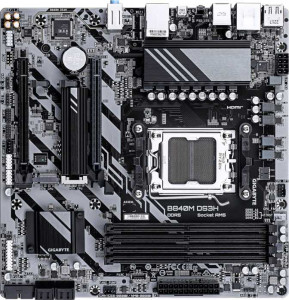
Gigabyte B840M DS3H
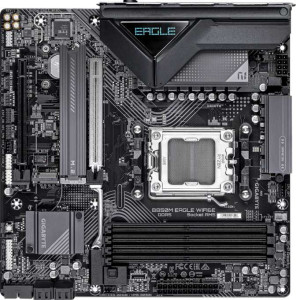
Gigabyte B850M Eagle Wi-Fi6E

Gigabyte B840M DS3H Gigabyte B850M Eagle Wi-Fi6E

Overview

Welcome to our in-depth specification comparison between the Gigabyte B840M DS3H and the Gigabyte B850M Eagle Wi-Fi6E. Both are Micro-ATX motherboards built on the AM5 platform with DDR5 support, but they take notably different approaches when it comes to connectivity, expansion slot generation, and onboard features. Whether you are building a no-frills budget system or a feature-rich modern desktop, understanding where these two boards diverge is key to making the right choice.

Common Features

  • Both boards use the AM5 CPU socket.
  • Both boards feature a Micro-ATX form factor.
  • Both boards support HDMI 2.1.
  • Both boards are easy to overclock.
  • Neither board makes it easy to reset the BIOS.
  • Both boards have 1 CPU socket.
  • Neither board has integrated graphics.
  • Both boards carry a 3-year warranty.
  • Both boards support a maximum memory amount of 256GB.
  • Both boards support a maximum RAM speed of 5200 MHz and an overclocked RAM speed of 8200 MHz.
  • Both boards have 4 memory slots and use DDR5 memory across 2 memory channels.
  • Neither board supports ECC memory.
  • Both boards have 1 USB 3.2 Gen 2 port (USB-A), 2 USB 3.2 Gen 1 ports (USB-A), and 4 USB 2.0 ports.
  • Neither board has USB 3.2 Gen 1 (USB-C), USB 3.2 Gen 2x2, USB 4 40Gbps, USB 4 20Gbps, or Thunderbolt 4 ports.
  • Both boards provide 2 USB 3.2 Gen 1 ports and 4 USB 2.0 ports through expansion.
  • Both boards have 4 SATA 3 connectors, 4 fan headers, and 2 M.2 sockets.
  • Both boards include a TPM connector.
  • Both boards have no U.2 sockets.
  • Both boards offer 1 PCIe x4 slot and no PCIe x1, PCI, PCIe 2.0 x16, or PCIe x8 slots.
  • Both boards deliver 7.1 audio channels with 3 audio connectors, and neither has an S/PDIF Out port.
  • Both boards support RAID 0, RAID 1, RAID 5, and RAID 10, but neither supports RAID 0+1.

Main Differences

  • The Gigabyte B840M DS3H uses the B840 chipset, while the Gigabyte B850M Eagle Wi-Fi6E uses the B850 chipset.
  • Wi-Fi support is present on the Gigabyte B850M Eagle Wi-Fi6E but not available on the Gigabyte B840M DS3H.
  • Bluetooth is present on the Gigabyte B850M Eagle Wi-Fi6E but not available on the Gigabyte B840M DS3H.
  • RGB lighting is present on the Gigabyte B850M Eagle Wi-Fi6E but not available on the Gigabyte B840M DS3H.
  • Dual BIOS is present on the Gigabyte B840M DS3H but not available on the Gigabyte B850M Eagle Wi-Fi6E.
  • The Gigabyte B840M DS3H has 0 USB 3.2 Gen 2 ports (USB-C), while the Gigabyte B850M Eagle Wi-Fi6E has 1.
  • The Gigabyte B840M DS3H has 1 PCIe 4.0 x16 slot, while the Gigabyte B850M Eagle Wi-Fi6E has none.
  • The Gigabyte B850M Eagle Wi-Fi6E has 1 PCIe 5.0 x16 slot, while the Gigabyte B840M DS3H has none.
Specs Comparison
Gigabyte B840M DS3H

Gigabyte B840M DS3H

Gigabyte B850M Eagle Wi-Fi6E

Gigabyte B850M Eagle Wi-Fi6E

General info:
CPU socket AM5 AM5
chipset B840 B850
form factor Micro-ATX Micro-ATX
release date January 2025 January 2025
supports Wi-Fi
Has Bluetooth
HDMI version HDMI 2.1 HDMI 2.1
Easy to overclock
has RGB lighting
Easy to reset BIOS
Has dual BIOS
CPU sockets 1 1
Has integrated graphics
warranty period 3 years 3 years
height 244 mm 244 mm
width 244 mm 244 mm
Has integrated CPU

Both boards share the same physical DNA: identical Micro-ATX form factor at 244 × 244 mm, a single AM5 socket, HDMI 2.1 output, overclocking support, no integrated CPU or graphics, and a 3-year warranty. For a builder choosing between them, these shared traits mean neither forces a compromise on case compatibility, display connectivity, or long-term support coverage.

The meaningful splits are in the chipset and connectivity stack. The DS3H runs on the B840 chipset while the Eagle Wi-Fi6E steps up to B850, which in practice translates to broader PCIe and USB bandwidth headroom for expansion. More immediately impactful for most users: the Eagle adds Wi-Fi and Bluetooth natively, eliminating the need for a separate adapter or occupying a PCIe slot — a real convenience advantage in any desk setup without easy Ethernet access. The Eagle also includes RGB lighting, which matters to builders targeting a themed aesthetic. On the flip side, the DS3H counters with dual BIOS — a meaningful safety net that lets users recover from a failed firmware flash without additional hardware, something the Eagle lacks entirely.

Overall, the Eagle Wi-Fi6E holds a clear general-purpose edge thanks to its higher-tier chipset, integrated wireless connectivity, and RGB support. The DS3H carves out a niche advantage with dual BIOS, making it the more resilient choice for users who tinker with firmware updates frequently and can live without built-in wireless. Buyers who need Wi-Fi out of the box and want room to grow on the platform should lean toward the Eagle; those prioritizing firmware safety and a no-frills build will find the DS3H a sensible, cost-conscious alternative.
Memory:
maximum memory amount 256GB 256GB
RAM speed (max) 5200 MHz 5200 MHz
overclocked RAM speed 8200 MHz 8200 MHz
memory slots 4 4
DDR memory version 5 5
memory channels 2 2
Supports ECC memory

Both the Gigabyte B840M DS3H and the Gigabyte B850M Eagle Wi-Fi6E support a maximum memory capacity of 256GB. They also both feature a maximum RAM speed of 5200 MHz and an overclocked RAM speed of 8200 MHz, providing similar performance potential for memory speed. Additionally, both motherboards come with 4 memory slots and support DDR5 memory, with a dual-channel memory configuration for optimal performance.

Neither motherboard supports ECC memory, ensuring that neither product is geared towards users requiring error-correcting code for high-reliability applications. Overall, the memory specifications are identical across both products, providing a comparable experience in terms of memory capacity, speed, and configuration.

Ports:
USB 3.2 Gen 2 ports (USB-A) 1 1
USB 3.2 Gen 1 ports (USB-A) 2 2
USB 3.2 Gen 2 ports (USB-C) 0 1
USB 3.2 Gen 1 ports (USB-C) 0 0
USB 2.0 ports 4 4
USB 3.2 Gen 2x2 ports 0 0
USB 4 40Gbps ports 0 0
USB 4 20Gbps ports 0 0
Thunderbolt 4 ports 0 0
Thunderbolt 3 ports 0 0
has an HDMI output
DisplayPort outputs 2 2
RJ45 ports 1 1
Has USB Type-C
eSATA ports 0 0
DVI outputs 0 0
has a VGA connector
PS/2 ports 1 1

The Gigabyte B840M DS3H and the Gigabyte B850M Eagle Wi-Fi6E share several similarities in their port offerings. Both motherboards feature one USB 3.2 Gen 2 port (USB-A), two USB 3.2 Gen 1 ports (USB-A), four USB 2.0 ports, one RJ45 Ethernet port, an HDMI output, and two DisplayPort outputs. They also both include one PS/2 port and have USB Type-C support. Additionally, neither product offers Thunderbolt 3 or Thunderbolt 4 ports, USB 4 ports, or eSATA ports.

Where they differ is in the USB 3.2 Gen 2 (USB-C) ports. The B850M Eagle Wi-Fi6E has one USB 3.2 Gen 2 (USB-C) port, while the B840M DS3H does not have any. Both motherboards lack USB 3.2 Gen 2x2 ports, USB 4 40Gbps or 20Gbps ports, and VGA connectors. Neither motherboard has DVI outputs.

Overall, the main difference between the two is the additional USB 3.2 Gen 2 (USB-C) port on the B850M Eagle Wi-Fi6E, while the rest of the port configurations are identical across both products.

Connectors:
USB 3.2 Gen 1 ports (through expansion) 2 2
USB 2.0 ports (through expansion) 4 4
SATA 3 connectors 4 4
fan headers 4 4
USB 3.0 ports (through expansion) 2 2
M.2 sockets 2 2
Has TPM connector
U.2 sockets 0 0
Has mSATA connector
SATA 2 connectors 0 0

The Gigabyte B840M DS3H and the Gigabyte B850M Eagle Wi-Fi6E have identical specifications when it comes to connectors. Both motherboards feature two USB 3.2 Gen 1 ports (through expansion), four USB 2.0 ports (through expansion), and two USB 3.0 ports (through expansion). Additionally, both motherboards offer four fan headers, two M.2 sockets, and four SATA 3 connectors.

Neither motherboard includes SATA 2 connectors, and neither has a U.2 socket. Both motherboards also have a TPM connector, but neither features an mSATA connector.

In summary, the connectors on the B840M DS3H and B850M Eagle Wi-Fi6E are the same, with no differences in their expansion or storage capabilities.

Expansion slots:
PCIe 4.0 x16 slots 1 0
PCIe 5.0 x16 slots 0 1
PCIe 3.0 x16 slots 0 0
PCIe x1 slots 0 0
PCI slots 0 0
PCIe 2.0 x16 slots 0 0
PCIe x4 slots 1 1
PCIe x8 slots 0 0

The Gigabyte B840M DS3H and the Gigabyte B850M Eagle Wi-Fi6E have differences in their expansion slots. The B840M DS3H includes one PCIe 4.0 x16 slot and one PCIe x4 slot, while the B850M Eagle Wi-Fi6E offers one PCIe 5.0 x16 slot and one PCIe x4 slot. The B840M DS3H does not include any PCIe 5.0 x16 slots, while the B850M Eagle Wi-Fi6E includes one.

Both motherboards lack PCIe x1 slots, PCI slots, PCIe 2.0 x16 slots, and PCIe x8 slots, so their expansion capabilities are limited to the slots mentioned above. The key difference is the PCIe 5.0 x16 slot available on the B850M Eagle Wi-Fi6E, which is not present on the B840M DS3H.

In summary, the B850M Eagle Wi-Fi6E offers a more future-proof option with its PCIe 5.0 x16 slot, while the B840M DS3H sticks to PCIe 4.0 for its primary expansion slot.

Audio:
audio channels 7.1 7.1
Has S/PDIF Out port
audio connectors 3 3

The Gigabyte B840M DS3H and the Gigabyte B850M Eagle Wi-Fi6E offer identical audio specifications. Both motherboards support 7.1 audio channels, providing a surround sound experience for users. Neither motherboard includes an S/PDIF Out port, and both have three audio connectors.

Since the audio specs are the same on both models, there is no difference between them in terms of audio capabilities.

Storage:
Supports RAID 1
Supports RAID 10 (1+0)
Supports RAID 5
Supports RAID 0
Supports RAID 0+1

The Gigabyte B840M DS3H and the Gigabyte B850M Eagle Wi-Fi6E share the same storage capabilities when it comes to RAID support. Both motherboards support RAID 1, RAID 10 (1+0), RAID 5, and RAID 0. However, neither of them supports RAID 0+1.

Since both models offer identical RAID functionality, there is no difference in their storage capabilities in terms of RAID support.

Comparison Summary & Verdict

After examining all the evidence, both boards share a strong foundation: AM5 socket, DDR5 memory with up to 256GB capacity, four SATA connectors, two M.2 sockets, and 7.1 audio. However, their differences define distinct audiences. The Gigabyte B840M DS3H stands out with its dual BIOS for added reliability and a PCIe 4.0 x16 slot, making it a dependable, cost-conscious pick for builders who value redundancy and straightforward setups. The Gigabyte B850M Eagle Wi-Fi6E counters with PCIe 5.0 x16 for next-generation GPU readiness, built-in Wi-Fi 6E and Bluetooth, RGB lighting, and an extra USB-C Gen 2 rear port, catering to users who want a more connected and future-proof platform.

Gigabyte B840M DS3H
Buy Gigabyte B840M DS3H if...

Buy the Gigabyte B840M DS3H if you want a reliable AM5 board with dual BIOS protection and do not need built-in Wi-Fi, Bluetooth, or PCIe 5.0 support.

Gigabyte B850M Eagle Wi-Fi6E
Buy Gigabyte B850M Eagle Wi-Fi6E if...

Buy the Gigabyte B850M Eagle Wi-Fi6E if you need built-in Wi-Fi 6E and Bluetooth, a PCIe 5.0 x16 slot for future-generation GPUs, and an additional USB-C Gen 2 rear port.