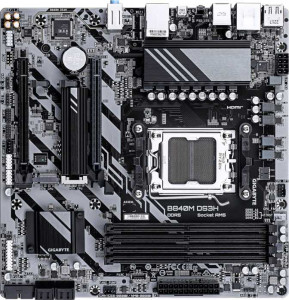
Gigabyte B840M DS3H
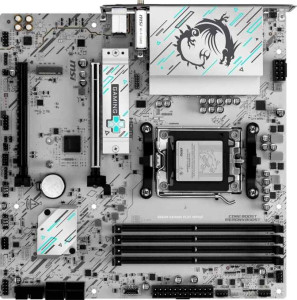
MSI B840M Gaming Plus Wi-Fi6E

Gigabyte B840M DS3H MSI B840M Gaming Plus Wi-Fi6E

Overview

Welcome to our in-depth specification comparison between the Gigabyte B840M DS3H and the MSI B840M Gaming Plus Wi-Fi6E. Both boards share the same AM5 socket, B840 chipset, and Micro-ATX form factor, making them natural rivals in the budget-to-mid-range segment. The real contest unfolds across their connectivity features, wireless capabilities, memory performance, and BIOS resilience options — areas where each board takes a notably different approach to meet the needs of different builders.

Common Features

  • Both motherboards use the AM5 CPU socket.
  • Both boards are built on the B840 chipset.
  • Both adopt the Micro-ATX form factor.
  • Both feature HDMI 2.1 video output.
  • Both support overclocking.
  • Both boards have a single CPU socket.
  • Neither board has integrated graphics.
  • Both come with a 3-year warranty.
  • Both support up to 256GB of maximum memory.
  • Both are equipped with 4 memory slots.
  • Both use DDR5 memory.
  • Both operate on a dual-channel memory architecture.
  • Neither board supports ECC memory.
  • Both have 1 USB 3.2 Gen 2 port (USB-A), 2 USB 3.2 Gen 1 ports (USB-A), and 4 USB 2.0 ports on the rear.
  • Neither board includes USB 3.2 Gen 1 USB-C, USB 3.2 Gen 2x2, USB 4, or Thunderbolt 4 ports.
  • Both provide 2 USB 3.2 Gen 1 ports and 4 USB 2.0 ports through internal expansion headers.
  • Both include 4 SATA 3 connectors and 2 M.2 sockets.
  • Both boards feature a TPM connector.
  • Both offer 7.1-channel audio with 3 audio connectors.
  • Both share identical PCIe slot configurations: 1 PCIe 4.0 x16 slot and 1 PCIe x4 slot.
  • Both support RAID 0, RAID 1, and RAID 10 storage configurations.
  • Neither board supports RAID 0+1.

Main Differences

  • Wi-Fi support is present on MSI B840M Gaming Plus Wi-Fi6E but not available on Gigabyte B840M DS3H.
  • Bluetooth is available on MSI B840M Gaming Plus Wi-Fi6E but not on Gigabyte B840M DS3H.
  • RGB lighting is featured on MSI B840M Gaming Plus Wi-Fi6E but absent on Gigabyte B840M DS3H.
  • Easy BIOS reset capability is present on MSI B840M Gaming Plus Wi-Fi6E but not on Gigabyte B840M DS3H.
  • Dual BIOS is available on Gigabyte B840M DS3H but not on MSI B840M Gaming Plus Wi-Fi6E.
  • The height is 244 mm on Gigabyte B840M DS3H and 243.8 mm on MSI B840M Gaming Plus Wi-Fi6E.
  • The width is 244 mm on Gigabyte B840M DS3H and 243.8 mm on MSI B840M Gaming Plus Wi-Fi6E.
  • Maximum native RAM speed is 5200 MHz on Gigabyte B840M DS3H and 5600 MHz on MSI B840M Gaming Plus Wi-Fi6E.
  • Maximum overclocked RAM speed is 8200 MHz on Gigabyte B840M DS3H and 8000 MHz on MSI B840M Gaming Plus Wi-Fi6E.
  • USB 3.2 Gen 2 USB-C port count is 0 on Gigabyte B840M DS3H and 1 on MSI B840M Gaming Plus Wi-Fi6E.
  • DisplayPort outputs number 2 on Gigabyte B840M DS3H and 0 on MSI B840M Gaming Plus Wi-Fi6E.
  • PS/2 port count is 1 on Gigabyte B840M DS3H and 0 on MSI B840M Gaming Plus Wi-Fi6E.
  • Fan headers number 4 on Gigabyte B840M DS3H and 5 on MSI B840M Gaming Plus Wi-Fi6E.
  • RAID 5 support is available on Gigabyte B840M DS3H but not on MSI B840M Gaming Plus Wi-Fi6E.
Specs Comparison
Gigabyte B840M DS3H

Gigabyte B840M DS3H

MSI B840M Gaming Plus Wi-Fi6E

MSI B840M Gaming Plus Wi-Fi6E

General info:
CPU socket AM5 AM5
chipset B840 B840
form factor Micro-ATX Micro-ATX
release date January 2025 June 2025
supports Wi-Fi
Has Bluetooth
HDMI version HDMI 2.1 HDMI 2.1
Easy to overclock
has RGB lighting
Easy to reset BIOS
Has dual BIOS
CPU sockets 1 1
Has integrated graphics
warranty period 3 years 3 years
height 244 mm 243.8 mm
width 244 mm 243.8 mm
Has integrated CPU

Both boards share the same essential platform foundation: the AM5 socket, B840 chipset, and Micro-ATX form factor, making them direct competitors targeting the same build scenarios. They also match on HDMI 2.1 output, overclocking support, a single CPU socket, no integrated graphics, and an identical 3-year warranty. Their physical dimensions are virtually the same at roughly 244 mm × 244 mm, so case compatibility is a non-issue when choosing between them.

The real differentiation lies in connectivity and convenience features. The MSI B840M Gaming Plus Wi-Fi 6E includes built-in Wi-Fi 6E and Bluetooth, which eliminates the need for a separate wireless adapter — a meaningful cost and slot saving for builds without easy Ethernet access. It also adds RGB lighting for aesthetics and, more practically, an easy BIOS reset mechanism, which is a genuine quality-of-life advantage when troubleshooting boot failures or bad overclocks. The Gigabyte B840M DS3H, by contrast, offers none of those, but counters with dual BIOS — a hardware-level failsafe that lets the board recover from a corrupted firmware flash automatically, something the MSI lacks entirely.

For most users, the MSI holds a clear overall edge in this group: wireless connectivity alone justifies its position for anyone building in a location without a wired network drop, and the easy BIOS reset adds everyday convenience. The Gigabyte's dual BIOS is a valuable safety net for enthusiasts who flash firmware frequently, but it is a narrower use case. If wireless is irrelevant to your build and firmware resilience is a priority, the Gigabyte makes sense; otherwise, the MSI offers more practical value out of the box.
Memory:
maximum memory amount 256GB 256GB
RAM speed (max) 5200 MHz 5600 MHz
overclocked RAM speed 8200 MHz 8000 MHz
memory slots 4 4
DDR memory version 5 5
memory channels 2 2
Supports ECC memory

On paper, the memory configurations look nearly identical: both boards support DDR5 in a 4-slot, dual-channel layout with a 256 GB ceiling and no ECC — exactly what you'd expect from consumer B840 platforms. The meaningful divergence sits in the speed ratings, and it cuts in opposite directions depending on how you plan to run your RAM.

The MSI B840M Gaming Plus Wi-Fi 6E holds a higher native-speed ceiling at 5600 MHz versus the Gigabyte's 5200 MHz, which matters if you intend to run off-the-shelf DDR5 kits at their rated JEDEC or XMP speeds without touching BIOS tuning. A 400 MHz advantage at stock settings translates to slightly better out-of-the-box memory bandwidth — relevant for memory-sensitive workloads like video editing or large dataset processing. Flip to the overclocking side, however, and the Gigabyte B840M DS3H reclaims ground with a 8200 MHz overclocked ceiling compared to the MSI's 8000 MHz — a modest but real 200 MHz headroom advantage for enthusiasts pushing memory frequencies to the limit.

The verdict here is close to a wash for most users, but leans slightly toward the MSI for typical builds. The majority of buyers will run XMP/EXPO profiles rather than manual overclocking, and the MSI's higher native cap means better compatibility and performance with common high-speed DDR5 kits without any additional configuration. The Gigabyte's higher OC ceiling is only relevant to a small subset of users willing to invest time in manual memory tuning, and the 200 MHz gap at that extreme is unlikely to produce a noticeable real-world difference.

Ports:
USB 3.2 Gen 2 ports (USB-A) 1 1
USB 3.2 Gen 1 ports (USB-A) 2 2
USB 3.2 Gen 2 ports (USB-C) 0 1
USB 3.2 Gen 1 ports (USB-C) 0 0
USB 2.0 ports 4 4
USB 3.2 Gen 2x2 ports 0 0
USB 4 40Gbps ports 0 0
USB 4 20Gbps ports 0 0
Thunderbolt 4 ports 0 0
Thunderbolt 3 ports 0 0
has an HDMI output
DisplayPort outputs 2 0
RJ45 ports 1 1
Has USB Type-C
eSATA ports 0 0
DVI outputs 0 0
has a VGA connector
PS/2 ports 1 0

The rear I/O layouts of these two boards share a solid common baseline — matching counts of USB Type-A ports across Gen 2 and Gen 1 speeds, four USB 2.0 ports for peripherals, a single RJ45 Ethernet jack, and HDMI output. Where they diverge is telling, and each board makes a distinctly different trade-off that will matter depending on your use case.

The MSI B840M Gaming Plus Wi-Fi 6E adds a USB 3.2 Gen 2 Type-C port — delivering up to 10 Gbps — which the Gigabyte entirely lacks. For users connecting modern external SSDs, docking stations, or recent smartphones via USB-C, this is a meaningful practical advantage that avoids the need for an adapter or PCIe expansion card. The Gigabyte B840M DS3H counters with two DisplayPort outputs alongside its HDMI, enabling a genuine dual-monitor setup from the rear I/O alone without consuming a PCIe slot for a discrete GPU. The MSI offers no DisplayPort at all, so multi-display configurations on that board depend entirely on a dedicated graphics card. The Gigabyte also retains a legacy PS/2 port, which has negligible relevance for virtually all modern builds.

Which board wins here depends squarely on your setup. For a single-display build where USB-C connectivity is a priority — think fast external storage or a USB-C monitor — the MSI has the edge. For a home office or productivity build targeting a dual-monitor configuration driven by integrated graphics, the Gigabyte's two DisplayPort outputs are a concrete, slot-saving advantage the MSI simply cannot match. Neither board dominates outright; the better choice is entirely use-case dependent.

Connectors:
USB 3.2 Gen 1 ports (through expansion) 2 2
USB 2.0 ports (through expansion) 4 4
SATA 3 connectors 4 4
fan headers 4 5
USB 3.0 ports (through expansion) 2 2
M.2 sockets 2 2
Has TPM connector
U.2 sockets 0 0
Has mSATA connector
SATA 2 connectors 0 0

Internal connector parity between these two boards is remarkably high. Both offer 2 M.2 sockets, 4 SATA 3 connectors, matched internal USB expansion headers, and a TPM connector — covering all the essentials for a mainstream build with no meaningful distinction to draw.

The sole differentiator in this group is fan headers: the MSI B840M Gaming Plus Wi-Fi 6E provides 5 fan headers versus 4 on the Gigabyte. That extra header is a small but practical advantage for builds with more demanding thermal setups — think a CPU cooler, multiple case fans, and a dedicated header for a radiator pump or an AIO unit, all without needing a fan hub. In compact Micro-ATX builds where airflow management is already constrained, having one additional native header preserves cleaner wiring and more granular control.

The MSI holds a narrow edge here purely on account of that fifth fan header. For a basic build with one or two case fans it is a non-issue, but for anyone planning a more elaborate cooling configuration, the extra header on the MSI removes a potential bottleneck before it arises.

Expansion slots:
PCIe 4.0 x16 slots 1 1
PCIe 5.0 x16 slots 0 0
PCIe 3.0 x16 slots 0 0
PCIe x1 slots 0 0
PCI slots 0 0
PCIe 2.0 x16 slots 0 0
PCIe x4 slots 1 1
PCIe x8 slots 0 0

Expansion slot configurations are identical across both boards: a single PCIe 4.0 x16 slot for a discrete GPU and one PCIe x4 slot for additional expansion — with no PCIe 5.0, x1, or legacy PCI slots on either. For Micro-ATX boards at this tier, that layout is exactly what the platform warrants.

The absence of PCIe 5.0 x16 on both is worth noting in context: the B840 chipset does not enable it, so neither board is at a disadvantage relative to the other — it is simply a ceiling set by the platform itself. The single x16 slot handles any current discrete GPU without issue, and the x4 slot covers common add-in cards like capture cards, additional NVMe controllers, or 10GbE NICs.

This group is a complete tie. There is no basis for preferring one board over the other on expansion slot grounds — the configurations are spec-for-spec identical, and both are appropriate for the Micro-ATX form factor and B840 platform they occupy.

Audio:
audio channels 7.1 7.1
Has S/PDIF Out port
audio connectors 3 3

Audio is the shortest story in this comparison: both boards are spec-for-spec identical, offering 7.1-channel surround support, 3 analog audio connectors, and no S/PDIF optical output. There is nothing to differentiate them here.

The 7.1-channel capability is standard for onboard audio at this price tier and covers stereo, 5.1, and full 7.1 surround configurations via the analog jacks. The absence of S/PDIF on both means users who rely on optical output to connect to an AV receiver or external DAC will need to look elsewhere — a PCIe sound card or USB audio interface would be the practical solution for either board.

This group is an unambiguous tie. Audio capability plays no role in distinguishing these two boards, and anyone with serious audio requirements would likely bypass onboard audio on either platform regardless.

Storage:
Supports RAID 1
Supports RAID 10 (1+0)
Supports RAID 5
Supports RAID 0
Supports RAID 0+1

RAID support between these two boards is nearly identical, with one exception that will matter to a specific type of user. Both handle RAID 0, RAID 1, and RAID 10 — covering the most common configurations for performance striping, mirroring, and combined redundancy respectively. The divergence is the Gigabyte B840M DS3H's additional support for RAID 5, which the MSI lacks.

RAID 5 distributes parity data across three or more drives, offering a balance of storage efficiency, read performance, and fault tolerance that neither pure mirroring nor striping achieves alone. It is the configuration of choice for small NAS-style or workstation setups where maximizing usable capacity while retaining single-drive redundancy is the goal. Losing RAID 5 on the MSI is not a concern for the vast majority of desktop users, but for a home server build or a storage-heavy workstation running multiple SATA drives, it is a genuine capability gap.

The Gigabyte holds a narrow but clear edge in this group. For typical gaming or productivity builds, RAID support rarely comes into play at all, making this a tie in practice. However, for anyone specifically planning a multi-drive redundant storage array, the Gigabyte's RAID 5 support is a concrete advantage the MSI cannot offer.

Comparison Summary & Verdict

After a thorough review of the specifications, both the Gigabyte B840M DS3H and the MSI B840M Gaming Plus Wi-Fi6E prove to be capable Micro-ATX boards built on the same AM5 and B840 foundation, but they cater to distinct types of builders. The Gigabyte B840M DS3H stands out with its dual BIOS protection, two DisplayPort outputs, a PS/2 port, slightly higher overclocked RAM ceiling of 8200 MHz, and RAID 5 support — making it a strong pick for users who value system resilience and broader display connectivity. The MSI B840M Gaming Plus Wi-Fi6E, on the other hand, wins on wireless connectivity with built-in Wi-Fi 6E and Bluetooth, offers a higher native RAM speed of 5600 MHz, includes an extra fan header, adds a USB 3.2 Gen 2 USB-C rear port, and features easy BIOS reset alongside RGB lighting — making it the better fit for modern, cable-free builds with a gaming aesthetic.

Gigabyte B840M DS3H
Buy Gigabyte B840M DS3H if...

Buy the Gigabyte B840M DS3H if you want dual BIOS protection, RAID 5 support, multiple DisplayPort outputs, and a higher overclocked RAM ceiling of 8200 MHz without paying for wireless features you do not need.

MSI B840M Gaming Plus Wi-Fi6E
Buy MSI B840M Gaming Plus Wi-Fi6E if...

Buy the MSI B840M Gaming Plus Wi-Fi6E if you need built-in Wi-Fi 6E and Bluetooth, a faster native RAM speed of 5600 MHz, an additional fan header, and a rear USB 3.2 Gen 2 USB-C port for a modern, connected build.