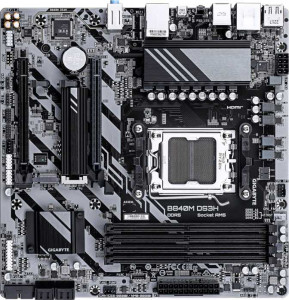
Gigabyte B840M DS3H
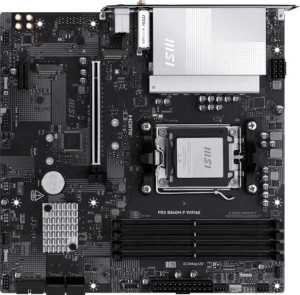
MSI Pro B840M-P Wi-Fi6E

Gigabyte B840M DS3H MSI Pro B840M-P Wi-Fi6E

Overview

Welcome to our in-depth spec comparison between the Gigabyte B840M DS3H and the MSI Pro B840M-P Wi-Fi6E. Both are Micro-ATX motherboards built on the B840 chipset with an AM5 socket, making them natural rivals in the budget-to-mid-range segment. Yet beneath their shared foundation lie meaningful distinctions in connectivity, wireless capabilities, storage redundancy, and display output options that could make one a far better fit for your build than the other.

Common Features

  • Both motherboards use the AM5 CPU socket.
  • Both motherboards feature the B840 chipset.
  • Both boards come in the Micro-ATX form factor.
  • Both support HDMI 2.1 video output.
  • Both boards support overclocking.
  • Each board has a single CPU socket.
  • Neither board has integrated graphics.
  • Both carry a 3-year warranty.
  • Both support up to 256GB of maximum memory.
  • Both provide 4 memory slots.
  • Both use DDR5 memory.
  • Both operate on a dual-channel memory architecture.
  • ECC memory is not supported on either board.
  • Both include 1 USB 3.2 Gen 2 port (USB-A), 2 USB 3.2 Gen 1 ports (USB-A), and 4 USB 2.0 ports on the rear panel.
  • Neither board has USB 3.2 Gen 1 (USB-C), USB 3.2 Gen 2x2, USB 4 40Gbps, USB 4 20Gbps, or Thunderbolt 4 ports.
  • Both boards provide 2 USB 3.2 Gen 1 ports and 4 USB 2.0 ports through internal expansion headers.
  • Both include 4 SATA 3 connectors and 2 M.2 sockets.
  • A TPM connector is present on both boards.
  • Both feature a single PCIe 4.0 x16 slot and no PCIe 5.0 x16 slots.
  • Both deliver 7.1-channel audio with 3 audio connectors and no S/PDIF Out port.
  • RAID 0, RAID 1, and RAID 10 (1+0) are supported on both boards.
  • RAID 0+1 is not supported on either board.

Main Differences

  • Wi-Fi support is present on MSI Pro B840M-P Wi-Fi6E but not available on Gigabyte B840M DS3H.
  • Bluetooth is present on MSI Pro B840M-P Wi-Fi6E but not available on Gigabyte B840M DS3H.
  • RGB lighting is present on MSI Pro B840M-P Wi-Fi6E but not available on Gigabyte B840M DS3H.
  • Easy BIOS reset is available on MSI Pro B840M-P Wi-Fi6E but not on Gigabyte B840M DS3H.
  • Dual BIOS is present on Gigabyte B840M DS3H but not available on MSI Pro B840M-P Wi-Fi6E.
  • Height is 244 mm on Gigabyte B840M DS3H and 243.8 mm on MSI Pro B840M-P Wi-Fi6E.
  • Width is 244 mm on Gigabyte B840M DS3H and 243.8 mm on MSI Pro B840M-P Wi-Fi6E.
  • Maximum native RAM speed is 5200 MHz on Gigabyte B840M DS3H and 5600 MHz on MSI Pro B840M-P Wi-Fi6E.
  • Maximum overclocked RAM speed is 8200 MHz on Gigabyte B840M DS3H and 8000 MHz on MSI Pro B840M-P Wi-Fi6E.
  • USB 3.2 Gen 2 (USB-C) port count is 0 on Gigabyte B840M DS3H and 1 on MSI Pro B840M-P Wi-Fi6E.
  • DisplayPort outputs number 2 on Gigabyte B840M DS3H and 0 on MSI Pro B840M-P Wi-Fi6E.
  • PS/2 port count is 1 on Gigabyte B840M DS3H and 0 on MSI Pro B840M-P Wi-Fi6E.
  • Fan headers number 4 on Gigabyte B840M DS3H and 5 on MSI Pro B840M-P Wi-Fi6E.
  • PCIe x1 slot count is 0 on Gigabyte B840M DS3H and 1 on MSI Pro B840M-P Wi-Fi6E.
  • PCIe x4 slot count is 1 on Gigabyte B840M DS3H and 0 on MSI Pro B840M-P Wi-Fi6E.
  • RAID 5 support is present on Gigabyte B840M DS3H but not available on MSI Pro B840M-P Wi-Fi6E.
Specs Comparison
Gigabyte B840M DS3H

Gigabyte B840M DS3H

MSI Pro B840M-P Wi-Fi6E

MSI Pro B840M-P Wi-Fi6E

General info:
CPU socket AM5 AM5
chipset B840 B840
form factor Micro-ATX Micro-ATX
release date January 2025 September 2025
supports Wi-Fi
Has Bluetooth
HDMI version HDMI 2.1 HDMI 2.1
Easy to overclock
has RGB lighting
Easy to reset BIOS
Has dual BIOS
CPU sockets 1 1
Has integrated graphics
warranty period 3 years 3 years
height 244 mm 243.8 mm
width 244 mm 243.8 mm
Has integrated CPU

Both boards share the same fundamental platform: the AM5 socket with a B840 chipset in a Micro-ATX form factor, and both support overclocking — a notable inclusion for a B840-tier board. Display output is identical at HDMI 2.1, and neither board integrates a CPU or discrete graphics. Dimensions and warranty are virtually the same, making the platform parity between these two essentially a wash.

The real divergence lies in connectivity and reliability features. The MSI Pro B840M-P Wi-Fi6E includes built-in Wi-Fi 6E and Bluetooth, which eliminates the need for a separate adapter or PCIe card — a meaningful convenience in compact or cable-managed builds. It also adds RGB lighting and an easy BIOS reset mechanism, the latter being genuinely useful during overclocking experiments or failed POST situations. The Gigabyte B840M DS3H, by contrast, skips wireless entirely but counters with dual BIOS — a hardware-level failsafe that lets the board recover from a corrupted firmware flash without user intervention, which is a stronger reliability guarantee than a simple reset button.

The MSI has a clear edge for users who need wireless connectivity out of the box or value ease of BIOS recovery during tuning. The Gigabyte is the better pick for wired-only builds where firmware resilience takes priority — its dual BIOS is a more robust safeguard than anything the MSI offers in this category. Neither board dominates outright; the right choice depends on whether you prioritize wireless flexibility or firmware redundancy.

Memory:
maximum memory amount 256GB 256GB
RAM speed (max) 5200 MHz 5600 MHz
overclocked RAM speed 8200 MHz 8000 MHz
memory slots 4 4
DDR memory version 5 5
memory channels 2 2
Supports ECC memory

At the structural level, these two boards are identical in memory architecture: both support DDR5 across 4 slots in a dual-channel configuration, with a 256GB capacity ceiling. For the vast majority of users — gamers, content creators, and workstation builders alike — this shared foundation means neither board imposes any meaningful limitation on memory scalability.

The differences emerge in speed support. The MSI edges ahead on native JEDEC speeds, rated to 5600 MHz versus the Gigabyte's 5200 MHz, which matters when running memory at its out-of-the-box XMP/EXPO profile without pushing into overclocked territory. Flip the scenario, though, and the Gigabyte takes a narrow lead on peak overclocked headroom at 8200 MHz compared to MSI's 8000 MHz ceiling — a 200 MHz difference that is largely academic at these extremes, as hitting either figure requires premium memory kits and favorable silicon.

In practical terms, the gap is narrow enough that it will not drive a purchase decision for most buyers. The MSI offers a slight advantage for plug-and-play high-speed configurations, while the Gigabyte offers a marginally higher theoretical overclock ceiling. Consider this category essentially evenly matched, with the MSI holding a modest real-world edge for users who prioritize hassle-free high-frequency operation straight out of the box.

Ports:
USB 3.2 Gen 2 ports (USB-A) 1 1
USB 3.2 Gen 1 ports (USB-A) 2 2
USB 3.2 Gen 2 ports (USB-C) 0 1
USB 3.2 Gen 1 ports (USB-C) 0 0
USB 2.0 ports 4 4
USB 3.2 Gen 2x2 ports 0 0
USB 4 40Gbps ports 0 0
USB 4 20Gbps ports 0 0
Thunderbolt 4 ports 0 0
Thunderbolt 3 ports 0 0
has an HDMI output
DisplayPort outputs 2 0
RJ45 ports 1 1
Has USB Type-C
eSATA ports 0 0
DVI outputs 0 0
has a VGA connector
PS/2 ports 1 0

Rear I/O on both boards follows a familiar budget-to-mid-range pattern: matched USB counts across Gen 1 and Gen 2 Type-A, four USB 2.0 ports, and a single RJ45 jack. Neither offers Thunderbolt, USB4, or eSATA, which is expected at this tier. The meaningful split comes down to two specific choices each manufacturer made in allocating their remaining port real estate.

The Gigabyte B840M DS3H prioritizes display output breadth, pairing HDMI with two DisplayPort outputs — giving it three simultaneous video outputs total. This is a tangible advantage for multi-monitor setups driven by integrated graphics on a future APU, or for use cases requiring flexible display combinations. The MSI Pro B840M-P Wi-Fi6E takes the opposite trade: it drops DisplayPort entirely but adds a USB 3.2 Gen 2 Type-C port running at 10Gbps, which is genuinely useful for fast external SSDs, modern peripherals, or connecting to a USB-C monitor via adapter. The MSI also ditches the Gigabyte's PS/2 port — a legacy inclusion that only matters to users with older keyboards or mice, but irrelevant to the majority of modern builds.

Which board wins here depends entirely on use case. For multi-display productivity or APU-driven setups, the Gigabyte's dual DisplayPort is a clear advantage. For users who need fast USB-C connectivity at the rear panel, the MSI delivers where the Gigabyte offers nothing. Neither board is objectively superior — they reflect two different philosophies — but the Gigabyte's display flexibility is likely to be relevant to a broader range of users.
Connectors:
USB 3.2 Gen 1 ports (through expansion) 2 2
USB 2.0 ports (through expansion) 4 4
SATA 3 connectors 4 4
fan headers 4 5
USB 3.0 ports (through expansion) 2 2
M.2 sockets 2 2
Has TPM connector
U.2 sockets 0 0
Has mSATA connector
SATA 2 connectors 0 0

Internal connectivity is almost perfectly mirrored across these two boards: both offer 2 M.2 sockets, 4 SATA 3 connectors, matching internal USB headers, and a TPM connector. For storage configuration purposes, they are functionally identical — two NVMe drives plus up to four SATA devices covers the realistic needs of virtually any Micro-ATX build.

The sole differentiator in this category is fan header count. The MSI Pro B840M-P Wi-Fi6E provides 5 fan headers versus the Gigabyte B840M DS3H's 4. That extra header has practical relevance in builds with more aggressive thermal requirements — a dedicated CPU fan, CPU pump header, and two or three chassis fans can quickly consume four headers, leaving no margin. The MSI's fifth header provides breathing room without forcing the user to resort to a fan hub or splitter cables.

This is a narrow but real advantage for the MSI in cooling-conscious builds, particularly those pairing the board with an AIO liquid cooler alongside multiple case fans. For simpler, lower-airflow systems, the Gigabyte's four headers are sufficient and the gap is inconsequential. Overall, the MSI holds a modest edge here, but only for users who plan to run a higher fan count from the outset.

Expansion slots:
PCIe 4.0 x16 slots 1 1
PCIe 5.0 x16 slots 0 0
PCIe 3.0 x16 slots 0 0
PCIe x1 slots 0 1
PCI slots 0 0
PCIe 2.0 x16 slots 0 0
PCIe x4 slots 1 0
PCIe x8 slots 0 0

Both boards share the same primary slot: a single PCIe 4.0 x16 for the discrete GPU, which is the expected standard at this tier. Neither offers a PCIe 5.0 x16 slot, so users chasing the absolute latest GPU interconnect bandwidth will need to look at higher-end chipsets regardless of which board they choose.

The secondary slot is where the two diverge. The Gigabyte B840M DS3H opts for a PCIe x4 slot, which carries meaningfully more bandwidth than a typical x1 — making it better suited for add-in cards that can actually use that headroom, such as a dedicated NVMe expansion card, a high-throughput capture card, or a 10GbE network adapter. The MSI Pro B840M-P Wi-Fi6E instead provides a PCIe x1 slot, which covers the most common add-in scenarios like a basic sound card or a USB expansion card, but will bottleneck any peripheral that demands higher throughput.

For users who plan to install a bandwidth-hungry secondary card, the Gigabyte's x4 slot is a tangible advantage. For those only ever adding a low-demand peripheral, the distinction is irrelevant. On balance, the Gigabyte holds the edge in expansion slot flexibility, since an x4 slot can accommodate everything an x1 card handles, but not vice versa.

Audio:
audio channels 7.1 7.1
Has S/PDIF Out port
audio connectors 3 3

Audio is a clean draw between these two boards. Both deliver 7.1-channel surround support through 3 analog audio jacks, and neither includes an S/PDIF optical output — meaning users who need a digital audio passthrough to an AV receiver or DAC will require an add-in solution regardless of which board they choose.

The 7.1 channel capability is worth contextualizing: on a 3-jack implementation, true 7.1 analog output requires the audio software to multiplex channels across the available connectors, which is functional but less elegant than a 5- or 6-jack array found on higher-end boards. For most users — those routing audio through a headset, stereo speakers, or HDMI — this makes no practical difference whatsoever.

There is no basis for preferring one board over the other in this category. Audio specs are identical across every provided data point, and the decision here will come down to whichever board wins on other criteria.

Storage:
Supports RAID 1
Supports RAID 10 (1+0)
Supports RAID 5
Supports RAID 0
Supports RAID 0+1

RAID support is nearly identical between these two boards, with both covering the most commonly used configurations: RAID 0 for performance striping, RAID 1 for mirroring, and RAID 10 for the combined redundancy-and-speed approach. For the overwhelming majority of home and small office users, this shared subset is all that will ever be needed.

The single point of divergence is RAID 5, which the Gigabyte B840M DS3H supports and the MSI Pro B840M-P Wi-Fi6E does not. RAID 5 distributes parity data across three or more drives, allowing the array to survive a single drive failure while preserving more usable capacity than RAID 1 — making it a pragmatic choice for users building small NAS-like storage arrays directly on a desktop platform. Its absence on the MSI is a genuine limitation for that specific use case.

For standard gaming or workstation builds where RAID is either unused or limited to RAID 0/1, this distinction is irrelevant. But for users deliberately building a multi-drive redundant storage system, the Gigabyte holds a clear advantage by virtue of its RAID 5 support — a capability the MSI simply cannot match in this category.

Comparison Summary & Verdict

After examining the full spec sheet, both boards share a strong common core: AM5 socket, B840 chipset, DDR5 support up to 256GB, dual-channel memory, 4 SATA ports, and 2 M.2 sockets. However, their differences reveal two distinct target audiences. The Gigabyte B840M DS3H stands out with its Dual BIOS for added reliability, two DisplayPort outputs, support for RAID 5, and a higher overclocked RAM ceiling of 8200 MHz, making it a compelling choice for users who prioritize data resilience and multi-display flexibility without wireless needs. The MSI Pro B840M-P Wi-Fi6E, on the other hand, wins on modern connectivity with built-in Wi-Fi 6E and Bluetooth, a USB 3.2 Gen 2 Type-C rear port, an extra fan header, and a higher native RAM speed of 5600 MHz, catering to users who want a cleaner, wireless-ready build out of the box.

Gigabyte B840M DS3H
Buy Gigabyte B840M DS3H if...

Buy the Gigabyte B840M DS3H if you need Dual BIOS protection, multiple DisplayPort outputs, RAID 5 storage support, and do not require built-in wireless connectivity.

MSI Pro B840M-P Wi-Fi6E
Buy MSI Pro B840M-P Wi-Fi6E if...

Buy the MSI Pro B840M-P Wi-Fi6E if you want integrated Wi-Fi 6E and Bluetooth, a rear USB 3.2 Gen 2 Type-C port, and a higher native RAM speed for a modern, cable-free build.