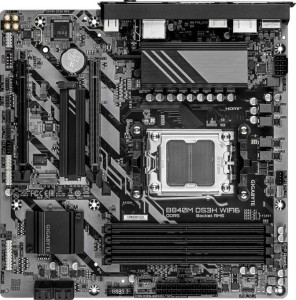
Gigabyte B840M DS3H Wi-Fi6
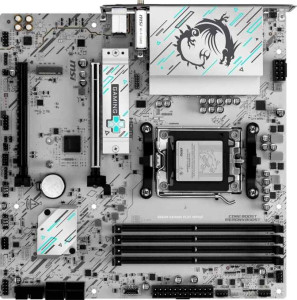
MSI B840M Gaming Plus Wi-Fi6E

Gigabyte B840M DS3H Wi-Fi6 MSI B840M Gaming Plus Wi-Fi6E

Overview

Welcome to our in-depth specification comparison between the Gigabyte B840M DS3H Wi-Fi6 and the MSI B840M Gaming Plus Wi-Fi6E. Both Micro-ATX motherboards share the AM5 socket and B840 chipset, making them natural rivals in the budget-to-mid-range segment. The battlegrounds are clear: wireless connectivity, memory performance, display output flexibility, BIOS resilience features, and peripheral connectivity all differ in meaningful ways that could tip the scales depending on your build goals.

Common Features

  • Both boards use the AM5 CPU socket.
  • Both boards feature the B840 chipset.
  • Both boards have a Micro-ATX form factor.
  • Wi-Fi connectivity is supported on both boards.
  • Bluetooth is available on both boards.
  • Both boards have Bluetooth version 5.3.
  • Both boards support HDMI 2.1.
  • Overclocking capability is available on both boards.
  • Both boards support a maximum of 256GB of RAM.
  • Both boards have 4 memory slots.
  • Both boards use DDR5 memory.
  • Both boards have 2 memory channels.
  • ECC memory is not supported on either board.
  • Both boards have 1 USB 3.2 Gen 2 port (USB-A), 2 USB 3.2 Gen 1 ports (USB-A), and 4 USB 2.0 ports on the rear.
  • Neither board has USB 3.2 Gen 1 USB-C, USB 3.2 Gen 2x2, USB 4, or Thunderbolt 4 rear ports.
  • Both boards offer 2 USB 3.2 Gen 1 and 4 USB 2.0 ports through internal expansion headers.
  • Both boards have 4 SATA 3 connectors and 2 M.2 sockets.
  • A TPM connector is present on both boards.
  • Both boards have 1 PCIe 4.0 x16 slot and 1 PCIe x4 slot.
  • Both boards deliver 7.1 audio channels with 3 audio connectors.
  • RAID 0, RAID 1, and RAID 10 are supported on both boards.
  • RAID 0+1 is not supported on either board.

Main Differences

  • Wi-Fi 6E (802.11ax) support is present on MSI B840M Gaming Plus Wi-Fi6E but not available on Gigabyte B840M DS3H Wi-Fi6.
  • RGB lighting is present on MSI B840M Gaming Plus Wi-Fi6E but not available on Gigabyte B840M DS3H Wi-Fi6.
  • Easy BIOS reset functionality is present on MSI B840M Gaming Plus Wi-Fi6E but not available on Gigabyte B840M DS3H Wi-Fi6.
  • Dual BIOS is present on Gigabyte B840M DS3H Wi-Fi6 but not available on MSI B840M Gaming Plus Wi-Fi6E.
  • Board height is 244 mm on Gigabyte B840M DS3H Wi-Fi6 and 243.8 mm on MSI B840M Gaming Plus Wi-Fi6E.
  • Board width is 244 mm on Gigabyte B840M DS3H Wi-Fi6 and 243.8 mm on MSI B840M Gaming Plus Wi-Fi6E.
  • Maximum native RAM speed is 5200 MHz on Gigabyte B840M DS3H Wi-Fi6 and 5600 MHz on MSI B840M Gaming Plus Wi-Fi6E.
  • Maximum overclocked RAM speed is 8200 MHz on Gigabyte B840M DS3H Wi-Fi6 and 8000 MHz on MSI B840M Gaming Plus Wi-Fi6E.
  • A USB 3.2 Gen 2 USB-C rear port is present on MSI B840M Gaming Plus Wi-Fi6E but not available on Gigabyte B840M DS3H Wi-Fi6.
  • DisplayPort outputs number 2 on Gigabyte B840M DS3H Wi-Fi6 and 0 on MSI B840M Gaming Plus Wi-Fi6E.
  • A PS/2 port is present on Gigabyte B840M DS3H Wi-Fi6 but not available on MSI B840M Gaming Plus Wi-Fi6E.
  • Fan headers number 4 on Gigabyte B840M DS3H Wi-Fi6 and 5 on MSI B840M Gaming Plus Wi-Fi6E.
  • RAID 5 support is present on Gigabyte B840M DS3H Wi-Fi6 but not available on MSI B840M Gaming Plus Wi-Fi6E.
Specs Comparison
Gigabyte B840M DS3H Wi-Fi6

Gigabyte B840M DS3H Wi-Fi6

MSI B840M Gaming Plus Wi-Fi6E

MSI B840M Gaming Plus Wi-Fi6E

General info:
CPU socket AM5 AM5
chipset B840 B840
form factor Micro-ATX Micro-ATX
release date January 2025 June 2025
supports Wi-Fi
Wi-Fi version Wi-Fi 4 (802.11n), Wi-Fi 5 (802.11ac), Wi-Fi 6 (802.11ax) Wi-Fi 4 (802.11n), Wi-Fi 5 (802.11ac), Wi-Fi 6 (802.11ax), Wi-Fi 6E (802.11ax)
Has Bluetooth
Bluetooth version 5.3 5.3
HDMI version HDMI 2.1 HDMI 2.1
Easy to overclock
has RGB lighting
Easy to reset BIOS
Has dual BIOS
has aptX
CPU sockets 1 1
Has integrated graphics
warranty period 3 years 3 years
height 244 mm 243.8 mm
width 244 mm 243.8 mm
Has integrated CPU

Both boards share the same fundamental platform: the AM5 socket with a B840 chipset in a Micro-ATX form factor, with nearly identical dimensions (a negligible 0.2 mm difference). They support overclocking, include Bluetooth 5.3, output via HDMI 2.1, and carry a 3-year warranty — so for the core build essentials, there is no practical difference to weigh.

The meaningful divergences lie in three areas. First, wireless connectivity: the MSI B840M Gaming Plus supports Wi-Fi 6E (802.11ax on 6 GHz), while the Gigabyte B840M DS3H tops out at Wi-Fi 6. In real-world terms, Wi-Fi 6E access to the uncongested 6 GHz band can deliver lower latency and faster sustained speeds in dense environments — a genuine advantage if your router supports it. Second, BIOS resilience takes opposite approaches: the Gigabyte offers dual BIOS (a hardware-level failsafe if a flash goes wrong), whereas the MSI provides an easy BIOS reset mechanism (faster recovery from a bad configuration). These cater to different risk profiles. Third, the MSI includes RGB lighting while the Gigabyte does not — relevant only for aesthetics.

Overall, the MSI B840M Gaming Plus Wi-Fi6E holds a clearer edge in this group, primarily due to its superior Wi-Fi 6E support and easier BIOS recovery — features with tangible practical upside. The Gigabyte's dual BIOS is a legitimate counter-advantage for users who flash firmware frequently and want a hardware safety net, but for most builders the MSI's wireless future-proofing tips the balance.
Memory:
maximum memory amount 256GB 256GB
RAM speed (max) 5200 MHz 5600 MHz
overclocked RAM speed 8200 MHz 8000 MHz
memory slots 4 4
DDR memory version 5 5
memory channels 2 2
Supports ECC memory

The memory foundations are essentially identical: both boards offer 4 slots, dual-channel DDR5, a 256 GB capacity ceiling, and no ECC support — meaning neither targets workstation or server use cases. For everyday builders, these shared traits matter more than any difference: four slots allow flexible upgrade paths, and dual-channel DDR5 ensures competitive bandwidth for gaming and productivity workloads alike.

Where the two diverge is in the speed spectrum. The MSI B840M Gaming Plus supports a higher native JEDEC ceiling of 5600 MHz versus the Gigabyte's 5200 MHz, which means out-of-the-box compatibility with faster DDR5 kits without relying on XMP/EXPO profiles. Flip the script on overclocking, however, and the Gigabyte B840M DS3H pulls ahead with a 8200 MHz overclocked ceiling compared to the MSI's 8000 MHz — a 200 MHz headroom advantage for enthusiasts pushing memory to its limits.

In practical terms, the gap is narrow enough that neither board has a dominant edge. Buyers pairing the system with a high-frequency DDR5 kit running stock JEDEC speeds will marginally favor the MSI; those intending to overclock RAM aggressively will find a slightly higher ceiling on the Gigabyte. For the vast majority of users who run XMP/EXPO profiles in the 6000–7200 MHz sweet spot, this group is effectively a tie.

Ports:
USB 3.2 Gen 2 ports (USB-A) 1 1
USB 3.2 Gen 1 ports (USB-A) 2 2
USB 3.2 Gen 2 ports (USB-C) 0 1
USB 3.2 Gen 1 ports (USB-C) 0 0
USB 2.0 ports 4 4
USB 3.2 Gen 2x2 ports 0 0
USB 4 40Gbps ports 0 0
USB 4 20Gbps ports 0 0
Thunderbolt 4 ports 0 0
Thunderbolt 3 ports 0 0
has an HDMI output
DisplayPort outputs 2 0
RJ45 ports 1 1
Has USB Type-C
eSATA ports 0 0
DVI outputs 0 0
has a VGA connector
PS/2 ports 1 0

Strip away the identical elements — matching USB-A counts, a shared single HDMI output, one RJ45, and no Thunderbolt on either side — and the real story in this group comes down to a direct trade-off between display flexibility and modern USB connectivity. The Gigabyte B840M DS3H adds two DisplayPort outputs alongside HDMI, enabling a three-monitor setup driven entirely by integrated graphics without any additional hardware. The MSI B840M Gaming Plus offers zero DisplayPort outputs, capping integrated-graphics display output at a single screen via HDMI.

The MSI counters with a USB 3.2 Gen 2 Type-C port on the rear I/O — delivering 10 Gbps throughput and compatibility with modern peripherals, external SSDs, and USB-C hubs. The Gigabyte has no rear USB-C at all, which is an increasingly noticeable omission as USB-C devices become the norm. The Gigabyte does include a PS/2 port, a legacy addition with niche appeal for users with older keyboards or KVM setups, but irrelevant to most modern builds.

Which board wins here depends entirely on use case. For a multi-display workstation leveraging integrated graphics, the Gigabyte's dual DisplayPort is a decisive advantage. For a single-monitor gaming or general-purpose build where modern peripheral connectivity matters more, the MSI's USB-C rear port is the more forward-looking choice. Neither board holds a universally superior position — the edge goes to whichever trade-off aligns with the user's actual setup.

Connectors:
USB 3.2 Gen 1 ports (through expansion) 2 2
USB 2.0 ports (through expansion) 4 4
SATA 3 connectors 4 4
fan headers 4 5
USB 3.0 ports (through expansion) 2 2
M.2 sockets 2 2
Has TPM connector
U.2 sockets 0 0
Has mSATA connector
SATA 2 connectors 0 0

Internal connectivity is remarkably uniform across these two boards. Both provide 2 M.2 sockets, 4 SATA 3 connectors, matching expansion USB counts, and a TPM connector — giving builders the same storage and front-panel flexibility regardless of which board they choose. For a Micro-ATX platform, two M.2 slots plus four SATA ports is a well-rounded offering that comfortably supports most storage configurations without compromise.

The single differentiator in this group is fan headers: the MSI B840M Gaming Plus includes 5 fan headers versus the Gigabyte's 4. That extra header has real practical value in thermally demanding builds — it allows independent control of an additional fan without requiring a splitter cable, which can introduce limitations in per-fan PWM control depending on the implementation. For users building a system with a CPU cooler, multiple case fans, and potentially a separate pump header, having that fifth header available from the start adds genuine convenience.

This group is nearly a tie, but the MSI earns a narrow edge on the strength of its additional fan header — a modest but tangible advantage for anyone prioritizing detailed thermal management in their build.

Expansion slots:
PCIe 4.0 x16 slots 1 1
PCIe 5.0 x16 slots 0 0
PCIe 3.0 x16 slots 0 0
PCIe x1 slots 0 0
PCI slots 0 0
PCIe 2.0 x16 slots 0 0
PCIe x4 slots 1 1
PCIe x8 slots 0 0

Expansion slot configurations are a perfect mirror between these two boards: one PCIe 4.0 x16 slot and one PCIe x4 slot on each, with no PCIe 5.0, x1, or legacy PCI slots present on either. For a Micro-ATX platform in this price segment, that layout is exactly what most builders need — the x16 slot handles a dedicated GPU at full bandwidth, while the x4 slot covers add-in cards such as additional NVMe controllers, capture cards, or 10GbE networking adapters.

The absence of a PCIe 5.0 x16 slot is worth noting for forward-looking buyers: next-generation GPUs are beginning to leverage PCIe 5.0 bandwidth, and neither board supports it. That said, current-generation graphics cards do not saturate PCIe 4.0 x16 in real-world scenarios, so this is a future consideration rather than a present-day limitation for the vast majority of users.

This group is a complete tie. There is no basis to distinguish between the Gigabyte B840M DS3H Wi-Fi6 and the MSI B840M Gaming Plus Wi-Fi6E here — both offer identical expansion capabilities, and the choice between them should rest entirely on differentiators found in other specification groups.

Audio:
audio channels 7.1 7.1
Has S/PDIF Out port
audio connectors 3 3

Audio is the shortest comparison in this sequence: both boards offer identical specifications across every provided data point. Each supports 7.1-channel audio output, provides 3 analog audio connectors, and omits an S/PDIF optical output — meaning neither board caters to users who rely on digital audio passthrough to an external DAC or AV receiver via optical cable.

The 7.1-channel capability is a reasonable offering for a motherboard in this class, supporting multi-speaker surround setups without requiring a dedicated sound card. The three analog jacks typically cover line-out, mic-in, and line-in configurations, which satisfies the needs of most headset and stereo speaker users. Those requiring more advanced analog connectivity or S/PDIF would need to add a discrete audio solution regardless of which board they choose.

This group is an unambiguous tie — there is no audio-based reason to favor one board over the other, and the decision should be driven entirely by differentiators in other specification groups.

Storage:
Supports RAID 1
Supports RAID 10 (1+0)
Supports RAID 5
Supports RAID 0
Supports RAID 0+1

RAID support is nearly identical across both boards, with shared compatibility for RAID 0, RAID 1, and RAID 10 — covering the most common configurations for performance striping, redundancy mirroring, and the combined stripe-plus-mirror setup. The one divergence is RAID 5, which the Gigabyte B840M DS3H supports and the MSI B840M Gaming Plus does not.

RAID 5 distributes parity data across three or more drives, offering a balance of usable capacity, read performance, and fault tolerance that makes it attractive for small NAS-style or archival setups. Its absence on the MSI means users managing three or more drives who want that specific redundancy-versus-capacity trade-off would be limited to RAID 1 or RAID 10 — both of which sacrifice more usable storage to achieve redundancy.

For the overwhelming majority of consumer builders, RAID 5 is rarely a practical requirement, and RAID 0 or RAID 1 covers most use cases. Still, on the data provided, the Gigabyte B840M DS3H Wi-Fi6 holds a narrow edge in this group by virtue of its broader RAID support — a meaningful distinction only for users with specific multi-drive storage strategies.

Comparison Summary & Verdict

After examining every specification, both boards prove to be competent AM5 platforms with DDR5 support and solid RAID capabilities, but they cater to distinct builders. The Gigabyte B840M DS3H Wi-Fi6 stands out for users who value system stability and versatility: its dual BIOS offers a reliable safety net, two DisplayPort outputs accommodate multi-monitor setups, RAID 5 support adds storage flexibility, and its higher overclocked RAM ceiling of 8200 MHz appeals to enthusiast tuners. The MSI B840M Gaming Plus Wi-Fi6E, on the other hand, is the stronger choice for connectivity-focused and aesthetics-conscious builders, offering Wi-Fi 6E, a rear USB-C Gen 2 port, an extra fan header for better thermal management, RGB lighting, easy BIOS reset, and a higher native RAM speed of 5600 MHz. Choose the Gigabyte for reliability and display versatility; choose the MSI for modern wireless performance and a more feature-rich gaming-oriented experience.

Gigabyte B840M DS3H Wi-Fi6
Buy Gigabyte B840M DS3H Wi-Fi6 if...

Buy the Gigabyte B840M DS3H Wi-Fi6 if you want the added safety of dual BIOS, need multiple DisplayPort outputs for a multi-monitor setup, or plan to push RAM overclocks as high as possible.

MSI B840M Gaming Plus Wi-Fi6E
Buy MSI B840M Gaming Plus Wi-Fi6E if...

Buy the MSI B840M Gaming Plus Wi-Fi6E if you need Wi-Fi 6E connectivity, a rear USB-C Gen 2 port, RGB lighting, or a higher native RAM speed out of the box.