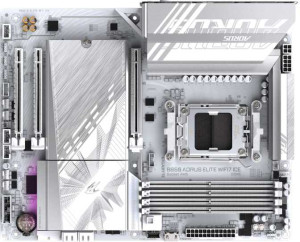
Gigabyte B850 Aorus Elite WiFi7 Ice
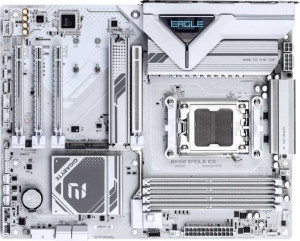
Gigabyte B850 Eagle Ice

Gigabyte B850 Aorus Elite WiFi7 Ice Gigabyte B850 Eagle Ice

Overview

When choosing between the Gigabyte B850 Aorus Elite WiFi7 Ice and the Gigabyte B850 Eagle Ice, buyers are navigating two AM5 motherboards built on the same B850 chipset and ATX form factor, yet with notably different feature sets. This comparison digs into the key battlegrounds: wireless connectivity, rear port selection, expansion slot configurations, and audio output options, helping you determine which board truly fits your build requirements.

Common Features

  • Both products use the AM5 CPU socket.
  • Both products feature the B850 chipset.
  • Both products use the ATX form factor.
  • Overclocking is supported on both products.
  • RGB lighting is available on both products.
  • Easy BIOS reset is not available on either product.
  • Dual BIOS is present on both products.
  • Both products have a single CPU socket.
  • Both products support a maximum memory amount of 256GB.
  • Both products support a maximum RAM speed of 5200 MHz.
  • Both products support an overclocked RAM speed of 8200 MHz.
  • Both products have 4 memory slots.
  • Both products use DDR5 memory.
  • Both products support 2 memory channels.
  • ECC memory is not supported on either product.
  • Both products have 2 USB 3.2 Gen 2 ports (USB-A).
  • Both products have 4 USB 2.0 ports.
  • USB 3.2 Gen 2x2 ports are not present on either product.
  • USB 4 40Gbps ports are not available on either product.
  • Thunderbolt 4 ports are not present on either product.
  • Thunderbolt 3 ports are not present on either product.
  • Both products have 1 DisplayPort output.
  • Both products provide 2 USB 3.2 Gen 1 ports through expansion.
  • Both products provide 4 USB 2.0 ports through expansion.
  • Both products have 4 SATA 3 connectors.
  • Both products have 6 fan headers.
  • Both products have 3 M.2 sockets.
  • A TPM connector is present on both products.
  • U.2 sockets are not available on either product.
  • Both products have 1 PCIe 5.0 x16 slot.
  • PCIe 4.0 x16 slots are not present on either product.
  • Both products have 2 PCIe x1 slots.
  • PCI slots are not present on either product.
  • Both products support 7.1 audio channels.
  • Both products support RAID 0, RAID 1, RAID 5, and RAID 10.
  • RAID 0+1 is not supported on either product.

Main Differences

  • Wi-Fi support is present on Gigabyte B850 Aorus Elite WiFi7 Ice but not available on Gigabyte B850 Eagle Ice.
  • Bluetooth is available on Gigabyte B850 Aorus Elite WiFi7 Ice but not available on Gigabyte B850 Eagle Ice.
  • USB 3.2 Gen 1 ports (USB-A) number 5 on Gigabyte B850 Aorus Elite WiFi7 Ice and 2 on Gigabyte B850 Eagle Ice.
  • USB 3.2 Gen 2 ports (USB-C) number 1 on Gigabyte B850 Aorus Elite WiFi7 Ice and 0 on Gigabyte B850 Eagle Ice.
  • USB 3.2 Gen 1 ports (USB-C) number 0 on Gigabyte B850 Aorus Elite WiFi7 Ice and 1 on Gigabyte B850 Eagle Ice.
  • An HDMI output is present on Gigabyte B850 Eagle Ice but not available on Gigabyte B850 Aorus Elite WiFi7 Ice.
  • PS/2 ports number 0 on Gigabyte B850 Aorus Elite WiFi7 Ice and 1 on Gigabyte B850 Eagle Ice.
  • PCIe x4 slots number 0 on Gigabyte B850 Aorus Elite WiFi7 Ice and 1 on Gigabyte B850 Eagle Ice.
  • An S/PDIF Out port is present on Gigabyte B850 Aorus Elite WiFi7 Ice but not available on Gigabyte B850 Eagle Ice.
  • Audio connectors number 2 on Gigabyte B850 Aorus Elite WiFi7 Ice and 3 on Gigabyte B850 Eagle Ice.
Specs Comparison
Gigabyte B850 Aorus Elite WiFi7 Ice

Gigabyte B850 Aorus Elite WiFi7 Ice

Gigabyte B850 Eagle Ice

Gigabyte B850 Eagle Ice

General info:
CPU socket AM5 AM5
chipset B850 B850
form factor ATX ATX
release date January 2025 April 2025
supports Wi-Fi
Has Bluetooth
Easy to overclock
has RGB lighting
Easy to reset BIOS
Has dual BIOS
CPU sockets 1 1
Has integrated graphics
warranty period 3 years 3 years
height 244 mm 244 mm
width 305 mm 305 mm
Has integrated CPU

At a foundational level, these two boards share the same DNA: both use the AM5 socket with a B850 chipset on a standard ATX form factor (244 × 305 mm), support overclocking, feature RGB lighting, include dual BIOS for firmware recovery, and come with a 3-year warranty. For a builder focused purely on platform capabilities and physical fit, either board slots into the same case and pairs with the same CPU lineup.

The decisive split in this group comes down to wireless connectivity. The Aorus Elite WiFi7 Ice includes both Wi-Fi and Bluetooth, while the Eagle Ice offers neither. This is not a minor footnote: Wi-Fi 7 delivers significantly higher throughput and lower latency than previous generations, making it relevant not just for convenience but for high-bandwidth use cases. Bluetooth adds value for peripherals, audio devices, and system management without dongles. The Eagle Ice forces you to either run an Ethernet cable or purchase a separate wireless adapter — adding cost and an occupied PCIe or USB slot.

For most users, the Aorus Elite WiFi7 Ice holds a clear advantage in this group strictly because of its integrated wireless stack. The Eagle Ice is evenly matched on every other general specification, so if you have a guaranteed wired Ethernet connection and no need for Bluetooth, the gap narrows — but the Elite's inclusion of Wi-Fi 7 and Bluetooth at no extra platform complexity gives it a meaningful real-world edge for the majority of builds.
Memory:
maximum memory amount 256GB 256GB
RAM speed (max) 5200 MHz 5200 MHz
overclocked RAM speed 8200 MHz 8200 MHz
memory slots 4 4
DDR memory version 5 5
memory channels 2 2
Supports ECC memory

On memory, these two boards are completely identical across every measured specification. Both support DDR5 across 4 slots in a dual-channel configuration, cap out at 256GB of maximum RAM, and share the same native and overclocked speed ceilings of 5200 MHz and 8200 MHz respectively.

Those numbers deserve some context. An overclocked ceiling of 8200 MHz is competitive for a B850 platform — fast enough to meaningfully reduce bottlenecks in memory-sensitive workloads like video editing, simulation, and high-framerate gaming. The four-slot layout also gives builders flexibility: you can start with two sticks and expand later without replacing anything. Neither board supports ECC memory, which is expected at this tier and only relevant for workstation or server use cases anyway.

This group is a complete tie. No matter which board you choose, your memory configuration options, performance ceiling, and upgrade path are exactly the same. Memory compatibility should not factor into the decision between these two products.

Ports:
USB 3.2 Gen 2 ports (USB-A) 2 2
USB 3.2 Gen 1 ports (USB-A) 5 2
USB 3.2 Gen 2 ports (USB-C) 1 0
USB 3.2 Gen 1 ports (USB-C) 0 1
USB 2.0 ports 4 4
USB 3.2 Gen 2x2 ports 0 0
USB 4 40Gbps ports 0 0
USB 4 20Gbps ports 0 0
Thunderbolt 4 ports 0 0
Thunderbolt 3 ports 0 0
has an HDMI output
DisplayPort outputs 1 1
RJ45 ports 1 1
Has USB Type-C
eSATA ports 0 0
DVI outputs 0 0
has a VGA connector
PS/2 ports 0 1

The rear I/O layout is where these two boards diverge most visibly in day-to-day use. The Aorus Elite WiFi7 Ice offers a significantly larger USB-A port count — 5 USB 3.2 Gen 1 ports versus just 2 on the Eagle Ice — and critically, its USB-C port runs at Gen 2 (10 Gbps) rather than the slower Gen 1 (5 Gbps) found on the Eagle. That USB-C distinction matters if you regularly transfer large files to an external SSD or connect modern peripherals that can saturate a 5 Gbps connection.

The Eagle Ice counters with two notable port additions of its own. It includes an HDMI output alongside the shared DisplayPort, which the Aorus Elite lacks entirely. That second video output gives users connecting to monitors or TVs via HDMI more plug-and-play flexibility without needing an adapter. The Eagle also includes a PS/2 port, a legacy inclusion with niche value for users still running older input devices or who require it for specific BIOS-level input scenarios.

Weighing the two: the Aorus Elite's advantage in raw USB-A port count and faster USB-C throughput will be more broadly useful for the majority of builders, making it the stronger choice for connectivity-heavy desks. The Eagle Ice's HDMI output is a meaningful win for display flexibility, but only if that specific connector is a requirement. Overall, the Aorus Elite WiFi7 Ice holds the edge here on USB depth and speed, while the Eagle trades that for legacy and display versatility.

Connectors:
USB 3.2 Gen 1 ports (through expansion) 2 2
USB 2.0 ports (through expansion) 4 4
SATA 3 connectors 4 4
fan headers 6 6
USB 3.0 ports (through expansion) 2 2
M.2 sockets 3 3
Has TPM connector
U.2 sockets 0 0
Has mSATA connector
SATA 2 connectors 0 0

Internal connectors tell the story of how a motherboard serves the inside of your case, and here the two boards are point-for-point identical. Both provide 3 M.2 sockets for NVMe storage, 4 SATA 3 connectors for traditional drives, 6 fan headers for cooling management, and a TPM connector for hardware security — a checklist that covers the needs of virtually any mainstream build.

The 3 M.2 slots are worth highlighting as a practical strength shared by both boards. Running three NVMe drives simultaneously allows for configurations like a dedicated OS drive, a high-speed scratch or game drive, and a bulk storage SSD — all without touching a single SATA port. The 6 fan headers similarly give builders fine-grained control over airflow without relying on splitters. These are not entry-level concessions; they reflect a well-equipped mid-range internal layout.

This group is an unambiguous tie. Every internal connector, socket count, and expansion option is mirrored exactly between the Aorus Elite WiFi7 Ice and the Eagle Ice. Storage capacity, cooling control, and internal expandability should play no part in choosing between these two boards.

Expansion slots:
PCIe 4.0 x16 slots 0 0
PCIe 5.0 x16 slots 1 1
PCIe 3.0 x16 slots 0 0
PCIe x1 slots 2 2
PCI slots 0 0
PCIe 2.0 x16 slots 0 0
PCIe x4 slots 0 1
PCIe x8 slots 0 0

Both boards lead with a single PCIe 5.0 x16 slot for the primary GPU — the current standard for high-end discrete graphics cards — and back it up with two PCIe x1 slots for add-in cards like sound cards, USB controllers, or capture cards. That shared foundation means neither board limits your GPU options or primary expansion in any meaningful way.

The one differentiator here belongs to the Eagle Ice, which adds a PCIe x4 slot absent on the Aorus Elite. A x4 slot opens the door to expansion cards that need more bandwidth than a x1 can offer — such as certain NVMe add-in cards, 10GbE network adapters, or additional USB controllers — without consuming the primary x16 slot. It is a modest but real advantage for builders planning a more expansive or specialized setup.

For a typical single-GPU build, both boards are effectively equal. However, if your build involves bandwidth-hungry expansion cards beyond the basics, the Eagle Ice holds a narrow but concrete edge in this group thanks to that extra PCIe x4 slot.

Audio:
audio channels 7.1 7.1
Has S/PDIF Out port
audio connectors 2 3

Both boards support 7.1 surround sound, so neither limits you on the channel side for a full home theater or multi-speaker desktop setup. The split comes in how that audio reaches your devices. The Aorus Elite WiFi7 Ice includes an S/PDIF optical output — useful for connecting to AV receivers, soundbars, or DACs that accept a digital signal directly — but offers only 2 analog audio connectors on the rear panel. The Eagle Ice drops S/PDIF entirely but provides 3 analog connectors, giving more simultaneous analog output options for multi-speaker configurations wired directly to the board.

The practical impact depends entirely on your audio setup. S/PDIF is the better path if you are routing audio through an external DAC or receiver, since it keeps the signal digital and avoids the onboard analog circuitry altogether. More analog jacks, on the other hand, benefit users running multiple sets of analog speakers or headphone amplifiers without an intermediary device.

Neither board holds an across-the-board advantage here — it is a trade-off shaped by your specific audio chain. The Aorus Elite edges ahead for digital output flexibility, while the Eagle Ice suits analog-first setups slightly better. Choose based on whether an optical digital out or an extra analog jack is more relevant to your peripherals.

Storage:
Supports RAID 1
Supports RAID 10 (1+0)
Supports RAID 5
Supports RAID 0
Supports RAID 0+1

RAID support is identical across both boards. Each supports RAID 0, 1, 5, and 10 — covering the full spectrum of configurations that matter for consumer and prosumer use. RAID 0 stripes data for maximum throughput, RAID 1 mirrors for redundancy, RAID 5 balances performance with fault tolerance across three or more drives, and RAID 10 combines mirroring and striping for both speed and resilience. Neither board supports RAID 0+1, but that distinction is largely academic since RAID 10 achieves a functionally superior result for most real-world scenarios anyway.

This is a complete tie. Storage configuration options are entirely equivalent between the Aorus Elite WiFi7 Ice and the Eagle Ice, and this group should carry no weight in the decision between them.

Comparison Summary & Verdict

Both boards share a strong common foundation: B850 chipset, DDR5 support up to 8200 MHz overclocked, three M.2 sockets, and PCIe 5.0 x16 for the primary GPU slot. However, their differences point clearly to distinct audiences. The Gigabyte B850 Aorus Elite WiFi7 Ice is the stronger choice for users who value built-in Wi-Fi and Bluetooth, a higher USB port count, a USB 3.2 Gen 2 Type-C rear port, and a S/PDIF digital audio output. The Gigabyte B850 Eagle Ice, on the other hand, appeals to builders who need an HDMI output for integrated graphics, an extra PCIe x4 expansion slot, a PS/2 legacy port, and one additional analog audio connector, all without paying for wireless features they may not need.

Gigabyte B850 Aorus Elite WiFi7 Ice
Buy Gigabyte B850 Aorus Elite WiFi7 Ice if...

Buy the Gigabyte B850 Aorus Elite WiFi7 Ice if you need built-in Wi-Fi and Bluetooth, more USB ports, or a digital S/PDIF audio output for your build.

Gigabyte B850 Eagle Ice
Buy Gigabyte B850 Eagle Ice if...

Buy the Gigabyte B850 Eagle Ice if you require an HDMI output, a legacy PS/2 port, an extra PCIe x4 slot, or prefer not to pay for integrated wireless connectivity.